
1. Introdución
The ProForm Carbon T7 Smart Treadmill is designed to provide an effective and engaging cardiovascular workout experience in your home. Featuring a 7-inch HD touchscreen and integration with iFIT, this treadmill offers a variety of interactive training options. This manual provides essential information for the safe assembly, operation, maintenance, and troubleshooting of your Carbon T7 treadmill.

This image shows the ProForm Carbon T7 Smart Treadmill from a front-side angle, highlighting its console with a 7-inch HD touchscreen, the running deck, and the sturdy frame.
2. Información importante de seguridade
Before operating the ProForm Carbon T7 Smart Treadmill, please read all instructions carefully. Keep this manual for future reference. Failure to follow these instructions could result in injury or damage to the product.
- Consulte sempre cun médico antes de comezar calquera programa de exercicios.
- Place the treadmill on a level surface with at least 2 meters (6.5 feet) of clear space behind it and 0.5 meters (1.6 feet) on each side.
- Manteña os nenos e as mascotas lonxe da fita durante a operación.
- Non fagas funcionar a cinta de correr se ten o cable de alimentación ou a clavija danados ou se non funciona correctamente.
- Usa roupa deportiva e calzado deportivo axeitados. Evita roupa solta que poida quedar enganchada nas pezas móbiles.
- Always use the safety key. Attach the clip to your clothing before starting the treadmill.
- Non subas nin baixes da cinta de correr mentres a cinta estea en movemento.
- Do not attempt to adjust or repair the treadmill yourself. Contact qualified service personnel.
3. Montaxe
The ProForm Carbon T7 Treadmill requires assembly. For detailed, step-by-step 3D instructions, download the free Bilt app on your smartphone or tablet. Ensure all parts are present before beginning assembly. It is recommended to have two people for assembly due to the weight and size of the components.
- Unpack all components and place them on a clear, flat surface.
- Follow the instructions provided in the Bilt app or the included assembly guide.
- Ensure all bolts, nuts, and screws are securely tightened before use.

The ProForm Carbon T7 Smart Treadmill is shown in its upright, folded configuration, illustrating its SpaceSaver design for compact storage when not in use.
4. Funcionamento
4.1 Iniciación
- Conexión de alimentación: Conecte o cable de alimentación a unha toma de terra.
- Chave de seguranza: Attach the safety key clip to your clothing and insert the safety key into the console. The treadmill will not operate without the safety key in place.
- Standing on the Treadmill: Stand on the foot rails, not the running belt, before starting your workout.
- Comezando un adestramento: Prema o botón "Inicio" na consola. A cinta comezará a moverse a baixa velocidade.
4.2 Using the Console and 7" HD Touchscreen
The Carbon T7 features a 7-inch HD interactive touchscreen display that allows you to stream iFIT workouts directly. The console also includes physical buttons for quick adjustments.
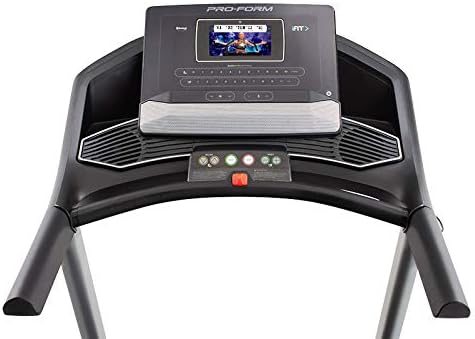
Un detallado view of the treadmill's console, featuring the 7-inch HD touchscreen display, control buttons for speed and incline, and integrated speakers.
- Navegación por pantalla táctil: Use the touchscreen to browse iFIT workouts, adjust settings, and view workout metrics.
- QuickSpeed Controls: Use the 'Speed' buttons or quick-select buttons on the console to adjust the running belt speed from 0 to 10 MPH.
- Quick Incline Controls: Use the 'Incline' buttons or quick-select buttons to adjust the incline from 0% to 10%.
- Parar un adestramento: Press the 'Stop' button to pause or end your workout. Remove the safety key to fully power off the treadmill.
4.3 iFIT Integration
Your ProForm Carbon T7 Treadmill includes a 30-Day iFIT Family Membership. iFIT provides access to live workouts, studio classes, and global workouts led by expert personal trainers. With iFIT, your trainer can auto-adjust your treadmill's speed and incline for an optimized and immersive exercise experience.
- Activating iFIT: Follow the on-screen prompts on the 7-inch HD touchscreen to activate your iFIT membership.
- Selección de adestramentos: Browse the iFIT library for a wide range of workouts, including running, walking, and cross-training.
- Trainer Control: During iFIT workouts, the treadmill's speed and incline may automatically adjust according to the trainer's program. You can override these adjustments manually if needed.

A woman is shown actively running on the ProForm Carbon T7 Smart Treadmill, demonstrating its use in a typical home environment. The treadmill's running deck and console are visible.
5. Mantemento
Regular maintenance ensures the longevity and optimal performance of your ProForm Carbon T7 Treadmill.
- Limpeza: Regularly wipe down the treadmill surfaces with a damp pano. Evite o uso de limpadores abrasivos ou disolventes.
- Limpeza da correa: Periodically clean the running belt and the area beneath it to prevent debris buildup.
- Lubricación da correa: The running belt is pre-lubricated. Refer to the full product manual for specific lubrication instructions and frequency, typically required after a certain number of hours of use.
- Aliñamento e tensión da correa: Check the running belt for proper alignment and tension. Adjust as needed according to the detailed instructions in the full product manual.
- Inspección do cable de alimentación: Inspeccione o cable de alimentación para comprobar se presenta algún dano. Se está danado, interrompa o seu uso e póñase en contacto co servizo de atención ao cliente.
6 Solución de problemas
If you encounter issues with your ProForm Carbon T7 Treadmill, refer to the table below for common problems and solutions.
| Problema | Causa posible | Solución |
|---|---|---|
| A cinta de correr non se acende. | Cable de alimentación non conectado; disyuntor saltado; chave de seguridade non inserida. | Ensure power cord is securely plugged in. Check household circuit breaker. Insert safety key fully into the console. |
| A cinta de correr non se move. | Safety key not inserted; 'Start' button not pressed; motor overload. | Insert safety key. Press 'Start'. If motor overload, reduce load and try again. |
| O cinto esvara ou dubida. | Tensión da correa demasiado frouxa; a correa require lubricación. | Adjust belt tension according to the full manual. Lubricate the belt if necessary. |
| A pantalla da consola está en branco ou non responde. | Problema de alimentación; fallo de software. | Ensure power is connected. Try unplugging the treadmill for 60 seconds and plugging it back in. If issue persists, contact customer support. |
7. Especificacións
Key technical specifications for the ProForm Carbon T7 Smart Treadmill:
| Característica | Detalle |
|---|---|
| Número de modelo | PFTL87720 |
| Dimensións do produto (L x W x H) | 186.69 cm x 89.41 cm x 146.05 cm (73.5" x 35.2" x 57.5") |
| Peso do elemento | 97.98 kg (216 lb) |
| Potencia do motor | 2.6 CHP (potencia continua) |
| Rango de velocidade | 0-10 MPH (0-16 KPH) |
| Rango de inclinación | 0-10% Digital Quick Incline |
| Tamaño da banda de rodaxe | 20" x 55" (51 cm x 140 cm) |
| Mostrar | Pantalla táctil interactiva HD de 7" |
| Capacidade de peso | 300 libras (136 kg) |
| Material do marco | Aceiro de aliaxe |
| Fonte de enerxía | Eléctrico con cable |
| Características especiais | SpaceSaver Design, ISO Flex Deck Cushioning |
8. Garantía e atención ao cliente
Your ProForm Carbon T7 Smart Treadmill is backed by a comprehensive warranty to ensure your peace of mind.
- Garantía do cadro: 10 anos
- Garantía de pezas e traballo: 1 ano
For warranty claims, technical assistance, or to order replacement parts, please contact ProForm customer support. Refer to the contact information provided in your product packaging or on the official ProForm websitio.