
1. Introdución
The Peaktech P2170 is a digital LCR meter with Equivalent Series Resistance (ESR) measurement capabilities. Designed for both component testing in professional environments and for service and maintenance tasks, its compact design and advanced features ensure precise measurements.
Key features include an illuminated multifunction display with a bargraph and a high measurement frequency of up to 100 kHz. The device also supports PC connectivity for data storage and analysis using the included software.
2. Información de seguridade
Observe sempre as seguintes precaucións de seguridade para evitar lesións ou danos no dispositivo:
- Read the entire manual before operating the device.
- Do not operate the meter if it appears damaged or if the insulation is compromised.
- Ensure correct battery installation and replacement.
- Avoid contact with live circuits when connecting or disconnecting test leads.
- Do not exceed the maximum input ratings specified for each function.
- Manteña o dispositivo seco e limpo.
3. Produto rematadoview
The Peaktech P2170 LCR Meter is a handheld device designed for measuring inductance (L), capacitance (C), and resistance (R), along with other parameters like ESR, DCR, Dissipation Factor (D), Quality Factor (Q), and Phase Angle (θ).
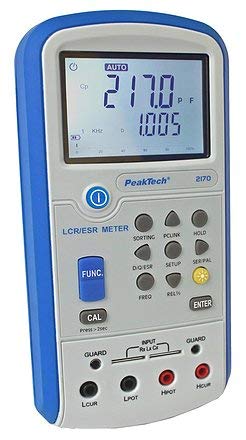
Figura 1: Fronte view of the Peaktech P2170 LCR Meter, showing the display, function buttons, and input terminals.
3.1 Compoñentes e accesorios
O paquete estándar inclúe os seguintes elementos:
- Peaktech P2170 LCR Meter
- cable de interface USB
- software para PC
- Kelvin clips (test leads)
- Funda protectora de transporte
- AAA batteries (6x 1.5V)
- Manual de instrucións
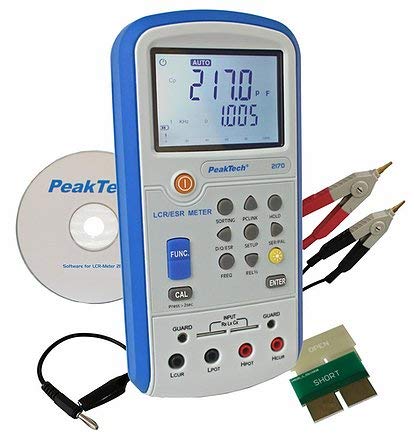
Figure 2: Peaktech P2170 LCR Meter shown with its included accessories, including Kelvin clips, USB cable, and software CD.
4. Configuración
4.1 Instalación da batería
The device operates on 6 x 1.5V AAA batteries. To install or replace batteries:
- Asegúrate de que o medidor estea apagado.
- Localiza a tapa do compartimento da batería na parte traseira do dispositivo.
- Open the cover and insert 6 AAA batteries, observing the correct polarity markings.
- Pecha a tapa do compartimento da batería de forma segura.
An optional 12V 500mA power adapter can also be used for external power.
4.2 Conexión dos cables de proba
Use the provided Kelvin clips for accurate measurements. Connect them to the input terminals as follows:
- Connect the red Kelvin clip to the Hpot e Hcur terminais.
- Connect the black Kelvin clip to the Lpot e Lcur terminais.
- For 2-wire measurements, connect the test leads to Hpot e Lpot.
- Ensure a secure connection to minimize measurement errors.
4.3 Software Installation (PC Link)
The included PC software allows for data logging and analysis. Follow these steps to install:
- Insert the software CD into your computer's optical drive.
- Siga as instrucións en pantalla para completar a instalación.
- Connect the meter to your PC using the supplied USB interface cable.
- Launch the software and establish communication with the device. Refer to the software's help documentation for detailed usage.
5. Instrucións de funcionamento
5.1 Acendido/Apagado
Preme o POTENCIA botón para acender ou apagar o medidor.
5.2 Modos de medición
The P2170 supports various measurement modes. Press the FUNC button to cycle through the primary measurement parameters:
- Ls (Series Inductance)
- Cs (Series Capacitance)
- Lp (Parallel Inductance)
- Cp (Parallel Capacitance)
- DCR (DC Resistance)
- ESR (Equivalent Series Resistance)
- Rp (Parallel Resistance)
- D (Dissipation Factor)
- Q (Quality Factor)
- θ (Phase Angle)
The illuminated display will show the selected mode and measurement results.
5.3 Measurement Frequency Selection
Preme o FREQ button to select the desired test frequency. Available frequencies include 100 Hz, 120 Hz, 1 kHz, 10 kHz, and 100 kHz. The chosen frequency will be displayed on the screen.
5.4 Función de retención de datos
Preme o ATENCIÓN button to freeze the current measurement reading on the display. Press it again to release the hold function.
5.5 Calibración
To perform a calibration, ensure no component is connected to the input terminals. Press and hold the CAL button for approximately 2 seconds. Follow any on-screen prompts.
6. Mantemento
6.1 Limpeza
Limpar a superficie c do medidorasing cun suave, damp pano. Non empregue produtos de limpeza abrasivos nin disolventes. Asegúrese de que o dispositivo estea apagado e desconectado de calquera fonte de alimentación antes de limpalo.
6.2 Substitución da batería
When the low battery indicator appears on the display, replace all 6 AAA batteries as described in Section 4.1.
6.3 Almacenamento
If the meter is not used for an extended period, remove the batteries to prevent leakage. Store the device in its protective carrying case in a cool, dry place, away from direct sunlight and extreme temperatures.
7 Solución de problemas
If you encounter issues with your Peaktech P2170, refer to the following common problems and solutions:
- O medidor non se acende: Check battery installation and ensure batteries are not depleted. Try replacing with new batteries.
- Lecturas inexactas:
- Asegúrese de que os cables de proba estean conectados correctamente e non estean danados.
- Perform a calibration (Section 5.5).
- Verify the correct measurement mode and frequency are selected for the component being tested.
- Ensure the component is properly connected to the Kelvin clips.
- O software do PC non se conecta:
- Comprobe a conexión do cable USB.
- Ensure the software drivers are correctly installed.
- Restart both the meter and the PC.
If the problem persists, contact Peaktech customer support.
8. Especificacións
Detailed technical specifications for the Peaktech P2170 LCR Meter:
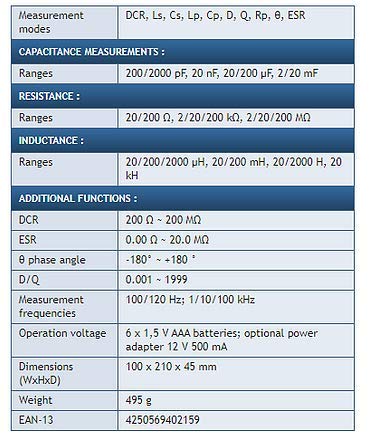
Figure 3: Detailed specifications table for the Peaktech P2170 LCR Meter, including measurement modes, ranges, frequencies, and physical characteristics.
| Parámetro | Valor |
|---|---|
| Modos de medición | DCR, Ls, Cs, Lp, Cp, D, Q, Rp, θ, ESR |
| Capacitance Ranges | 200/2000 pF, 20 nF, 20/200 µF, 2/20 mF |
| Rangos de resistencia | 20/200 Ω, 2/20/200 kΩ, 2/20/200 MΩ |
| Inductance Ranges | 20/200/2000 µH, 20/200 mH, 20/2000 H, 20 kH |
| DCR Range | 200 Ω ~ 200 MΩ |
| ESR Range | 0.00 Ω ~ 20.0 MΩ |
| Phase Angle (θ) | -180° ~ +180° |
| D/Q Resolution | 0.001 ~ 1999 |
| Measurement Frequencies | 100/120 Hz; 1/10/100 kHz |
| Precisión básica | 0.3 % |
| Operación Voltage | 6 x 1.5 V AAA batteries; optional power adapter 12 V 500 mA |
| Dimensións (ancho x alto x prof.) | 100 x 210 x 45 mm |
| Peso | 495 g |
| Fabricante | Peaktech |
9. Garantía e soporte
For warranty information, technical support, or service inquiries, please contact Peaktech directly or refer to their official websitio. Garde o recibo da compra como xustificante da mesma.