
Introdución
Thank you for choosing the WAYXIN R9 6-Way Motorcycle Intercom. This device is designed to enhance your riding experience by providing seamless communication, music playback, and navigation audio directly to your helmet. Featuring advanced DSP & CVC noise reduction technology, a long-range intercom system, and a durable, waterproof design, the R9 ensures clear audio and reliable performance in various conditions. Please read this manual carefully to ensure proper installation and optimal use of your intercom system.
O que hai na caixa
Upon unpacking your WAYXIN R9 intercom system, please verify that all the following components are included:
- 2x R9 Intercom Units (Host-R9)
- 2x altofalantes
- 2x Hardcore Microphones
- 2x Button Microphones
- 2x Charging Cables
- 2x Metal Mounting Sheets
- 4x Tornillos de montaxe
- 1 x chave Allen
- 1 x Manual de usuario
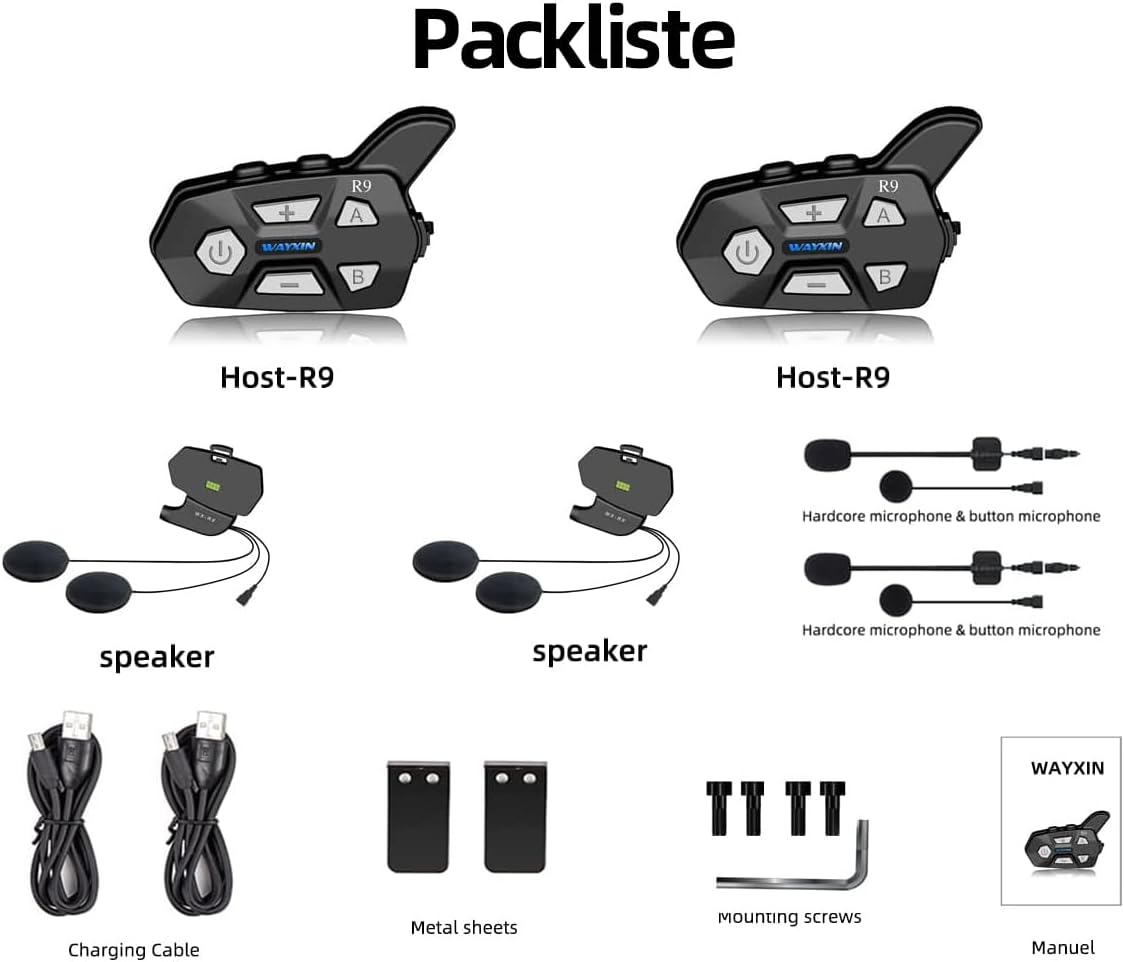
Imaxe: Detallada view of all components included in the WAYXIN R9 package.
Produto rematadoview
The WAYXIN R9 intercom system offers a robust set of features designed for motorcycle riders:
- 6-Way Intercom Communication: Connect with up to 6 riders simultaneously over a range of up to 1500 meters (theoretical value).
- Redución avanzada de ruído: Integrated DSP (Digital Signal Processing) and CVC (Clear Voice Capture) technology effectively reduce wind noise and other background sounds for clear conversations, even at speeds up to 90-100 km/h.
- Bluetooth 5.0: Ensures stable and efficient wireless connectivity with your mobile phone, GPS, and other Bluetooth devices.
- Batería de longa duración: Equipped with an 850 mAh battery, providing up to 15 hours of continuous talk time, 380 hours of standby time, and a quick 3-hour charging time.
- Configuración de micrófono dual: Includes both a button microphone and a hardcore microphone for versatile use and improved comfort.
- Radio FM: Built-in full-band FM radio (76 MHz-108 MHz) for entertainment on the go.
- Emparellamento universal: Compatible with intercom systems from other manufacturers.
- Soporte do asistente de voz: Easily activate your smartphone's voice assistant (e.g., Siri, Google Assistant).
- Deseño impermeable: Constructed with waterproof materials suitable for various outdoor sports and weather conditions.

Image: Key features of the WAYXIN R9 intercom system.

Image: WAYXIN R9 intercom in use on a motorcycle helmet.

Image: DSP & CVC noise reduction technology for clear audio.
Configuración
1. Installation on Helmet
The WAYXIN R9 intercom unit can be easily mounted on most helmet types.
- Choose a suitable location on the side of your helmet for the intercom unit.
- Use the provided mounting screws and metal sheets to securely attach the intercom bracket to the helmet. Ensure it is firm and does not obstruct your vision or helmet functionality.
- Insert the speakers into the helmet's ear pockets. Ensure they are positioned directly over your ears for optimal sound quality.
- Attach the microphone (either hardcore or button type) to a position inside the helmet where it is close to your mouth but not interfering with your breathing or helmet closure.
- Connect the speaker and microphone cables to the corresponding ports on the intercom unit.
2. Carga inicial
Before first use, fully charge the intercom unit.
- Connect the charging cable to the charging port on the R9 unit and to a USB power source.
- Unha carga completa adoita tardar unhas 3 horas.

Image: Battery specifications for the WAYXIN R9.
Instrucións de funcionamento
1. Acendido/apagado
- Encendido: Press and hold the Power button for approximately 3 seconds until the blue LED lights up.
- Apagado: Press and hold the Power button for approximately 1 second until the red LED lights up.
2. Bluetooth Pairing with Mobile Phone
- With the R9 unit powered off, press and hold the Power button for about 5-7 seconds until the LED indicator flashes red and blue alternately, indicating pairing mode.
- No teu teléfono móbil, activa o Bluetooth e busca os dispositivos dispoñibles.
- Select "WAYXIN R9" from the list of devices. Once connected, the LED will flash blue slowly.
3. Intercom Pairing (Multi-Rider)
The R9 supports communication with up to 6 riders. For optimal performance, pair units one by one.
- Ensure both R9 units are powered off.
- On the first unit, press and hold the Power button until it enters pairing mode (red and blue flashing).
- On the second unit, press and hold the "A" button until it enters pairing mode.
- Once paired, the LEDs on both units will flash blue slowly. Repeat this process for additional units, using buttons "B", "C", etc., as per the full manual.
- To initiate intercom communication, briefly press the "A" or "B" button corresponding to the desired rider.

Image: WAYXIN R9 supporting 6-way intercom communication up to 1500m.
4. Music Playback and Sharing
- Once paired with your phone, music will play automatically or can be controlled via your phone.
- To share music with another paired R9 unit (valid for two persons), refer to the specific instructions in the full user manual for the music sharing function.

Image: Music sharing feature between two WAYXIN R9 units.
5. Radio FM
- To activate FM radio, briefly press the FM button (usually indicated by a radio icon).
- Use the Volume Up/Down buttons to change stations.

Image: WAYXIN R9 with FM radio capability.
6. Asistente de voz
- Double-tap the Power button to activate your smartphone's voice assistant (e.g., Siri, Google Assistant).
7. Control de volume
- Use the '+' and '-' buttons on the intercom unit to adjust the volume.

Image: Detailed button layout and functions of the WAYXIN R9 intercom.
Mantemento
To ensure the longevity and optimal performance of your WAYXIN R9 intercom, follow these maintenance guidelines:
- Limpeza: Limpe a unidade cun d, suaveamp pano. Non use produtos químicos agresivos ou produtos de limpeza abrasivos.
- Resistencia á auga: While the R9 is waterproof, avoid submerging it in water for extended periods. Ensure the charging port cover is securely closed when not charging.
- Coidado da batería: For best battery life, avoid fully discharging the unit frequently. Charge it regularly, especially if storing it for a long time. Store in a cool, dry place.
- Almacenamento: When not in use, store the intercom in a dry environment at room temperature.
Resolución de problemas
If you encounter issues with your WAYXIN R9 intercom, refer to the following common solutions:
| Problema | Causa posible | Solución |
|---|---|---|
| Sen Poder | A batería está descargada. | Cargue a unidade durante polo menos 3 horas. |
| Non se pode emparellar co teléfono | Intercom not in pairing mode; Bluetooth off on phone; device already paired. | Ensure R9 is in pairing mode (red/blue flashing). Turn phone Bluetooth off/on. Forget previous pairings on phone and R9 (press A+B for 3 seconds to restore pairing record). |
| Intercom Not Connecting | Units not in pairing mode; out of range; interference. | Ensure both units are in intercom pairing mode. Move closer to each other. Avoid areas with strong 2.4G signal interference. |
| Poor Audio Quality / Wind Noise | Microphone placement; high speed; strong wind. | Adjust microphone closer to mouth. Ensure DSP & CVC are active. While noise reduction is effective, extreme wind conditions may still affect clarity. |
| A radio FM non funciona | Zona con mala sinalización. | Move to an area with better FM signal reception. |
Especificacións
| Característica | Detalle |
|---|---|
| Marca | WAYXIN |
| Nome do modelo | WAYXIN R9 6 |
| Número de modelo | R9 |
| Cor | Negro |
| Tecnoloxía de conectividade | Sen fíos |
| Tecnoloxía de comunicación sen fíos | Bluetooth |
| Versión Bluetooth | 5.0 |
| Control de ruído | Active Noise Cancellation (DSP & CVC) |
| Colocación do oído | Extra-aural |
| Factor de forma | In-Ear (for speakers) |
| Impedancia | 32 ohmios |
| Conector para auriculares | Jack de 3.5 mm |
| Método de control | Tactile, Voice Control |
| Tempo de carga | 3 horas |
| Duración media da batería (tempo de conversa) | 15 horas |
| Tempo de espera | 380 horas |
| Rango de frecuencias | 20 Hz - 20,000 Hz |
| Nivel de resistencia á auga | Impermeable |
| Material do caso | Plástico |
| Peso do elemento | 65 gramos |
| Dispositivos compatibles | Smartphones, Tablets, GPS devices, Bluetooth helmets |
| Usos recomendados | Touring motorcycle communication |
Garantía e Soporte
For warranty information and customer support, please refer to the documentation included with your product or visit the official WAYXIN websitio. Garde o recibo da compra como xustificante da mesma.