
1. Introdución
This manual provides detailed instructions for the setup, operation, maintenance, and troubleshooting of your HP S4000 Wireless Optical Mouse. Please read this manual thoroughly before using the device to ensure optimal performance and longevity.
2. Configuración
2.1 Desembalaxe
Carefully remove the HP S4000 Wireless Optical Mouse and its accessories from the packaging. Ensure all components are present:
- HP S4000 Wireless Optical Mouse
- Receptor USB
- Pilas AAA (2x)

Image: The HP S4000 Wireless Mouse packaging box, showing the mouse and its key features.
2.2 Instalación da batería
- Localiza o compartimento da batería na parte inferior do rato.
- Deslice a tapa do compartimento da batería.
- Introduza dúas pilas AAA, asegurándose de manter a polaridade correcta (+/-).
- Pecha a tapa do compartimento da batería de forma segura.
2.3 USB Receiver Connection
- The USB receiver is typically stored inside the battery compartment for convenience. Remove it.
- Conecta o receptor USB a un porto USB dispoñible do teu ordenador (PC ou portátil).
- O teu sistema operativo debería detectar e instalar automaticamente os controladores necesarios. Isto pode tardar uns intres.
2.4 Acendido
Localiza o interruptor de acendido/apagado na parte inferior do rato. Desliza o interruptor á posición "Aceso". O rato xa está listo para usar.
3. Funcionamento
3.1 Funcións básicas
- Clic esquerdo: Selección e activación primarias.
- Clic dereito: Abre menús contextuais.
- Roda de desprazamento: Scrolls content vertically. Can also be clicked for middle-click functionality (application dependent).

Imaxe: Arriba view of the HP S4000 Wireless Mouse, highlighting the left/right buttons, scroll wheel, and DPI button.
3.2 Axuste de DPI
The HP S4000 mouse features a DPI (Dots Per Inch) adjustment button located just below the scroll wheel. Press this button to cycle through different sensitivity settings (800, 1200, 1600 DPI). This allows you to adjust cursor speed to your preference or task requirements.
3.3 Xestión de enerxía
To conserve battery life, always switch the mouse to the "Off" position when not in use for extended periods. The mouse also features an automatic sleep mode to save power during short periods of inactivity.
4. Mantemento
4.1 Limpeza
Para limpar o rato, use un pano suave, seco e sen fiapos. Para a sucidade persistente, dóreo lixeiramenteampen the cloth with water or a mild cleaning solution. Avoid using harsh chemicals, abrasives, or spraying liquids directly onto the mouse.
4.2 Substitución da batería
When the mouse performance degrades or stops responding, it is likely time to replace the batteries. Follow the battery installation steps (Section 2.2) to replace the two AAA batteries. Dispose of old batteries responsibly according to local regulations.
5 Solución de problemas
| Problema | Causa posible | Solución |
|---|---|---|
| O rato non responde | Low or dead batteries; USB receiver not connected; Mouse is off. | Replace batteries; Ensure USB receiver is firmly plugged in; Turn the mouse On. |
| Movemento errático do cursor | Dirty optical sensor; Interference; Mouse used on unsuitable surface. | Clean the optical sensor; Move mouse closer to receiver; Use on a mouse pad or opaque surface. |
| Retraso ou atraso | Distance from receiver; Interference from other wireless devices. | Reduce distance between mouse and receiver; Minimize other 2.4Ghz devices nearby. |
| O botón DPI non cambia a sensibilidade | Fallo temporal do software. | Restart your computer or unplug/replug the USB receiver. |
6. Especificacións
- Modelo: S4000
- Conectividade: Sen fíos de 2.4 GHz (receptor USB)
- Detección de movemento: Óptica
- Configuración de DPI: 800/1200/1600 DPI
- Botóns: 4 (Left, Right, Scroll Wheel Click, DPI Button)
- Orientación das mans: Ambidiestro
- Dimensións: 11.5 x 6.1 x 3.2 cm (aprox. 4.5 x 2.4 x 1.3 polgadas)
- Peso: 65 g (aprox. 2.3 onzas)
- Baterías: 2 x AAA (incluídos)
- Sistemas operativos compatibles: Windows XP, Linux (and newer versions of Windows/macOS typically compatible)
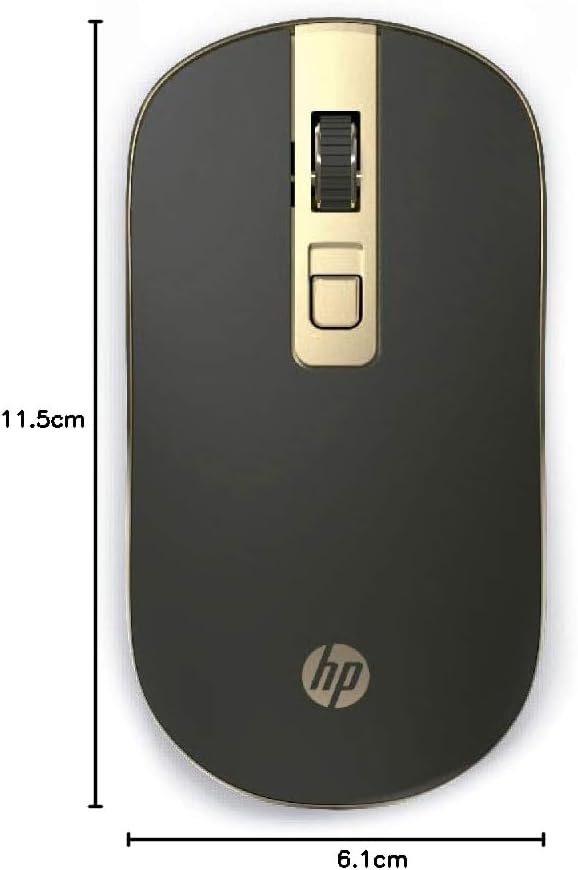
Image: The HP S4000 Wireless Mouse displaying its approximate length (11.5 cm) and width (6.1 cm).
7. Garantía e soporte
7.1 Información da garantía
HP products are covered by a limited warranty. The specific terms and duration of your warranty may vary by region and product. Please refer to the warranty card included with your purchase or visit the official HP websitio para obter información detallada sobre a garantía.
7.2 Atención ao cliente
For technical assistance, product inquiries, or warranty claims, please contact HP Customer Support. You can find contact information, support resources, and FAQs on the official HP websitio: