
1. Introdución
Thank you for choosing the HOCO E52 Euphony Wireless Bluetooth Audio Receiver. This manual provides essential information for the safe and efficient use of your device. Please read it thoroughly before operation and retain it for future reference.
2. Produto rematadoview
The HOCO E52 is a compact wireless Bluetooth audio receiver designed to convert wired audio devices into Bluetooth-enabled ones. It features an integrated microphone for hands-free calls and comes with a pair of in-ear earphones.

Figure 2.1: HOCO E52 Euphony Wireless Bluetooth Audio Receiver with included earphones.
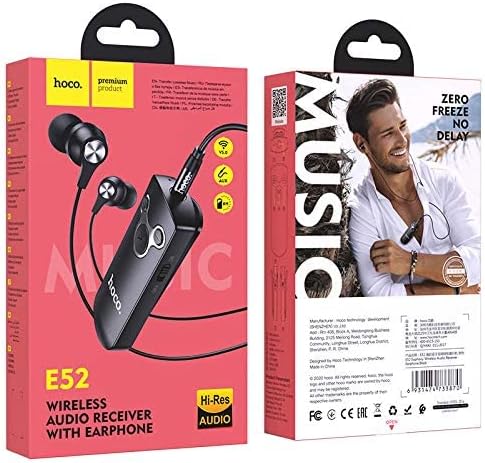
Figura 2.2: detallada view of the HOCO E52 receiver, highlighting the control buttons and power switch.
3. Contido do paquete
Asegúrate de que todos os elementos estean presentes no paquete:
- HOCO E52 Wireless Bluetooth Audio Receiver
- Auriculares intrauditivos
- Cable de carga
- Almofadas para os oídos (varios tamaños)
- Funda protectora
- Manual de usuario (este documento)
4. Configuración
4.1 Carga do dispositivo
Before first use, fully charge the HOCO E52 receiver. Connect the provided charging cable to the micro-USB port on the receiver and the other end to a USB power source (e.g., computer USB port, wall adapter). The indicator light will show charging status and turn off or change color when fully charged.
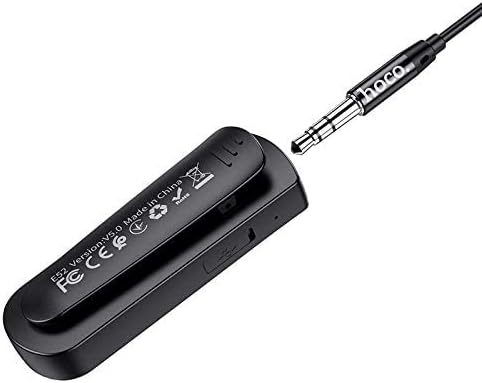
Figura 4.1: Traseira view of the HOCO E52 receiver, illustrating the clip and the micro-USB charging port.
4.2 Emparejamento Bluetooth
- Encendido: Slide the power switch to the 'ON' position. The indicator light will flash, indicating it is in pairing mode.
- Activar Bluetooth: No teu teléfono intelixente ou noutro dispositivo con Bluetooth, vai á configuración de Bluetooth e asegúrate de que o Bluetooth estea activado.
- Seleccione o dispositivo: Look for 'HOCO E52' (or similar) in the list of available devices and select it to connect.
- Confirmación: Once successfully paired, the indicator light on the E52 will stop flashing and remain solid, or flash slowly. A voice prompt may also confirm the connection.
- Conectar auriculares: Plug the included earphones (or your own 3.5mm wired headphones) into the 3.5mm audio jack on the HOCO E52 receiver.
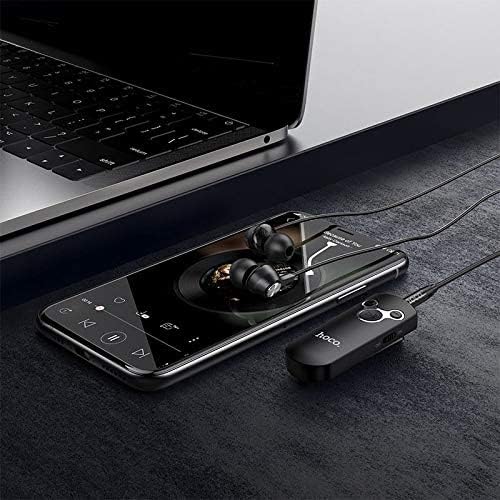
Figure 4.2: The HOCO E52 receiver connected to a smartphone, demonstrating its use with a media device.
5. Instrucións de funcionamento
5.1 Encendido/apagado
- Encendido: Slide the 'ON/OFF' switch to the 'ON' position.
- Apagado: Slide the 'ON/OFF' switch to the 'OFF' position.
5.2 Reprodución de música
- Reproducir/Pausa: Prema o botón central Reproducir/Pausa botón unha vez.
- Próxima pista: Manteña premido o Subir volume (+) botón.
- Pista anterior: Manteña premido o Baixar volume (-) botón.
5.3 Xestión de chamadas
With the built-in microphone, you can manage calls directly from the receiver.
- Responder/Finalizar chamada: Prema o botón central Reproducir/Pausa button once during an incoming call to answer, or during an active call to end.
- Rexeitar a chamada: Press and hold the central Reproducir/Pausa button for 2 seconds during an incoming call.
- Volver a marcar o último número: Double-press the central Reproducir/Pausa botón.
5.4 Control de volume
- Aumentar o volume: Preme o Subir volume (+) botón.
- Diminuír o volume: Preme o Baixar volume (-) botón.
6. Mantemento
- Manteña o dispositivo seco. Evite a exposición á humidade ou a líquidos.
- Limpa o dispositivo cun pano suave e seco. Non empregues produtos químicos agresivos nin produtos de limpeza abrasivos.
- Garda o dispositivo nun lugar fresco e seco cando non estea en uso.
- Avoid extreme temperatures, as this can shorten the lifespan of electronic components.
- Non intente desmontar nin modificar o dispositivo, xa que isto anulará a garantía e podería causar danos.
7 Solución de problemas
| Problema | Causa posible | Solución |
|---|---|---|
| O dispositivo non se acende | Batería baixa | Cargue o dispositivo completamente. |
| Non se pode emparellar co dispositivo | Bluetooth not enabled on source device; E52 not in pairing mode; too far apart | Ensure Bluetooth is on. Power cycle E52 to enter pairing mode. Keep devices within 10 meters. |
| Sen son | Volume too low; earphones not connected properly; incorrect audio output selected on source device | Increase volume on E52 and source device. Re-plug earphones. Check audio output settings on your phone/computer. |
| Batería de curta duración | Device not fully charged; high volume usage | Ensure full charge. Reduce volume if possible. |
8. Especificacións
- Modelo: E52
- Versión Bluetooth: 5.0
- Tecnoloxía de conectividade: Sen fíos (Bluetooth)
- Music & Talk Time: Aproximadamente 6 horas
- Micrófono: Integrado
- Factor de forma dos auriculares: En Orella
- Cor: Negro
- Dimensións do paquete: 18.2 x 10.8 x 3.2 cm
- Peso do artigo: 72 g
- Fabricante: HOCO
9. Información de seguridade
- Non expoñas o dispositivo a temperaturas extremas, á luz solar directa nin ao lume.
- Evite deixar caer ou someter o dispositivo a fortes impactos.
- Manter fóra do alcance dos nenos.
- Desfágase do dispositivo e da súa batería de forma responsable segundo a normativa local.
- Do not use the device while driving or in situations where your attention is critical.
10. Garantía e soporte
For warranty information and customer support, please refer to the documentation provided at the point of purchase or contact your retailer. HOCO products typically come with a limited warranty against manufacturing defects.