
1. Introdución
This manual provides detailed instructions for the installation, operation, maintenance, and troubleshooting of your ATOTO AC-HD03LR 720P Rear View Backup Camera. Please read this manual thoroughly before using the product to ensure correct usage and optimal performance. Keep this manual for future reference.
2. Produto rematadoview
Características clave
- HD 720P Video Output: Provides clear 720P HD video signals for enhanced visibility.
- 180-Degree Ultra-Wide Angle: Offers an expansive field of view para minimizar os puntos cegos.
- Real-time Rear View (LRV): Mostra a parte traseira view in real-time even when driving forward, aiding in obstacle avoidance.
- Virtual Surround View (VSV) Parking Assist: Compatible with specific ATOTO head units to provide a simulated bird's-eye view for parking.
- Capacidade de visión nocturna: Garante unha visibilidade clara en condicións de pouca luz.
- Clasificación de impermeabilidade IP67: Deseñado para soportar diversas condicións climáticas.
- Fácil instalación: Simple setup with an included 8-meter extension wire.
Compatibilidade
This camera is specifically designed for use with the following ATOTO car stereo models:
- ATOTO A6PF/PL/PP series
- ATOTO S8 series (excluding S8 UN/PN/MS/Gen4 models)
- ATOTO S8 Gen1 models (requires firmware update for LRV function)
Nota: Esta cámara é non compatible with ATOTO A6GC, F7, A5, or X10 models, or other car stereo brands.

Image: The 180-degree wide-angle view provides a significantly broader perspective compared to standard cameras, enhancing situational awareness. The 720P image quality ensures clear and detailed visuals, superior to 480-line resolution.
3. Contido do paquete
Verifique que todos os elementos que se indican a continuación estean incluídos no seu paquete:
- 1x ATOTO AC-HD03LR Rear Wide-Angle Camera
- 1x 8-Meter Extension Wire
- 2x Tornillos de montaxe
- 1x Adhesive Sticker
- 1x Calibration Cloth

Image: The package includes the AC-HD03LR camera (01), an 8-meter extension wire (02), two screws (03), an adhesive sticker (04), and a calibration cloth (05).
4. Configuración e instalación
Diagrama de cableado
Follow the wiring diagram below for proper connection to your ATOTO car stereo system. Ensure all connections are secure to prevent signal loss or power issues.
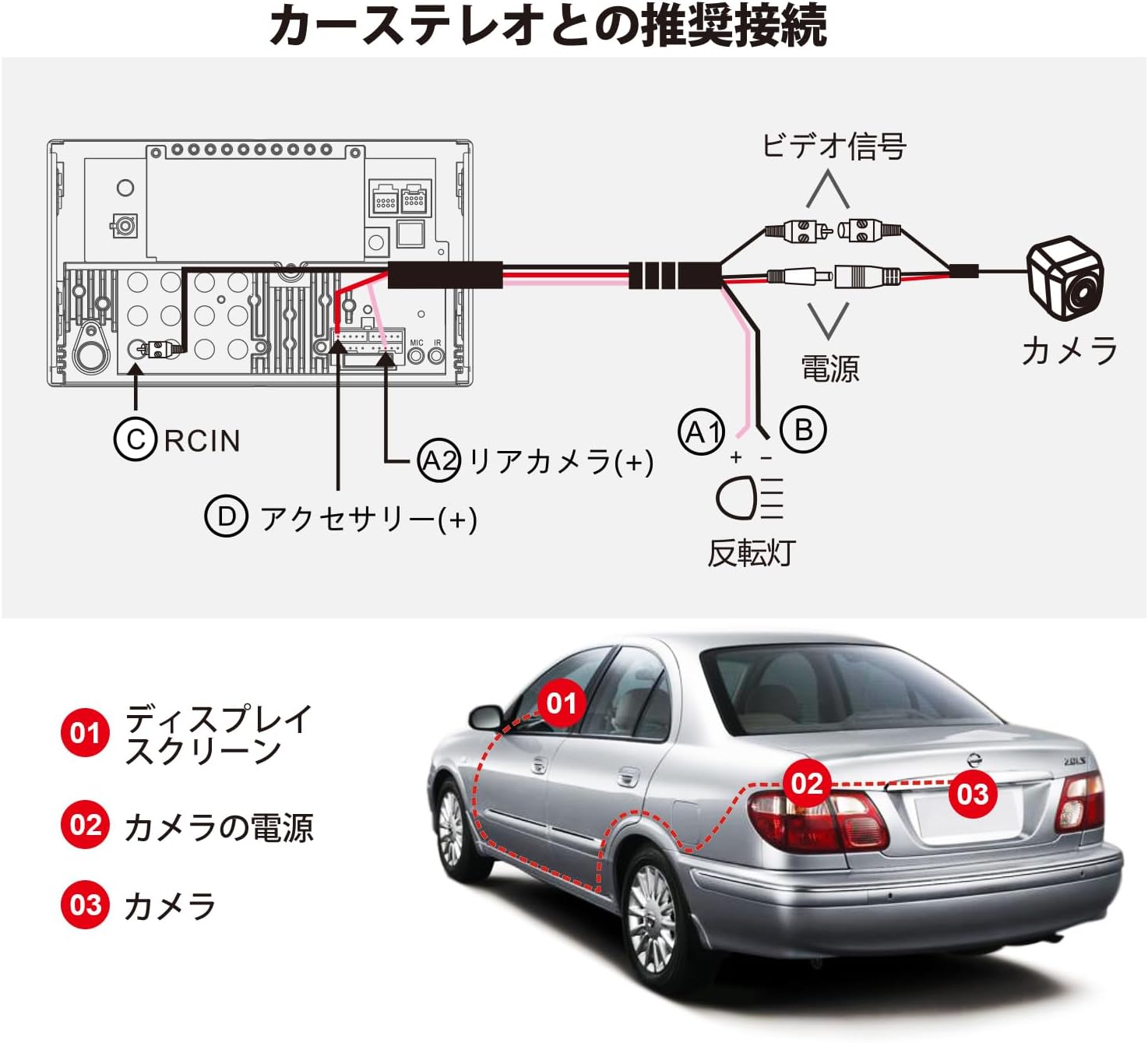
Image: Recommended connection diagram. The camera's video signal connects to the car stereo's RCIN (C). The camera's power (A1, B) connects to the reversing light and accessory power (D), while the rear camera trigger wire (A2) connects to the car stereo's rear camera input.
Pasos de instalación
- Montar a cámara: Choose a suitable location on the rear of your vehicle, typically near the license plate, for optimal viewing. Secure the camera using the provided screws or adhesive sticker.
- Ruta do cable: Carefully route the 8-meter extension wire from the camera to the car stereo unit. Ensure the cable is protected from sharp edges, heat, and moving parts.
- Conectar enerxía: Connect the camera's power wire (red) to the vehicle's reversing light power supply (typically 12V). Connect the ground wire (black) to a suitable chassis ground point.
- Connect Video Signal: Plug the RCA video connector from the camera's extension wire into the 'RCIN' (Rear Camera Input) port on your ATOTO car stereo.
- Connect Trigger Wire: Connect the camera's trigger wire (usually a thin red wire on the RCA cable) to the 'Rear Camera (+)' or 'Reverse Gear Signal' input on your ATOTO car stereo. This tells the stereo when to switch to the camera view.
- Funcionalidade de proba: Before finalizing the installation, turn on your car stereo and engage reverse gear to ensure the camera displays correctly.
5. Instrucións de funcionamento
Virtual Surround View (VSV) Parking
The VSV function, available on compatible ATOTO S8 (Gen2) Android car stereos, uses the AC-HD03LR camera to create a simulated bird's-eye view of your vehicle's surroundings. This feature significantly enhances parking safety by providing a comprehensive overhead perspective.
- To activate VSV, ensure your ATOTO S8 (Gen2) head unit has the necessary firmware and image stitching algorithm.
- The system will process the camera's 180-degree input to generate a dynamic, simulated 360-degree view on your car stereo screen.
- Your vehicle's position and surrounding obstacles will be clearly distinguished on the display.
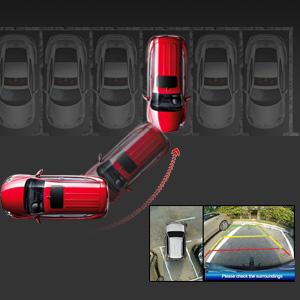
Image: A simulated bird's-eye view from the VSV parking assist system, showing the vehicle's position relative to parking lines and surrounding objects.
Real-time Rear View (LRV)
The LRV function allows you to view the rear of your vehicle in real-time, even when driving forward. This is particularly useful for monitoring traffic behind you or checking for blind spots.
- This feature is supported by specific ATOTO head units and requires a firmware update for S8 Gen1 models.
- Consult your car stereo's manual for instructions on how to activate and switch to the real-time rear view visualización.
Calibración da cámara
Calibration is essential for accurate VSV display. The included calibration cloth is used to help the system map the camera's view correctly. Perform calibration in a flat, open area with good lighting.

Image: Vehicle positioned over the calibration cloth. The distance between the cloth's center and the rear bumper may vary by vehicle type, but the entire cloth should be visible on screen for proper calibration.

Image: Calibration steps on the car stereo display. Step 1: Select Vehicle Size by entering parameters. Step 2: Start Calibration by touching 'Calibration' on the rear camera video screen. Step 3: Center the Rear Video Image if the camera is not centrally mounted. Step 4: Trim Rear View Cámara Footage to remove black blocks in corners and adjust the back shade.
6. Mantemento
Un mantemento regular garante a lonxevidade e o rendemento óptimo da túa cámara.
- Limpeza: Limpe periodicamente a lente da cámara cun pano suave eamp cloth to remove dirt, dust, or water spots. Avoid abrasive cleaners that could scratch the lens.
- Inspección: Regularly check the camera's mounting and wiring for any signs of damage, corrosion, or loose connections. Ensure the camera is securely fastened.
- Exposición á auga: While the camera is IP67 waterproof, avoid directing high-pressure water jets directly at the camera during car washes, as this could potentially compromise the seal over time.
7 Solución de problemas
If you encounter issues with your ATOTO AC-HD03LR camera, refer to the following common problems and solutions:
| Problema | Causa posible | Solución |
|---|---|---|
| Non hai imaxe na pantalla | Conexión do cable de vídeo solta Sen alimentación á cámara Incorrect trigger wire connection Camera malfunction | Check RCA video cable connection at both ends. Verify camera power supply (12V) and ground connections. Ensure trigger wire is correctly connected to the car stereo's reverse input. Test camera with another compatible display if possible. |
| A imaxe está borrosa ou distorsionada | Lente sucia Incorrect camera angle Firmware issue on head unit Calibration required/incorrect | Limpar a lente da cámara. Adjust camera angle for optimal view. Ensure car stereo firmware is up-to-date. Perform camera calibration as per instructions. |
| VSV/LRV not working | Incompatible head unit Firmware not updated Calibration not performed | Confirm head unit compatibility (ATOTO A6PF/PL/PP, S8 series). Update car stereo firmware, especially for S8 Gen1 models. Perform camera calibration. |
| Image has black blocks in corners | Calibration trimming needed | Follow Step 4 of the calibration process to trim the video footage. |
8. Especificacións
| Característica | Especificación |
|---|---|
| Modelo de produto | AC-HD03LR (North American version, with license plate mounting bracket) |
| Formato do sensor de imaxe | CMOS de 1/2.9 polgadas |
| Píxeles | 1280 (H) x 720 (V) |
| Balance de brancos | Automático |
| Compensación de contraluz | Si |
| Redución de ruído | DNR 3D |
| Velocidade de fotogramas de vídeo | 720P @ 30FPS |
| Saída de sinal de vídeo | Analog HD signal, 1.0 Vp-p / 75Ω |
| Vol. Operativotage | DC 12 V |
| Corrente de funcionamento | 130 mA ~ 150 mA |
| Temperatura de funcionamento | -30 ℃ ~ + 80 ℃ (-22 °F ~ 176 °F) |
| Traseira View Pauta | Not built-in, provided by car stereo system |
| Clasificación impermeable | IP67 |
| Visión Nocturna | Si |
| Campo da lente View | 180 graos |
| Tipo de montaxe | Montaxe en superficie |
9. Garantía e soporte
ATOTO products are designed for reliability and performance. For warranty information, technical support, or service inquiries, please refer to the warranty card included with your product or visit the official ATOTO website. You can also contact ATOTO customer service directly through their support channels.
Official ATOTO Websitio: www.myatoto.com