
Introdución
This manual provides detailed instructions for the proper use and maintenance of your Conambo Trucker Bluetooth Headset 5.0. Please read this manual thoroughly before using the device to ensure optimal performance and longevity.
Contido do paquete
Ao abrir o paquete, comproba que inclúa todos os seguintes elementos:
- Conambo Trucker Bluetooth Headset (Model DE-JBT9)
- Cable de carga USB-C
- Manual de usuario

Image: The Conambo Trucker Bluetooth Headset, a USB-C charging cable, and the user manual are neatly arranged in the product packaging.
Produto rematadoview
Familiarize yourself with the various components and controls of your headset.
- Diadema axustable: Allows for a customized and comfortable fit for various head sizes.
- Soft Protein Memory-Foam Earpad: Provides comfort for extended wear.
- Flexible Gooseneck Microphone: Can be rotated 270 degrees for use on either the left or right ear, and adjusted for optimal voice pickup. Features a wind cover for clear audio.
- Botóns de control: Located on the earpiece for easy access to power, volume, call management, and mute functions.
- Porto de carga USB-C: Para recargar a batería dos auriculares.

Image: A user demonstrates the adjustable headband, soft ear pad, and anti-slip pad for comfortable wear on either ear.
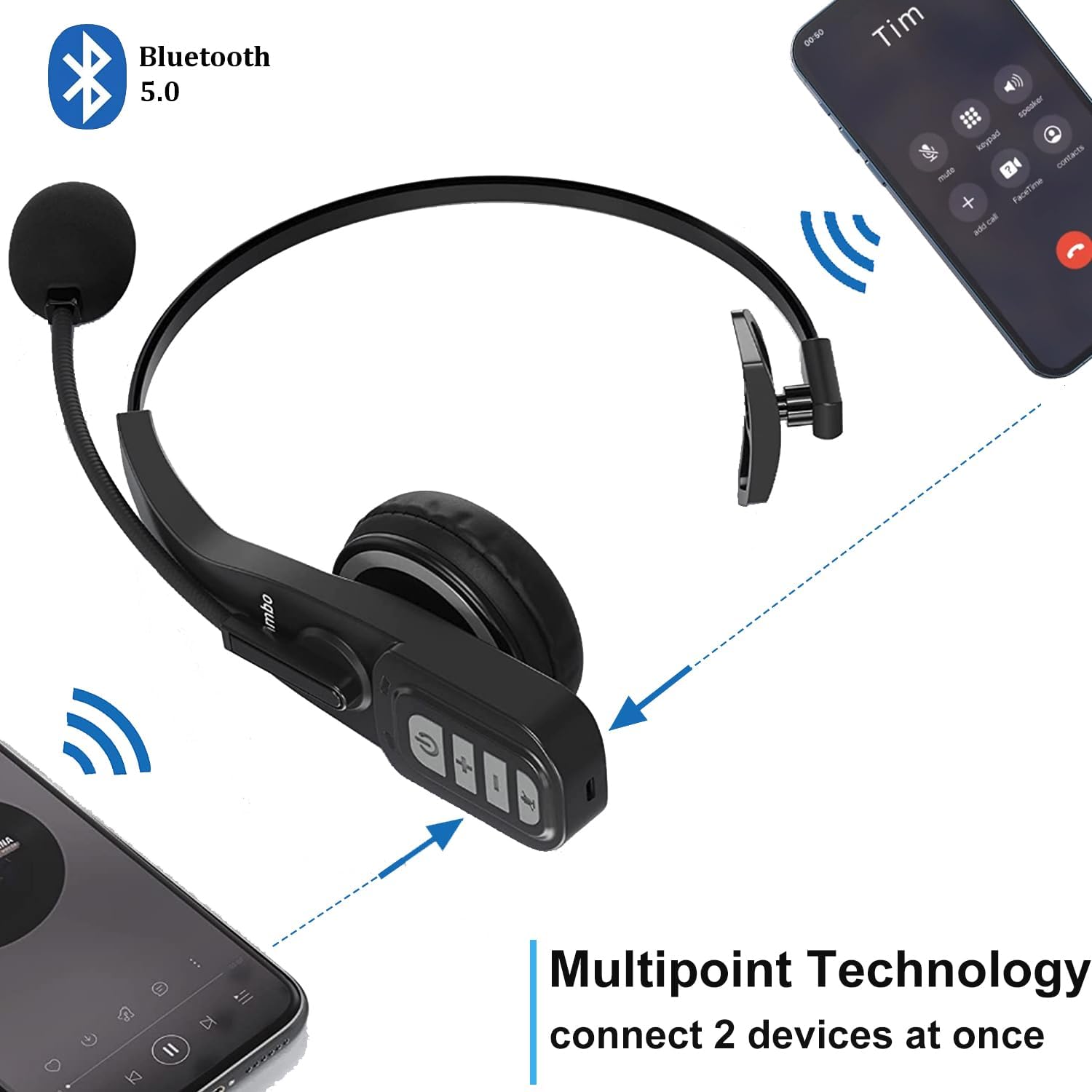
Image: Close-up of the headset's control panel, highlighting the volume up/down, power/call, and mute buttons.
Configuración
1. Cargando os auriculares
Before initial use, fully charge your headset. A full charge takes approximately 4 hours.
- Connect the provided USB-C charging cable to the charging port on the headset.
- Conecta o outro extremo do cable USB-C a unha fonte de alimentación USB compatible (por exemplo, un porto USB do ordenador ou un adaptador de parede).
- The LED indicator on the headset will show charging status (refer to the LED indicator section for details).
2. Emparejamento cun dispositivo Bluetooth
The headset uses Bluetooth 5.0 technology for stable and fast connections. It supports multipoint connection, allowing simultaneous connection to two Bluetooth devices.
- Asegúrese de que os auriculares estean cargados.
- Slide the power switch to the "ON" position. The headset will automatically enter pairing mode, indicated by a flashing LED light.
- On your device (e.g., smartphone, laptop, PC), enable Bluetooth and search for available devices.
- Select "A19" or "Conambo JBT900" (or similar model name) from the list of found devices to connect.
- Once connected, the LED indicator will become solid, confirming successful pairing.

Image: The headset is shown connected to two different smartphones, illustrating its multipoint technology feature.
Video: A demonstration of the Conambo JBT900 Bluetooth 5.0 Headset, showcasing as súas características e facilidade de uso.
Instrucións de funcionamento
Xestión de chamadas
- Responder/Finalizar chamada: Press the Phone Call button once.
- Rexeitar a chamada: Press and hold the Phone Call button for 2 seconds.
- Silenciar/Activar o micrófono: During a call, press the Mute button (often the same as the Phone Call button or a dedicated button) once.
- Volver a marcar o último número: Double-press the Phone Call button.

Image: A woman wearing the headset, demonstrating the mute function during a call.
Control de música
- Reproducir/Pausa: Press the Phone Call button once.
- Subir/Baixar o volume: Use the dedicated Volume + and Volume - buttons.
- Próxima pista: Manteña premido o botón Volume +.
- Pista anterior: Manteña premido o botón de Volume -.
Asistente de voz (Siri/Asistente de Google)
Press and hold the Mute button to activate your device's voice assistant for hands-free commands.
Comodidade e axustabilidade
The Conambo headset is designed for comfort during prolonged use.
- The headband is stretchable and can be adjusted to fit various head sizes.
- The soft protein memory-foam earpad ensures a comfortable fit on your ear.
- The microphone boom can be rotated 270 degrees, allowing you to wear the earpiece on either your left or right ear.

Image: A man wearing the headset, demonstrating the flexible microphone positioned for clear communication, highlighting its noise-cancelling capabilities.
Mantemento
Para garantir a lonxevidade e o rendemento óptimo dos seus auriculares, siga estas pautas de mantemento:
- Clean the earpad and microphone foam regularly with a soft, dry cloth.
- Avoid exposing the headset to extreme temperatures, moisture, or direct sunlight.
- Garda os auriculares nun lugar fresco e seco cando non estes en uso.
- Do not attempt to disassemble or repair the headset yourself. Contact customer support for assistance.
Resolución de problemas
If you encounter any issues with your headset, please refer to the following common solutions:
- Os auriculares non se acenderon: Asegúrese de que os auriculares estean completamente cargados.
- Non se puido emparellar: Make sure the headset is in pairing mode (flashing LED) and your device's Bluetooth is enabled and searching. Try restarting both the headset and your device.
- No audio/poor audio quality: Check the volume levels on both the headset and your connected device. Ensure the headset is within the 33ft wireless range of your device.
- O micrófono non funciona: Ensure the microphone is not muted. Adjust the microphone's position closer to your mouth.
Especificacións
| Número de modelo | DE-JBT9 |
| Versión Bluetooth | 5.0 |
| Tecnoloxía de conectividade | Bluetooth 5.0, Sen fíos |
| distancia wireless | Ata 33 pés (10 metros) |
| Tempo de conversa | Ata 22 horas |
| Tempo de carga | Aproximadamente 4 horas |
| Tempo de espera | Up to 360 hours (implied from images) |
| Control de ruído | Cancelación activa de ruído (para micrófono) |
| Peso do elemento | 0.17 quilogramos (5.9 onzas) |
| Material | Leather, Soft protein memory-foam, Stretchable headband |
| Dispositivos compatibles | Cellphones, Laptops, PC Call Center Equipment |
Garantía e Soporte
For warranty information or technical support, please refer to the contact details provided in the included user manual or visit the official Conambo websitio.