
K-Snake KS-BM600-B
K-Snake Rechargeable Lightweight Gaming Mouse
Manual de usuario
Model: KS-BM600-B | Brand: K-Snake
1. Introdución
Thank you for choosing the K-Snake Rechargeable Lightweight Gaming Mouse. This manual provides essential information for setting up, operating, and maintaining your new gaming mouse. Designed for optimal performance, this wireless mouse features advanced 2.4GHz wireless transmission technology, a lightweight honeycomb shell, and customizable RGB backlighting, ensuring a stable connection and an enhanced gaming experience.

Image 1.1: The K-Snake Rechargeable Lightweight Gaming Mouse, showcasing its ergonomic design and included USB receiver.
2. Contido do paquete
Verifique que todos os elementos estean presentes no seu paquete:
- 1 x K-Snake Wireless Gaming Mouse
- 1 x USB Receiver (located in the bottom slot of the mouse)
- 1 x cable de carga
3. Características do produto
- Lightweight Honeycomb Design: Ergonomic hollow perforated shell for reduced weight and improved heat dissipation, ensuring comfort during extended use.
- DPI axustable: Three adjustable DPI levels (1200/1800/2400) for precise control, with a response rate of up to 1000Hz.
- RGB LED Backlight: Multiple lighting patterns and side flow effects, controllable via a dedicated button on the mouse bottom.
- Tecnoloxía sen fíos de 2.4 GHz: Stable and flexible wireless connection up to 10 meters. Supports wired mode for charging and simultaneous use.
- Batería recargable: Built-in 400mAh lithium polymer battery for long-term standby and automatic power-saving sleep mode.
- Compatibilidade universal: Plug-and-play USB receiver, compatible with Windows 2000/XP/Vista/7/8/10/11 and MAC OS.

Image 3.1: The mouse's lightweight design and vibrant RGB lighting effects.

Image 3.2: Illustration of the mouse's internal professional game-grade IC chip.
4. Instrucións de configuración
- Carga o rato: Before first use, connect the provided charging cable to the mouse and a USB power source (e.g., computer USB port, USB wall adapter). The mouse can be used while charging.

Image 4.1: The mouse connected for charging.
- Localizar o receptor USB: The nano USB receiver is stored in a slot on the bottom of the mouse. Gently remove it.
- Conectar o receptor USB: Conecte o receptor USB a un porto USB dispoñible no seu ordenador.
- Acender o rato: Locate the power switch on the bottom of the mouse. Slide it to the "ON" position. The mouse will automatically connect to your computer.
- Instalación de controladores: No additional software or drivers are required. The mouse is plug-and-play.
5. Manexo do rato
5.1 Axuste de DPI
The mouse features three adjustable DPI levels: 1200, 1800, and 2400. To change the DPI, press the dedicated DPI button, usually located behind the scroll wheel. Each press will cycle through the available DPI settings.
Control de retroiluminación RGB 5.2
The RGB backlight can be customized. A dedicated light adjustment button is located on the bottom of the mouse. Press this button to cycle through different lighting patterns and effects. To turn off the backlight, adjust the power switch on the bottom of the mouse to the appropriate position (often labeled "OFF" or a specific backlight off setting if available, otherwise turn off the mouse completely).
5.3 Modo de aforro de enerxía
To conserve battery life, the mouse will automatically enter sleep mode if not used for 5 minutes. To wake the mouse, simply press any button.
6. Mantemento
- Limpeza: Usa un pano suave e seco para limpar a superficie do rato. Para a sucidade persistente, usa un pano lixeiramente seco.amp pódese usar un pano, garantindo que non entre humidade nos compoñentes internos. Evite produtos químicos agresivos ou produtos de limpeza abrasivos.
- Coidado da batería: The mouse has a built-in rechargeable battery. For optimal battery life, avoid fully discharging the mouse frequently. Recharge when the mouse's response becomes slow or erratic.
- Almacenamento: When not in use for extended periods, turn off the mouse to conserve battery. Store in a cool, dry place.
7 Solución de problemas
- Mouse response is slow or not working properly:
This often indicates a low battery. Connect the mouse to a power source using the charging cable. The issue should resolve after charging.
- Mouse not connecting to computer:
- Ensure the mouse is turned "ON" using the power switch on its bottom.
- Comprobe que o receptor USB estea conectado correctamente a un porto USB que funcione no seu ordenador.
- Proba a conectar o receptor USB a un porto USB diferente.
- Asegúrate de que o rato estea dentro do alcance sen fíos de 10 metros do receptor.
- A retroiluminación RGB non funciona:
Check if the mouse is powered on. Press the light adjustment button on the bottom of the mouse to cycle through lighting modes. Ensure the battery is sufficiently charged.
8. Especificacións
| Característica | Detalle |
|---|---|
| Marca | K-Snake |
| Modelo | KS-BM600-B |
| Tipo de conexión | 2.4G Wireless, USB (for charging/wired use) |
| Número de botóns | 6 buttons + 1 power switch + 1 RGB control switch |
| Configuración de DPI | 1200 / 1800 / 2400 |
| Tecnoloxía de detección de movemento | Óptica |
| Tipo de batería | Rechargeable Lithium Polymer (400mAh) |
| Fonte de enerxía | Eléctrico con cable (carga por USB) |
| Sistemas operativos compatibles | Windows 98/2000/ME/NT/XP/VISTA/7/8/10/11, MAC OS |
| Características especiais | Ergonomic Design, Lightweight Honeycomb Shell, RGB Backlight, Auto Sleep Mode |
| Orientación das mans | Ambidiestro |
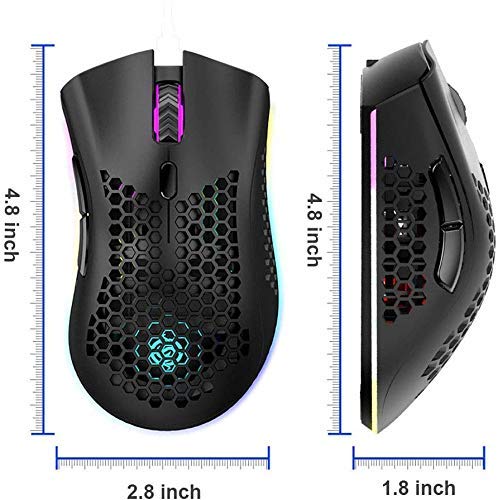
Image 8.1: Physical dimensions of the K-Snake Gaming Mouse.
9. Garantía e soporte
K-Snake products are manufactured to high-quality standards. For information regarding warranty coverage, please refer to the warranty card included with your purchase or visit the official K-Snake websitio.
If you encounter any issues or have questions not covered in this manual, please contact K-Snake customer support through the retailer where the product was purchased or via the contact information provided on the official K-Snake websitio.
Ask a question about this manual
Ask about setup, troubleshooting, compatibility, parts, safety, or missing instructions. Manuals+ will review the question and use this page’s manual context to help answer it.