
Ctronics CTIPC-285C-Z4B
Ctronics 5X Optical Zoom WiFi Outdoor Security Camera User Manual
Model: CTIPC-285C-Z4B
1. Introdución
Thank you for choosing the Ctronics 5X Optical Zoom WiFi Outdoor Security Camera. This manual provides detailed instructions for the installation, operation, and maintenance of your camera. Please read this manual thoroughly before use to ensure proper functionality and safety. This camera is designed for outdoor surveillance, offering advanced features such as 5X optical zoom, human detection, auto-tracking, color night vision, and two-way audio.

Figura 1.1: Ctronics 5X Optical Zoom WiFi Outdoor Security Camera. This image shows the main unit of the camera with its dual antennas and lens array.
2. Información de seguridade
Observe as seguintes precaucións de seguridade para evitar danos ao produto ou lesións a vostede mesmo ou a outras persoas:
- Ensure the power supply is stable and matches the camera's voltagrequisitos de e (12 voltios).
- Non expoñas a cámara a temperaturas ou humidade extremas fóra do seu rango de funcionamento.
- Avoid direct exposure of the lens to strong light sources, which may damage the sensor.
- Non intente desmontar nin modificar a cámara. Encargue calquera mantemento a persoal cualificado.
- Manteña a cámara e os seus accesorios fóra do alcance dos nenos.
- Ensure proper mounting to prevent the camera from falling.
3. Contido do paquete
Please check the package contents upon opening. If any items are missing or damaged, contact your retailer or Ctronics support.
- Ctronics 5X Optical Zoom WiFi Outdoor Security Camera
- Adaptador de alimentación
- Parafusos de montaxe e tacos de parede
- Kit impermeable para cable de rede (se corresponde)
- Guía de inicio rápido
4. Configuración
4.1 Instalación física
- Escolle unha localización: Select a suitable outdoor location with a clear view of the area you wish to monitor. Ensure the location has access to a power outlet.
- Montaxe: Use the provided mounting template (if included) to mark drill holes on the wall or ceiling. Drill the holes, insert wall plugs, and secure the camera bracket using the screws.
- Conexión de alimentación: Connect the power adapter to the camera's power input and plug it into a power outlet.
4.2 Conexión de rede
The camera supports 2.4GHz Wi-Fi networks.
- Descarga a aplicación: Download the "Ctronics" app from your smartphone's app store (iOS/Android). For PC users, download the HiP2P software for MAC/Windows.
- Configuración inicial: Segue as instrucións da aplicación para engadir a túa cámara. Isto normalmente implica escanear un código QR na cámara ou introducir manualmente o seu ID.
- Configuración Wi-Fi: Connect the camera to your 2.4GHz Wi-Fi network through the app.

Figura 4.1: Broad Compatibility. This image illustrates the camera's compatibility with various devices and operating systems, including iOS, Android, Windows, and Mac OS, through the Ctronics Pro app and HiP2P Client software.
4.3 Micro SD Card Installation (Optional)
The camera supports a micro SD card up to 64GB for local storage of recordings.
- Locate the SD card slot on the camera (refer to the camera diagram in the quick start guide).
- Carefully insert the micro SD card into the slot until it clicks into place.
- Format the SD card via the camera's settings in the Ctronics app for optimal performance.
5. Funcionamento da cámara
5.1 Panorámica, inclinación e zoom (PTZ)
The camera features motorized pan (355° horizontally) and tilt (90° vertically) functions, along with 5X optical zoom.
- Control: Use the Ctronics app to remotely control the camera's pan and tilt movements by swiping on the live view pantalla.
- Zoom óptico: Pinch-to-zoom on the live view to activate the 5X optical zoom. The camera will auto-focus for clear detailed images.
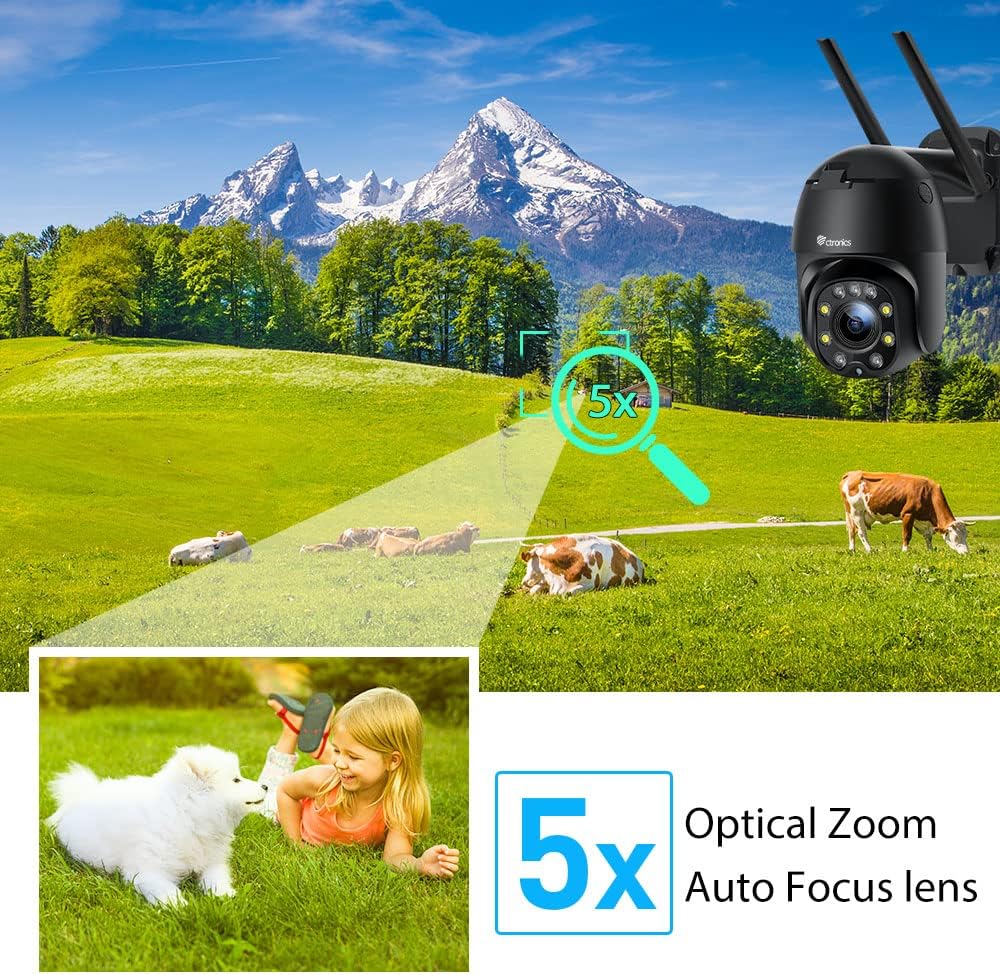
Figura 5.1: 5X Optical Zoom. This image demonstrates the camera's 5X optical zoom capability, allowing for detailed viewing of distant objects with auto-focus functionality.
5.2 Human Detection and Auto-Tracking
The camera utilizes AI algorithms to distinguish human movement from other triggers, reducing false alarms by up to 95%.
- Detección: Cando se detecta unha persoa, a cámara rastrexará automaticamente o seu movemento dentro do seu campo de view.
- Alertas: You will receive instant notifications via the app, FTP, or email.
- Gravación: Detected events are recorded to the installed SD card.

Figura 5.2: Human Detection. This image illustrates how the camera's human detection feature accurately identifies people while ignoring non-human movements like pets, significantly reducing false alarms.

Figura 5.3: Auto Tracking. This image demonstrates the camera's auto-tracking capability, showing how it follows a detected subject's movement within its 355° horizontal and 90° vertical range.
5.3 HD 1080P & Night Vision
The camera provides 1920x1080P resolution for clear images and offers two night vision modes.
- Visión nocturna en cor: With 4 spotlights and 5 infrared lights, the camera can display vivid color images in total darkness up to 25 meters.
- Visión nocturna por infravermellos: Standard black and white infrared vision is also available.

Figura 5.4: Color Night Vision. This image illustrates the camera's ability to provide full-color video surveillance even in low-light or nighttime conditions.
5.4 Audio bidireccional
Comuníquese cos visitantes ou disuada os intrusos usando o micrófono e o altofalante integrados.
- Real-time Conversation: Use the Ctronics app to engage in real-time conversations.
- Redución de ruído: The camera features ambient noise reduction technology for clearer sound quality.

Figura 5.5: Two-Way Audio. This image depicts the camera's two-way audio functionality, allowing users to communicate with individuals near the camera via their smartphone.
5.5 Acceso remoto
View vivir footage and recordings from anywhere at any time using the Ctronics app or HiP2P software.
- Ensure your camera is connected to the internet.
- Log in to your Ctronics app or HiP2P software account to access your camera feed.
6. Mantemento
Un mantemento regular garante a lonxevidade e o rendemento óptimo da túa cámara.
- Limpeza: Limpe suavemente a lente e o corpo da cámara cun pano suave eamp pano. Non use produtos químicos agresivos ou produtos de limpeza abrasivos.
- Actualizacións de firmware: Check the Ctronics app periodically for available firmware updates. Keeping the firmware updated ensures you have the latest features and security enhancements.
- Ciclo de enerxía: If the camera experiences minor issues, try power cycling it by unplugging and replugging the power adapter.
7 Solución de problemas
Esta sección aborda problemas comúns cos que podes atoparte.
| Problema | Causa posible | Solución |
|---|---|---|
| Cámara sen conexión | Sen electricidade; Wi-Fi desconectada; Problema co router | Check power connection; Reconnect Wi-Fi in app; Restart router |
| Mala calidade de imaxe | Dirty lens; Network bandwidth; Low light | Clean lens; Check internet speed; Ensure sufficient lighting or use night vision |
| Falsas alarmas | Sensitivity too high; Non-human movement | Adjust detection sensitivity in app; Ensure human detection is enabled |
| A tarxeta SD non grava | SD card full/corrupted; Not formatted; Incorrect settings | Format SD card in app; Check recording settings; Replace SD card if faulty |
8. Especificacións
Detailed technical specifications for the Ctronics CTIPC-285C-Z4B camera:
| Característica | Especificación |
|---|---|
| Número de modelo | CTIPC-285C-Z4B |
| Dimensións (L x W x H) | 11 x 17 x 30 cm |
| Peso | 940 gramos |
| Material | Acrilonitrilo Butadieno Estireno (ABS) |
| Tipo de potencia | Cable eléctrico |
| Voltage | 12 voltios |
| Consumo de enerxía | 6 vatios |
| Resolución | 1920 x 1080 p |
| Zoom óptico | 5X |
| Pan Range | 355° |
| Rango de inclinación | 90° |
| Distancia de visión nocturna | Aprox. 25 metros |
| Clasificación impermeable | IP66 |
| Tipo de tarxeta de memoria | Micro SD |
| Capacidade máxima de memoria | 64 GB |
| Dispositivos compatibles | Smartphone (iOS/Android), PC (MAC/Windows) |
9. Garantía e soporte
Ctronics products come with a standard warranty. For specific warranty terms and conditions, please refer to the warranty card included with your product or visit the official Ctronics website. If you encounter any issues not covered in this manual or require further assistance, please contact Ctronics customer support:
- Websitio: www.ctronics.com
- Correo electrónico: Consulte a embalaxe do produto ou websitio para correo electrónico de soporte.
- Teléfono: Consulte a embalaxe do produto ou websitio web para o número de teléfono de asistencia.
Please have your model number (CTIPC-285C-Z4B) and purchase information ready when contacting support.
Ask a question about this manual
Ask about setup, troubleshooting, compatibility, parts, safety, or missing instructions. Manuals+ will review the question and use this page’s manual context to help answer it.