
1. Introdución
Thank you for choosing the HOCO ES40 Genial TWS Bluetooth Wireless Headset. This manual provides detailed instructions for the proper use, setup, and maintenance of your new wireless earbuds. Please read this manual thoroughly before using the product to ensure optimal performance and longevity. This headset is designed for use with various Bluetooth-enabled devices, including mobile phones.
2. Produto rematadoview
The HOCO ES40 headset consists of two wireless earbuds and a portable charging case. Familiarize yourself with the components for ease of use.
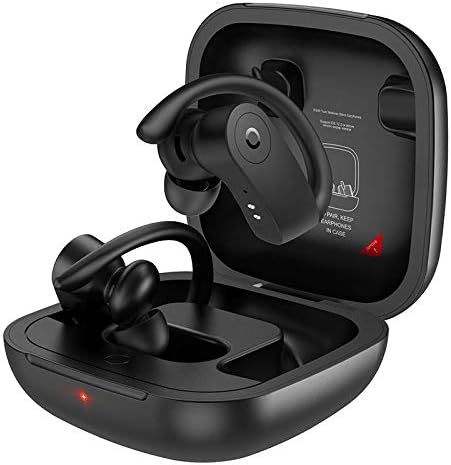
Image 2.1: HOCO ES40 earbuds placed inside their open charging case, showing the ear hook design and charging indicators.

Imaxe 2.2: Primeiro plano view of a single HOCO ES40 earbud, highlighting the ergonomic ear hook and the control button area.
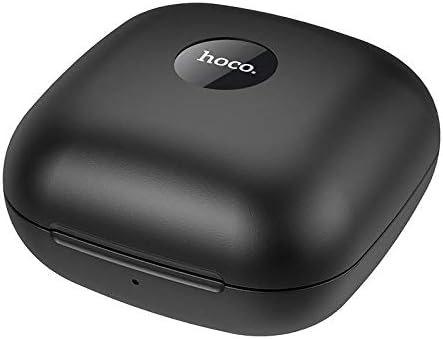
Image 2.3: The HOCO ES40 charging case in a closed position, displaying the 'hoco.' brand logo on the top surface.
3. Contido do paquete
Upon opening your HOCO ES40 package, please verify that all the following items are included:
- HOCO ES40 TWS Bluetooth Wireless Earbuds (Left and Right)
- Estuche de carga sen fíos
- USB Charging Cable (typically included with such devices)
- Manual de usuario (este documento)
4. Configuración
4.1. Cargando os auriculares
Before initial use, it is recommended to fully charge both the charging case and the earbuds.
- Carga do estuche: Connect the USB charging cable to the charging port on the case and to a suitable USB power source. The charging indicator on the case will illuminate to show charging status. The charging case takes approximately 2 hours to fully charge.
- Cargando os auriculares: Place the earbuds into their respective slots in the charging case. Ensure they are correctly seated. The earbuds will begin charging automatically. The headset charging time is approximately 1 hour.
4.2. Emparellamento Bluetooth
Follow these steps to pair your HOCO ES40 headset with your device:
- Encendido: Abre a caixa de carga e retira os dous auriculares. Acenderanse automaticamente e entrarán no modo de emparellamento.
- Activar Bluetooth: On your smartphone or other Bluetooth-enabled device, navigate to the Bluetooth settings and ensure Bluetooth is turned on.
- Seleccione o dispositivo: In the list of available Bluetooth devices, locate and select "HOCO ES40".
- Confirmar emparellamento: Once selected, your device should confirm that the headset is connected. You may hear an audible confirmation from the earbuds.

Image 4.1: A smartphone screen showing the Bluetooth settings with "HOCO ES40" listed as a connected device, next to the open charging case with earbuds.
The headset uses Bluetooth V5.0 for a stable and efficient connection.
5. Instrucións de funcionamento
Once paired, you can control various functions of your HOCO ES40 headset.
5.1. Acendido/apagado
- Encendido: Os auriculares acéndense automaticamente ao retiralos da caixa de carga.
- Apagado: Place the earbuds back into the charging case. They will automatically disconnect and power off.
5.2. Reprodución de música
The earbuds feature touch-sensitive controls for music management:
- Reproducir/Pausa: Toca calquera dos auriculares unha vez.
- Próxima pista: Toca dúas veces o auricular dereito.
- Pista anterior: Toca dúas veces o auricular esquerdo.
5.3. Xestión de chamadas
Manage your phone calls directly from the earbuds:
- Responder/Finalizar chamada: Tap either earbud once during an incoming call or an active call.
- Rexeitar a chamada: Manteña premido calquera dos auriculares durante aproximadamente 2 segundos durante unha chamada entrante.
6. Mantemento
Proper care and maintenance will extend the life of your HOCO ES40 headset.
- Limpeza: Usa un pano suave, seco e sen pelusa para limpar os auriculares e a funda de carga. Evita o uso de materiais abrasivos ou produtos químicos agresivos.
- Almacenamento: Cando non os uses, garda os auriculares no seu estoxo de carga para protexelos do po e dos danos. Gardaos nun lugar fresco e seco, lonxe da luz solar directa e de temperaturas extremas.
- Coidado da batería: To maintain battery health, avoid fully discharging the batteries frequently. Charge the device regularly, even if not used for extended periods.
- Exposición á auga: The earbuds are not waterproof. Avoid exposure to water, rain, or excessive moisture.
7 Solución de problemas
If you encounter issues with your HOCO ES40 headset, refer to the following common solutions:
- Auriculares que non se emparellan entre si: Place both earbuds back into the charging case, close the lid, wait a few seconds, then open the lid and remove them again. This often resets their connection.
- Os auriculares non se conectan ao dispositivo: Ensure Bluetooth is enabled on your device. Forget the "HOCO ES40" from your device's Bluetooth list and attempt to pair again. Ensure the earbuds are charged.
- Sen son dun auricular: Check if both earbuds are charged. Try placing them back in the case and reconnecting.
- Problemas de carga: Ensure the charging cable is securely connected to both the case and the power source. Try a different USB port or power adapter. Clean the charging contacts on the earbuds and inside the case.
- Volume baixo: Adjust the volume on both your connected device and the earbuds (if volume control is available via touch, though not explicitly stated for this model).
8. Especificacións
Below are the technical specifications for the HOCO ES40 Genial TWS Bluetooth Wireless Headset:
| Característica | Especificación |
|---|---|
| Especificación Bluetooth | Bluetooth V5.0 JL6936D |
| Capacidade da batería dos auriculares | 50mAh (single headset) |
| Capacidade da batería do estuche de carga | 400 mAh |
| Tempo de carga dos auriculares | Aproximadamente 1 hora |
| Estuche de carga Tempo de carga | Aproximadamente 2 horas |
| Tempo de conversa / música | 5 horas |
| Tempo de espera | 200 horas |
| Dimensións (caso) | 78 * 78 * 46 mm |
| Peso (Total) | 109 g |
| Weight (Single Headset) | 10 g |
| Cor | Negro |
| Factor de forma dos auriculares | En Orella |
| Tecnoloxía de conectividade | Sen fíos |
| Dispositivos compatibles | Teléfonos móbiles |
| Material | Plástico |
9. Garantía e soporte
The HOCO ES40 Genial TWS Bluetooth Wireless Headset comes with a standard manufacturer's warranty. For specific warranty terms and conditions, please refer to the warranty card included in your product packaging or visit the official HOCO website. For technical support, troubleshooting assistance beyond this manual, or warranty claims, please contact your retailer or the HOCO customer service department.