
1. Introdución
This manual provides detailed instructions for the safe and efficient use of your Hoco HC3 Bounce Sports Wireless Speaker. Please read this manual thoroughly before operating the device and retain it for future reference. The Hoco HC3 is a versatile portable speaker supporting Bluetooth, FM radio, TF card, USB, AUX, and TWS modes.

Figure 1: Hoco HC3 Bounce Sports Wireless Speaker. This image displays the speaker in a vertical orientation, showcasing its black mesh grille, the 'hoco' logo at the bottom right, and a braided carrying strap attached to the top left side. The control buttons are visible on the side panel.
2. Contido do paquete
Asegúrate de que todos os artigos estean presentes ao desembalar:
- Hoco HC3 Bounce Sports Wireless Speaker
- Cable de carga USB
- Manual de usuario (este documento)
- AUX Audio Cable (if included with your model)
3. Produto rematadoview
3.1 Compoñentes do altofalante

Figure 2: Rear panel of the Hoco HC3 speaker. This image highlights the various input ports and control buttons located on the back of the speaker. Visible elements include the power switch, USB port, TF card slot, AUX input, and LED indicator.
Familiarízate cos controis e os portos do altofalante:
- Botón de encendido: Long press to power on/off. Short press to switch modes.
- Botón Reproducir/Pausa: Play or pause audio. Answer/end calls.
- Botón para subir o volume / seguinte canción: Prema curta para a seguinte canción, prema longa para subir o volume.
- Botón para baixar o volume / pista anterior: Presión curta para a canción anterior, presión longa para baixar o volume.
- Botón de modo (M): Short press to cycle through Bluetooth, FM, TF card, USB, and AUX modes.
- Porto USB: Para a reprodución desde unha unidade USB.
- Ranura para tarxetas TF: Para reprodución con tarxeta TF (MicroSD).
- Entrada AUX: Conector de 3.5 mm para conexión de audio con cable.
- Porto de carga: Porto micro USB para cargar o altofalante.
- Indicador LED: Displays charging status and operating mode.
3.2 Características principais
- Bluetooth V5.0: Ofrece conectividade sen fíos estable e eficiente.
- Múltiples modos de reprodución: Supports Bluetooth, FM radio, TF card, USB drive, and AUX input.
- True Wireless Stereo (TWS): Allows two HC3 speakers to connect wirelessly for a stereo sound experience.
- Batería de longa duración: 2400mAh battery capacity offers up to 5 hours of music playback.
- Altofalantes dobres: Equipped with two 45mm speaker units, each with 5W power output.
- Compacto e portátil: Dimensions of 202*60*60mm and weight of 561g for easy transport.
4. Configuración
4.1 Carga do altofalante
- Conecta o cable de carga USB fornecido ao porto de carga do altofalante.
- Connect the other end of the USB cable to a 5V USB power adapter (not included) or a computer's USB port.
- The LED indicator will illuminate to show charging status. It typically takes about 3 hours for a full charge.
- Once fully charged, the LED indicator will change or turn off (refer to specific LED behavior in the troubleshooting section if unsure).
Note: For optimal battery life, fully charge the speaker before first use.
4.2 Acendido/Apagado
- Para acender: Long press the Power button until you hear an audible prompt and the LED indicator lights up.
- Para apagar: Long press the Power button again until you hear an audible prompt and the LED indicator turns off.
5. Instrucións de funcionamento
5.1 Emparejamento Bluetooth
- Ensure the speaker is powered on and in Bluetooth mode (the LED indicator will typically flash blue, indicating it's ready for pairing). If not, short press the Mode (M) button to switch to Bluetooth mode.
- Activa o Bluetooth no teu dispositivo móbil (teléfono intelixente, tableta, ordenador).
- Busca available Bluetooth devices. You should see "HC3" or "Hoco HC3" in the list.
- Select "HC3" to connect. Once paired, the speaker will emit an audible confirmation, and the LED indicator will stop flashing and remain solid blue.
- Agora podes reproducir audio desde o teu dispositivo a través do altofalante.
Nota: O altofalante tentará volver conectarse automaticamente co último dispositivo emparellado ao acendelo, se o Bluetooth dese dispositivo está activo e dentro do alcance.
Modo de radio FM 5.2
- Acende o altofalante.
- Short press the Mode (M) button repeatedly until you enter FM radio mode.
- To auto-scan and save available FM stations, short press the Play/Pause button. The speaker will scan and store stations.
- Use the Volume Up / Next Track and Volume Down / Previous Track buttons to navigate between saved stations.
Reprodución con tarxeta TF de 5.3 polgadas/USB
- Acende o altofalante.
- Insert a TF (MicroSD) card into the TF card slot or a USB flash drive into the USB port.
- The speaker should automatically switch to TF card or USB mode and begin playing audio files. If not, short press the Mode (M) button to select the correct mode.
- Use the Play/Pause, Volume Up / Next Track, and Volume Down / Previous Track buttons to control playback.
Note: Ensure your TF card or USB drive contains compatible audio files (por exemplo, formato MP3).
5.4 Modo AUX
- Acende o altofalante.
- Connect one end of a 3.5mm audio cable (if included) to the speaker's AUX input port.
- Conecta o outro extremo do cable de audio á toma de saída de audio do teu dispositivo externo (por exemplo, reprodutor de MP3, ordenador).
- The speaker should automatically switch to AUX mode. If not, short press the Mode (M) button to select AUX mode.
- Controla a reprodución desde o teu dispositivo externo. O volume pódese axustar tanto no altofalante como no dispositivo externo.
Función TWS (estéreo sen fíos verdadeiro) 5.5
The TWS function allows you to pair two Hoco HC3 speakers together for a true stereo sound experience.
- Ensure both HC3 speakers are powered off.
- Power on both speakers simultaneously. They should both enter Bluetooth pairing mode.
- On un of the speakers (this will become the primary speaker), long press the Mode (M) button or a dedicated TWS button (if present, otherwise try the Play/Pause button for 3-5 seconds) until you hear a pairing tone. The speakers will attempt to connect to each other.
- Once successfully paired, you will hear a confirmation tone, and one speaker's LED will indicate it's the primary (e.g., flashing slowly), while the other's LED will be solid.
- Now, connect your mobile device to the primaria speaker via Bluetooth as described in section 5.1.
- O son reproducirase agora en estéreo a través dos dous altofalantes.
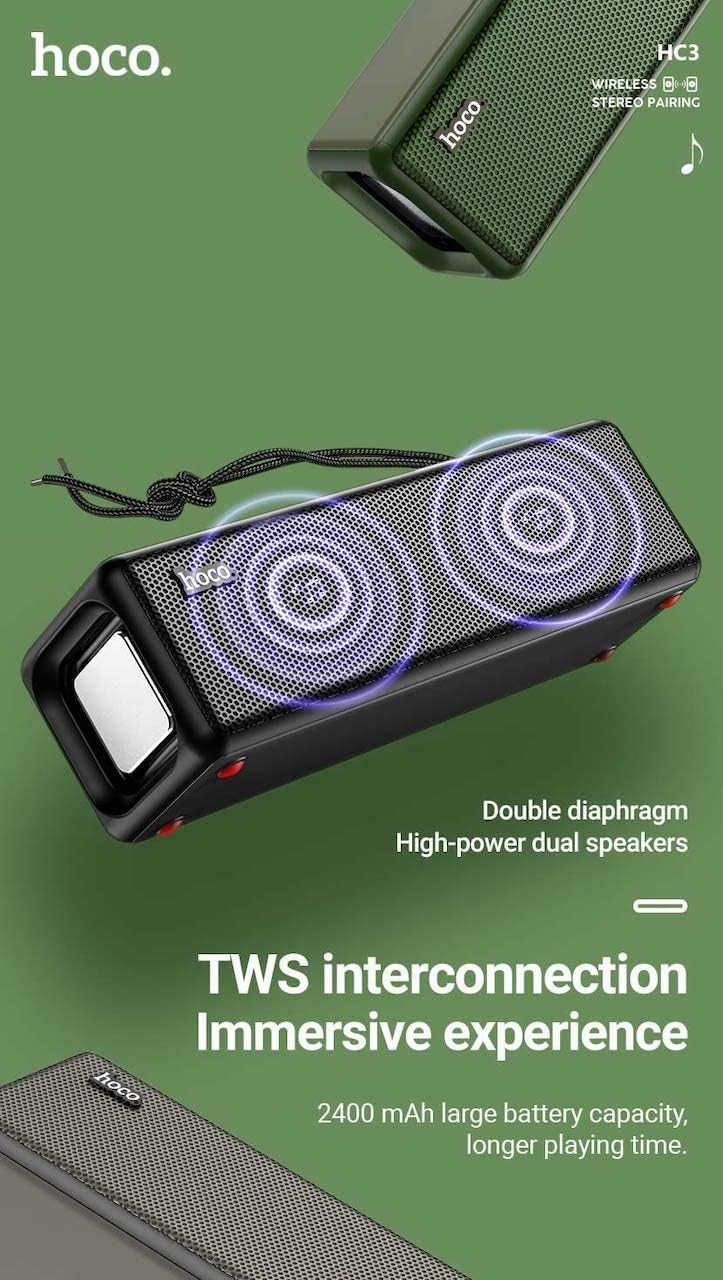
Figure 3: TWS Interconnection. This image illustrates the concept of two Hoco HC3 speakers wirelessly connected to provide a stereo audio experience, highlighting the dual speaker setup and the 2400 mAh battery capacity.
5.6 Xestión de chamadas
Cando se conecta a un teléfono intelixente mediante Bluetooth:
- Responder chamada: Prema brevemente o botón Reproducir/Pausa.
- Finalizar a chamada: Prema brevemente o botón Reproducir/Pausa durante unha chamada.
- Rexeitar a chamada: Mantén premido o botón Reproducir/Pausa cando soe unha chamada entrante.
- Volver a marcar o último número: Prema dúas veces o botón Reproducir/Pausa.
6. Mantemento
- Limpeza: Use a soft, dry cloth to clean the speaker's surface. Do not use abrasive cleaners, alcohol, or other chemical solvents.
- Almacenamento: Garde o altofalante nun lugar fresco e seco, lonxe da luz solar directa e de temperaturas extremas.
- Coidado da batería: To prolong battery life, charge the speaker regularly, even if not in use for extended periods (e.g., once every 3 months). Avoid fully discharging the battery frequently.
- Resistencia á auga: While designed for sports, avoid submerging the speaker in water. Refer to product specifications for any IP rating.
- Evitar impacto: Protect the speaker from drops and strong impacts.
7 Solución de problemas
If you encounter issues with your Hoco HC3 speaker, refer to the following table for common problems and solutions:
| Problema | Causa posible | Solución |
|---|---|---|
| O altofalante non se acende. | Batería baixa. | Cargue o altofalante durante polo menos 30 minutos. |
| Non se pode emparellar por Bluetooth. | Bluetooth non activado no dispositivo; o altofalante non está en modo de emparellamento; demasiado lonxe do dispositivo. | Ensure Bluetooth is on, speaker is in pairing mode (flashing blue LED), and devices are within 10 meters. Forget "HC3" on your device and try pairing again. |
| Sen son. | Volume demasiado baixo; modo incorrecto seleccionado; o dispositivo non reproduce audio. | Increase volume on both speaker and connected device. Verify correct mode (Bluetooth, AUX, TF, USB). Ensure audio is playing on the source device. |
| A recepción da radio FM é deficiente. | Sinal débil; interferencias ambientais. | Move the speaker to a location with better reception. Re-scan for stations. |
| TF card/USB playback not working. | Card/drive not inserted correctly; incompatible file formato; corrompido files. | Ensure card/drive is fully inserted. Check file formats (MP3 recommended). Try another card/drive. |
| Fallou o emparellamento de TWS. | Speakers not in TWS pairing mode; too far apart. | Ensure both speakers are powered on and in TWS pairing mode. Keep them close during pairing. Refer to section 5.5. |
8. Especificacións
| Característica | Detalle |
|---|---|
| Modelo | HC3 |
| Dimensións | 202 x 60 x 60 mm |
| Peso | 561 g |
| Versión Bluetooth | V5.0 (Chip: JLAC6928B) |
| Capacidade da batería | 2400 mAh |
| Tempo de carga | Aproximadamente 3 horas |
| Tempo de conversa/música | Ata 5 horas |
| Unidade de altofalante | 45 mm * 2 |
| Saída de potencia dos altofalantes | 5W * 2 |
| Modos de conectividade | Bluetooth, FM, TF card, USB, AUX, TWS |
| Modo de saída de audio | Envolvente |
| Fabricante | Hoco |
| País de Orixe | China |
9. Garantía e soporte
Hoco products are manufactured to high quality standards. For information regarding warranty coverage, please refer to the warranty card included with your purchase or contact your local Hoco distributor or retailer. Keep your proof of purchase for any warranty claims.
For technical support or further assistance, please visit the official Hoco website or contact their customer service department. Contact details are typically available on the product packaging or the official websitio.