
1. Introdución
This manual provides essential instructions for the safe and efficient operation of your CanMixs Smartwatch V101. Please read this manual thoroughly before using the device and retain it for future reference. The Smartwatch V101 is designed to monitor various health and fitness metrics, provide notifications, and assist with daily activities.
2. Produto rematadoview
The CanMixs Smartwatch V101 features a full touch screen and offers a range of functionalities including health and sports monitoring, IP68 waterproofing, and smart notifications.
Características principais:
- Interface de pantalla táctil completa
- Health Monitoring: Heart Rate, Sleep Duration, Temperature, Calories Burned
- Sports Monitoring: Multiple Sports Modes, Step Count, Distance
- Clasificación de impermeabilidade IP68
- Call, SMS, and App Message Notifications
- Control de música
- Maior duración da batería
- Alarm Clock, Sedentary Reminder, Remote Shutter, Find Phone

Imaxe: Máis deview of the Smartwatch V101 displaying its various functions and features.
3. Configuración
3.1 Carga do dispositivo
Before initial use, fully charge your Smartwatch V101. The device features a built-in USB charging metal strip. To charge:
- Gently remove one side of the strap to expose the USB metal strip.
- Insert the metal strip end into any standard USB charging port (e.g., computer USB port, USB wall adapter, power bank).
- The watch screen will display a charging indicator. A full charge typically takes 1-1.5 hours.
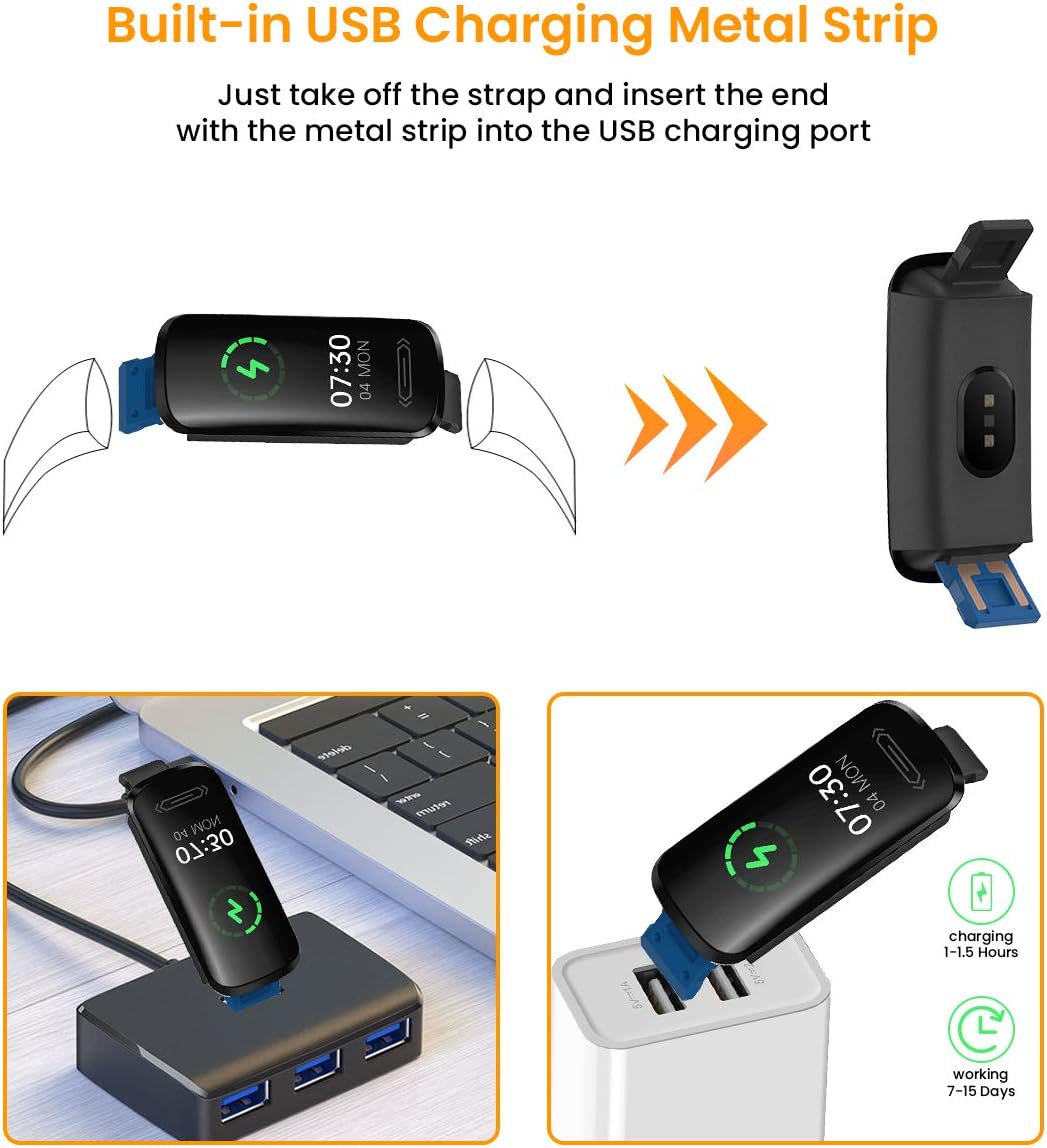
Image: Instructions for charging the Smartwatch V101 using its integrated USB connector.
3.2 Instalación e emparellamento da aplicación
To unlock the full potential of your smartwatch, download and install the companion application on your smartphone. The app is compatible with both Android and iOS devices.
- Descarga a aplicación: Busca the official companion app (refer to the packaging or quick start guide for the exact app name) in your smartphone's app store (Google Play Store for Android, Apple App Store for iOS).
- Crear unha conta: Open the app and follow the on-screen instructions to create a user account.
- Activar Bluetooth: Asegúrate de que o Bluetooth estea activado no teu smartphone.
- Vincular o dispositivo: In the app, navigate to the device pairing section. Select your Smartwatch V101 from the list of available devices. Confirm the pairing request on both your phone and the smartwatch if prompted.
- Conceder permisos: Allow necessary permissions (e.g., location, notifications) for the app to function correctly.
4. Instrucións de funcionamento
4.1 Navegación básica
- Activar pantalla: Levanta o pulso ou preme o botón lateral para activar a pantalla.
- Pase o dedo cara arriba/abaixo: Desprácese polos menús e as notificacións.
- Pase o dedo cara á esquerda/dereita: Access different functions or widgets (e.g., heart rate, steps, weather).
- Toca: Selecciona un elemento ou confirma unha acción.
- Prensa longa: May activate certain functions or change watch faces.
4.2 Vixilancia da saúde
The Smartwatch V101 provides continuous monitoring of several health metrics.
- Monitor de frecuencia cardíaca: The watch continuously tracks your heart rate. Swipe to the heart rate interface to view datos en tempo real e tendencias históricas na aplicación.
- Monitor de sono: Wear the watch to bed for automatic sleep tracking. It records sound sleep and light sleep durations. View detailed sleep analysis in the companion app.
- Medición de temperatura: To measure wrist skin temperature, ensure the monitoring switch is enabled in the app settings. The watch will display temperature readings. Note: This feature is for reference only and not intended for medical diagnosis.

Image: Heart Rate and Sleep Monitoring features of the Smartwatch V101.

Image: Wrist skin temperature measurement interface and notification display on the Smartwatch V101.
4.3 modos deportivos
The smartwatch supports multiple sports modes to track your workouts effectively.
- Acceder aos modos deportivos: Swipe on the watch face until you find the sports mode icon, then tap to enter.
- Seleccionar actividade: Choose from activities like Run, Cycle, Indoor Run, Plank, and more.
- Inicio/Parada: Tap to start tracking your activity. Tap again to pause or long-press to end the session.
- Datos Review: View real-time data on the watch and detailed summaries in the app after your workout.
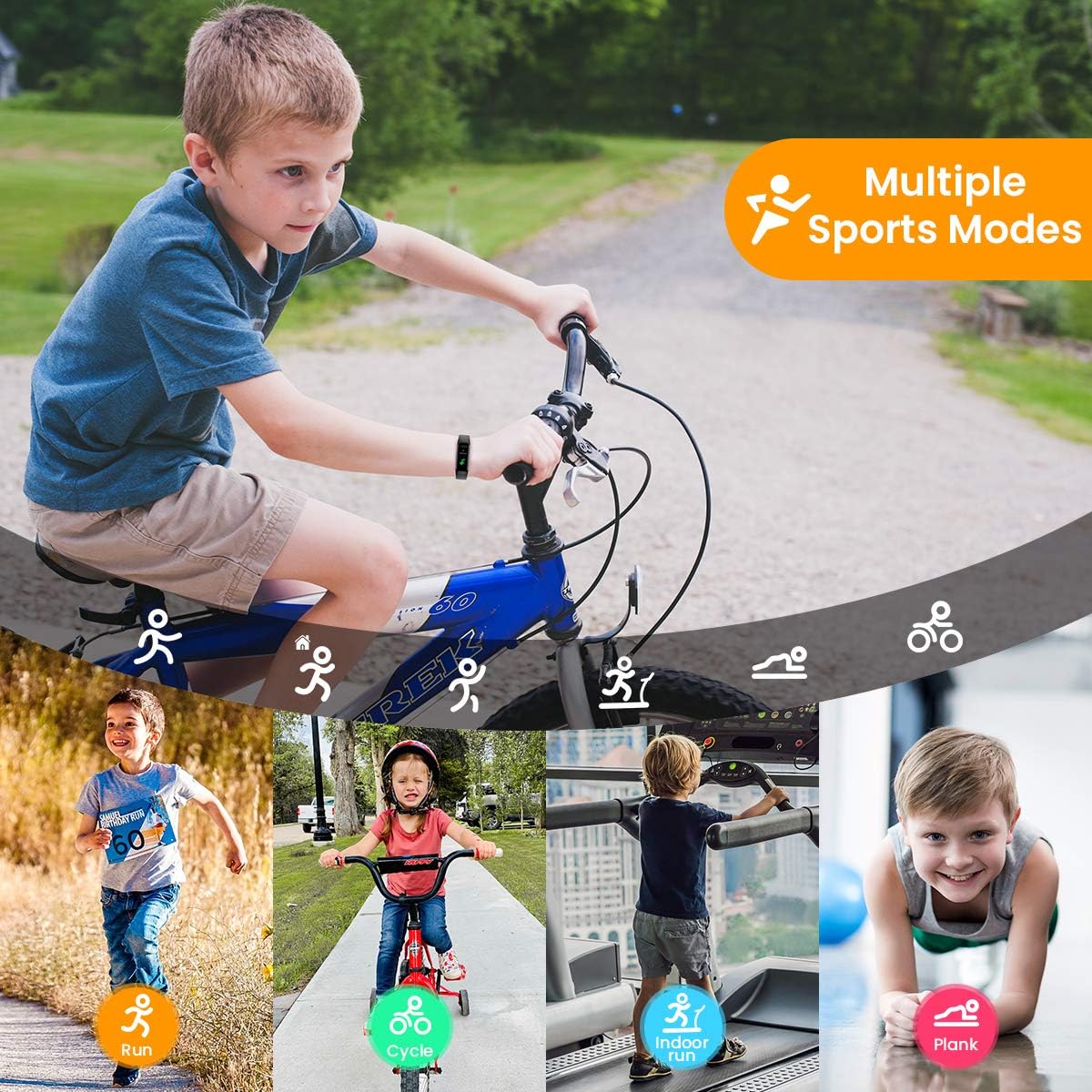
Image: The Smartwatch V101 tracking various sports activities.
4.4 Notificacións
Receive call, SMS, and app message notifications directly on your wrist.
- Ensure the watch is paired with your smartphone and the app has notification permissions.
- Enable specific app notifications within the companion app settings.
- Incoming notifications will cause the watch to vibrate and display the message content.
4.5 Resistencia á auga (IP68)
The Smartwatch V101 has an IP68 waterproof rating, meaning it is resistant to dust and can withstand immersion in water up to 1.5 meters for up to 30 minutes.
- Suitable for daily use, including hand washing, rain, and showering.
- Can be worn for swimming in shallow water.
- Not suitable for diving, snorkeling, hot showers, or saunas, as steam and high pressure water can compromise the seal.

Image: The IP68 waterproof capability of the Smartwatch V101, shown during swimming.
5. Mantemento
Un mantemento axeitado garante a lonxevidade e o rendemento óptimo do teu reloxo intelixente.
- Limpeza: Limpa regularmente o reloxo e a correa cun pano suave eamp pano. Evite o uso de produtos químicos agresivos ou materiais abrasivos.
- Secado: After exposure to water, ensure the watch is completely dry before charging or prolonged use.
- Coidado da batería: Avoid fully discharging the battery frequently. Charge the device when the battery level is low. Store the device in a cool, dry place if not used for extended periods, and charge it periodically to prevent deep discharge.
- Evita temperaturas extremas: Non expoñas o reloxo a temperaturas extremas, xa que isto pode danar a batería e os compoñentes internos.
6 Solución de problemas
- O reloxo non se acende: Asegúrate de que o reloxo estea completamente cargado. Conéctao a unha fonte de alimentación USB durante polo menos 10 minutos.
- Non se pode emparellar co teléfono intelixente:
- Asegúrate de que o Bluetooth estea activado no teu teléfono.
- Asegúrate de que o reloxo estea dentro do alcance do teu teléfono.
- Reinicia tanto o reloxo como o teléfono.
- Check if the app has necessary permissions.
- Esquece o dispositivo na configuración de Bluetooth do teu teléfono e tenta emparellalo de novo.
- Datos sanitarios inexactos:
- Asegúrate de levar o reloxo ben axustado ao pulso, nin demasiado axustado nin demasiado solto.
- Limpa o sensor que está na parte traseira do reloxo.
- Evitar movementos excesivos durante as medicións.
- Notificacións non recibidas:
- Verificar a conexión Bluetooth.
- Check app notification settings on both the watch app and your phone's system settings.
- Asegúrate de que a aplicación se execute en segundo plano no teu teléfono.
7. Especificacións
| Característica | Detalle |
|---|---|
| Nome do modelo | V101 |
| Marca | CanMixs |
| Tamaño de visualización | 0.96 polgadas |
| Tipo de visualización | AMOLED |
| Tecnoloxía de conectividade | Bluetooth |
| Estándar de comunicación sen fíos | Bluetooth |
| Resistencia á auga | IP68 |
| Peso | 22 g |
| Dimensións do produto | 5 x 2 x 1.2 cm |
| Tipo de batería | Polímero de litio (1 incluído) |
| Compatible con | Teléfono intelixente |
| Vixilancia da Saúde | Heart Rate Monitor, Sleep Duration, Temperature, Calories Burned |
| Seguimento da actividade | Distance, Step Count, Multisport Tracker |
8. Garantía e soporte
CanMixs products are designed for reliability and performance. For specific warranty details, please refer to the warranty card included with your product or visit the official CanMixs website. If you encounter any issues or require technical assistance, please contact CanMixs customer support through the contact information provided on the official websitio ou embalaxe do produto.
Please have your product model (V101) and purchase date ready when contacting support.