
ttec 2KM133T
Manual do usuario dos auriculares sen fíos AirBeat Free de Ttec
Model: 2KM133T
Introdución
Thank you for choosing the ttec AirBeat Free True Wireless Earphones. This manual provides essential information for setting up, operating, and maintaining your earphones to ensure optimal performance and longevity. Please read this manual thoroughly before using the product.
Contido do paquete
Asegúrate de que todos os elementos estean presentes no teu paquete:
- ttec AirBeat Free True Wireless Earphones (Left and Right)
- Estuche de carga
- Cable de carga USB
- Almofadas para orellas
- Manual de usuario (este documento)
Produto rematadoview
Familiarize yourself with the components of your ttec AirBeat Free earphones and charging case.

Figure 1: The compact ttec AirBeat Free charging case, shown held in a hand, highlighting its portable design.
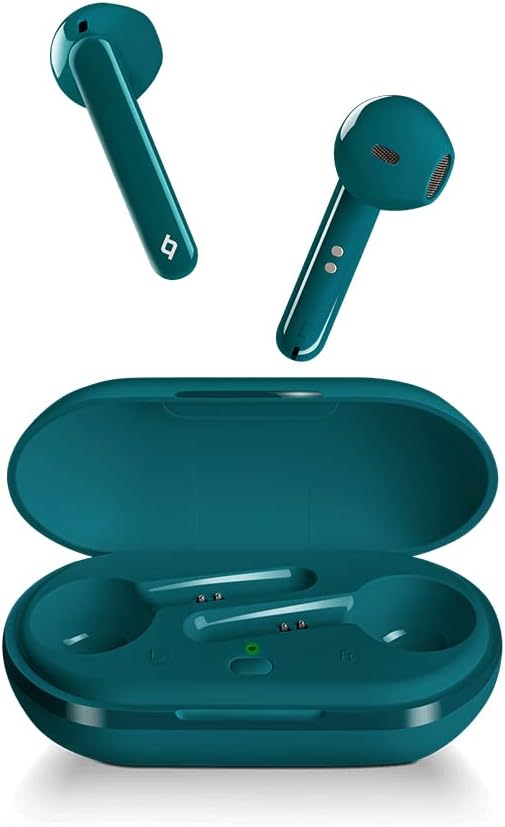
Figure 2: The ttec AirBeat Free earbuds displayed alongside their open charging case, showing the earbuds' design and the charging slots.

Figure 3: A single ttec AirBeat Free earbud positioned next to its open charging case, illustrating the earbud's form factor and the case's interior.
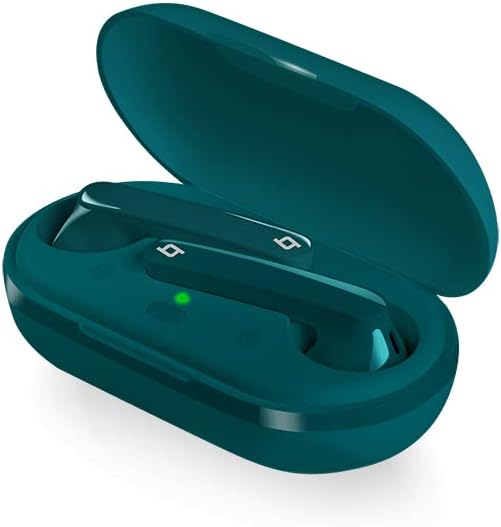
Figura 4: Un ángulo view of the ttec AirBeat Free earbuds securely placed within their open charging case, showing the charging indicators.
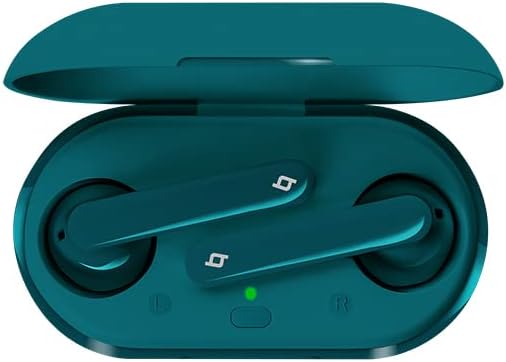
Figura 5: De arriba abaixo view of the ttec AirBeat Free earbuds nestled in their open charging case, clearly showing the left and right earbud positions and the charging status light.
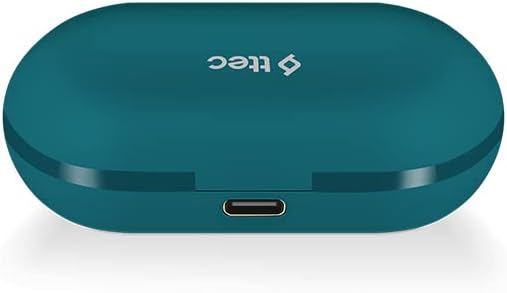
Figure 6: The closed ttec AirBeat Free charging case, viewed from the back, highlighting the USB-C charging port.
Configuración
1. Carga dos auriculares e da funda
Antes do primeiro uso, carga completamente os auriculares e a caixa de carga.
- Coloque os dous auriculares na caixa de carga.
- Connect the USB charging cable to the charging port on the back of the case (refer to Figure 6) and plug the other end into a USB power source.
- The indicator light on the charging case will show charging status. A full charge provides up to 30 hours of extra battery life with the case, and up to 4 hours for the earphones on a single charge.
- O Charge & Go feature allows 1 hour of use with only 15 minutes of charging.
2. Emparellamento Bluetooth
Pair your ttec AirBeat Free earphones with your Bluetooth-enabled device.
- Asegúrate de que os auriculares estean cargados e dentro da caixa de carga.
- Abre a tapa da caixa de carga. Os auriculares entrarán automaticamente no modo de emparellamento.
- No teu dispositivo (teléfono intelixente, tableta, etc.), vai á configuración de Bluetooth e activa Bluetooth.
- Busca available devices. Select "ttec AirBeat Free"da lista.
- Unha vez conectado, escoitarás un ton de confirmación e a luz indicadora dos auriculares pode cambiar.
- O MonoSmart technology allows either earbud to be used independently. To use a single earbud, simply remove one from the case while the other remains inside or is turned off.
Instrucións de funcionamento
The ttec AirBeat Free earphones feature touch sensors for easy control of music and calls.
Control de música
- Reproducir/Pausa: Single tap on either earbud's touch sensor.
- Próxima pista: Double tap on the right earbud's touch sensor.
- Pista anterior: Double tap on the left earbud's touch sensor.
- Subir volume: Triple tap on the right earbud's touch sensor.
- Baixar volume: Triple tap on the left earbud's touch sensor.
Control de chamadas
- Responder/Finalizar chamada: Single tap on either earbud's touch sensor.
- Rexeitar a chamada: Press and hold either earbud's touch sensor for 2 seconds.
- Activar o asistente de voz: Press and hold either earbud's touch sensor for 3 seconds (e.g., Siri, Google Assistant).
Encendido/apagado
- Encendido: Open the charging case lid, or press and hold the touch sensor for 3 seconds if out of case.
- Apagado: Place earphones back into the charging case and close the lid, or press and hold the touch sensor for 5 seconds.
Mantemento e coidados
Proper care will extend the life of your earphones.
- Limpeza: Usa un pano suave, seco e sen pelusa para limpar os auriculares e a funda de carga. Non empregues produtos químicos agresivos nin materiais abrasivos.
- Resistencia á auga: The earphones have an IPX4 water and dust proof rating, meaning they are resistant to splashing water from any direction. Do not submerge them in water or expose them to heavy rain. Dry them thoroughly if they get wet.
- Almacenamento: Cando non estean en uso, garde os auriculares no seu estoxo de carga para protexelos e mantelos cargados. Garde nun lugar fresco e seco, lonxe de temperaturas extremas.
- Duración da batería: To preserve battery life, charge the earphones and case regularly, even if not used for extended periods.
Resolución de problemas
If you encounter issues with your ttec AirBeat Free earphones, try the following solutions:
| Problema | Posible Solución |
|---|---|
| Os auriculares non se emparellan/conectan. |
|
| Só funciona un auricular. |
|
| Volume baixo ou mala calidade de son. |
|
| A caixa de carga non carga. |
|
Especificacións
Key technical specifications for the ttec AirBeat Free True Wireless Earphones:
- Nome do modelo: AirBeat gratuíto
- Número de modelo: 2KM133T
- Versión Bluetooth: 5.0
- Water and Dust Proof Rate: IPX4
- Peso do auricular: 3.6 gramos (cada un)
- Peso da caixa de carga: 37 gramos
- Earphone Battery Life (single charge): Ata 4 horas
- Duración total da batería (con funda de carga): Ata 30 horas
- Carga rápida: 15 minutes charge for 1 hour playback (Charge & Go)
- Control de ruído: Cancelación activa de ruído
- Tecnoloxía de conectividade: Sen fíos (Bluetooth)
- Headphones Ear Placement: En Orella
- Compoñentes incluídos: Almofadas para orellas
- Cor: Turquesa
Garantía e Soporte
For warranty information and customer support, please refer to the official ttec websitio web ou póñase en contacto co seu distribuidor local.
Fabricante: ttec
Data de primeira dispoñibilidade: 9 de febreiro de 2021
If you experience issues not covered in the troubleshooting section, please contact ttec customer service for further assistance.
Ask a question about this manual
Ask about setup, troubleshooting, compatibility, parts, safety, or missing instructions. Manuals+ will review the question and use this page’s manual context to help answer it.