
Produto rematadoview
The Hoco ES41 TWS (True Wireless Stereo) Bluetooth Headset provides a wireless audio experience with clear sound. This manual will guide you through the setup, operation, and maintenance of your ES41 headset.
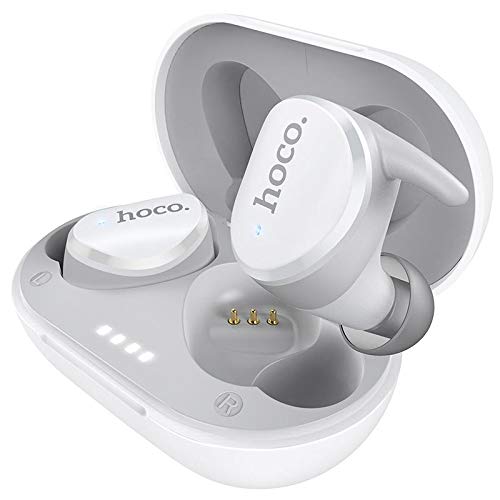
Image: The Hoco ES41 TWS Bluetooth Wireless Headset, showing both earbuds and the charging case in white.
Contido do paquete
Comprobe se o paquete contén os seguintes elementos:
- Hoco ES41 TWS Wireless Earbuds (Left and Right)
- Estuche de carga sen fíos
- Cable de carga USB (micro USB)
- Manual de usuario

Imaxe: Anverso e reverso view of the Hoco ES41 retail packaging, displaying the product and key features.
Configuración
1. Charging the Headset and Case
Antes do primeiro uso, carga completamente a caixa de carga e os auriculares.
- Connect the provided USB charging cable to the charging port on the case and to a USB power source.
- As luces indicadoras da caixa de carga acenderanse para mostrar o estado de carga.
- Coloca os auriculares no estoxo de carga. Asegúrate de que estean correctamente colocados; os auriculares comezarán a cargarse automaticamente.
- Charging time for the headset is approximately 1 hour. The charging case takes approximately 2.5 hours to fully charge.

Image: The Hoco ES41 earbuds placed inside the open charging case, showing the LED indicator lights for battery status.
2. Emparejamento cun dispositivo Bluetooth
The ES41 headset uses Bluetooth 5.0 for a stable connection.
- Emparejamento inicial:
- Abre a caixa de carga. Os auriculares acenderanse automaticamente e entrarán no modo de emparellamento.
- No teu dispositivo (teléfono intelixente, tableta, etc.), activa o Bluetooth.
- Busca Bluetooth devices and select "Hoco ES41" from the list.
- Unha vez conectado, escoitarás un ton de confirmación e as luces indicadoras dos auriculares cambiarán.
- Reconexión:
- After initial pairing, the earbuds will automatically connect to the last paired device when removed from the charging case and Bluetooth is enabled on the device.
Instrucións de funcionamento
Encendido/apagado
- Encendido: Open the charging case, or long-press the touch area on both earbuds for approximately 3 seconds.
- Apagado: Place the earbuds back into the charging case and close the lid, or long-press the touch area on both earbuds for approximately 5 seconds.
Reprodución de música
- Reproducir/Pausa: Toca unha vez a zona táctil de calquera dos auriculares.
- Próxima pista: Toca dúas veces a área táctil do auricular dereito.
- Pista anterior: Toca dúas veces a área táctil do auricular esquerdo.
Xestión de chamadas
- Responder/Finalizar chamada: Toca unha vez a zona táctil de calquera dos auriculares.
- Rexeitar a chamada: Long-press the touch area on either earbud for 2 seconds.
Asistente de voz
- Activar o asistente de voz: Triple-tap the touch area on either earbud.
Mantemento
- Limpeza: Usa un pano suave e seco para limpar os auriculares e a funda de carga. Non empregues produtos químicos agresivos nin materiais abrasivos.
- Almacenamento: Cando non os uses, garda os auriculares no seu estoxo de carga para protexelos e mantelos cargados. Gardaos nun lugar fresco e seco, lonxe da luz solar directa e de temperaturas extremas.
- Resistencia á auga: The earbuds are not waterproof. Avoid exposure to water, sweat, or high humidity.
Resolución de problemas
- Auriculares que non se emparellan entre si:
Place both earbuds back into the charging case, close the lid, then open it again. This should reset their connection.
- Os auriculares non se conectan ao dispositivo:
Ensure Bluetooth is enabled on your device. Forget "Hoco ES41" from your device's Bluetooth settings and attempt to pair again.
- Sen son dun auricular:
Check if both earbuds are charged. Try placing them back in the case and taking them out again. If the issue persists, try resetting the earbuds (refer to the full manual if available for specific reset instructions).
- Problemas de carga:
Ensure the charging cable is securely connected and the power source is active. Clean the charging contacts on both the earbuds and the case with a dry cotton swab.
Especificacións
| Característica | Especificación |
|---|---|
| Nome do modelo | ES41 |
| Versión Bluetooth | 5.0 |
| Chip Bluetooth | JL6936D |
| Capacidade da batería do estuche de carga | 400 mAh |
| Single Headset Battery Capacity | 40 mAh |
| Tempo de conversa/música | 5 horas |
| Tempo de espera | 200 horas |
| Tempo de carga dos auriculares | 1 horas |
| Estuche de carga Tempo de carga | 2.5 horas |
| Peso total | 37 g |
| Single Headset Weight | 4g |
| Método de control | Toca |
| Tecnoloxía de conectividade | Sen fíos |
| Factor de forma dos auriculares | En Orella |
| Material | Plástico |
| Dispositivos compatibles | Teléfonos móbiles |
Garantía e Soporte
For warranty information and technical support, please refer to the documentation provided with your purchase or contact HOCO customer service. Keep your proof of purchase for warranty claims.