
1. Introdución
Grazas pola compraasing the ONIKUMA K1 RGB Gaming Headset. This manual provides detailed instructions for setup, operation, maintenance, and troubleshooting to ensure optimal performance and longevity of your headset. Please read this manual carefully before use and retain it for future reference.
2. Produto rematadoview
The ONIKUMA K1 is a wired gaming headset designed for multi-platform compatibility, featuring vibrant RGB lighting, 7.1 surround sound, and a noise-cancelling microphone. It is built for comfort during extended gaming sessions.
Características principais:
- Son envolvente 7.1: Provides immersive audio for an enhanced gaming experience.
- Micrófono con cancelación de ruído: Garante unha comunicación clara ao reducir o ruído de fondo.
- Iluminación RGB: Dynamic lighting effects for an aesthetic appeal.
- Compatibilidade multiplataforma: Works with PC, PlayStation (PS3, PS4), Mobile devices, and Xbox (Xbox One requires an adapter, not included).
- Deseño cómodo: Features soft protein earpads, an adjustable headband, and cozy head cushions.
- Controis en liña: Easy access to volume adjustment and microphone mute.
Compoñentes:
The headset includes the main unit with integrated microphone and a wired connection featuring a 3.5mm audio jack and a USB connector for RGB lighting.

Figure 1: Headset with in-line volume and microphone mute control, USB connector for RGB lighting, and 3.5mm audio jack.

Figure 2: Flexible microphone with 160-degree adjustment and 360-degree voice pick-up for clear communication.

Figure 3: Soft protein earpads, adjustable headband, and cozy head cushions designed for supreme comfort.
3. Instrucións de configuración
Follow these steps to connect your ONIKUMA K1 headset to your device.
Compatibilidade multiplataforma:
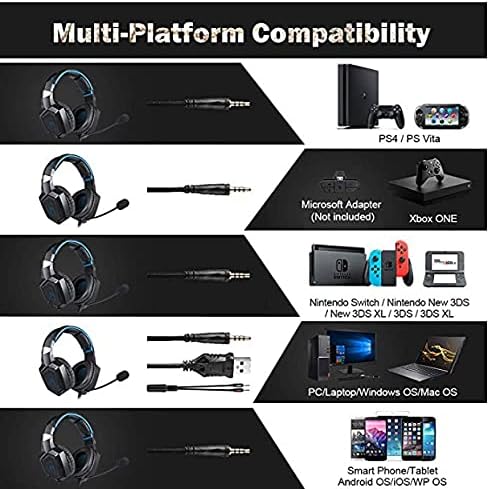
Figura 4: Compatibilidade sobreview for PC, PlayStation, Xbox, Nintendo Switch, and mobile devices.
- For PC/Laptop (Windows OS/Mac OS):
Connect the 3.5mm audio jack to your computer's audio output/input port. Connect the USB cable to a USB port for RGB lighting. Ensure your sound settings are configured to use the headset. - For PlayStation (PS4/PS Vita/PS3):
Connect the 3.5mm audio jack to the controller or console's audio port. For PS4, go to Settings > Devices > Audio Devices > Output to Headphones > All Audio. Connect the USB for RGB lighting if a USB port is available. - For Xbox ONE:
An additional Microsoft Adapter (not included) is required for older Xbox One controllers. Connect the 3.5mm audio jack to the adapter, then connect the adapter to your controller. Newer Xbox One controllers have a built-in 3.5mm jack. Connect the USB for RGB lighting if a USB port is available on the console. - For Nintendo Switch/New 3DS XL/3DS/3DS XL:
Connect the 3.5mm audio jack directly to the console's audio port. - For Smart Phone/Tablet (Android OS/iOS/WP OS):
Connect the 3.5mm audio jack directly to your mobile device's headphone jack.
4. Instrucións de funcionamento
Once connected, you can begin using your headset. Here are the basic operating functions:
- Control de volume: Use the in-line volume roller to adjust the audio output level. Roll up to increase volume, roll down to decrease.
- Silenciar o micrófono: Use the in-line switch to mute or unmute the microphone. Slide the switch to the 'OFF' position to mute and 'ON' to unmute.
- Axuste do micrófono: The microphone is flexible. Adjust its position closer to your mouth for optimal voice pickup or away when not in use.
- Iluminación RGB: The RGB lighting is powered via the USB connection. Once the USB is plugged in, the lighting will activate automatically. There are no user-adjustable controls for the RGB lighting patterns on the headset itself.
- Axuste dos auriculares: Adjust the headband to ensure a comfortable and secure fit over your ears. The earpads should fully cover your ears for optimal sound isolation and comfort.
5. Mantemento
Un coidado axeitado prolongará a vida útil dos seus auriculares.
- Limpeza: Usa un pano suave e seco para limpar os auriculares. Non empregues produtos de limpeza líquidos nin materiais abrasivos.
- Almacenamento: Garde os auriculares nun lugar fresco e seco, lonxe da luz solar directa e de temperaturas extremas.
- Coidado do cable: Avoid sharp bends or excessive pulling on the cables to prevent damage. The cable is designed to be tangle-free.
- Evitar a humidade: The headset is not water-resistant. Keep it away from liquids.
6 Solución de problemas
Se tes problemas cos teus auriculares, consulta as seguintes solucións habituais:
| Problema | Posible Solución |
|---|---|
| Sen son nin baixo volume |
|
| O micrófono non funciona |
|
| A iluminación RGB non funciona |
|
| Sound quality issues (e.g., no 7.1 surround sound) |
|
7. Especificacións
| Característica | Detalle |
|---|---|
| Nome do modelo | K1-B-Black RGB |
| Tecnoloxía de conectividade | Con cable |
| Conector para auriculares | Jack de 3.5 mm |
| Sensibilidade | 104 dB |
| Resposta en frecuencia | Not specified (Original data: 3045 Unknown Rate) |
| Control de ruído | Cancelación activa de ruído |
| Factor de forma dos auriculares | Sobre orella |
| Colocación do oído | Sobre orella |
| Cor | Negro |
| Nome da marca | ONIKUMA |
| Dimensións do produto | 22.5 x 19.5 x 10.5 cm |
| Peso do elemento | 394 gramos |
| Función de cable | Libre de enredos |
| Tipo de control | Control de volume |
| Dispositivos compatibles | Multiplataforma |
| Usos recomendados | Gaming, Making Calls |
| Usos específicos do produto | Auriculares para xogos |
| Materiais | Plastic, Polycarbonate Leather (PC) |
| Descrición do intervalo de idade | Adulto |
| Nivel de resistencia á auga | Non resistente á auga |
8. Garantía e soporte
Para obter información sobre a garantía ou asistencia técnica, consulte a documentación incluída coa súa compra ou póñase en contacto directamente co vendedor. Garde o comprobante de compra para calquera reclamación de garantía.