
MONTAXE MU0034
MOUNTUP MU0034 Manual de instrucciones de montaje en escritorio para monitor único
Marca: MONTAXE | Modelo: MU0034
1. Introdución
Este manual ofrece instrucións detalladas para a instalación, o funcionamento e o mantemento do soporte de escritorio para un só monitor MOUNTUP MU0034. Lea este manual detidamente antes da instalación para garantir unha configuración correcta e un funcionamento seguro. Este soporte para monitor está deseñado para mellorar a ergonomía do seu espazo de traballo ao proporcionar unha posición axustable para un só monitor.
2. Información de seguridade
- Asegúrese de que todos os compoñentes estean presentes e intactos antes da instalación. Non o use se falta algunha peza ou se está defectuosa.
- Este produto está pensado para monitores que pesan ata 8 kg (17.6 lb) e tamaños de pantalla de 17 a 32 polgadas. Non exceda a capacidade máxima de peso.
- Os patróns VESA compatibles son 75x75 mm e 100x100 mm. Verifica o patrón VESA do teu monitor antes de continuar.
- Asegúrate de que a superficie da mesa sexa estable e resistente dabondo para soportar o peso conxunto do soporte e do monitor.
- Aperte todos os parafusos firmemente, pero non os aperte demasiado para evitar rachar as roscas ou danar os compoñentes.
- Manteña os nenos e as mascotas afastados durante a instalación.
- Se tes algunha dúbida sobre o proceso de instalación, consulta cun profesional cualificado.
3. Contido do paquete
Comprobe que todas as pezas estean incluídas no seu paquete:
- Conxunto do brazo do monitor
- Escritorio Clamp Base
- Compoñentes da base do ilhó
- Prato VESA
- Kit de ferramentas (parafusos, arandelas, chaves Allen)
- Manual de instrucións
4. Especificacións
| Característica | Especificación |
|---|---|
| Número de modelo | MU0034 |
| Material | Aluminio pulido |
| Compatibilidade do tamaño da pantalla | 17" a 32" (plano ou curvo) |
| Capacidade de peso | Ata 17.6 libras (8 kg) |
| Compatibilidade VESA | 75x75mm, 100x100mm |
| Axuste de altura | Ata 11" (rango total de axuste de altura de 16.3") |
| Rango de inclinación | +45° a -45° |
| Alcance xiratorio | 360° (brazo), 180° (placa do monitor) |
| Rotación | 360° (de horizontal a vertical) |
| Grosor máximo do escritorio (C-cl)amp) | 3.35" |
| Diámetro do orificio do ilhó | 0.39" - 3.1" |
5. Configuración e instalación
O MOUNTUP MU0034 ofrece dúas opcións de instalación: C-clamp montaxe e montaxe con ilhós. Escolla o método axeitado para o seu escritorio.
5.1. C-Clamp Montaxe
Este método é para escritorios sen orificios para ilhós existentes, ou se o prefires clampata o bordo da túa mesa. Asegúrate de que o grosor da túa mesa non sexa superior a 3.35 polgadas.
- Coloque o C-clamp: Montar o C-clamp compoñentes á base do brazo do monitor. Coloque a base na beira da súa mesa e aperte o clipamp parafuso ata que estea seguro.
- Coloque a placa VESA ao monitor: Fixa a placa VESA á parte traseira do monitor cos parafusos axeitados do kit de hardware. Asegúrate de que os parafusos estean ben apertados.
- Deslizar o monitor no brazo: Deslice con coidado o monitor (coa placa VESA incorporada) sobre a cabeza VESA do brazo do monitor. Asegúrese de que encaixa no seu lugar ou de que estea fixado co mecanismo de bloqueo proporcionado.
- Axustar a tensión: Consulte a Sección 6.1 para axustar a tensión do resorte de gas ao peso do monitor.

Figura 1: Ilustración de C-clamp e opcións de montaxe con ilhós. O C-clamp móstrase fixando o soporte ao bordo do escritorio, mentres que o soporte con ilhós usa un burato para o escritorio.
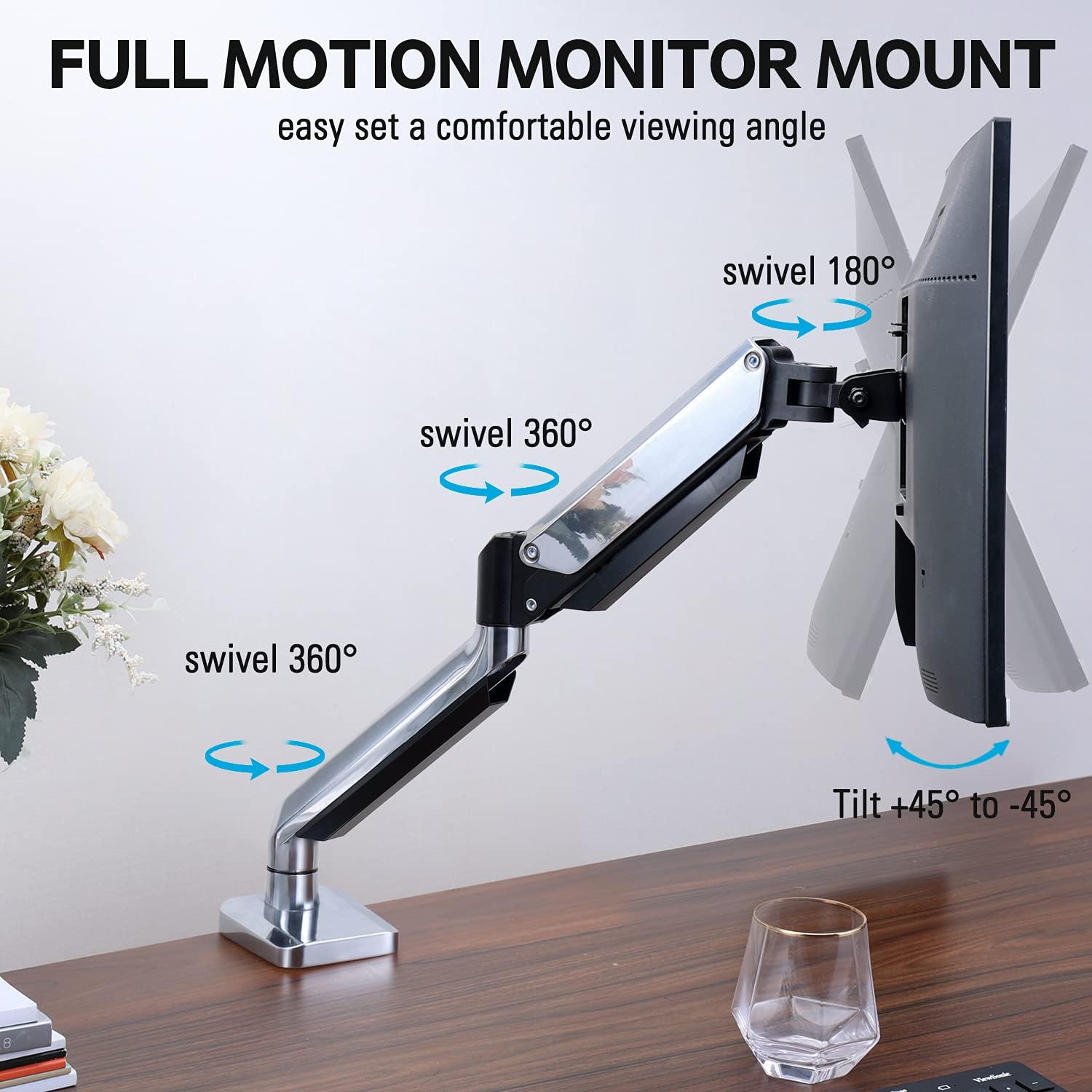
Figura 2: A placa VESA extraíble fixada na parte traseira dun monitor e deslizándose sobre o brazo do monitor para facilitar a instalación.
5.2. Montaxe de ojales
Este método utiliza un burato existente na túa mesa. Asegúrate de que o grosor da mesa non sexa superior a 3.35 cm e que o diámetro do burato do ilhó estea entre 0.39 e 3.1 cm.
- Montar a base do ilhó: Insira os compoñentes da base do ilhó polo burato do escritorio e asegúreos desde debaixo do escritorio usando a placa e a porca proporcionadas.
- Coloque a placa VESA ao monitor: Fixa a placa VESA á parte traseira do monitor cos parafusos axeitados do kit de hardware. Asegúrate de que os parafusos estean ben apertados.
- Deslizar o monitor no brazo: Deslice con coidado o monitor (coa placa VESA incorporada) sobre a cabeza VESA do brazo do monitor. Asegúrese de que encaixa no seu lugar ou de que estea fixado co mecanismo de bloqueo proporcionado.
- Axustar a tensión: Consulte a Sección 6.1 para axustar a tensión do resorte de gas ao peso do monitor.
6. Funcionamento e axustes
O brazo para monitor MOUNTUP MU0034 ofrece varios axustes para unha visualización óptima viewcomodidade.
6.1. Axuste da tensión do resorte de gas
A tensión do resorte de gas debe axustarse ao peso do monitor. Isto garante que o monitor se manteña na súa posición unha vez axustado.
- Se o monitor baixa, xire o parafuso de axuste (normalmente situado na articulación do brazo) no sentido das agullas do reloxo ("+") para aumentar a tensión.
- Se o monitor flota cara arriba, xire o parafuso de axuste en sentido antihorario ("-") para reducir a tensión.
- Axústao gradualmente ata que o monitor permaneza estable a calquera altura.
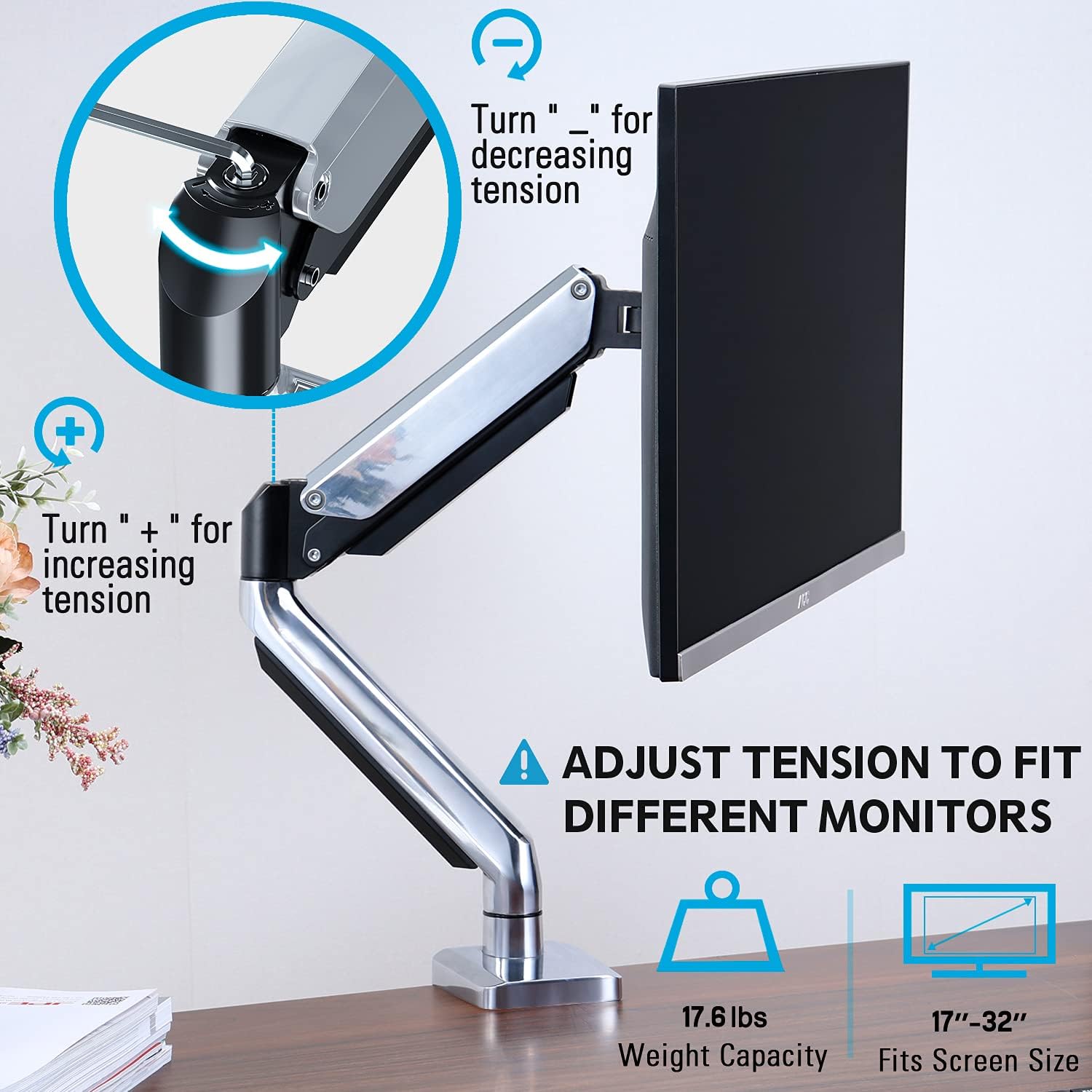
Figura 3: Instrucións para axustar a tensión do resorte de gas cunha chave Allen. Xirando no sentido horario aumenta a tensión, no sentido antihorario diminúea.
6.2. Axuste de altura
Unha vez axustada correctamente a tensión do resorte de gas, podes subir ou baixar facilmente o monitor á altura ergonómica desexada. O brazo permite un axuste vertical de ata 11 cm.

Figura 4: Diagrama que ilustra o axuste máximo de altura de 11 cm e a extensión máxima de 17.5 cm.
6.3. Inclinación, xiro e rotación
O brazo do monitor ofrece capacidades de movemento completas:
- Inclinación: Axusta a pantalla do monitor de +45° a -45° para reducir o brillo ou atopar unha posición cómoda viewángulo de ing.
- Xiratorio: O brazo pode xirar 360° na base e 360° na articulación central. A propia placa do monitor pode xirar 180°. Isto permite compartir ou reposicionar a pantalla facilmente.
- Rotación: Xire o monitor 360° para alternar entre as orientacións horizontal e vertical.

Figura 5: Representación visual das capacidades de movemento completo do brazo do monitor, incluíndo o xiro de 360°, o xiro de 180° na placa do monitor e a inclinación de +45° a -45°.

Figura 6: Unha imaxe que demostra a capacidade do monitor para xirar 360 graos, o que permite tanto a orientación horizontal como vertical viewmodos de ing.
7. Xestión de cables
O MOUNTUP MU0034 inclúe unha xestión de cables integrada para manter o teu espazo de traballo ordenado.
- Pasa os cables do monitor (de alimentación, vídeo, etc.) pola parte inferior do brazo.
- Empregue as abrazaderas ou cubertas para cables fornecidas para fixar os cables dentro das canles do brazo.
- Asegúrate de que os cables teñan a folgura suficiente para permitir unha ampla amplitude de movemento sen tensión.

Figura 7: Ilustración de como se pasan e organizan os cables a través das canles integradas no brazo do monitor, mantendo o escritorio despexado.
8. Mantemento
- Comprobe regularmente todos os parafusos e conexións para garantir que estean ben axustados.
- Limpar a montura cun pano suave eamp pano. Evite produtos de limpeza abrasivos ou solventes.
- Non lubrique o mecanismo do resorte de gas.
9 Solución de problemas
| Problema | Causa posible | Solución |
|---|---|---|
| O monitor baixa ou non se mantén activo | A tensión do resorte de gas é demasiado baixa para o peso do monitor. | Aumente a tensión do resorte de gas xirando o parafuso de axuste no sentido horario ("+"). |
| O monitor flota cara arriba ou é difícil empuxalo cara abaixo | A tensión do resorte de gas é demasiado alta para o peso do monitor. | Diminúa a tensión do resorte de gas xirando o parafuso de axuste en sentido antihorario ("-"). |
| O monitor está tremido | O soporte non está fixado firmemente ao escritorio ou a placa VESA non está axustada. | Comprobe e aperte todos os pechesampparafusos de ilhó e parafusos da placa VESA. |
| Dificultade para xirar/inclinar o monitor | As articulacións están demasiado apertadas. | Afrouxa lixeiramente os parafusos de unión correspondentes (non os retires). |
10. Garantía e soporte
O soporte de escritorio para un só monitor MOUNTUP MU0034 ten un período de asistencia de 3 anos. Para asistencia técnica, pezas que faltan ou reclamacións de garantía, póñase en contacto co servizo de atención ao cliente de MOUNTUP a través dos seus canais oficiais ou co vendedor onde comprou o produto.
Conserve o comprobante de compra para efectos da garantía.
Documentos relacionadosMU0034


Ask a question about this manual
Ask about setup, troubleshooting, compatibility, parts, safety, or missing instructions. Manuals+ will review the question and use this page’s manual context to help answer it.