
ARCADE1UP 195570000861
Arcade1Up Outrun Stand Up Edition Instruction Manual
Modelo: 195570000861
Introdución
This manual provides essential information for the safe and proper assembly, operation, maintenance, and troubleshooting of your Arcade1Up Outrun Stand Up Edition arcade game. Please read this manual thoroughly before assembly and retain it for future reference.
The Arcade1Up Outrun cabinet includes four classic racing games: Fuxir, Turbo Outrun, Outrunners, e Power Drift. It features a steering wheel, gas pedal, and brake pedal for an authentic arcade experience.
Información de seguridade
Always follow basic safety precautions when assembling and operating this product to reduce the risk of fire, electric shock, or injury.
- Manter lonxe da auga e da humidade.
- Non intente desmontar nin modificar a unidade.
- Asegúrese de colocar a unidade nunha superficie estable e nivelada.
- Unplug the unit from the power outlet before cleaning or maintenance.
- Este produto está pensado só para uso en interiores.
Contido do paquete
Verify that all components are present before beginning assembly. If any parts are missing or damaged, contact Arcade1Up customer support.
- Arcade Cabinet Panels
- Control Panel Assembly (Steering Wheel, Buttons)
- Gas and Brake Pedal Assembly
- Light-Up Marquee
- Monitor
- Adaptador de alimentación
- Paquete de ferraxes (parafusos, pernos, etc.)
- Manual de instrucións
Configuración e montaxe
Assembly typically requires two adults. Follow the numbered steps carefully. Tools required (not included): Phillips head screwdriver.
- Desempaquetar compoñentes: Retire con coidado todas as pezas da embalaxe e colóqueas sobre unha superficie limpa e suave para evitar rabuñaduras.
- Montar paneis laterais: Attach the base and back panels to the main side panels using the provided hardware. Ensure all connections are secure.
- Instalar o monitor: Mount the monitor into the designated slot within the cabinet structure. Connect the necessary video and power cables.
- Adxuntar o panel de control: Secure the control panel, including the steering wheel and buttons, to the front of the cabinet. Connect the control panel wiring to the main board.
- Install Pedal Assembly: Place the gas and brake pedal assembly at the base of the cabinet and connect its cable to the main board.
- Mount Light-Up Marquee: Attach the light-up marquee to the top of the cabinet and connect its power cable.
- Comprobacións finais: Before powering on, double-check all connections and ensure all screws are tightened.

Figure 1: Fully assembled Arcade1Up Outrun cabinet.

Figure 2: Close-up of the control panel and screen displaying game options.
Instrucións de funcionamento
Once assembled and plugged in, the unit is ready for operation.
- Encendido: Locate the power switch, typically on the back or side of the cabinet, and switch it to the 'ON' position. The marquee will light up and the screen will display the game selection menu.
- Select Game: Use the steering wheel or directional buttons (if present) and the 'SELECT' or 'ENTER' button to navigate through the available games: Fuxir, Turbo Outrun, Outrunners, e Power Drift.
- Comezar o xogo: Press the 'START' button to begin playing the selected game.
- Controis de xogo:
- Volante: Turn left or right to control your vehicle's direction.
- Gas Pedal: Press down to accelerate.
- Pedal de freo: Press down to decelerate or stop.
- Shift Lever (if applicable): Use to change gears (High/Low).
- Exiting a Game: To return to the main game selection menu, press and hold the 'PLAYER 1 START' button for approximately 5 seconds.
- Apagado: When finished playing, switch the power button to the 'OFF' position.
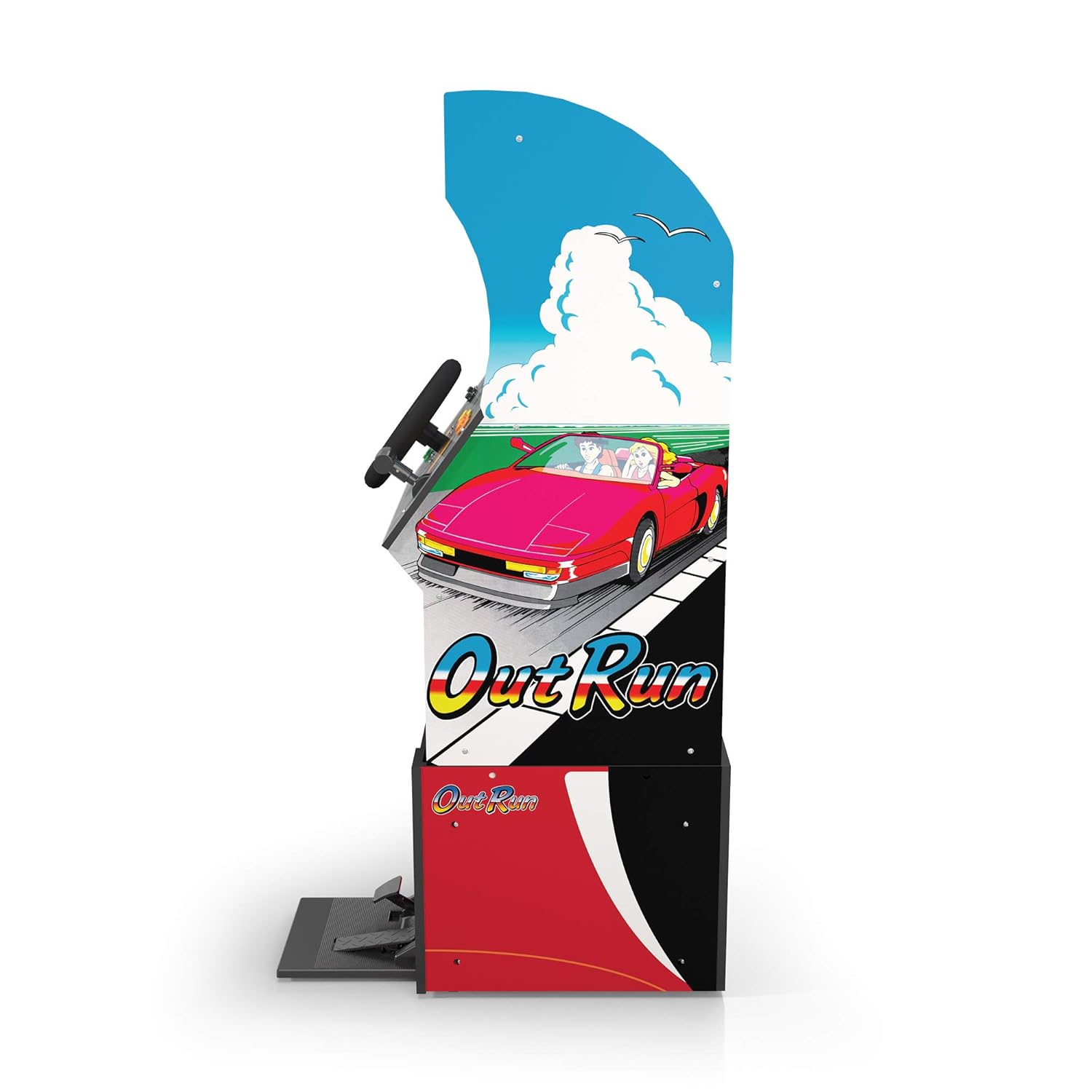
Figura 3: Pro lateralfile of the arcade cabinet, illustrating the driving controls.
Mantemento
Regular maintenance ensures the longevity and optimal performance of your arcade cabinet.
- Limpeza: Use a soft, dry cloth to wipe down the cabinet surfaces. For stubborn marks, a slightly damp cloth with mild soap can be used, followed by drying. Avoid abrasive cleaners or excessive moisture.
- Coidado da pantalla: Clean the monitor screen with a microfiber cloth specifically designed for electronics. Do not spray liquid directly onto the screen.
- Mantemento do pedal: Periodically check the gas and brake pedals for any debris or obstructions that might hinder their movement. Keep the area around the pedals clean.
- Xestión de cables Ensure all cables are neatly tucked away and not pinched or exposed, which could lead to damage.
Resolución de problemas
Consulta esta sección para coñecer os problemas habituais e as súas solucións. Se o problema persiste, ponte en contacto co servizo de atención ao cliente.
| Problema | Causa posible | Solución |
|---|---|---|
| A unidade non se acende. | Power cable not connected; Power outlet issue; Power switch off. | Ensure power cable is securely plugged into the unit and a working outlet. Check power switch is 'ON'. |
| Sen imaxe na pantalla. | Monitor cable loose; Monitor not powered. | Check monitor's power and video cables are securely connected. |
| Controls (steering wheel/pedals) unresponsive. | Control panel/pedal cables loose; Software glitch. | Verify all control panel and pedal cables are firmly connected to the main board. Try restarting the unit. |
| O xogo conxélase ou falla. | Problema temporal de software. | Power off the unit, wait 10 seconds, then power back on. |
Especificacións
- Número de modelo: 195570000861
- Dimensións (montadas): 47.75 x 23.75 x 10.5 polgadas (alto x ancho x fondo)
- Peso: 89.5 libras
- Xogos incluídos: Outrun, Turbo Outrun, Outrunners, Power Drift
- Controis: Steering Wheel, Gas Pedal, Brake Pedal, Game Selection Buttons
- Potencia: AC Adapter (Input: 100-240V ~ 50/60Hz, Output: Specific to adapter, refer to label)
- Fabricante: Arcade 1Up
- Data de lanzamento: 7 de abril de 2021
Garantía e Soporte
Arcade1Up products typically come with a limited manufacturer's warranty. For specific warranty terms and conditions, please refer to the warranty card included with your product or visit the official Arcade1Up websitio.
For technical support, missing parts, or warranty claims, please contact Arcade1Up Customer Support:
- Websitio: arcade1up.com/pages/contact-us
- Teléfono: Consulte o oficial websitio para os números de contacto rexionais.
Ao contactar co servizo de asistencia, teña á man o número de modelo (195570000861) e o comprobante de compra.
Ask a question about this manual
Ask about setup, troubleshooting, compatibility, parts, safety, or missing instructions. Manuals+ will review the question and use this page’s manual context to help answer it.