
1. Introdución
The DANOPLUS KIB-006 is a 4-channel K-type thermocouple thermometer data logger designed for precise temperature measurement and recording. This device allows for simultaneous monitoring of up to four temperature points, storing data directly onto an SD card for easy retrieval and analysis without requiring specialized software. It features a large LCD with backlight for clear readings, programmable high/low limit alarms, and various measurement functions suitable for a wide range of industrial, laboratory, and environmental applications.

Image: The DANOPLUS KIB-006 thermometer with four K-type thermocouple probes connected, showing its digital display and an 8GB SD card.
2. Contido do paquete
Comprobe o contido do paquete ao recibilo para asegurarse de que todos os artigos estean presentes e non estean danados:
- 1 x DANOPLUS KIB-006 4-Channel K-Type Thermometer SD Logger
- 2 x K-Type Thermocouple Probes
- 1 x Tarxeta SD de 8 GB
- 4 pilas AA
- 1 x English Operation Manual (this document)
- Standard Factory Packaging

Image: The DANOPLUS KIB-006 thermometer, two K-type thermocouples, an 8GB SD card, and batteries, representing the included items.
3. Características clave
- 4-Channel Measurement: Simultaneously displays temperature readings from up to four K-type thermocouple probes.
- SD Card Data Logging: Records unlimited temperature data directly to an included 8GB SD card in TXT format, eliminating the need for software.
- Programmable High/Low Limit Alarm: Features an audible buzzer and LED indicator that activate when temperature thresholds are exceeded.
- Amplio rango de medición: Capable of measuring temperatures from -200 to 1370°C (-328 to 2498°F) for the main unit.
- Large LCD with Backlight: Provides clear temperature readings and operational status, with an adjustable backlight for low-light conditions.
- MAX/MIN/HOLD Function: Permite aos usuarios view maximum, minimum, and hold current measured values on the screen.
- Unidades conmutables: Cambia facilmente entre Celsius (°C) e Fahrenheit (°F).
- Differential Temperature (T1-T2): Calculates and displays the temperature difference between two selected channels.
- Apagado automático: Aforra batería ao apagarse automaticamente despois de 20 minutos de inactividade.

Image: Visual representation of the thermometer's features, including its 4-channel capability, SD card data logging, wide measurement range, alarm, unit switching, and data hold.
4. Guía de configuración
4.1. Instalación da batería
- Localiza a tapa do compartimento da batería na parte traseira do dispositivo.
- Deslice a tapa para abrir.
- Insira 4 pilas AA, asegurándose de polaridade correcta (+/-).
- Pecha a tapa do compartimento da batería de forma segura.
4.2. Inserción da tarxeta SD
- Localiza a ranura para tarxetas SD no lateral do dispositivo.
- Insira con coidado a tarxeta SD de 8 GB fornecida na ranura ata que encaixe no seu lugar. Asegúrese de que a tarxeta estea orientada correctamente.
- To remove, press the SD card inward until it springs out.

Image: Demonstrates the insertion of an SD card into the data logger for data storage.
4.3. Conexión do termopar
- Identify the four K-type thermocouple input ports on the top of the device, labeled CH1, CH2, CH3, and CH4.
- Connect the K-type thermocouple probes to the desired channels. Ensure the positive (+) and negative (-) terminals of the probe match the corresponding markings on the device's input ports.
- Gently push the probe connectors firmly into the ports until they are secure.
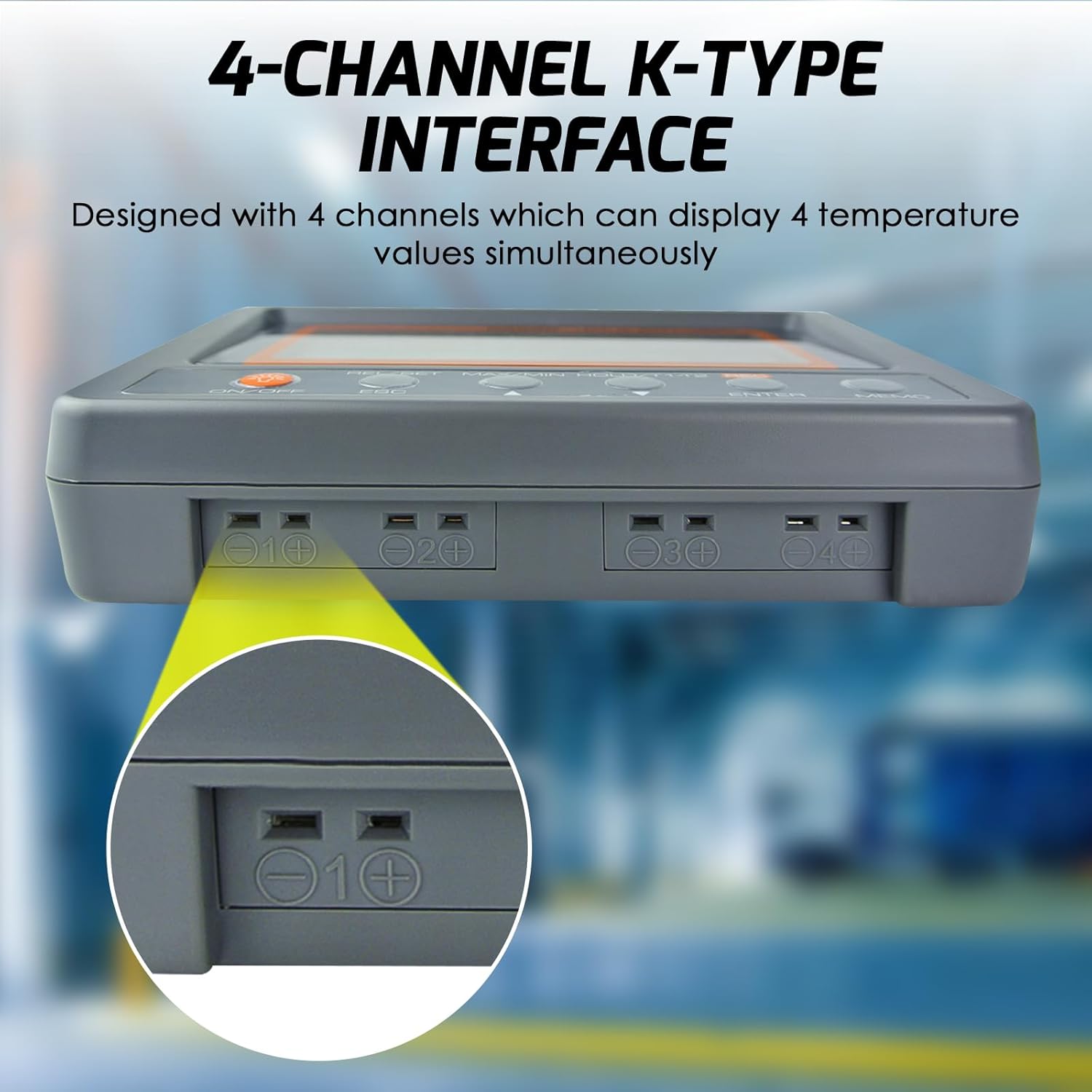
Image: Illustrates the connection of a K-type thermocouple probe into one of the four input channels on the device.
5. Funcionamento
5.1. Acendido/apagado
- Preme o ON/OFF botón para acender o dispositivo.
- Para apagalo, manteña premido o botón ON/OFF botón durante aproximadamente 3 segundos.
5.2. Control de contraluz
- Preme o ON/OFF button briefly to toggle the LCD backlight on or off.
5.3. Medición da temperatura
- Once powered on and thermocouples are connected, the device will immediately begin displaying real-time temperature readings for each active channel.
5.4. MAX/MIN/HOLD Function
Esta función permítelle view the maximum, minimum, and current held values during a measurement session.
- Preme o MÁX/MÍN/MANTER button once to display the maximum (MAX) temperature recorded.
- Preme o MÁX/MÍN/MANTER button again to display the minimum (MIN) temperature recorded.
- Preme o MÁX/MÍN/MANTER button a third time to hold the current readings (HOLD).
- Preme o MÁX/MÍN/MANTER button a fourth time to return to real-time measurement mode.

Video: Demonstration of the MAX/MIN/HOLD function on the DANOPLUS KIB-006 thermometer.
5.5. Data Logging to SD Card
The device records temperature data to the SD card in a simple TXT file format, which can be opened with any text editor or spreadsheet software.
- Para comezar a gravar, prema REC button. The 'REC' indicator will appear on the screen.
- Para deixar de gravar, prema o botón REC button again. The 'REC' indicator will disappear.
- O sampling rate for data logging can be programmed (refer to advanced settings in the full manual for details).
5.6. Alarm Function (High/Low Limit)
The thermometer features programmable high and low temperature alarms.
- When a measured temperature exceeds the set high limit or falls below the set low limit, the device will activate an audible buzzer and an LED indicator.
- Refer to the full manual for instructions on how to set specific high and low alarm thresholds.

Image: The thermometer indicating an active alarm with visual and auditory cues.
5.7. Cambio de unidades (°C/°F)
- Preme o ° C / ° F button (often combined with another function button, refer to button labels) to toggle between Celsius and Fahrenheit temperature units.
5.8. Differential Temperature (T1-T2)
- Preme o T1-T2 button to display the temperature difference between channel 1 and channel 2.
6. Aplicacións
The DANOPLUS KIB-006 is suitable for a variety of temperature monitoring tasks, including but not limited to:
- Sistemas HVAC: Monitoring air conditioning and heating system performance.
- Procesos industriais: Temperature control in manufacturing, machinery, and equipment.
- Uso no laboratorio: Research, experiments, and quality control requiring precise temperature data.
- Food Service: Monitoring temperatures in ovens, refrigerators, and freezers.
- Acuarios: Maintaining stable water temperatures for aquatic life.
- Refrigeration Equipment: Performance testing and maintenance of cooling units.

Imaxe: Examples of diverse environments where the thermometer can be effectively utilized.
7. Especificacións
| Parámetro | Valor |
|---|---|
| Thermometer Main Unit Temp. Range | -200 a 1370 °C (-328 a 2498 °F) |
| Resolución | 0.1 °C, 0.1 °F |
| Accuracy (under 18-28°C ambient temp.) | ±(0.3% lectura + 1 °C) |
| K Bead Type Thermocouple Temp. Range | -50 a 200 °C (-58 a 392 °F) |
| Samptaxa de ling | Programmable from 1 second up |
| Tamaño LCD (HxW) | 47 x 104 mm (1.85 x 4.1 polgadas) |
| Temperatura de funcionamento | 0 a 50 °C |
| % RH operativo | Humidade <80% |
| Temperatura de almacenamento | -20 a 50 °C |
| Almacenamento % RH | Humidade <90% |
| Dimensión (L x W x P) | 152 x 100 x 39 mm |
| Peso | 300 g (0.66 libras) |
| Fonte de alimentación | 4 x AA Batteries (included) or 9V adaptor (not included) |
| Tecnoloxía de conectividade | Tarxeta SD |
| Tipo de visualización | LCD |
| Material exterior | Plástico |
| Número de modelo | KIB-006 |
| UPC | 619317589858 |

Image: Detailed specifications and physical dimensions of the thermometer.
8. Mantemento
- Limpeza: Wipe the device clean with a soft, dry cloth. Do not use abrasive cleaners or solvents.
- Substitución da batería: Replace all 4 AA batteries when the low battery indicator appears on the display to ensure accurate readings and proper operation.
- Almacenamento: When not in use for extended periods, remove the batteries and store the device in a cool, dry place away from direct sunlight and extreme temperatures.
- Coidado do termopar: Handle thermocouple probes carefully. Avoid bending or kinking the wires excessively, as this can affect accuracy. Replace damaged probes.
9 Solución de problemas
| Problema | Causa posible | Solución |
|---|---|---|
| O dispositivo non se acende | Baterías agotadas ou mal instaladas | Comprobe a polaridade das pilas; substitúaas por pilas AA novas. |
| No temperature reading / "----" on display | Thermocouple not connected or faulty | Ensure thermocouple is securely connected to the correct channel. Test with another probe if available. |
| Lecturas inexactas | Damaged thermocouple; incorrect probe type; environmental interference | Inspect probes for damage. Ensure K-type probes are used. Avoid strong electromagnetic fields. |
| Data not saving to SD card | SD card full or faulty; card not inserted correctly; recording not initiated | Check SD card capacity. Reinsert SD card. Ensure 'REC' indicator is active. Try a different SD card. |
| A alarma non funciona | Alarm limits not set; alarm function disabled | Verify alarm settings and ensure they are enabled. |
10. Garantía e soporte
The DANOPLUS KIB-006 comes with a standard manufacturer's warranty. For specific warranty details, please refer to the documentation included with your purchase or contact DANOPLUS customer support.
For technical assistance, troubleshooting beyond this manual, or to inquire about replacement parts, please contact your retailer or the manufacturer directly. Contact information can typically be found on the product packaging or the official DANOPLUS websitio.