
Introdución
This manual provides comprehensive instructions for the XINJIA XJ-768 Electronic Voice Watch, designed for individuals with visual impairments, middle-aged, and elderly users. It features English voice prompts, an alarm clock, and a large digital display for ease of use. Please read this manual thoroughly to understand the watch's functions and ensure proper operation.

Figura 1: Fronte view of the XINJIA XJ-768 Electronic Voice Watch.
Características do produto
- Visualización do tempo: Clearly displays the current time and allows for easy time setting.
- Función de alarma: Provides customizable alarm settings with the option to change the alarm tone.
- Timekeeping Function: Features a 'TALKING' button to broadcast the current time and an automatic hourly timekeeping function that can be toggled on or off.
- Función de Snooze: Allows for a temporary pause of the alarm, with the alarm sounding again after 5 minutes.
- Usabilidade mellorada: Designed with a larger font display, increased volume, and simplified operation for improved accessibility.
Configuración
Instalación inicial da batería
The XINJIA XJ-768 watch comes with one LR44 battery included. Before initial use, ensure the battery is properly seated. If the display is blurred or the watch is unresponsive, the battery may need to be replaced. Refer to the 'Battery Replacement' section for detailed instructions.
Instrucións de funcionamento
The watch features four primary buttons for operation: B1 (MODE), B2 (MINUTE), B3 (HOUR), e B4 (TALKING). These buttons are located on the sides of the watch case.

Figura 2: Lateral view ilustrando os botóns do reloxo.
1. Axustar a hora
- No modo de visualización da hora normal, prema a tecla B1 (MODE) button once. The time digits will begin flashing.
- Preme o B2 (MINUTE) botón para axustar os minutos.
- Preme o B3 (HOUR) botón para axustar as horas.
- Unha vez configurada a hora correcta, prema B1 (MODE) again to exit time setting mode.
2. Axustar a hora da alarma
- No modo de visualización da hora normal, prema a tecla B1 (MODE) button twice. The display will show the 'AL' symbol, and the alarm time digits will flash.
- Preme o B2 (MINUTE) botón para axustar os minutos da alarma desexados.
- Preme o B3 (HOUR) button to set the desired alarm hours.
- Once the alarm time is set, press B1 (MODE) de novo para saír do modo de configuración da alarma.
3. Selecting Alarm Tone and Turning Alarm On/Off
- No modo de visualización da hora normal, prema a tecla B3 (HOUR) botón.
- Each press will cycle through alarm tone options and toggle the alarm function on or off.
- When the alarm is set to ON, the alarm will sound at the set time, and the LCD will display the alarm time. After the alarm plays, the normal time will be displayed.
- When the alarm is set to OFF, the alarm symbol will disappear, and the watch will broadcast a 'DI' sound to confirm.
4. Turning Hourly Timekeeping On/Off
- No modo de visualización da hora normal, prema a tecla B2 (MINUTE) botón.
- Each press will toggle the hourly timekeeping function on or off.
- When activated, a specific symbol will appear on the dial, and the watch will automatically announce the hour.
- When turned off, the symbol will disappear.
5. Uso da función de pospoñer a alarma
- Cando soe a alarma, prema o botón B4 (TALKING) botón.
- This will stop the current alarm and activate the snooze function.
- The alarm will sound again automatically after 5 minutes.
6. Broadcasting the Current Time
- No modo de visualización da hora normal, prema a tecla B4 (TALKING) botón unha vez.
- The watch will audibly announce the current time.
Mantemento
Substitución da batería
The watch uses one LR44 battery. You will know it's time to replace the battery if you observe any of the following:
- The display font becomes blurred or disappears.
- The sound volume becomes significantly lower.
- The watch functions abnormally or inconsistently.
To replace the battery, carefully open the back casing of the watch. Replace the old LR44 battery with a new one, ensuring correct polarity. Close the back casing de forma segura.
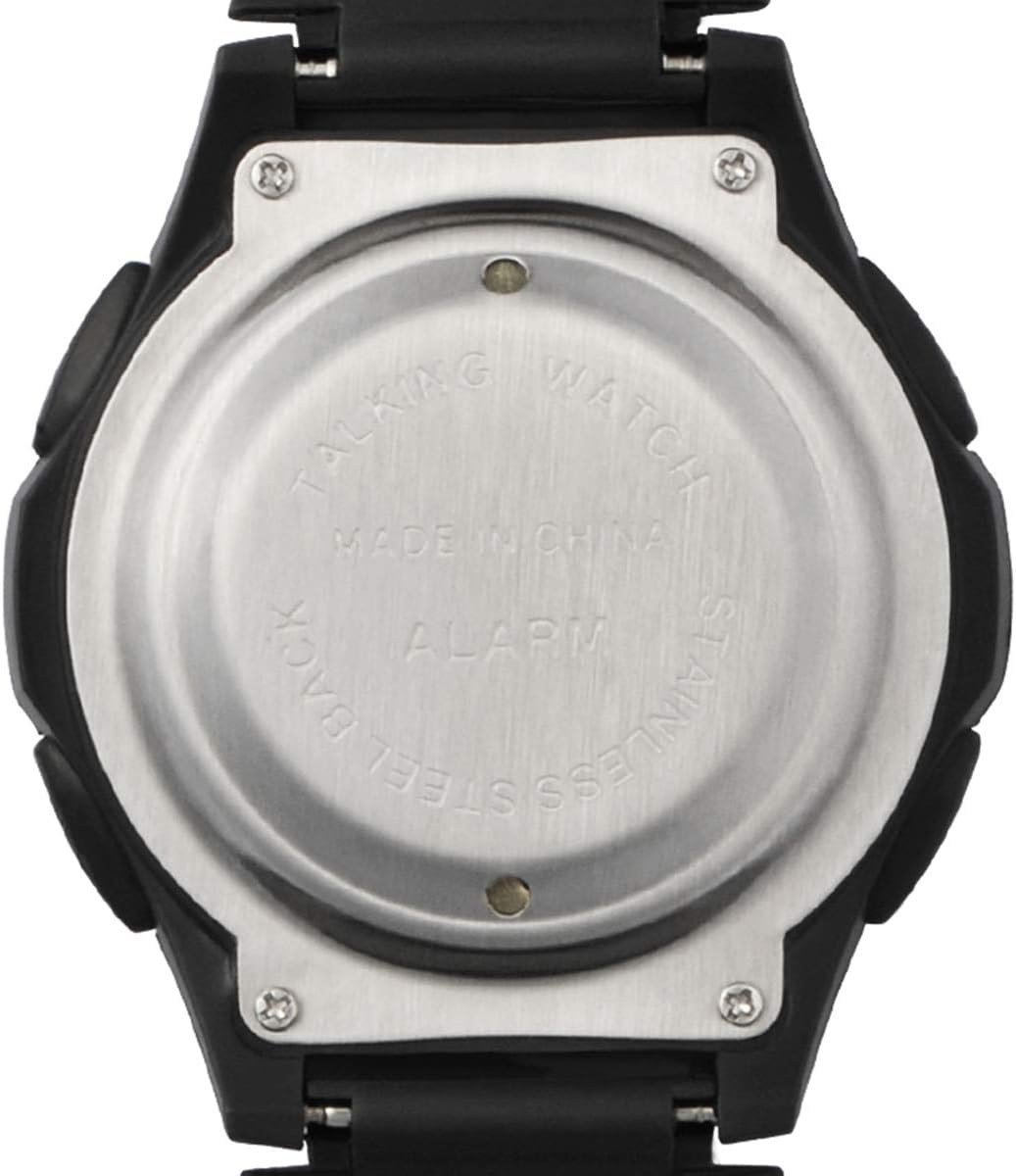
Figura 3: Atrás view of the watch, showing the battery compartment access.
Resolución de problemas
If you experience issues with your XINJIA XJ-768 watch, consider the following common solutions:
- Sen pantalla ou pantalla tenue: Check the battery. It may be depleted or improperly installed. Replace with a new LR44 battery if necessary.
- Sen son ou son baixo: This is often an indication of a low battery. Replace the battery.
- Incorrect Time/Alarm: Ensure you have followed the time and alarm setting instructions precisely. Repeat the setting process if needed.
- Botóns que non responden: A low battery can affect button responsiveness. Try replacing the battery. If the issue persists, ensure no debris is obstructing the buttons.
Para problemas persistentes que non se resolven con estes pasos, consulte a sección Garantía e asistencia.
Especificacións
| Característica | Detalle |
|---|---|
| Número de modelo | XJ-768 |
| Dimensións do produto | 25 x 4.4 x 1.65 cm |
| Peso | 59 g |
| Tipo de batería | 1 LR44 (incluída) |
| Fabricante | Wuhan Prisco |
| Departamento | Unisex-adulto |
Garantía e Soporte
For information regarding warranty coverage or technical support for your XINJIA XJ-768 Electronic Voice Watch, please contact the seller or manufacturer directly. Keep your purchase receipt as proof of purchase.
Manufacturer: Wuhan Prisco