
1. Introdución
The Avidsen HomeCam Battery is a 100% wireless outdoor surveillance camera designed for easy installation and robust home protection. Featuring 1080P Full HD resolution, a solar panel for continuous power, night vision, and two-way audio, this camera allows you to monitor your property remotely via a smartphone application without any subscription fees. This manual provides detailed instructions for setting up, operating, and maintaining your camera.
2. Que hai na caixa
Comprobe que todos os compoñentes estean presentes no paquete:
- 1 x Avidsen HomeCam Battery IP WiFi Camera
- 1 x Solar Panel (PV module)
- 2 pilas 18650
- 1 x Camera Sealing Gasket
- Parafusos de montaxe e tacos de parede

Image: The Avidsen HomeCam Battery camera and its accompanying solar panel, unmounted, showing the main components included in the box.
3. Guía de configuración
3.1. Instalación da batería
- Localiza o compartimento da batería da cámara.
- Insert the two 18650 batteries, ensuring correct polarity (+/-).
- Pecha o compartimento da batería de forma segura.
3.2. Montaxe da cámara e do panel solar
The camera and solar panel are designed for outdoor use and can be mounted separately or together. Choose a location that provides optimal sunlight exposure for the solar panel and a clear view para a cámara.
- Montaxe da cámara: The camera features an innovative magnetic mount for precise orientation. Secure the base of the mount to a wall using the provided screws and wall plugs. Attach the camera to the magnetic base and adjust its angle.
- Montaxe en panel solar: Mount the solar panel in a location that receives direct sunlight for several hours a day. Connect the solar panel cable to the camera's charging port.
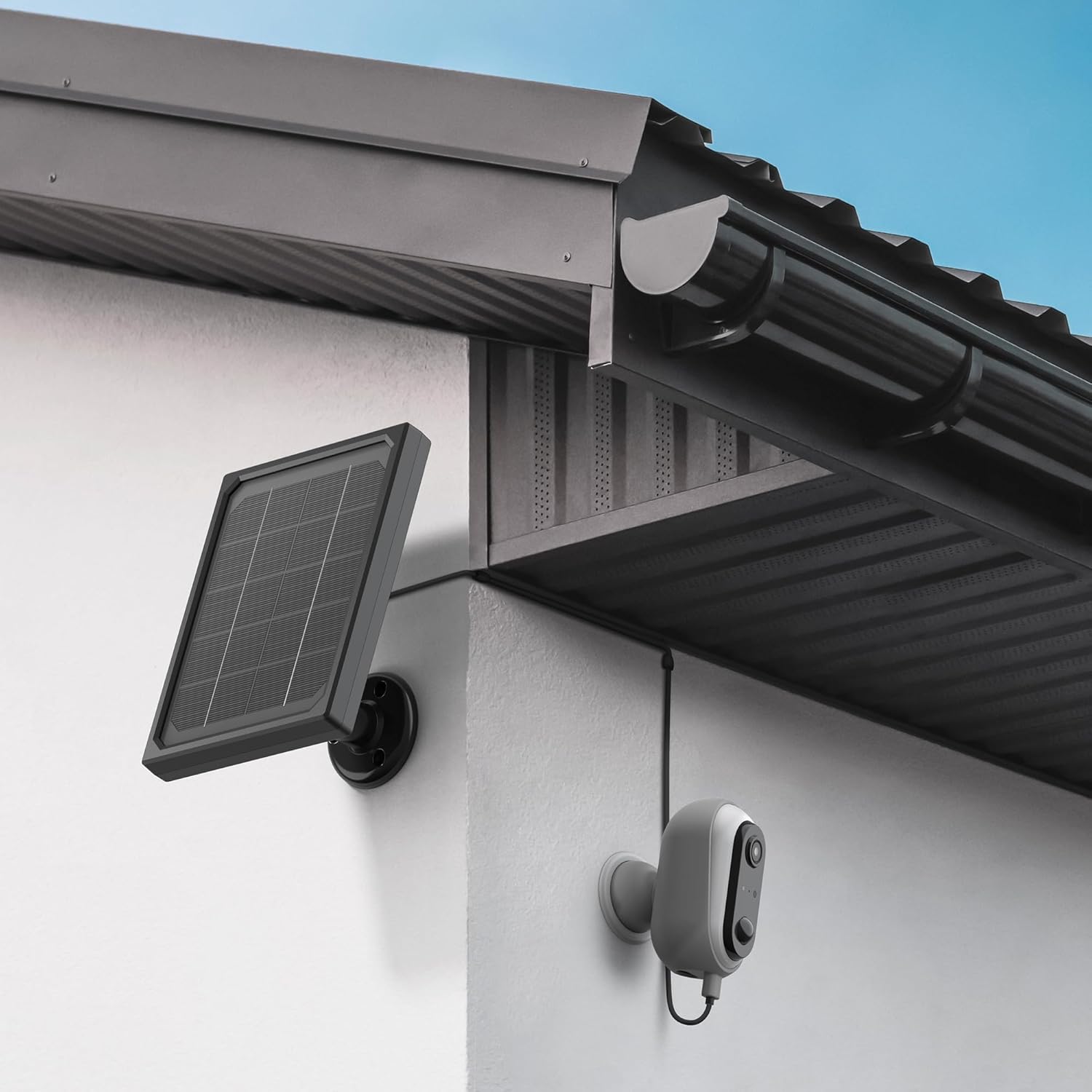
Image: The Avidsen HomeCam Battery camera and its solar panel are shown securely mounted on an exterior wall, positioned to capture sunlight and monitor the area.

Imaxe: Primeiro plano view of the Avidsen HomeCam Battery camera, highlighting its adjustable magnetic mount which allows for flexible positioning and angle adjustments.
3.3. App Download and Initial Pairing
- Download the "Avidsen Home" application from your smartphone's app store (available on Google Play and Apple App Store).
- Abre a aplicación e crea unha conta ou inicia sesión se xa tes unha.
- Follow the in-app instructions to add a new device. This typically involves scanning a QR code on the camera or manually selecting the device type.
- Ensure your smartphone is connected to a 2.4GHz Wi-Fi network during the pairing process.
3.4. Conexión Wi-Fi
During the app pairing process, you will be prompted to connect the camera to your home Wi-Fi network.
- Enter your Wi-Fi network name (SSID) and password when requested by the app.
- The camera supports 2.4GHz Wi-Fi networks only. Ensure your router is configured accordingly.
- Once connected, the camera's indicator light will change, and the app will confirm successful pairing.
4. Funcionamento da cámara
4.1. En directo View e Controis
Once connected, open the Avidsen Home app to access the live feed from your camera.
- Vídeo en directo: Tap on the camera in the app to view the real-time video stream.
- Audio bidireccional: Use the microphone icon in the app to speak through the camera's speaker and the speaker icon to listen to audio from the camera's microphone.
- Gravación: Manually record video or capture screenshots directly from the live view interface.
- Reprodución: Acceso gravado footage stored on the MicroSD card (not included) via the app's playback feature.

Image: A smartphone screen showing the Avidsen Home app, with options for live view, screenshot, two-way talk, recording, playback, and photo album.
4.2. Detección de movemento e notificacións
The camera features motion detection to alert you to activity.
- Activar/Desactivar: In the app settings for your camera, you can enable or disable motion detection.
- Sensibilidade: Adjust the motion detection sensitivity to minimize false alarms.
- Notificacións: When motion is detected, you will receive a notification on your smartphone.
- Gravación: Motion-triggered events are automatically recorded to the MicroSD card (if installed).
4.3. Visión nocturna
The integrated infrared LEDs provide clear visibility up to 8 meters in total darkness.
- Night vision activates automatically in low-light conditions.
- The camera provides a clear black and white image in night vision mode.
4.4. Local Storage (MicroSD Card)
The camera supports local storage via a MicroSD card (up to 128GB, not included).
- Insert the MicroSD card into the designated slot on the camera.
- Ensure the card is formatted correctly (FAT32 recommended).
- All recordings, including motion-triggered events, will be saved to this card.
4.5. Integración do fogar intelixente
The Avidsen HomeCam Battery is compatible with Amazon Alexa and Google Assistant.
- Link your Avidsen Home account with your Alexa or Google Assistant app.
- Usa comandos de voz para view a túa cámara transmite a información en pantallas intelixentes compatibles.
5. Mantemento
5.1. Limpeza
- Regularly clean the camera lens and the surface of the solar panel with a soft, damp pano para garantir un rendemento óptimo.
- Avoid using harsh chemicals or abrasive materials that could damage the surfaces.
5.2. Coidado da batería
- The solar panel is designed to keep the batteries charged. Ensure the panel is free from obstructions and receives adequate sunlight.
- If the camera's battery level drops significantly, consider repositioning the solar panel or manually charging the batteries if possible (refer to specific battery charging instructions if applicable).
5.3. Connection Check
- Periodically check the physical connection between the solar panel and the camera to ensure it is secure and free from corrosion.
- Verify the camera's Wi-Fi connection status in the Avidsen Home app.
6 Solución de problemas
6.1. No Power / Camera Not Turning On
- Ensure the 18650 batteries are correctly inserted with the right polarity.
- Check if the batteries are charged. If not, ensure the solar panel is connected and receiving sunlight, or try charging the batteries externally if possible.
- Verify the power button (if any) is pressed.
6.2. Non se pode conectar á wifi
- Confirm your Wi-Fi network is 2.4GHz. The camera does not support 5GHz networks.
- Asegúrate de que o contrasinal wifi introducido na aplicación sexa correcto.
- Achega a cámara ao teu enrutador Wi-Fi para mellorar a intensidade do sinal.
- Reinicia o teu enrutador e a cámara.
- If issues persist, try resetting the camera to factory settings (refer to the reset procedure in the app or device manual) and re-pairing.
6.3. Mala calidade de imaxe
- Limpa a lente da cámara para eliminar calquera sucidade ou manchas.
- Asegúrate de que non haxa obstáculos diante da lente.
- Comproba a intensidade do sinal wifi; un sinal débil pode afectar á calidade da transmisión de vídeo.
6.4. Motion Detection Not Working or Too Many False Alarms
- Verify motion detection is enabled in the Avidsen Home app.
- Adjust the motion detection sensitivity settings in the app. Lower sensitivity for fewer false alarms, higher for more sensitive detection.
- Asegúrate de que o campo de acción da cámara view is clear and not obstructed by moving objects like tree branches.
7. Especificacións
| Nome do modelo | HOME CAM BATTERY (127070) |
| Resolución | Full HD 1080p |
| Conectividade | Sen fíos (Wi-Fi 2.4 GHz) |
| Fonte de enerxía | Solar Panel (5V 3W), 2x 18650 Batteries |
| Range de visión nocturna | Ata 8 metros |
| Campo de View | 130° |
| Clasificación IP | IP65 (Outdoor use) |
| Almacenamento | MicroSD card (up to 128GB, not included) |
| Características especiais | Motion Detection, Two-Way Audio, Smart Home Compatibility (Alexa, Google Assistant) |
| Dimensións | 31.5 x 21 x 8.5 cm |
| Peso | 1100 gramos |
8. Garantía e soporte
8.1. Garantía do fabricante
This Avidsen product is covered by a 2 anos de garantía do fabricante desde a data de compra. Conserve o comprobante de compra para reclamacións de garantía. A garantía cobre defectos de materiais e fabricación en condicións de uso normal.
8.2. Soporte técnico
For technical assistance, troubleshooting, or further inquiries, please visit the official Avidsen website or contact their customer support. You can find contact information and FAQs on their websitio: