
1. Introdución
Thank you for choosing the Hoco W27 Cat Ear Bluetooth Headphones. These headphones combine advanced Bluetooth 5.0 technology with a unique glowing cat ear design, offering a versatile audio experience. They support Bluetooth, TF card, and AUX playback modes, making them compatible with a wide range of mobile phones and tablets. This manual provides detailed instructions for setup, operation, maintenance, and troubleshooting to ensure you get the most out of your device.
2. Produto rematadoview
Familiarize yourself with the components of your Hoco W27 headphones.
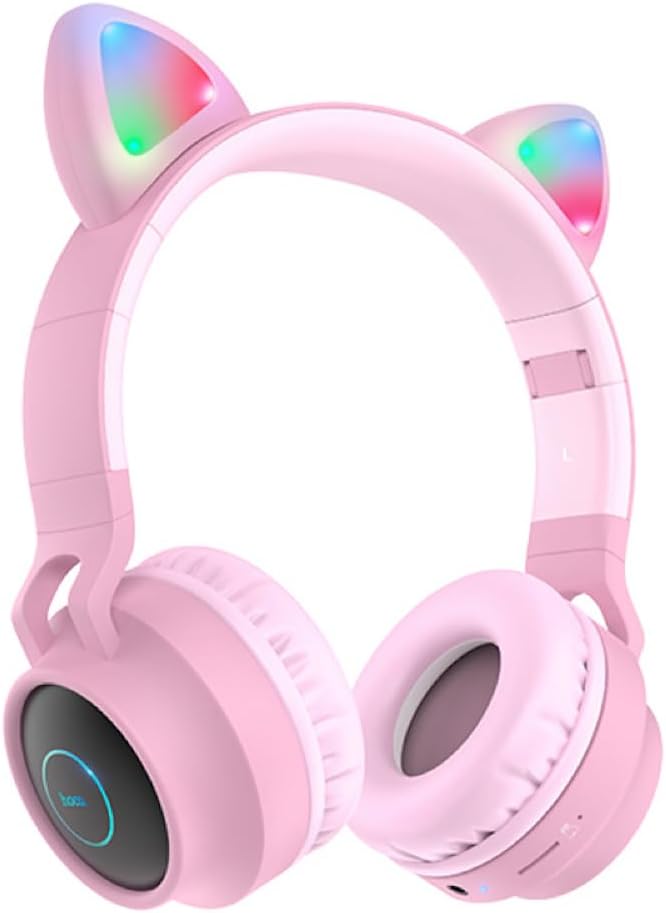
Figura 2.1: Fronte view of the Hoco W27 Cat Ear Bluetooth Headphones in pink, showcasing the glowing cat ears and over-ear design.

Figura 2.2: Lado view of the Hoco W27 headphones, highlighting the control buttons on the left earcup, including volume, track control, and mode switch.

Figura 2.3: Arriba abaixo view of the Hoco W27 headphones, showing the adjustable headband and the placement of the control panel on the earcup.
3. Configuración
3.1 Carga dos auriculares
Before first use, fully charge the headphones. The built-in 300mAh battery requires approximately 2 hours for a full charge.
- Connect the charging cable (usually USB-C or Micro-USB, depending on model) to the charging port on the headphones.
- Conecta o outro extremo do cable a unha fonte de alimentación USB (por exemplo, un porto USB do ordenador, un adaptador de parede).
- The indicator light will show charging status (e.g., red light while charging, off or blue when fully charged).
3.2 Emparejamento Bluetooth
The Hoco W27 headphones feature Bluetooth 5.0 for stable and efficient wireless connection.
- Asegúrese de que os auriculares estean apagados.
- Press and hold the Power button until the indicator light flashes blue and red alternately, indicating pairing mode.
- No teu dispositivo (teléfono intelixente, tableta, ordenador), activa o Bluetooth e busca os dispositivos dispoñibles.
- Select "Hoco W27" or a similar name from the list of found devices.
- Once connected, the indicator light will typically flash blue slowly or turn off, and you will hear a confirmation tone.
3.3 Modo de tarxeta TF
The headphones support TF (MicroSD) card playback.
- Insert a TF card with your desired audio files na ranura para tarxetas TF dos auriculares.
- The headphones should automatically switch to TF card playback mode. If not, press the Mode button to cycle through modes until TF card mode is active.
3.4 Modo AUX
For wired connection, use the AUX mode.
- Connect one end of a 3.5mm audio cable (not always included) to the AUX port on the headphones.
- Conecta o outro extremo á toma de saída de audio do teu dispositivo.
- The headphones will automatically switch to AUX mode. Note that controls on the headphones may be limited in this mode, and playback is controlled by the connected device.
4. Instrucións de funcionamento
4.1 Encendido/apagado
- Encendido: Press and hold the Power button for approximately 3 seconds until the indicator light turns on and you hear a power-on prompt.
- Apagado: Press and hold the Power button for approximately 3-5 seconds until the indicator light turns off and you hear a power-off prompt.
4.2 Reprodución de música
- Reproducir/Pausa: Press the Multi-function button (often the Power button or a dedicated Play/Pause button) once.
- Próxima pista: Press and hold the Volume Up (+) button or a dedicated Next Track button.
- Pista anterior: Press and hold the Volume Down (-) button or a dedicated Previous Track button.
- Subir volume: Prema brevemente o botón para subir volume (+).
- Baixar volume: Prema brevemente o botón para baixar o volume (-).
The headphones offer up to 5 hours of continuous music playback on a full charge.
4.3 Funcións de chamada
- Responder/Finalizar chamada: Prema o botón multifunción unha vez durante unha chamada entrante.
- Rexeitar a chamada: Manteña premido o botón multifunción durante aproximadamente 2 segundos durante unha chamada entrante.
- Volver a marcar o último número: Prema dúas veces o botón multifunción cando non estea nunha chamada.
4.4 Cambio de modo
Press the 'M' (Mode) button to cycle between Bluetooth, TF Card, and AUX playback modes.
4.5 Cat Ear Lights
The glowing cat ear design adds a unique aesthetic. The lights typically activate automatically when the headphones are powered on. Refer to the product packaging or specific model features for details on controlling the lights, if a dedicated button exists.
4.6 Voice Prompt Switch
To switch the voice prompt language or disable prompts:
- When the headphones are non conectado to a device, double-click the 'M' (Mode) button. You will hear a beep, indicating a change in the voice prompt setting.
5. Mantemento
Un coidado axeitado garante a lonxevidade dos teus auriculares.
- Limpeza: Use a soft, dry, lint-free cloth to clean the surfaces of the headphones. Do not use abrasive cleaners, solvents, or spray directly onto the headphones.
- Almacenamento: Store the headphones in a cool, dry place away from direct sunlight and extreme temperatures. If storing for an extended period, ensure they are partially charged.
- Coidado da batería: To preserve battery life, avoid fully discharging the headphones frequently. Charge them regularly, even if not in use for a long time.
- Evitar a humidade: Non expoñas os auriculares á auga nin a humidade excesiva.
6 Solución de problemas
If you encounter issues with your Hoco W27 headphones, try the following solutions:
| Problema | Causa posible | Solución |
|---|---|---|
| Os auriculares non se acenden. | Batería baixa. | Charge the headphones for at least 30 minutes. |
| Non se pode emparellar por Bluetooth. | Os auriculares non están en modo de emparellamento; o Bluetooth do dispositivo está desactivado; demasiado lonxe do dispositivo. | Ensure headphones are in pairing mode (flashing red/blue). Turn device Bluetooth off and on. Move headphones closer to device. |
| Sen son dos auriculares. | Volume too low; incorrect mode; loose AUX cable; corrupted TF card files. | Increase volume on headphones and device. Ensure correct mode (Bluetooth, TF, AUX). Re-insert AUX cable. Check TF card files. |
| Mala calidade de son. | Interference; low battery; distance from device. | Move away from sources of interference. Charge headphones. Reduce distance between headphones and device. |
| Cat ear lights not working. | Headphones off; specific light control setting. | Ensure headphones are powered on. Check if there's a dedicated button for lights (refer to product specifics). |
7. Especificacións
Key technical specifications for the Hoco W27 Cat Ear Bluetooth Headphones:
| Característica | Especificación |
|---|---|
| Versión Bluetooth | 5.0 (JL AC6925F chip) |
| Capacidade da batería | 300 mAh |
| Tempo de carga | Aproximadamente 2 horas |
| Call / Music Time | Ata 5 horas |
| Tempo de espera | Ata 200 horas |
| Diámetro do altofalante | 40 mm |
| Dimensións (L*W*H) | 203 x 175 x 80 mm (8 x 6.9 x 3.1 polgadas) |
| Peso | 182 g (6.4 onzas) |
| Modos admitidos | Bluetooth, Tarxeta TF, AUX |
| Característica de deseño | Glowing cat ear shape |
| Colocación do oído | Sobre orella |
| Control de ruído | Ningún |
8. Información de seguridade
Please read and follow these safety guidelines for safe operation:
- Non desmonte, repare nin modifique o produto. Isto podería provocar incendios, descargas eléctricas ou danos completos no produto.
- Keep the headphones away from extreme temperatures, direct sunlight, and high humidity.
- Avoid exposing the headphones to water or other liquids.
- Do not use the headphones at excessively high volumes for prolonged periods, as this may cause hearing damage.
- Manter fóra do alcance dos nenos.
9. Garantía e soporte
For warranty information and customer support, please refer to the documentation provided with your purchase or contact the retailer where you purchased the Hoco W27 headphones. Keep your proof of purchase for any warranty claims.