1. Produto rematadoview
The JYX Karaoke System JYX-69BT is a portable and versatile audio system designed for entertainment. It features high-quality sound output, wireless microphones, and multiple connectivity options, making it suitable for various occasions. This manual provides detailed instructions for setting up, operating, and maintaining your karaoke system.
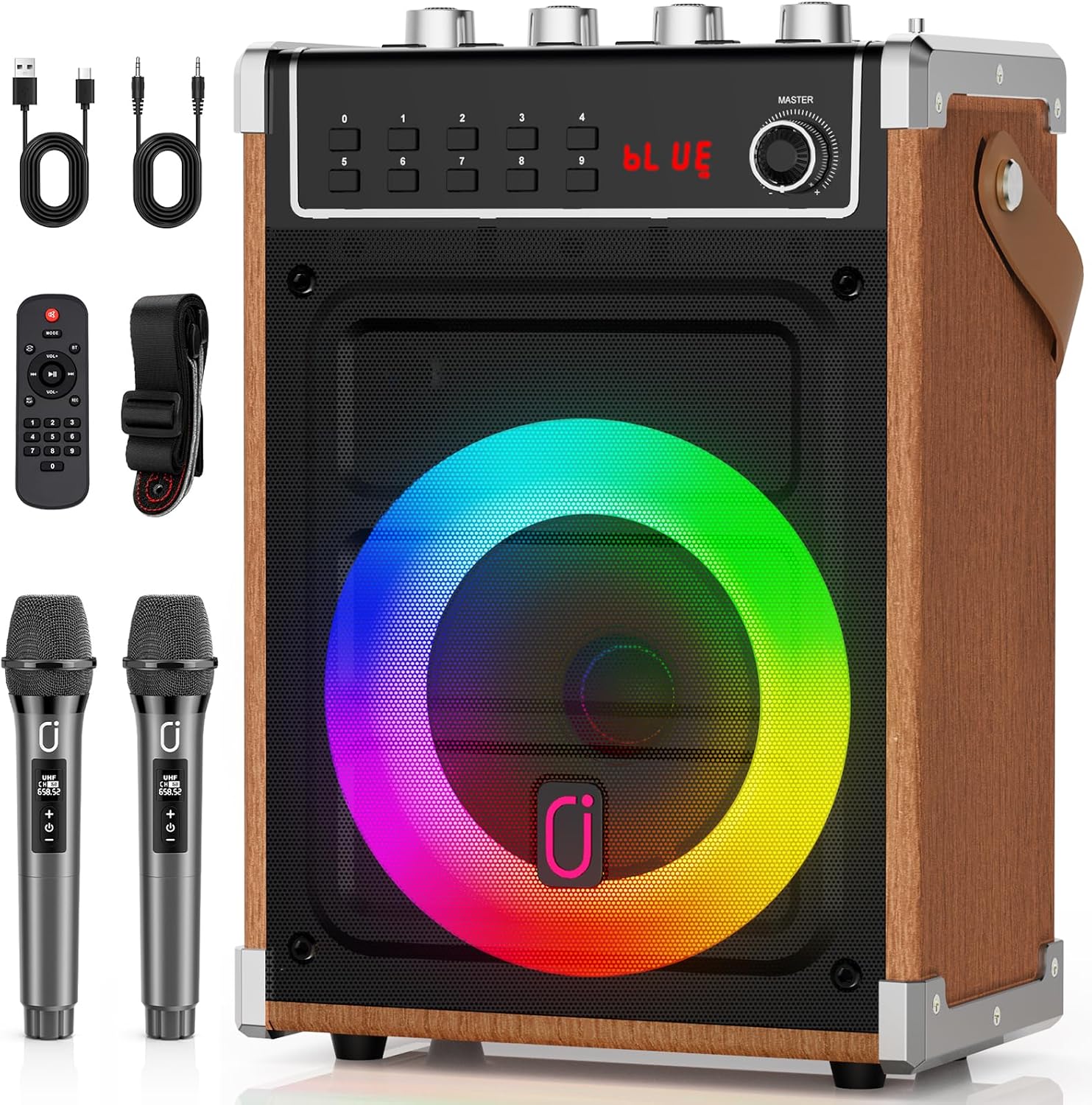
Image 1.1: The JYX Karaoke System JYX-69BT, showcasing the main unit, two wireless microphones, remote control, and charging cables.
Características principais:
- Deseño portátil: Equipped with a durable shoulder strap for easy transport.
- Audio de alta calidade: Features a superior subwoofer and Bluetooth 5.0 for clear sound.
- Micrófonos sen fíos duais: Includes two wireless microphones for duets and interactive performances.
- Batería de longa duración: Rechargeable battery provides up to 8 hours of operation.
- TWS Stereo Surround: Connect two JYX-69BT units for an immersive stereo experience.
- Conectividade multifuncional: Supports Bluetooth, AUX, USB, TF Card, and FM radio.
- Dynamic DJ Lights: Integrated disco lights synchronize with music for an enhanced atmosphere.
- Control remoto por infravermellos: Allows convenient control of functions from a distance.
2. Configuración
2.1 Desembalaxe e contido
Retire con coidado todos os compoñentes da embalaxe. Asegúrese de que estean presentes os seguintes elementos:
- JYX Karaoke System JYX-69BT Main Unit
- 2 micrófonos sen fíos
- Control remoto
- Cable de carga USB
- Cable AUX
- Correa de ombreiro
- Manual de usuario (este documento)
2.2 Carga da unidade
Before first use, fully charge the karaoke system. Connect the provided USB charging cable to the 5V-1A POWER port on the unit and to a compatible USB power adapter (not included). The charging indicator light will show the charging status. A full charge provides up to 8 hours of playtime.
2.3 Configuración do micrófono
The wireless microphones are pre-paired with the main unit. Ensure the microphones have batteries installed (if required, check microphone compartment) and are powered on. They will automatically connect to the karaoke system when both are active.

Image 2.1: A user operating the wireless microphone with the JYX Karaoke System.
3. Instrucións de funcionamento
3.1 Encendido/apagado
To power on the unit, locate the POTENCIA switch, usually on the control panel, and slide it to the 'ON' position. To power off, slide it to 'OFF'.

Imaxe 3.1: Detallada view of the JYX-69BT control panel, showing input ports, volume knobs, and function buttons.
3.2 Selección de modo
Preme o MODO button on the control panel or remote control to cycle through available input modes: Bluetooth, AUX, USB, TF Card, and FM Radio. The current mode will be displayed on the LED screen.
3.3 Conexión Bluetooth
- Power on the JYX-69BT unit.
- Seleccione Bluetooth modo usando o MODO button. The LED display will show "BLUE" and a blinking Bluetooth icon, indicating it's ready for pairing.
- No teu dispositivo móbil (teléfono intelixente, tableta, etc.), activa o Bluetooth e busca os dispositivos dispoñibles.
- Select "JYX-69BT" from the list of devices.
- Once connected, the unit will emit a confirmation sound, and the Bluetooth icon will stop blinking. You can now play audio from your device through the karaoke system.

Image 3.2: Demonstrating Bluetooth connectivity and dynamic lighting effects.
Conexión TWS (estéreo sen fíos verdadeiro) 3.4
To achieve a stereo sound experience, you can connect two JYX-69BT units wirelessly:
- Ensure both JYX-69BT units are powered on and in Bluetooth mode, but not yet connected to any mobile device.
- On one of the units (this will be the primary unit), press and hold the TWS button. The unit will emit a pairing sound.
- The primary unit will automatically search for and connect to the second unit. Once connected, both units will play audio in stereo.
- Now, connect your mobile device to the primary JYX-69BT unit via Bluetooth as described in Section 3.3.

Image 3.3: Visual representation of the TWS connection mode for enhanced stereo audio.
3.5 Playing Music from USB/TF Card
Insira unha unidade flash USB ou unha tarxeta TF (Micro SD) que conteña son MP3 files into the respective USB or Tarxeta TF slot. The system will automatically switch to the corresponding mode and begin playing music. Use the ANTERIOR / SEGUINTE buttons to skip tracks and REPRODUCIR/PAUSA para controlar a reprodución.
3.6 Entrada AUX
Conecte un dispositivo de son externo (por exemplo, un reprodutor de MP3, un ordenador) ao AUX IN port using the provided AUX cable. Select AUX modo usando o MODO button. Audio from the connected device will play through the karaoke system.
3.7 Radio FM
In Radio FM modo, prema REPRODUCIR/PAUSA para buscar automaticamente e gardar as emisoras de radio dispoñibles. Usa o botón ANTERIOR / SEGUINTE botóns para navegar entre as emisoras gardadas.
3.8 Microphone and Karaoke Functions
Axusta o volume do micrófono usando o botón MIC VOL botón. O ECO knob controls the echo effect for vocals. Use the Bass e TREBLE knobs to fine-tune the overall sound output. Ensure microphones are powered on and connected.
Para gravar a túa actuación, preme o botón REC button. A USB drive or TF card must be inserted to save recordings.
3.9 DJ Lighting Effects
The integrated DJ lights automatically synchronize with the music rhythm. There are various lighting effects that can be cycled through or turned off using a dedicated button (if available) or the remote control.
3.10 Uso do control remoto
The infrared remote control allows you to manage playback, volume, mode selection, and other functions from a distance. Point the remote control directly at the unit's infrared receiver for optimal performance.
4. Mantemento
4.1 Limpeza
Wipe the unit with a soft, dry cloth. Do not use abrasive cleaners, waxes, or solvents as they may damage the finish. Keep the speaker grille free from dust and debris.
4.2 Almacenamento
When not in use for extended periods, store the karaoke system in a cool, dry place away from direct sunlight and extreme temperatures. Ensure the unit is fully charged before storing to prolong battery life.
4.3 Coidado coa batería
To maintain the rechargeable battery's health, avoid completely draining it frequently. Recharge the unit regularly, even if not in constant use. Do not expose the battery to high temperatures.
5 Solución de problemas
| Problema | Causa posible | Solución |
|---|---|---|
| Sen poder | A batería está esgotada. | Cargue a unidade usando o cable USB fornecido. |
| Non hai son do altofalante | Volume is too low; incorrect mode selected; audio source issue. | Aumentar MESTRE volume. Ensure correct input mode (Bluetooth, AUX, USB, TF). Check audio source device volume and connection. |
| O micrófono non funciona | Microphone is off; batteries are low; MIC VOL é baixa. | Ensure microphone is powered on. Replace microphone batteries. Increase MIC VOL botón. |
| A conexión Bluetooth falla | A unidade non está en modo de emparellamento; dispositivo demasiado lonxe; interferencias. | Ensure unit is in Bluetooth pairing mode ("BLUE" blinking). Move device closer. Disconnect other Bluetooth devices. |
| Falla a conexión de TWS | Units not in correct mode; TWS pairing not initiated correctly. | Ensure both units are in Bluetooth mode and not connected to a phone. Press and hold TWS button on one unit to initiate pairing. |
| O control remoto non funciona | Remote batteries low; line of sight blocked. | Substitúa as pilas do mando a distancia. Asegúrese de que haxa unha liña de visión libre co receptor de infravermellos da unidade. |
6. Especificacións
| Característica | Detalle |
|---|---|
| Número de modelo | JYX-69BT |
| Marca | JYX |
| Dimensións (L x W x H) | 17 x 28 x 40 cm (aproximadamente 6.7 x 11 x 15.7 polgadas) |
| Peso | 2.96 quilogramos (aproximadamente 6.5 libras) |
| Tecnoloxía de conectividade | Bluetooth 5.0 |
| Audio Input Options | Bluetooth, AUX, USB, Tarxeta TF |
| Número de canles | 2 |
| Fonte de enerxía | Alimentado por batería |
| Tipo de batería | 1 Lithium-ion battery (rechargeable) |
| Uso recomendado | Sistema de son |
| Material | Metal (frame/accents) |
| Dispositivos compatibles | portátil, teléfono intelixente, tableta |
| UPC | 797442539389 |

Image 6.1: Internal components of the JYX-69BT speaker, highlighting the tweeter and subwoofer.
7. Garantía e soporte
7.1 Garantía do fabricante
The JYX Karaoke System JYX-69BT comes with a Garantía do fabricante de 12 meses desde a data de compra. Esta garantía cobre defectos de materiais e fabricación en condicións de uso normal. Non cobre danos causados por mal uso, accidentes, modificacións non autorizadas ou desgaste normal.
Conserve o comprobante de compra para reclamacións de garantía.
7.2 Atención ao cliente
For technical assistance, troubleshooting beyond this manual, or warranty inquiries, please contact JYX customer support. Refer to the contact information provided with your product packaging or visit the official JYX websitio para obter detalles de asistencia.
When contacting support, please have your product model number (JYX-69BT) and proof of purchase readily available.