
Mcilpoog WS-T6
Mcilpoog WS-T6 Super Automatic Espresso Coffee Machine User Manual
Model: WS-T6
1. Introdución
This manual provides essential instructions for the safe and efficient operation, maintenance, and troubleshooting of your Mcilpoog WS-T6 Super Automatic Espresso Coffee Machine. Please read this manual thoroughly before using the appliance and retain it for future reference.
2. Produto rematadoview
The Mcilpoog WS-T6 is a super automatic espresso machine designed for convenience and quality. It features a built-in milk jug and a user-friendly touchscreen interface.
2.1 Compoñentes da máquina
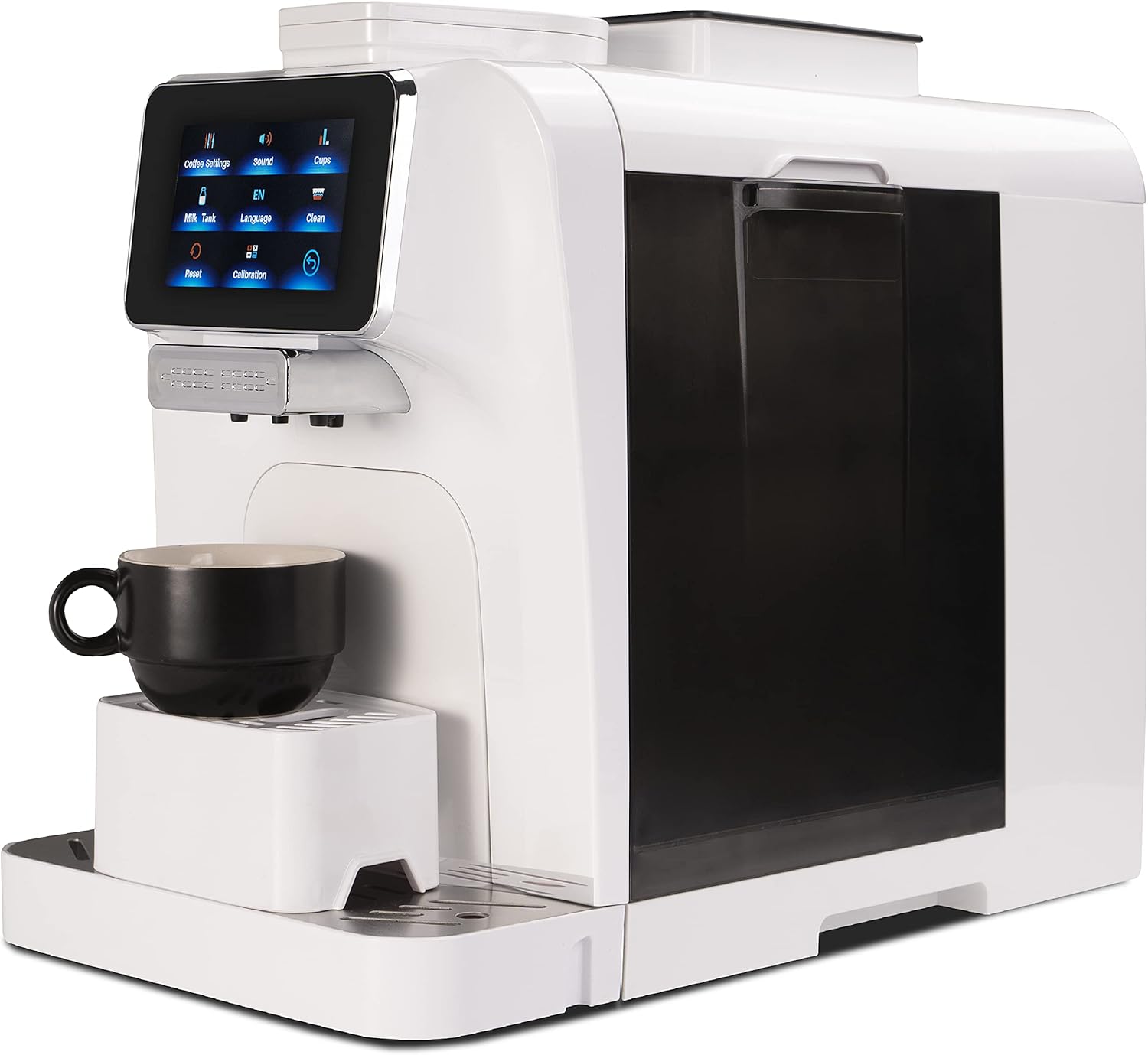
Figura 1: Fronte view of the Mcilpoog WS-T6 Espresso Machine. This image shows the sleek white design of the machine with its touchscreen display and coffee dispenser.
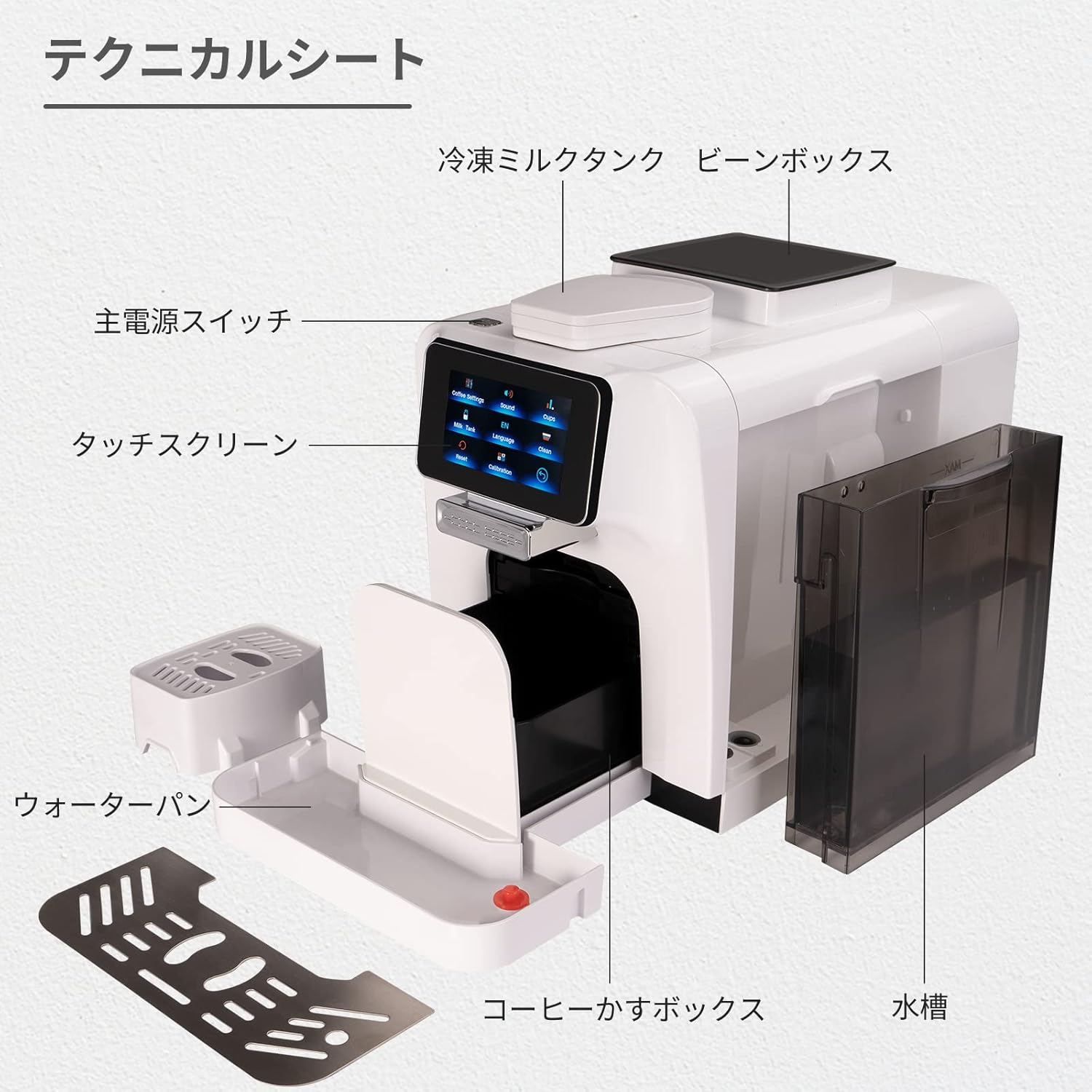
Figura 2: Explotado view diagram of the Mcilpoog WS-T6 components. Key parts include the main power switch, touchscreen, cold milk tank, bean box, water pan, coffee grounds box, and water tank.
- Pantalla táctil: For selecting beverages and adjusting settings.
- Tolva de grans de café: Contén grans de café enteiros para moer.
- Depósito de auga: Depósito extraíble para auga doce.
- Milk Jug/Frother: Integrated system for milk-based beverages.
- Bandexa de goteo: Collects excess liquids.
- Recipiente para posos: Recolle os posos de café usados.
2.2 Características principais
- Funcionamento totalmente automático
- Integrated Milk System
- Control de pantalla táctil
- Adjustable Coffee Settings (strength, volume, temperature)
- Multiple Beverage Options
- Automatic Cleaning Functions
3. Configuración inicial
- Desembalaxe: Retire con coidado todos os materiais de embalaxe e asegúrese de que estean presentes todos os compoñentes.
- Colocación: Place the machine on a stable, level surface away from heat sources and direct sunlight. Ensure adequate ventilation.
- Depósito de auga: Remove the water tank, rinse it, and fill it with fresh, cold water up to the MAX line. Reinsert it securely.
- Tolva de grans de café: Open the lid of the coffee bean hopper and fill it with whole coffee beans. Do not use ground coffee in the bean hopper.
- Sistema de leite: If using the milk system, ensure the milk jug is clean and properly connected.
- Conexión de alimentación: Enchufe o cable de alimentación a unha toma eléctrica conectada a terra.
- Ciclo de enxague inicial: Follow the on-screen prompts for the initial rinse cycle to prime the system. This is crucial for optimal performance.
4. Instrucións de funcionamento
Navegación con pantalla táctil 4.1
The machine is operated via its intuitive touchscreen display. Navigate through menus by tapping the icons.

Figure 3: Touchscreen interface showing language selection. Users can select their preferred language from the available options.
4.2 Preparación dunha bebida
- Activar: Press the power button to turn on the machine. It will perform a brief self-check.
- Seleccionar bebida: On the touchscreen, select your desired beverage (e.g., Espresso, Cappuccino, Latte).
- Personalizar (opcional): For some beverages, you can adjust settings like coffee strength, volume, or milk foam quantity via the touchscreen.
- Copa de lugar: Position a cup under the coffee dispenser. For milk-based drinks, ensure the milk frother spout is correctly positioned over the cup.
- Comezar a elaborar cervexa: Press the 'Start' button on the screen. The machine will automatically grind beans, brew coffee, and froth milk as required.
- Disfruta: Once the brewing cycle is complete, your beverage is ready.

Figure 4: Beverage selection screen. This image displays the variety of coffee drinks that can be prepared with a single touch.
4.3 Axustar a configuración da moenda
The grind setting can be adjusted inside the bean hopper. Only adjust the grind setting while the grinder is operating to prevent damage. Refer to the specific instructions on the machine for precise adjustment.
5. Mantemento e Limpeza
A limpeza e o mantemento regulares garanten a lonxevidade e o rendemento óptimo da súa máquina de café expreso.
5.1 Limpeza diaria
- Bandexa de goteo e recipiente para posos: Baleirar e enxaugar diariamente.
- Sistema de leite: After each use, run the automatic milk system cleaning cycle. Disassemble and rinse milk components regularly.
- Depósito de auga: Enxágüe e encha con auga fresca diariamente.
- Exterior: Limpe o exterior cun suave, damp pano.
5.2 Limpeza semanal/mensual
- Unidade de elaboración: The removable brew unit should be rinsed under lukewarm water weekly. Allow it to air dry before reinserting.
- Boca de café: Clean the coffee spout with a small brush to remove any coffee residue.
5.3 Descalcificación
The machine will indicate when descaling is required. Follow the on-screen instructions and use a descaling solution specifically designed for espresso machines. Descaling removes mineral buildup and is crucial for machine performance and lifespan.
6 Solución de problemas
Se tes problemas coa túa máquina, consulta os seguintes problemas e solucións comúns:
- A máquina non se acende:
Ensure the power cord is securely plugged into a working outlet. Check the main power switch on the machine. - Non se dispensa café:
Check if the water tank is filled and correctly inserted. Ensure the coffee bean hopper has beans. Clean the brew unit and coffee spout. - Fugas na máquina:
Verify the water tank is properly seated. Check for any blockages in the drip tray or internal components. If leaking persists, contact customer support. - Milk Frother Not Working/Poor Foam:
Ensure the milk system components are clean and free of blockages. Use fresh, cold milk. Check that all milk system parts are correctly assembled. - Mensaxes de erro na pantalla:
Refer to the specific error code displayed on the screen. The manual or manufacturer's website may provide a list of error codes and their solutions. Often, emptying the grounds container or refilling the water tank resolves these. - Coffee Tastes Weak/Watery:
Adjust the grind setting to a finer consistency. Increase the coffee strength setting on the touchscreen. Ensure fresh coffee beans are used.
Se o problema persiste despois de intentar estas solucións, póñase en contacto co servizo de atención ao cliente.
7. Especificacións
| Característica | Detalle |
|---|---|
| Marca | Mcilpoog |
| Número de modelo | WS-T6 |
| Dimensións do produto | 9.69" D x 6" W x 14.57" H |
| Peso do elemento | 31.2 libras |
| Capacidade | 1200 Milliliters (Water Tank) |
| Tipo de cafetera | Máquina espresso |
| Modo de operación | Totalmente automático |
| Entrada da interface humana | Pantalla táctil |
| Compoñentes incluídos | Espumador de leite |
| UPC | 601673773637 |
8. Garantía e soporte
For warranty information and customer support, please refer to the documentation included with your product or visit the official Mcilpoog websitio. Garde o recibo da compra como xustificante de compra para reclamacións de garantía.
Ask a question about this manual
Ask about setup, troubleshooting, compatibility, parts, safety, or missing instructions. Manuals+ will review the question and use this page’s manual context to help answer it.