
Introdución
Thank you for choosing the Newskill Manticore Gaming PC Case. This manual provides essential information for the proper installation, operation, and maintenance of your new PC chassis. Please read these instructions carefully before beginning the assembly process to ensure optimal performance and longevity of your components.
Produto rematadoview
The Newskill Manticore is an ATX mid-tower gaming PC case designed for high-performance builds. It features a mesh front panel for superior airflow, a tempered glass side panel to showcase your components, and four pre-installed 120mm ARGB fans for effective cooling and customizable aesthetics.
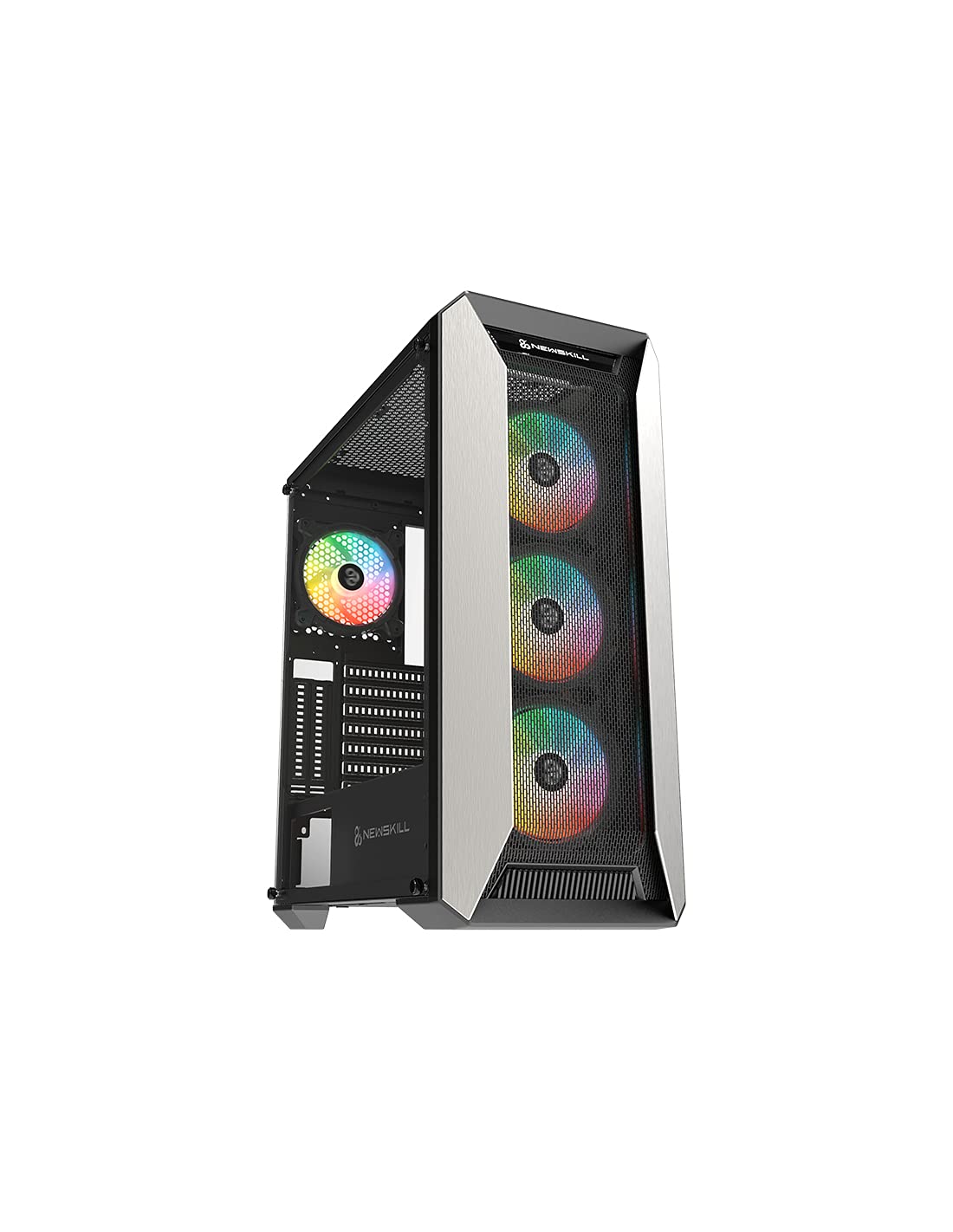
Figura 1: Fronte view of the Newskill Manticore Gaming PC Case, highlighting the mesh front and tempered glass side panel.
Características principais:
- ATX Mid-Tower compatibility
- Mesh front panel for optimized airflow
- Panel lateral de vidro temperado
- Four pre-installed 120mm ARGB fans
- Two removable dust filters
- USB 3.0 connectivity on the front panel
Configuración e instalación
1. Desembalaxe
Carefully remove the PC case from its packaging. Inspect for any damage that may have occurred during shipping. Retain the packaging for future transport or warranty claims.
2. Identificación de compoñentes
Before installation, familiarize yourself with the case components and included accessories:
- Newskill Manticore PC Case
- Caixa de accesorios (parafusos, bridas, separadores)
- Manual de usuario (este documento)
3. Instalación da placa base
- Retire o panel lateral de vidro temperado desenroscando os parafusos de polgada.
- Install the necessary motherboard standoffs into the motherboard tray.
- Carefully place your ATX motherboard onto the standoffs, aligning the screw holes.
- Fixe a placa base cos parafusos proporcionados.
4. Instalación da fonte de alimentación (PSU)
- Localiza a área de montaxe da fonte de alimentación na parte inferior traseira da caixa.
- Slide your PSU into position from the rear of the case.
- Fixe a fonte de alimentación con parafusos desde a parte traseira exterior da caixa.
5. Instalación da unidade de almacenamento
The case supports various storage configurations. Refer to your specific drive type for mounting instructions (e.g., 2.5" SSDs, 3.5" HDDs).
6. Instalación da tarxeta gráfica e da tarxeta de expansión
Remove the necessary PCIe slot covers and install your graphics card or other expansion cards, securing them with screws.
7. Conexións do panel frontal
Connect the front panel cables (USB 3.0, HD Audio, Power Switch, Reset Switch, Power LED, HDD LED) to the corresponding headers on your motherboard. Consult your motherboard manual for exact pin layouts.
8. Xestión de cables
Utiliza os recortes de cableado e os puntos de suxeición que hai detrás da bandexa da placa base para xestionar os cables. Isto mellora a circulación do aire e a estética.
Instrucións de funcionamento
Encendido/apagado
Press the power button located on the top panel of the case to turn on your system. To shut down, use the operating system's power-off function or press and hold the power button for several seconds for a forced shutdown (not recommended for regular use).
Control de iluminación ARGB
The pre-installed ARGB fans can be controlled via your motherboard's ARGB software (if compatible) or a dedicated ARGB controller (if included or purchased separately). Refer to your motherboard or controller manual for specific instructions on changing lighting effects and colors.
Mantemento
Limpeza do filtro de po
The Newskill Manticore includes two removable dust filters (typically located on the top and bottom/front). Regularly clean these filters to maintain optimal airflow and prevent dust buildup inside your PC. Gently slide them out, clean with water and mild soap, or use a vacuum cleaner, and ensure they are completely dry before re-inserting.
Limpeza exterior
Limpe as superficies exteriores cun suave, damp pano. Evite produtos de limpeza abrasivos ou solventes que poidan danar o acabado ou o vidro temperado.
Resolución de problemas
Sen Poder
- Asegúrate de que a fonte de alimentación estea conectada correctamente á toma de corrente e acendida.
- Verifique que todos os cables de alimentación da fonte de alimentación estean conectados correctamente á placa base e aos compoñentes.
- Check front panel power switch connections to the motherboard.
Os ventiladores non xiran / O ARGB non se ilumina
- Confirme que os cables de alimentación do ventilador estean conectados correctamente á placa base ou ao controlador do ventilador.
- Check ARGB connections to the motherboard's ARGB header or dedicated controller.
- Ensure ARGB software or controller settings are correctly configured.
Poor Airflow / Overheating
- Clean dust filters regularly.
- Ensure no obstructions are blocking air intake or exhaust vents.
- Verify all fans are spinning correctly and oriented for optimal airflow.
For further assistance, please contact Newskill support.
Especificacións
| Característica | Detalle |
|---|---|
| Nome do modelo | Mantícora |
| Número de modelo | 1102 |
| Tipo de caso | Torre media |
| Compatibilidade da placa base | ATX |
| Dimensións (L x W x H) | 60 x 60 x 85 cm |
| Peso | 1 kg |
| Material | Vidro temperado, Metal |
| Método de arrefriamento | Air (4x 120mm ARGB fans included) |
| Portos de E / S dianteiros | USB 3.0, Audio Jacks, Power, Reset |
| Filtros de po | 2 (extraíbles) |
| Uso recomendado | Xogos |
Información da garantía
The Newskill Manticore PC Case comes with a 2 anos de garantía do fabricante. This warranty covers defects in materials and workmanship under normal use. It does not cover damage caused by misuse, accident, modification, or unauthorized repair. Please retain your proof of purchase for warranty claims.
Soporte e Contacto
For technical support, troubleshooting assistance, or warranty inquiries, please visit the official Newskill website or contact their customer service department. You can find contact information on the Newskill websitio: www.newskillgaming.com


