
1. Introdución
Thank you for choosing the MEDION X64060 Party Speaker. This manual provides essential information for the safe and efficient use of your device. Please read it thoroughly before operating the speaker and keep it for future reference.
The MEDION X64060 is a versatile party speaker designed for various entertainment needs, featuring powerful audio output, integrated DJ and karaoke functions, and dynamic light effects.
2. Instrucións de seguridade
- Lea atentamente todas as instrucións antes do uso.
- Manteña o altofalante lonxe da auga, da humidade e das temperaturas extremas.
- Non bloquee as aberturas de ventilación.
- Use only the power cord supplied with the device.
- Non intente reparar o dispositivo vostede mesmo. Encargue calquera mantemento a persoal cualificado.
- Asegúrate de colocar o altofalante sobre unha superficie estable e nivelada para evitar que se volque.
- Evite a exposición prolongada a altos niveis de volume para evitar danos auditivos.
3. Contido do paquete
Comprobe se o paquete contén os seguintes elementos:
- MEDION X64060 Party Speaker
- 1 x micrófono
- Cable de alimentación
- Manual de usuario (este documento)
4. Produto rematadoview
Familiarize yourself with the main components and controls of your MEDION X64060 Party Speaker.

Image: Control Panel Overview
This image displays a close-up of the speaker's top control panel, showing various knobs and buttons for audio adjustments, DJ functions, and input selections.

Image: Speaker Dimensions and Connections
This image illustrates the overall dimensions of the speaker (980mm height, 350mm width, 340mm depth) and highlights the available connection ports: 1x USB, 2x Microphone (6.3 mm), 1x Guitar (6.3 mm), 1x Audio Input (3.5 mm), and 1x Audio Input (RCA).
4.1 Panel frontal
- Relatores: Two main speakers with integrated LED lighting.
- Efectos de luz: Dynamic LED lights that synchronize with music.
4.2 Panel de control superior
- Botón de encendido: Para activar/desactivar o altofalante.
- Controis de volume: Main volume, microphone volume (MIC1 VOL, MIC2 VOL), guitar volume (GUITAR VOL), and echo volume (ECHO VOL).
- Ecualizador (EQ): 5-band equalizer for sound adjustment.
- Selectores de entrada: Buttons for Bluetooth, USB, AUX.
- DJ Functions: Cross-fader, scratch wheel, drum pads (HI-HAT, SNARE, BASS DRUM, CYMBAL, TOM1, TOM2), and record function.
- Porto USB: Para reprodución por USB.
- Entradas de micrófono: Two 6.3 mm jack inputs.
- Entrada de guitarra: One 6.3 mm jack input.
- Entrada AUX: 3.5 mm jack input.
4.3 Panel posterior
- Entrada de enerxía: Para conectar o cable de alimentación.
- Entrada de son RCA: Additional audio input.
4.4 Características de mobilidade
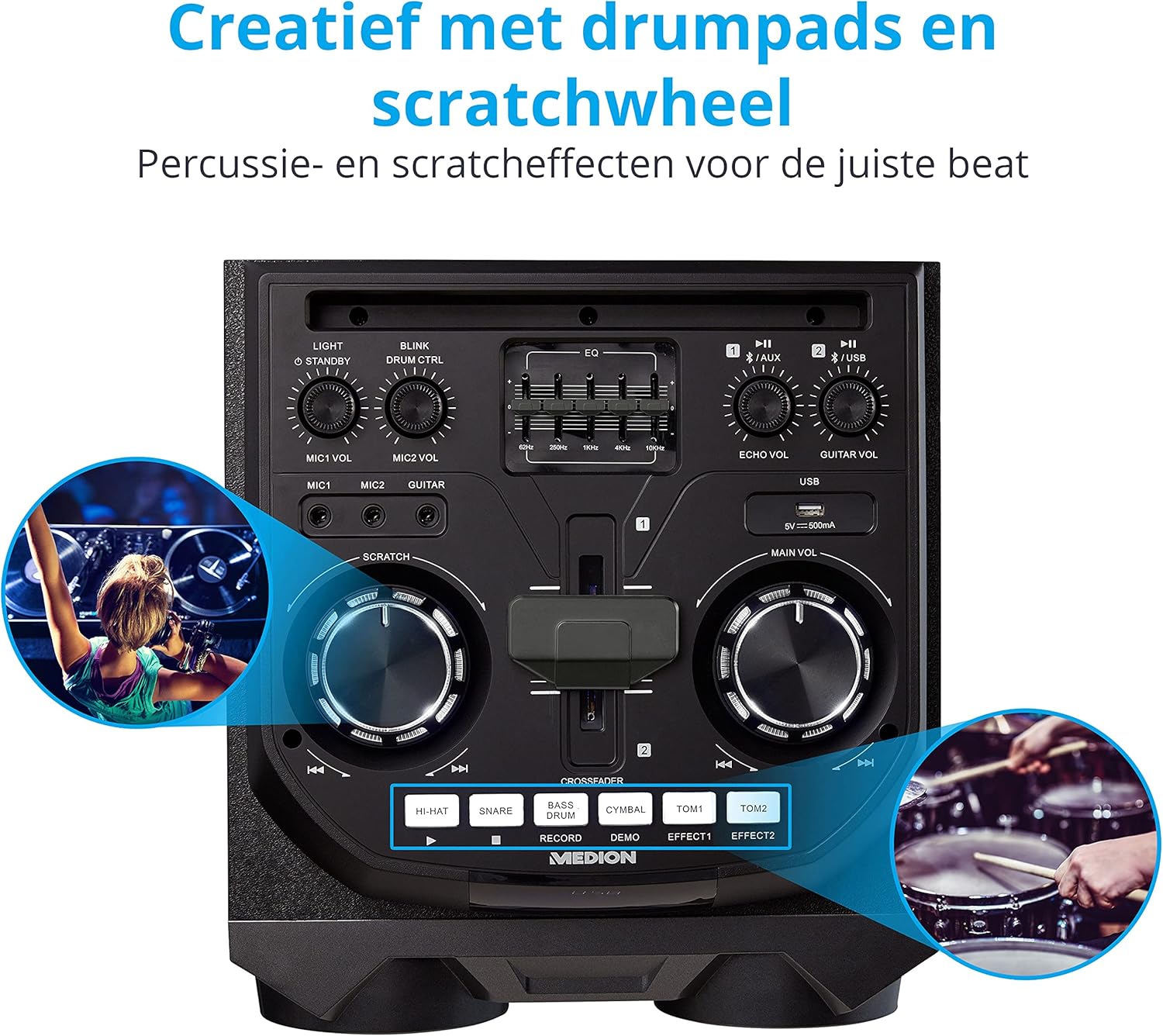
Image: Integrated Wheels for Portability
This image shows the back of the speaker, highlighting the integrated wheels at the bottom, designed for easy transport.
- Integrated Wheels: For easy transportation of the speaker.
- Asas: Ergonomic handles for lifting and moving.
5. Configuración
5.1 Colocación inicial
Place the speaker on a stable, flat surface. Ensure there is adequate ventilation around the unit. Avoid placing it near heat sources or in direct sunlight.
5.2 Conexión de alimentación
- Connect the supplied power cord to the power input on the rear of the speaker.
- Conecte o outro extremo do cable de alimentación a unha toma de corrente axeitada.
- Press the power button on the top control panel to turn on the speaker. The LED lights will illuminate.
5.3 Connecting a Microphone or Guitar
For karaoke or live instrument performance:
- Plug your microphone(s) into the MIC1 or MIC2 6.3 mm jack inputs on the top panel.
- Plug your guitar into the GUITAR 6.3 mm jack input on the top panel.
- Adjust the respective volume knobs (MIC1 VOL, MIC2 VOL, GUITAR VOL) and ECHO VOL to your preference.
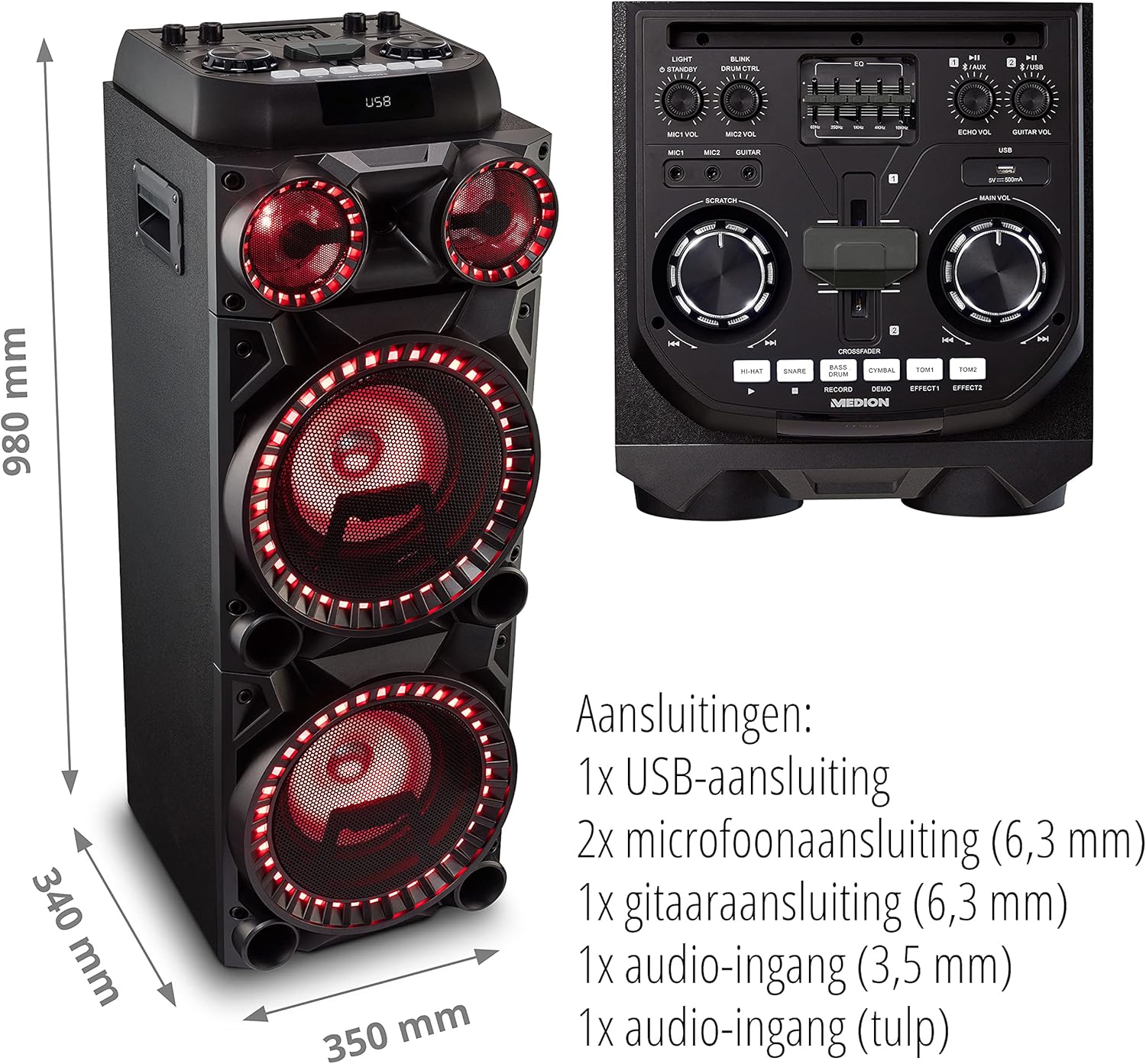
Image: Microphone and Guitar Connection for Karaoke
This image shows individuals enjoying karaoke, demonstrating the use of a microphone connected to the speaker for singing.
6. Instrucións de funcionamento
6.1 Conexión Bluetooth
- Preme o Bluetooth button on the control panel. The Bluetooth indicator will blink.
- Activa o Bluetooth no teu teléfono intelixente, tableta ou outro dispositivo de son.
- Busca "MEDION X64060" in your device's Bluetooth settings and select it to pair.
- Once connected, the Bluetooth indicator will stop blinking and remain solid. You can now play music wirelessly.

Image: Bluetooth Music Playback
This image shows a smartphone displaying a music application, indicating a wireless Bluetooth connection to the speaker for audio streaming.
Reprodución por USB 6.2
- Insira unha unidade flash USB que conteña audio files into the USB port on the top panel.
- Preme o USB botón para seleccionar o modo USB.
- The speaker will automatically detect and begin playing audio files from the USB drive. Use the playback controls (play/pause, skip track) on the control panel.
6.3 Entrada AUX
- Connect an external audio device (e.g., MP3 player, laptop) to the 3.5 mm AUX input or the RCA audio input on the rear panel using an appropriate audio cable (not included).
- Preme o AUX botón para seleccionar o modo AUX.
- Play audio from your connected device. The speaker will output the sound.
6.4 DJ Functions
The MEDION X64060 includes various DJ features for creative sound mixing.

Image: DJ Function Controls
Esta imaxe ofrece información detallada view of the DJ control section, including the cross-fader, scratch wheel, and various drum pads.
- Cross-fader: Use the cross-fader to smoothly transition between different audio sources or effects.
- Scratch Wheel: Manipulate the scratch wheel for classic DJ scratch effects.
- Pads de batería: Preme o HI-HAT, ASOCIADO, BOMBO, PLATILLO, TOM1, e TOM2 pads to add drum sound effects to your music.
- Función de rexistro: Usa o RECORDAR button to record your drum pad sequences.
6.5 Función de karaoke
Connect a microphone as described in section 5.3. Play your chosen karaoke track via Bluetooth, USB, or AUX. Adjust the microphone and echo volumes for the desired effect.
6.6 Efectos luminosos
The speaker features dynamic LED light effects that respond to the music. These lights automatically activate when the speaker is on. There may be a dedicated button (e.g., "LIGHT" or "BLINK") to control or cycle through different light modes, refer to the control panel for specific options.

Image: Dynamic Blue Light Effects
This image showcases the speaker with its blue LED lights illuminated, demonstrating the atmospheric light effects.

Image: Dynamic Red Light Effects
This image shows the speaker with its red LED lights illuminated, highlighting another color option for the atmospheric light effects.
7. Mantemento
7.1 Limpeza
- Desconecte sempre o altofalante da toma de corrente antes de limpalo.
- Use un pano suave e seco para limpar as superficies exteriores.
- Do not use liquid cleaners, aerosols, or abrasive materials, as these can damage the finish or internal components.
7.2 Almacenamento
When not in use for extended periods, store the speaker in a cool, dry place, away from direct sunlight and extreme temperatures. Cover the unit to protect it from dust.
8 Solución de problemas
| Problema | Causa posible | Solución |
|---|---|---|
| Sen poder | Power cord not connected properly; Power outlet not working. | Ensure the power cord is securely plugged into both the speaker and a working wall outlet. Test the outlet with another device. |
| Sen son | Volume too low; Incorrect input selected; Device not paired (Bluetooth); Cable not connected (AUX/Guitar/Mic). | Increase the main volume and individual input volumes. Select the correct input source (Bluetooth, USB, AUX). Re-pair Bluetooth device. Check all cable connections. |
| A conexión Bluetooth falla | Altofalante non en modo de emparellamento; Dispositivo demasiado lonxe; Interferencia. | Ensure the speaker is in Bluetooth pairing mode (blinking indicator). Move your device closer to the speaker. Avoid obstacles and other wireless devices. |
| O micrófono/guitarra non funciona | Volume too low; Cable faulty; Incorrect input. | Increase MIC/GUITAR VOL. Check microphone/guitar cable. Ensure the instrument is properly connected. |
9. Especificacións
| Marca | MEDION |
| Número de modelo | X64060 | MD44060 |
| Potencia de saída | 2 x 100 W RMS (2 x 1000 W max. music output power) |
| Tecnoloxía de conectividade | Bluetooth 5.0, USB, AUX (3.5mm, RCA) |
| Entradas de audio | 2 x Microphone (6.3 mm), 1 x Guitar (6.3 mm), 1 x AUX (3.5 mm), 1 x RCA |
| Ecualizador | 5 bandas |
| Cor | Negro |
| Material | Plástico |
| Dimensións do produto (L x W x H) | 38.8 x 35 x 101 cm |
| Peso do elemento | 15 kg |
| Tipo de montaxe | Piso de pé |
| Fonte de enerxía | Eléctrico con cable |
| Dispositivos compatibles | Portátil, Smartphone |
10. Garantía e soporte
Para obter información sobre a garantía e asistencia técnica, consulte a tarxeta de garantía incluída co produto ou visite o sitio web oficial de MEDION. websitio. Garda o comprobante de compra para calquera reclamación de garantía.
Atención ao cliente de MEDION: For assistance, please contact MEDION customer support through their official channels. Contact details can typically be found on the MEDION websitio ou na embalaxe do produto.