
LG OLED65C1PUB
LG OLED65C1PUB 65 Inch 4K Smart OLED TV User Manual
Model: OLED65C1PUB
Introdución
This manual provides comprehensive instructions for the setup, operation, and maintenance of your LG OLED65C1PUB 65 Inch 4K Smart OLED TV. Please read this manual thoroughly before using your television to ensure proper and safe operation. Keep this manual for future reference.
The LG OLED65C1PUB features a self-luminous display technology that delivers exceptional picture quality with perfect blacks and accurate colors. Powered by the a9 Gen 4 AI Processor 4K, it enhances both picture and sound. This TV is designed for an immersive viewing experience, supporting advanced gaming features like G-SYNC Compatible, FreeSync, VRR, and ALLM, and integrating webOS with ThinQ AI for smart functionality.
Contido do paquete
Antes de continuar coa configuración, asegúrate de que todos os compoñentes estean presentes na caixa:
- LG OLED65C1PUB 65 Inch 4K Smart OLED TV
- Control remoto máxico
- Compoñentes do soporte de TV
- Cable de alimentación
- Manual de usuario (este documento)
- Manual electrónico (versión dixital accesible a través da TV)

Imaxe: Fronte view of the LG OLED65C1PUB 65-inch 4K Smart OLED TV, showcasinpolo seu deseño delgado e a súa vibrante pantalla.
Configuración
1. Montaxe do soporte
Carefully place the TV screen-down on a soft, flat surface to prevent damage. Attach the stand components to the TV using the provided screws. Ensure the stand is securely fastened before lifting the TV.

Imaxe: En ángulo view of the LG OLED TV, illustrating the attached stand and thin profile.
2. Conexión de periféricos
Connect your external devices such as cable boxes, Blu-ray players, gaming consoles, and sound systems to the appropriate ports on the back of the TV. The LG OLED65C1PUB features multiple HDMI ports (including HDMI 2.1 for 4K@120Hz support), USB ports, and an Ethernet port for wired internet connection.
- HDMI: Para vídeo e audio de alta definición.
- USB: Para conectar dispositivos de almacenamento USB.
- Ethernet (LAN): Para conexión a internet por cable.
- Saída de audio dixital óptica: Para conectar a unha barra de son ou a un receptor de audio.

Imaxe: Traseira view of the LG OLED TV, showing the various input and output ports for connecting external devices.
3. Conexión de alimentación
Plug the power cable into the TV's power input and then into a wall outlet. The TV will enter standby mode.
4. Asistente de configuración inicial
Ao acender o televisor por primeira vez, este guiarache a través dun asistente de configuración inicial. Isto inclúe:
- Selección de idioma.
- Network connection (Wi-Fi or wired Ethernet).
- Tuning channels (if using an antenna/cable).
- Aceptando os termos e condicións.
- Setting up the Magic Remote.
Funcionamento da TV
Control remoto máxico
The LG Magic Remote allows for intuitive control of your TV. It features a point-and-click interface, voice control, and a scroll wheel.
- Apuntando: Point the remote at the screen to move the cursor.
- Premendo: Press the scroll wheel (OK button) to select items.
- Recoñecemento de voz: Press and hold the microphone button to use voice commands for searching content or controlling the TV.
- Roda de desprazamento: Use to scroll through menus or zoom in/out.
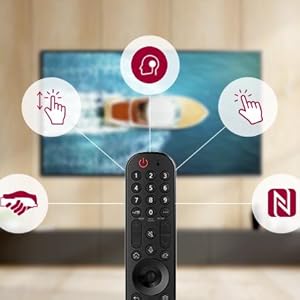
Image: Illustration of the LG Magic Remote highlighting its key interactive features like pointing, clicking, and voice control.
Funcións intelixentes (webSistema operativo e IA ThinQ)
Your LG OLED TV runs on webOS, providing a user-friendly interface for accessing apps, streaming services, and connected devices. ThinQ AI integrates voice assistants for smart home control and personalized recommendations.
- Panel de control de inicio: Access all connected devices and smart home appliances.
- App Store: Download and install various streaming and utility applications.
- AI Picture Pro/Sound Pro: The a9 Gen 4 AI Processor automatically optimizes picture and sound settings based on content type.

Image: Split screen demonstrating the visual enhancement capabilities of AI Picture Pro, showing improved color and clarity.
Características do xogo
The LG OLED65C1PUB is equipped with advanced gaming features for an optimized experience:
- G-SYNC Compatible & FreeSync: Reduce o desgarro e as trabadas da pantalla para unha xogabilidade máis fluída.
- VRR (frecuencia de actualización variable): Synchronizes the TV's refresh rate with the game's frame rate.
- ALLM (modo de baixa latencia automática): Cambia automaticamente o televisor a un modo de baixa latencia cando se detecta unha consola de xogos.
- Optimizador de xogos: A dedicated menu for adjusting gaming-specific settings, including genre optimization, black stabilizer, and white stabilizer.
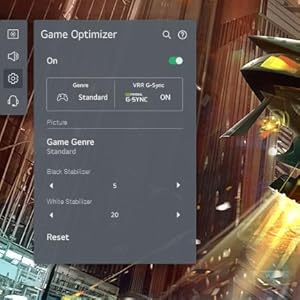
Image: Screenshot of the Game Optimizer menu on the LG TV, showing options for genre, VRR, G-Sync, and picture adjustments like Black Stabilizer.
Mantemento
Proper care will extend the life of your LG OLED TV.
- Limpeza da pantalla: Limpe a pantalla con suavidade cun pano de microfibra suave e seco. Para marcas difíciles, limpe lixeiramenteampEnxágüe o pano con auga destilada. Evite o uso de produtos químicos agresivos, alcol ou produtos de limpeza abrasivos.
- Limpeza do cadro: Use un pano suave e seco para limpar a estrutura do televisor.
- Ventilación: Asegúrate de que haxa unha circulación de aire axeitada arredor do televisor. Non bloquees as aberturas de ventilación.
- Apagado: Cando non o use durante períodos prolongados, desconecte o televisor da toma de corrente.
Resolución de problemas
Se tes problemas co teu televisor, consulta os seguintes problemas e solucións comúns:
| Problema | Posible causa/solución |
|---|---|
| Sen Poder | Comprobe se o cable de alimentación está ben conectado ao televisor e á toma de corrente. Probe a toma de corrente con outro dispositivo. |
| Sen imaxe/son | Verify the correct input source is selected. Check cable connections to external devices. Restart connected devices. |
| O control remoto non funciona | Replace the batteries. Ensure there are no obstructions between the remote and the TV. Re-register the Magic Remote if necessary (refer to E-Manual). |
| Mala calidade de imaxe | Check the signal strength for broadcast channels. Adjust picture settings (brightness, contrast, sharpness). Ensure the source content is high quality. |
| Problemas de conexión Wi-Fi | Restart your router and modem. Ensure the TV is within range of your Wi-Fi network. Re-enter the Wi-Fi password. |
For more detailed troubleshooting, refer to the E-Manual accessible directly on your TV or visit the LG support websitio.
Especificacións
| Característica | Detalle |
|---|---|
| Marca | LG |
| Número de modelo | E94LGOLED65C1PUB |
| Tamaño da pantalla | 65 polgadas |
| Tecnoloxía de visualización | OLED |
| Resolución | 4K (3840 x 2160) |
| Taxa de actualización | 120 Hz |
| Procesador | a9 Gen 4 AI Processor 4K |
| Sistema Operativo | webOS Smart TV |
| Conectividade | Wi-Fi, Ethernet, HDMI, USB |
| Dimensións do produto (P x A x A) | 9.9" de profundidade x 57" de ancho x 33.9" de alto (con soporte) |
| Peso do elemento | 25 libras |
| Cor | Negro |

Image: Diagram illustrating the dimensions of the LG OLED TV, including width, height, and depth with the stand.
Garantía e Soporte
Your LG OLED65C1PUB TV comes with a manufacturer's limited warranty. Additionally, this bundle includes a Premium 4 Year Extended Protection Plan. Please refer to the documentation provided with your purchase for specific terms and conditions of both the manufacturer's warranty and the extended protection plan.
For technical support, service, or warranty claims, please contact LG Customer Service. You can find contact information on the official LG website or in the E-Manual on your TV.
Atención ao cliente de LG: www.lg.com/us/support

Image: Packaging for the 4-Year Premium Protection Plan, indicating coverage for screen damage, cracked frames, and hardware faults.