
C-LOGIC 580
Manual do usuario do multímetro dixital intelixente C-LOGIC 580
Modelo: 580
1. Introdución
This manual provides comprehensive instructions for the safe and effective use of the C-LOGIC 580 Smart Digital Multimeter. Please read this manual thoroughly before operation and retain it for future reference.
The C-LOGIC 580 is a smart digital multimeter designed for accurate and efficient electrical measurements. Its smart technology allows for automatic recognition of measurement parameters, reducing potential errors for amateur users and saving time for professionals.
2. Información de seguridade
Always observe safety precautions when using electrical testing equipment. Failure to do so may result in injury or damage to the device.
- Non exceda os valores de entrada máximos especificados para cada función.
- Ensure the test leads are properly connected and the function switch is in the correct position before making any measurements.
- Extreme as precaucións ao traballar con circuítos con tensión.
- Non empregue o multímetro se parece estar danado ou se os cables de proba están comprometidos.
- Refer to the CAT III 600V and MAX 600V markings on the device for voltage límites.
3. Características do produto
- Tecnoloxía intelixente: Automatic recognition of measurement parameters.
- Error Reduction: Designed to minimize errors for amateur users.
- Aforro de tempo: Streamlines measurement processes for professional users.
- Pantalla dixital: Clear and easy-to-read digital readout.
- Múltiples funcións: Capable of measuring various electrical parameters.
4. Contido do paquete
Comprobe que todos os elementos estean presentes e sen danos ao abrir o paquete.
- C-LOGIC 580 Smart Digital Multimeter
- Cables de proba (vermello e negro)
- Manual de usuario
5. Configuración
5.1 Instalación da batería
The C-LOGIC 580 is battery powered. Ensure batteries are correctly installed before first use.
- Localiza a tapa do compartimento da batería na parte traseira do multímetro.
- Use un desaparafusador para abrir o compartimento da batería.
- Insert the required batteries, observing the correct polarity (+ and -).
- Coloque a tapa do compartimento da batería e fíxaa.
5.2 Conexión dos cables de proba
A conexión correcta dos cables de proba é crucial para obter medicións precisas e seguras.
- Insira o cable de proba negro na toma de entrada "COM" (común).
- Insert the red test lead into the "VHz%" input jack for voltage, frequency, and duty cycle measurements.
- Ensure connections are firm and secure.
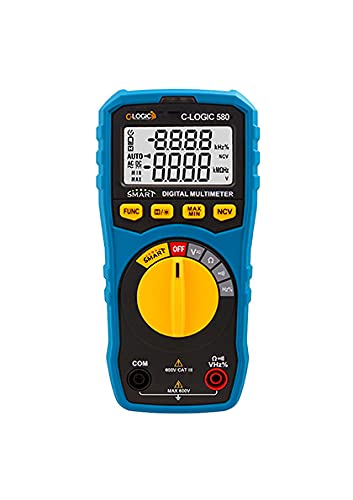
Figura 1: Fronte view of the C-LOGIC 580 Smart Digital Multimeter, showing the display, rotary switch, function buttons, and input jacks (COM and VHz%). The display shows "-8.8.8.8" and "0.0.0.0" with indicators for AUTO, AC/DC, kHz%, NCV, MAX, MIN, and V. The rotary switch is set to OFF. The input jacks are labeled "COM" and "VHz%".
6. Instrucións de funcionamento
6.1 Acendido/Apagado
To power on the multimeter, rotate the central yellow dial from the "OFF" position to any desired measurement function. To power off, rotate the dial back to "OFF".
6.2 Smart Measurement Mode
The C-LOGIC 580 features a smart mode that automatically identifies the type of measurement (e.g., AC voltage, DC voltage, resistance) when the leads are connected to a circuit. This simplifies operation by eliminating the need to manually select the measurement type.
6.3 Botóns de función
The multimeter includes several function buttons below the display:
- FUNCIÓN: Used to cycle through different measurement modes within a single rotary switch setting (e.g., AC/DC voltage, resistance/continuity).
- (Diode/Continuity): Activates diode test or continuity check.
- MAX / MIN: Toggles between maximum and minimum value hold during a measurement.
- NCV: Activa o volume sen contactotage detección.
6.4 Medicións básicas
VoltagMedición (CA/CC):
- Set the rotary switch to the 'V' position.
- Conecte o cable de proba negro á toma 'COM' e o cable de proba vermello á toma 'VHz%'.
- Conecte os cables de proba en paralelo ao circuíto ou compoñente que se vai medir.
- O multímetro detectará automaticamente o volume de CA ou CCtage. Use the FUNC button if manual selection is needed.
Medición de resistencia:
- Set the rotary switch to the 'Ω' position.
- Conecte o cable de proba negro á toma 'COM' e o cable de proba vermello á toma 'VHz%'.
- Asegúrese de que o circuíto estea desenergizado antes de medir a resistencia.
- Conecte os cables de proba ao compoñente que se vai medir.
Proba de continuidade:
- Set the rotary switch to the 'Ω' position.
- Preme o (Diode/Continuity) button to select continuity mode.
- Connect the test leads across the circuit or component. A beep indicates continuity.
Vol. Sen contactotagDetección de e (NCV):
- Axuste o interruptor rotatorio á posición "NCV".
- Move the top part of the multimeter near a live conductor. The device will indicate the presence of AC voltage sen contacto directo.
7. Mantemento
7.1 Limpeza
Limpar o multímetro casing con anuncioamp cloth and mild detergent. Do not use abrasives or solvents. Ensure the device is dry before storage or use.
7.2 Substitución da batería
When the low battery indicator appears on the display, replace the batteries promptly to ensure accurate readings. Follow the battery installation steps in Section 5.1.
7.3 Almacenamento
Garda o multímetro nun lugar fresco e seco, lonxe da luz solar directa e de temperaturas extremas. Se o gardas durante períodos prolongados, retira as pilas para evitar fugas.
8 Solución de problemas
| Problema | Causa posible | Solución |
|---|---|---|
| O multímetro non se acende. | Baterías gastadas ou instaladas incorrectamente. | Comprobe a polaridade das baterías ou substitúaas. |
| Lecturas inexactas. | Incorrect function selected; poor test lead connection; low battery. | Ensure correct function is selected (if not in smart mode); check test lead connections; replace batteries. |
| Sen pitido de continuidade. | Circuit is open; continuity mode not selected. | Verify circuit integrity; press FUNC button to select continuity mode. |
9. Especificacións
| Parámetro | Detalle |
|---|---|
| Marca | C-LOXICA |
| Modelo | 580 |
| Fonte de enerxía | Alimentado por batería |
| Tipo de medida | Multímetro |
| Fabricante | C-LOXICA |
| ASIN | B0967VMK1W |
| UPC | 810053671603 |
| Data de primeira dispoñibilidade | 31 de maio de 2021 |
10. Garantía e soporte
For warranty information or technical support regarding your C-LOGIC 580 Smart Digital Multimeter, please contact C-LOGIC customer service. Refer to the product packaging or the official C-LOGIC websitio para os detalles de contacto.
Nota: Os termos específicos da garantía poden variar segundo a rexión e o establecemento. Garda o comprobante de compra.
Ask a question about this manual
Ask about setup, troubleshooting, compatibility, parts, safety, or missing instructions. Manuals+ will review the question and use this page’s manual context to help answer it.