
1. Introdución
The ASUS TUF Gaming F15 (model TUF506HE-DS74) is a high-performance gaming laptop designed for demanding applications and gaming. It features an Intel Core i7-11800H processor, NVIDIA GeForce RTX 3050 Ti graphics, a 15.6-inch 144Hz Full HD IPS-Type display, 16GB DDR4 RAM, and a 512GB PCIe SSD. This manual provides essential information for its proper use and care.

Fronte view of the ASUS TUF Gaming F15 laptop, showcasina súa pantalla e o seu teclado.
2. Configuración
2.1 Desembalaxe e inspección inicial
Retire con coidado todos os compoñentes da embalaxe. Asegúrese de que estean presentes os seguintes elementos:
- ASUS TUF Gaming F15 Laptop (TUF506HE-DS74)
- Adaptador de alimentación e cable
- Guía de usuario
- Tarxeta de garantía
Inspeccione o portátil para ver se presenta danos físicos antes de continuar.
2.2 Conexión do adaptador de corrente
Connect the power cord to the AC adapter, then plug the AC adapter into a power outlet. Insert the DC output connector of the AC adapter into the power input port on the left side of your laptop.

The left side of the laptop features various ports, including the power input, Ethernet, HDMI, USB, and audio jack.
2.3 Acendido inicial e configuración de Windows
Press the power button located on the top right of the keyboard to turn on the laptop. Follow the on-screen instructions to complete the initial Windows 10 Home setup. This includes selecting your region, connecting to a Wi-Fi network, and creating a user account.

Un de arriba abaixo view of the laptop's keyboard, featuring a numeric keypad and backlit keys.
3. Manexo do portátil
3.1 Teclado e panel táctil
The laptop features a full-sized keyboard with a numeric keypad and customizable RGB backlighting. The touchpad supports multi-touch gestures for navigation.
3.2 Características de visualización
The 15.6-inch Full HD (1920x1080) IPS-Type display offers a 144Hz refresh rate for smooth visuals. Adaptive-Sync technology synchronizes the display's refresh rate with the GPU's frame rate to reduce lag and visual tearing.

The laptop's display showcasing its 144Hz refresh rate, IPS-level panel, 100% sRGB color, and Adaptive-Sync technology.
3.3 Sistema de audio
The laptop is equipped with DTS X Ultra for 7.1-channel virtual surround sound and AI Noise-Cancellation technology to enhance communication clarity.

Diagram illustrating the 7.1-channel surround sound and AI Noise-Cancellation features of the laptop.
3.4 Conectividade
The laptop supports Wi-Fi 6 (802.11ax) for high-speed wireless networking and Bluetooth for connecting peripherals. It includes multiple USB 3.0 ports and an HDMI output for external displays.

Diagram showing the various input/output ports available on the laptop, including USB, HDMI, and audio jack.
3.5 Modos de rendemento
The laptop offers different performance modes to balance power and acoustics. These modes typically include Silent, Performance, and Turbo, which can be adjusted via ASUS software.

A graph illustrating the relationship between GPU performance, CPU performance, and noise levels across Silent, Performance, and Turbo operating modes.
4. Mantemento
4.1 Sistema de refrixeración
The ASUS TUF Gaming F15 features a patented Anti-Dust Cooling (ADC) system designed to prevent dust buildup and maintain optimal performance and longevity. Ensure the vents are not obstructed during use.

Diagram illustrating the Anti-Dust Cooling system, showing how dust is expelled from the chassis.
4.2 Limpeza do portátil
Use a soft, lint-free cloth to clean the screen and exterior surfaces. For stubborn smudges, a slightly dampened cloth with water or a mild, non-abrasive cleaner can be used. Avoid spraying liquids directly onto the laptop.
4.3 Melloras de almacenamento e RAM
The laptop is designed with an accessible upgrade slot for additional storage (NVMe PCIe SSD) and RAM. Refer to the detailed instructions in the full user manual or consult a qualified technician for upgrades to avoid voiding your warranty.
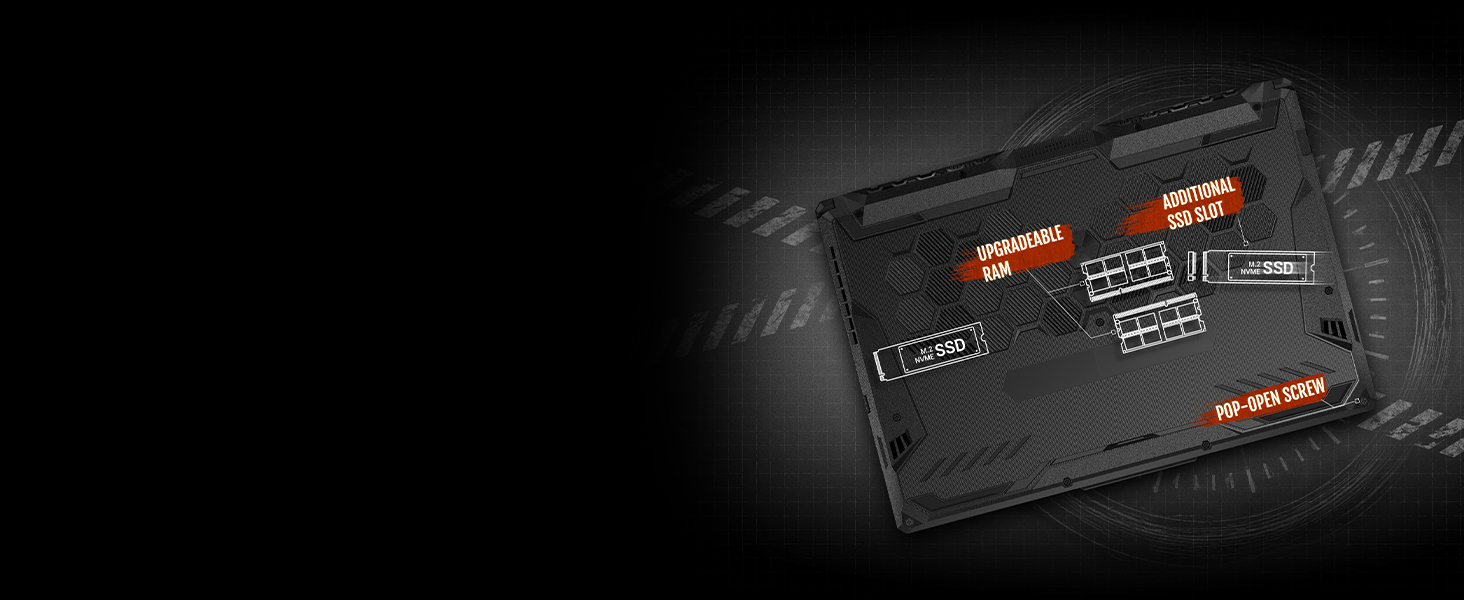
Unha interna view diagram highlighting the upgradeable RAM slots and additional SSD slot, accessible via a pop-open screw.
5 Solución de problemas
If you encounter issues with your ASUS TUF Gaming F15, consider the following basic troubleshooting steps:
- Sen enerxía: Asegúrate de que o adaptador de CA estea conectado correctamente tanto ao portátil como a unha toma de corrente que funcione. Proba cunha toma diferente.
- Problemas de visualización: If the screen is blank, try connecting an external monitor to verify if the issue is with the laptop's display or graphics output.
- Problemas de conectividade: For Wi-Fi issues, restart your router and the laptop. Ensure Wi-Fi is enabled in Windows settings.
- Retraso de rendemento: Close unnecessary applications. Check for background processes consuming high CPU or RAM. Ensure cooling vents are clear.
For more complex issues or persistent problems, refer to the comprehensive troubleshooting section in the full user manual or visit the official ASUS support websitio de asistencia.
6. Especificacións
Key technical specifications for the ASUS TUF Gaming F15 (TUF506HE-DS74):
| Característica | Especificación |
|---|---|
| Nome do modelo | TUF506HE-DS74 |
| Procesador | 11th Gen Intel Core i7-11800H (up to 4.6 GHz, 8 Cores) |
| Gráficos | NVIDIA GeForce RTX 3050 Ti 4GB GDDR6 |
| Mostrar | 15.6-inch FHD (1920x1080) IPS-Type, 144Hz |
| RAM | 16 GB DDR4 3200 MHz |
| Almacenamento | Unidade de estado sólido (SSD) M.2 NVMe PCIe de 512 GB |
| Sistema Operativo | Windows 10 Home |
| Conectividade sen fíos | Wi-Fi 6 (802.11ax), Bluetooth |
| Portos | USB 3.0, HDMI, 3.5mm Audio Jack, Ethernet |
| Dimensións (LxWxH) | 14.13 x 10.08 x 0.96 polgadas |
| Peso | 5.07 libras |
| Durabilidade | MIL-STD-810H military standard |

Visual representation of the MIL-STD-810H military standard durability tests, including resistance to drops, vibrations, extreme heat, cold, and humidity.
7. Garantía e soporte
Your ASUS TUF Gaming F15 laptop comes with a manufacturer's warranty. Please refer to the included Warranty Card for detailed terms and conditions, including coverage period and service procedures.
For technical support, driver downloads, and additional resources, please visit the official ASUS support website. Keep your product's serial number (found on the bottom of the laptop or on the packaging) handy when contacting support.
Soporte ASUS Websitio: www.asus.com/support/