
1. Introdución
The G-MARK G4000IEM is a professional UHF wireless in-ear monitor system designed for stage performances, studio recording, band rehearsals, and live events. It provides reliable, high-quality audio monitoring with features such as broad frequency response, low latency, strong anti-interference capabilities, and stable signal transmission over a wide coverage area.
Características principais:
- Premium Monitoring System: Offers a broad frequency response of 50Hz-20KHz and less than 5ms latency for real-time audio monitoring.
- Forte anti-interferencia: UHF receiver with PLL phase-locked frequency synthesis, covering 550 MHz-580 MHz with 100 adjustable frequencies.
- Stable Signal & Broad Coverage: Dual-antenna receiver with advanced digital signal processing for enhanced signal and extended range up to 160-320 feet.
- Practical & Durable Design: Constructed with high-quality brushed metal for longevity, featuring an intuitive LCD display and operation buttons.
- Sistema ampliable: Designed to be an expandable wireless monitoring system.
- Cancelación de ruído: Built-in noise cancellation for focused audio monitoring.
2. Información de seguridade
Please read and understand all safety instructions before operating this device. Retain this manual for future reference.
- Fonte de alimentación: Use only the specified power adapter for the transmitter. Ensure the voltage coincide cos requisitos do dispositivo.
- Baterías: The bodypack receiver requires two AA batteries (not included). Ensure correct polarity when inserting batteries. Do not mix old and new batteries, or different types of batteries. Remove batteries if the device will not be used for an extended period.
- Humidade: Do not expose the device to rain, moisture, or extreme humidity.
- Calor: Manteña o dispositivo lonxe de fontes de calor como radiadores, reixas de calor, estufas ou outros aparellos que produzan calor.
- Ventilación: Ensure proper ventilation for the transmitter unit, especially if rack-mounted. Do not block ventilation openings.
- Limpeza: Limpar só cun pano seco. Non usar produtos de limpeza líquidos nin aerosois.
- Servizo: Non intente atender este produto vostede mesmo. Remita todo o servizo a persoal de servizo cualificado.
- Protección auditiva: Prolonged exposure to high volume levels can cause permanent hearing damage. Set the volume to a comfortable level before placing earphones in your ears.
3. Contido do paquete
Carefully unpack your G-MARK G4000IEM system and verify that all items listed below are present and in good condition.
- G-MARK G4000IEM Transmitter Unit
- 2 x G-MARK G4000IEM Bodypack Receivers
- 2 x In-Ear Earphones
- 2 x Transmitter Antennas
- Adaptador de corrente para transmisor
- Audio Cables (e.g., 1/4" to 1/4" or XLR to 1/4")
- Manual de usuario (este documento)

Figure 3.1: G-MARK G4000IEM System Product List
4. Compoñentes do produtoview
4.1. Bodypack Receiver
The bodypack receiver is a compact unit designed for personal monitoring. It features an antenna for signal reception, a frequency display, IR pairing window, battery compartment, volume adjustment knob, and a 3.5mm earphone input.

Figure 4.1: Bodypack Receiver Components
- Antena: Receives wireless signals from the transmitter.
- Visualización de frecuencia: Shows the current operating frequency.
- IR Pairing Window: Used for infrared synchronization with the transmitter.
- Compartimento de batería: Alimenta dúas pilas AA (non incluídas).
- Botón de axuste de volume: Controls the output volume to the earphones.
- Entrada de 3.5 mm: Connects to the included in-ear earphones.
4.2. Transmitter Unit
The transmitter unit is the central hub of the system, sending audio signals wirelessly to the bodypack receivers. It features input jacks for audio sources, controls for channel selection, and a damping adjustment knob.

Figure 4.2: Transmitter Unit Front Panel
- DampBotón de axuste: Reduces clicking sounds and provides a softer button feel.
- Pantalla LCD: Mostra a frecuencia, a canle e outra información operativa.
- Channel Controls (CH-A, CH-B): Buttons for selecting and adjusting frequencies for each channel.
- Botón SET: Enters adjustment state for frequency selection.
- Ventá IR: For infrared synchronization with bodypack receivers.
- Botón de encendido: Turns the transmitter unit on or off.
- Portos de antena: Connect the included antennas for signal transmission.
- Entradas de audio: (Typically XLR or 1/4" combo jacks on the rear, not visible in this image) Connect audio sources like mixing consoles.
5. Guía de configuración
5.1. Transmitter Connection
- Connect the provided antennas to the antenna ports on the rear of the transmitter unit.
- Connect the power adapter to the transmitter's DC input and plug it into a suitable power outlet.
- Connect your audio source (e.g., mixing console, audio interface) to the audio input jacks on the transmitter using appropriate cables.
- Preme o botón de acendido para acender o transmisor.
5.2. Configuración do receptor de corpo
- Open the battery compartment on the bodypack receiver.
- Insert two AA batteries, ensuring correct polarity.
- Pecha o compartimento da batería.
- Connect the included in-ear earphones to the 3.5mm input jack on the bodypack receiver.
5.3. IR Pairing (Frequency Synchronization)
To ensure the bodypack receiver receives audio from the transmitter, you must synchronize their frequencies using the IR pairing function.

Figure 5.1: IR Match Process
- No transmisor, prema o botón SET button to enter the adjustment state for the desired channel (CH-A or CH-B).
- Usa o ▲ (arriba) ou ▼ (down) buttons to select the desired frequency.
- Turn on the bodypack receiver.
- Align the IR pairing window on the bodypack receiver with the IR window on the transmitter.
- Hold them in alignment until you hear a beep sound, indicating that the frequencies of the transmitter and the bodypack receiver are successfully matched. The frequency displayed on the bodypack should now match the transmitter.
6. Funcionamento
6.1. Acendido/apagado
- Transmisor: Preme o POTENCIA button on the front panel. The display will illuminate.
- Receptor de corpo: Xire o ON/OFF/Volum knob clockwise to power on. The display will illuminate. Turn counter-clockwise until it clicks to power off.
6.2. Selección da frecuencia
The G4000IEM system offers 100 adjustable frequencies within the 550 MHz-580 MHz range to avoid interference.
- No transmisor, prema o botón SET button for the channel you wish to adjust (CH-A or CH-B). The frequency display will blink.
- Usa o ▲ (arriba) ou ▼ (down) buttons to cycle through available frequencies.
- Once the desired frequency is selected, press SET again to confirm, or wait a few seconds for it to automatically save.
- After changing the transmitter frequency, re-perform the IR pairing process (Section 5.3) to synchronize the bodypack receiver.
6.3. Axuste de volume
Adjust the monitoring volume using the Botón de axuste de volume on the bodypack receiver. Start with a low volume and gradually increase it to a comfortable listening level to prevent hearing damage.
6.4. Alcance e rendemento sen fíos
The system provides a stable signal range of 160-320 feet (approximately 50-100 meters) in optimal conditions. Obstacles such as walls and other wireless devices can affect performance.

Figure 6.1: Wireless Range and Dual Antenna System
6.5. Funcionalidade Bluetooth
The G4000IEM system supports wireless Bluetooth transmission, allowing for additional connectivity options. Refer to the transmitter's display for Bluetooth pairing indicators.
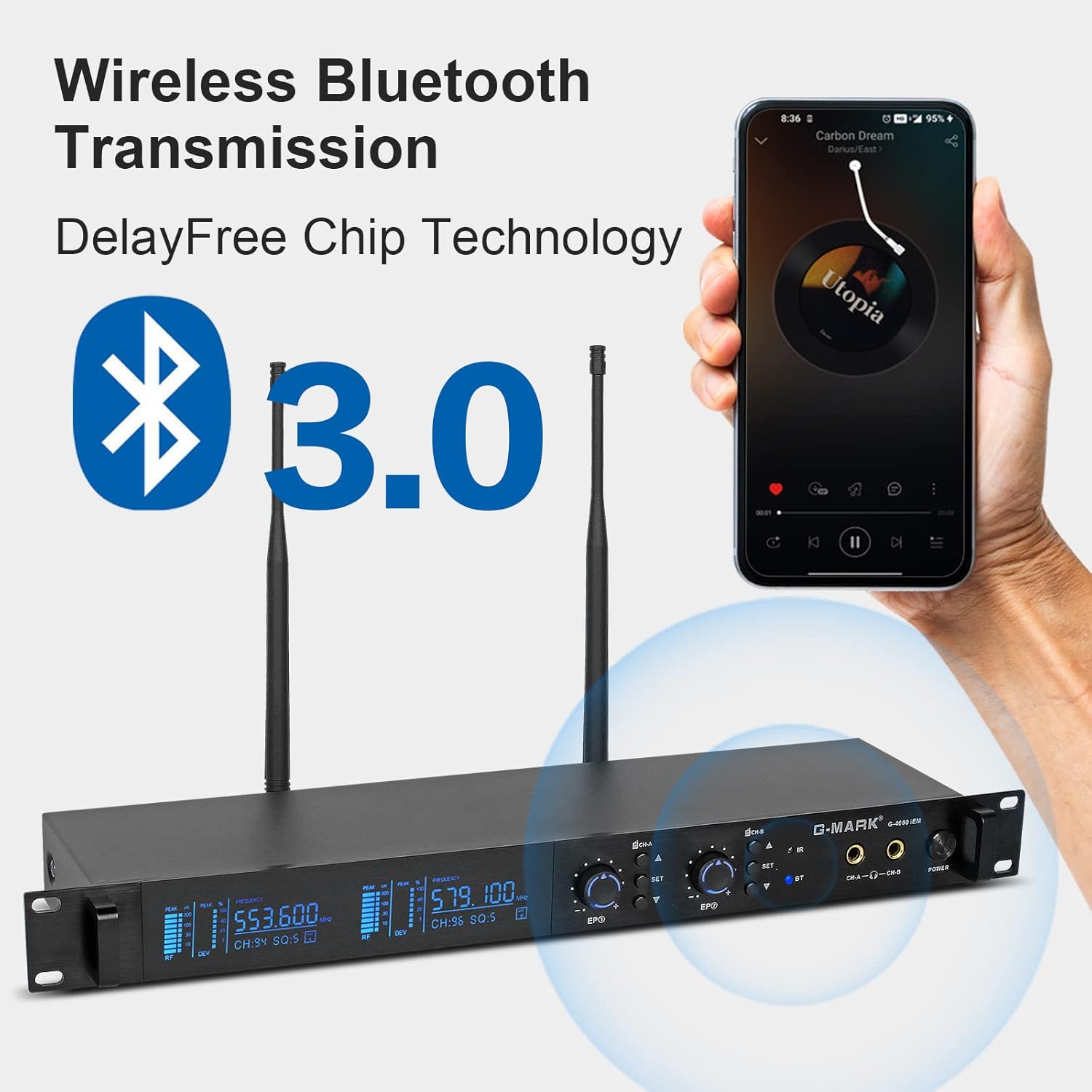
Figure 6.2: Wireless Bluetooth Transmission
7. Mantemento
- Limpeza: Use a soft, dry cloth to clean the surfaces of the transmitter and bodypack receivers. Do not use abrasive cleaners, solvents, or chemical sprays.
- Almacenamento: Garde o sistema nun lugar fresco e seco, lonxe da luz solar directa e de temperaturas extremas cando non o estea a usar.
- Coidado da batería: Remove batteries from the bodypack receivers if they will not be used for an extended period to prevent leakage and damage.
- Xestión de cables Avoid sharp bends or kinks in audio and power cables to prevent damage.
8 Solución de problemas
If you encounter issues with your G-MARK G4000IEM system, refer to the following common problems and solutions:
- No Sound from Earphones:
- Ensure the bodypack receiver is powered on and has fresh batteries.
- Check that the earphones are securely plugged into the 3.5mm jack.
- Verify the bodypack receiver's volume knob is turned up.
- Confirm the transmitter is powered on and receiving an audio input signal.
- Perform IR pairing again to ensure frequencies are synchronized (Section 5.3).
- Interferencia ou estática:
- Change the operating frequency on the transmitter (Section 6.2) and re-pair the bodypack.
- Ensure the transmitter and receiver antennas are fully extended and unobstructed.
- Move the transmitter and receiver away from other wireless devices, Wi-Fi routers, or large metal objects.
- Comprobe se hai fontes locais de interferencia de radiofrecuencia fortes.
- Alcance sen fíos curto:
- Ensure antennas on both transmitter and receiver are properly connected and oriented.
- Minimizar as obstrucións entre o transmisor e o receptor.
- Check battery levels in the bodypack receiver.
- O transmisor non se acende:
- Verify the power adapter is securely connected to both the transmitter and a working power outlet.
- Asegúrate de que a toma de corrente estea activa.
9. Especificacións técnicas
| Característica | Especificación |
|---|---|
| Número de modelo | G4000IEM |
| Marca | MARCA G |
| Tecnoloxía de conectividade | Sen fíos (RF) |
| Tecnoloxías de comunicación sen fíos | RF |
| Resposta en frecuencia | 50Hz - 20KHz |
| UHF Frequency Coverage | 550 MHz - 580 MHz |
| Frecuencias axustables | 100 |
| Latencia | Menos de 5 ms |
| distancia wireless | 160FT - 320FT (approx. 50-100 meters) |
| Colocación do oído | En Orella |
| Factor de forma | En Orella |
| Control de ruído | Cancelación activa de ruído |
| Conector para auriculares | Jack de 3.5 mm |
| Bodypack Power Source | 2 pilas AA (non incluídas) |
| Material do recinto | Metal (Transmitter) |
| Número de elementos | 2 (Bodypacks) |
10. Garantía e soporte
Genuine G-MARK audio products come with a 1 anos de garantía do fabricante. This warranty covers defects in materials and workmanship under normal use. For troubleshooting, replacement of discontinuous/defective parts, or any other customer service inquiries, please contact G-MARK customer support through your retailer or the official G-MARK websitio.


