Produto rematadoview
The Poly Sync 60 USB/Bluetooth smart speakerphone is designed to provide clear audio for small to medium conference rooms. It features powerful twin speakers and a six-microphone array that focuses on voices while reducing background noise. This allows for natural conversations, even when multiple participants speak simultaneously. The device offers versatile connectivity options, including USB-A, USB-C, and Bluetooth, enabling connection to PCs, Macs, and smartphones. It is powered by an AC adapter, eliminating the need for battery charging during use. For larger spaces, two units can be wirelessly paired to expand voice pickup coverage.
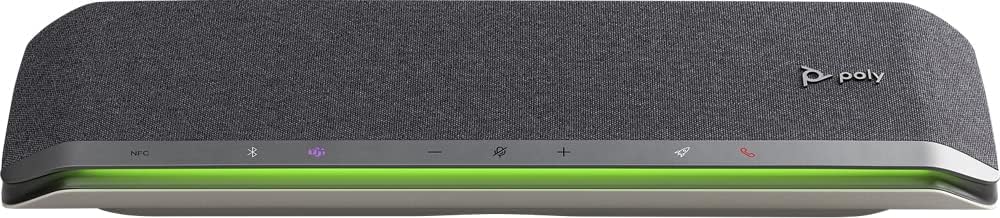
Imaxe: Fronte view of the Poly Sync 60 Smart Speakerphone, showing the speaker grille, control buttons, and an illuminated LED light bar.
Contido do paquete
- Poly Sync 60 Speakerphone
- Main power supply with global pin adapters
- USB cable with USB-A and USB-C connectors
Características clave
- Audio avanzado: Six-microphone steerable array for echo and noise reduction, ensuring clear voice pickup.
- Altofalantes dobres: High-performance speakers deliver rich, clear audio for all participants.
- Alimentado por CA: Operates continuously via AC power, eliminating battery concerns.
- Capacidade da cadea de margaritas: Wirelessly pair two units for extended coverage in larger meeting spaces.
- Conectividade flexible: Connects to computers via combined USB-A/USB-C cable and to smartphones via Bluetooth.
- USB Video Camera Support: Connect a USB video camera to the speakerphone for combined audio and video with a single cable to the computer.
- Carga de dispositivos móbiles: Two USB ports allow charging of up to two mobile phones simultaneously.
- Certificado en Microsoft Teams: Includes a dedicated Teams button for instant access to the Teams application.
Guía de configuración
1. Conexión de alimentación
Connect the provided main power supply to the Poly Sync 60 and plug it into a wall outlet. The device requires AC power for operation.
2. Connecting to a Computer (PC/Mac)
Use the integrated USB cable to connect the Poly Sync 60 to your computer. The cable supports both USB-A and USB-C ports. Once connected, the device should be recognized automatically by your operating system.
3. Connecting to a Smartphone (Bluetooth)
- Manteña premido o Botón Bluetooth on the Poly Sync 60 until the LED indicator flashes blue.
- On your smartphone, navigate to the Bluetooth settings and select "Poly Sync 60" from the list of available devices.
- Unha vez vinculado, o indicador LED volverá azul fijo.
4. Daisy Chain Two Units (Optional)
For expanded audio coverage, two Poly Sync 60 units can be wirelessly paired. Refer to the official Poly support documentation for detailed instructions on how to enable this feature.
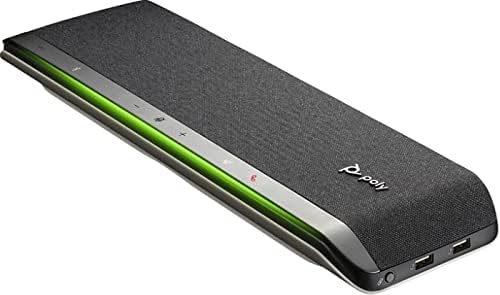
Imaxe: Lateral view of the Poly Sync 60 Smart Speakerphone, highlighting the USB ports for charging mobile devices and connecting a video camera.
Instrucións de funcionamento
Controis básicos
- Subir/Baixar o volume: Usa o + e - botóns para axustar o volume do altofalante.
- Silenciar/Activar o silencio: Preme o microphone icon button to mute or unmute the microphone. The LED indicator will change color to show mute status.
- Resposta/Fin da chamada: Preme o phone icon button para responder ou rematar unha chamada.
- Botón de Microsoft Teams: Preme o Teams icon button to launch or interact with the Microsoft Teams application (if certified version).
Carga de dispositivos móbiles
Connect your mobile phone or other USB-powered device to one of the two USB ports on the Poly Sync 60 to charge it during a meeting.
Mantemento e coidados
- Clean the Poly Sync 60 with a soft, dry, lint-free cloth.
- Do not use abrasive cleaners, solvents, or strong chemicals, as these may damage the device.
- Evite expoñer o dispositivo a temperaturas extremas, humidade ou luz solar directa.
- Garda o altofalante nun lugar fresco e seco cando non o uses.
Resolución de problemas
- Sen audio/Micrófono non funciona:
- Ensure the device is powered on and the AC adapter is securely connected.
- Verify that the speakerphone is not muted (check the mute button LED).
- Check the volume levels on both the Poly Sync 60 and your connected computer/smartphone.
- Confirm that the Poly Sync 60 is selected as the audio input/output device in your computer's sound settings or conferencing application.
- Problemas de conexión (USB):
- Proba a conectar o cable USB a un porto diferente do teu ordenador.
- Reinicia o teu ordenador.
- Connection Issues (Bluetooth):
- Ensure Bluetooth is enabled on your smartphone and the Poly Sync 60 is in pairing mode.
- Desvincula e volve vincular o dispositivo desde a configuración de Bluetooth do teu teléfono intelixente.
- Asegúrate de que ningún outro dispositivo Bluetooth estea a causar interferencias.
- Echo or Background Noise:
- Place the speakerphone centrally in the room, away from walls or highly reflective surfaces.
- Ensure the room is quiet and free from excessive background noise.
Especificacións técnicas
| Característica | Especificación |
|---|---|
| Nome do modelo | Sincronización 60 |
| Número de modelo do artigo | 216873-01 |
| Tipo de altofalante | Multimedia |
| Tecnoloxía de conectividade | Bluetooth, USB |
| Tecnoloxía de comunicación sen fíos | Bluetooth |
| Alcance Bluetooth | 3 metros |
| Fonte de enerxía | Eléctrico con cable |
| Potencia de saída máxima do altofalante | 60 vatios |
| Modo de saída de audio | Estéreo |
| Configuración da canle de son envolvente | 2.0 |
| Método de control | Pulsador |
| Dimensións do produto | 1.5" D x 15.5" W x 4.8" H |
| Peso do elemento | 2.2 libras (1000 gramos) |
| Usos recomendados | Office work, remote work, conference calls, personal entertainment, charging mobile devices |
| Tipo de montaxe | Soporte de mesa |
| Fabricante | Poli |
| UPC | 017229172517, 197029590572 |
Información da garantía
The Poly Sync 60 Smart Speakerphone comes with a full manufacturer's warranty. For detailed information regarding warranty terms, duration, and claim procedures, please refer to the official Poly websitio web ou a documentación da garantía incluída coa súa compra.
Apoio
For further assistance, product updates, software downloads, or detailed guides, please visit the official Poly support website. You can also contact Poly customer service for technical support or service inquiries.
Official Poly Websitio: www.poly.com