
1. Produto rematadoview
The NC TWS Bluetooth 5.1 Earphones offer a high-fidelity audio experience with advanced features designed for convenience and durability. These wireless earbuds provide clear stereo sound, effective noise cancellation, and a comfortable fit for various activities.

Image: NC TWS Bluetooth 5.1 Earphones in their charging case, displaying battery levels and earbud status.
Características principais:
- Tecnoloxía Bluetooth 5.1: Ensures stable and fast connection with low power consumption.
- CVC 8.0 Noise Cancelling: Provides clear call quality by reducing ambient noise.
- Son estéreo 9D: Delivers strong deep bass music sound with DSR lossless HD rendering technology.
- Clasificación de impermeabilidade IPX7: Protects against water, rain, and sweat, suitable for sports and outdoor activities.
- Control táctil: Intuitive one-button control for managing music, calls, and voice assistant.
- Caixa de carga de gran capacidade: 3500mAh charging box provides extended battery life and can also charge mobile devices.
Vídeo: Produto oficial rematadoview of the NC TWS Bluetooth Earphones, highlighting key features and design.
2. Contido do paquete
Comprobe se o paquete contén os seguintes elementos:
- 2 auriculares Bluetooth (esquerdo e dereito)
- 1 x estuche de carga
- 1 x cable USB
- 1 x Manual de usuario
- 2 x Earphone Cups (L, M Size)
3. Product Structure & Design
The NC TWS Earphones are designed for comfort and stability, featuring a lightweight and compact body that fits ergonomically in the ear canal.

Image: A woman wearing an NC TWS earbud, illustrating the comfortable and stable fit of the lightweight design.
Compoñentes internos:
Equipped with advanced Bluetooth 5.1 chipset, these earphones ensure stable and fast transmission. The 10mm dual drive units deliver precise audio reproduction.

Imaxe: Detallada view of the earbud's internal circuitry, highlighting the Bluetooth 5.1 chip for enhanced stability and compatibility.
4. Configuración e emparellamento
The earphones feature one-step pairing for ease of use.
Emparejamento inicial:
- Take both wireless Bluetooth headphones out of the charging box.
- They will automatically connect with each other.
- The earphones will automatically connect to the last-paired device.
These earphones are compatible with most Bluetooth devices, including smartphones, laptops, tablets, and smart speakers, supporting both Android and iOS devices.

Image: NC TWS earbuds and their charging case placed on a keyboard, with a smartphone nearby displaying its Bluetooth connection screen, illustrating the pairing process.
5. Instrucións de funcionamento
The earphones feature smart touch control for various functions.
Funcións de control táctil:
- Reproducir/Pausa: Light touch the left earphone once.
- Responder/colgar chamada: Light touch the left earphone once.
- Summon Siri (Voice Assistant): Long press the left earphone for 1 second.
- Redución de volume: Touch the left earphone triple in a row.
- Switch Previous Song: Touch the left earphone for 2 seconds.
- Activar/Desactivar: Long press the earphone for 5 seconds.
These controls allow for seamless management of your audio and calls without needing to access your connected device.
6. Carga e duración da batería
The NC TWS Earphones come with a powerful charging case to ensure extended usage.

Image: The charging case with an LED display showing battery percentage and estimated usage times: 100 hours standby, 36 hours phone call, and 24 hours playing.
Rendemento da batería:
- Earphone Playback: 5-6 hours on a single charge.
- Reprodución total coa caixa: Up to 180 hours (charging case can recharge earphones approximately 21 times).
- Estuche de carga Tempo de carga: Approximately 1.5 hours via USB-C.
Método de carga:
- Carga dos auriculares: Place the earphones in the charging compartment and close the lid. The earphones will automatically charge. The earphone indicator light will be red when charging and turn off when fully charged.
- Estuche de carga Carga: Connect the USB cable to the charging case. The red light in the charging cabin lights up and goes out when fully charged.
Funcionalidade do banco de enerxía:
The large-capacity charging compartment can not only charge the earphones but also provide emergency battery life for mobile phones or other mobile devices, preventing them from running out of power.

Image: The earphone charging case connected to a smartphone via a USB cable, demonstrating its capability to charge external mobile devices.
7. Resistencia á auga
The NC TWS Earbuds are constructed with high-quality waterproof materials and a multi-process design, undergoing high-specification waterproof tests to achieve an IPX7 rating. This effectively protects the internal components from water, rain, and sweat, making them ideal for cycling, running, fitness, skiing, traveling, hiking, and water sports.
8. Especificacións
Detailed technical specifications for the NC TWS Bluetooth Earphones:
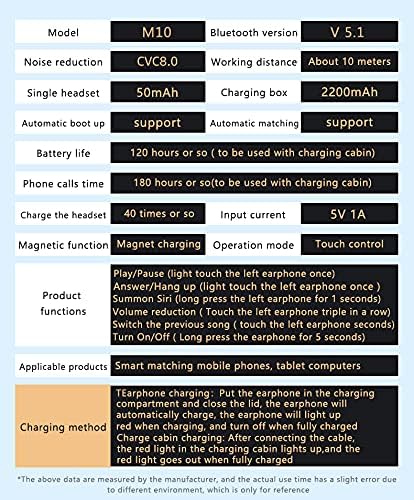
Image: A table detailing the specifications of the NC TWS Earbuds, including model, Bluetooth version, noise reduction, battery life, and product functions.
| Característica | Especificación |
|---|---|
| Nome do modelo | Auriculares |
| Versión Bluetooth | 5.1 |
| Tecnoloxía de conectividade | Sen fíos, Bluetooth 5.1 |
| Tecnoloxía de comunicación sen fíos | Bluetooth |
| Control de ruído | Cancelación activa de ruído (CVC 8.0) |
| Earphone Battery Life | 5-6 Hours (single charge) |
| Total Playback (with case) | Ata 180 horas |
| Capacidade da batería do estuche de carga | 3500 mAh |
| Estuche de carga Tempo de carga | 1.5 horas |
| Nivel de resistencia á auga | Impermeable IPX7 |
| Método de control | Toca |
| Alcance Bluetooth | 15 metros |
| Tipo de controlador de audio | Dynamic Driver (10mm dual drive units) |
| Micrófono incorporado | Si |
| Dispositivos compatibles | Smartphones, Laptops, Tablets, Smart Speakers (Android, iOS) |
| Dimensións do produto | 1.18 x 0.79 x 0.39 polgadas |
| Peso do elemento | 3.53 onzas (100 gramos) |
9. Mantemento
To ensure the longevity and optimal performance of your NC TWS Earphones, follow these maintenance guidelines:
- After use, gently wipe the earbuds with a soft, dry cloth to remove any sweat or debris.
- Ensure the charging contacts on both the earbuds and the charging case are clean and dry before placing the earbuds back into the case.
- Store the earphones and charging case in a cool, dry place away from extreme temperatures and direct sunlight.
- Avoid dropping the earphones or subjecting them to strong impacts.
- While the earphones are IPX7 waterproof, avoid prolonged submersion in water or exposure to harsh chemicals.
10 Solución de problemas
If you encounter any issues with your NC TWS Earphones, please refer to the following common troubleshooting steps:
- Sen son/Mala calidade de son: Ensure earphones are fully charged and properly paired. Check volume levels on both earphones and connected device. Clean any debris from earbud speakers.
- Auriculares sen emparellamento: Ensure Bluetooth is enabled on your device. Place both earphones back into the charging case, close the lid, then open it again to re-initiate pairing. Forget the device in your phone's Bluetooth settings and try pairing again.
- Problemas de carga: Ensure the charging cable is securely connected to both the case and a power source. Check if the charging case has power. Clean charging contacts on both earphones and case.
- Conexión intermitente: Ensure you are within the 15-meter Bluetooth range. Avoid obstacles between the earphones and your device. Reduce interference from other wireless devices.
- Os controis táctiles non responden: Asegúrate de ter os dedos limpos e secos. Tenta reiniciar os auriculares meténdoos na funda e sacándoos de novo.
Se o problema persiste despois de probar estes pasos, ponte en contacto co servizo de atención ao cliente.
11. Garantía e soporte
For warranty information and customer support, please refer to the documentation included with your product or visit the official NC product support page. Keep your purchase receipt for any warranty claims.