
1. Introdución
Thank you for choosing the AUKEY Sprint Wireless Power Bank PB-Y32. This device is designed to provide portable power for your mobile devices, featuring both wired and wireless fast charging capabilities. Please read this manual carefully before use to ensure optimal performance and safety.
2. Características do produto
- Capacidade 10000 mAh: High-capacity battery to charge your devices multiple times.
- Soporte de carga rápida: Supports Quick Charge 3.0 and Power Delivery for rapid charging of compatible devices.
- Carga sen fíos: Conveniently charge Qi-compatible devices at up to 10W.
- Múltiples portos de saída: Equipped with USB-C and USB-A ports for versatile charging.
- Deseño compacto e portátil: Fácil de transportar para ter enerxía en calquera lugar.
- Características de seguridade: Built-in protections against overcharge, over-discharge, overcurrent, and short circuits.
3. Contido do paquete
- AUKEY Sprint Wireless Power Bank PB-Y32
- Cable USB-A a C
- Manual de usuario
4. Configuración e uso inicial
4.1 Carga da batería externa
Before first use, fully charge the power bank. It takes approximately 7 hours to fully charge the power bank using a compatible USB-C power adapter.
- Connect the included USB-A to C cable to the power bank's USB-C input port.
- Connect the other end of the cable to a USB wall charger (not included).
- The LED indicators will light up to show the charging status. All four LEDs will be solid when fully charged.
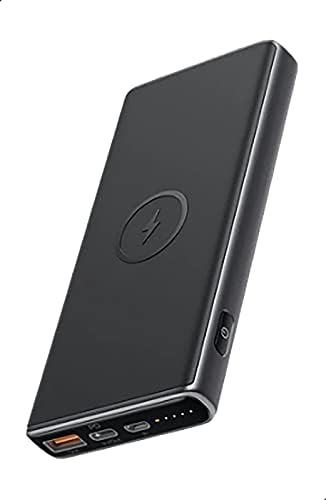
Image: The AUKEY Sprint Wireless Power Bank PB-Y32, showcasino seu elegante deseño negro e a disposición dos portos.
5. Instrucións de funcionamento
Carga con cable 5.1
To charge your device using a cable:
- Connect your device's charging cable to either the USB-A output port or the USB-C output port on the power bank.
- Conecte o outro extremo do cable ao dispositivo.
- O banco de enerxía comezará a cargar o teu dispositivo automaticamente.
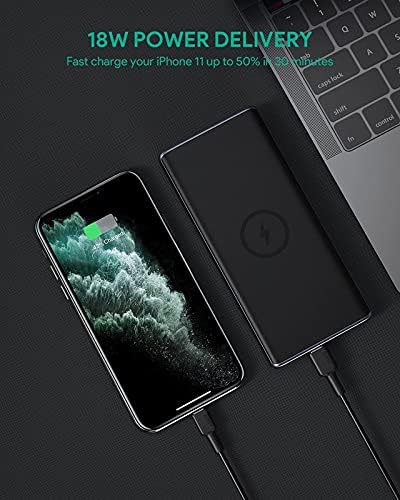
Image: The power bank connected via cable to a smartphone, demonstrating 18W Power Delivery fast charging.

Image: A smartphone connected to the power bank, illustrating Qualcomm Quick Charge 3.0 capabilities for rapid charging.
5.2 Carga sen fíos
To charge your Qi-compatible device wirelessly:
- Place your Qi-compatible device directly onto the wireless charging pad located on the top surface of the power bank. Ensure the device is centered on the charging symbol.
- The power bank will automatically detect your device and begin wireless charging.

Image: A smartphone placed on the power bank's surface, demonstrating the wireless charging feature.

Imaxe: Primeiro plano view of the power bank showing the silicone ring designed to keep the phone stable during wireless charging.
5.3 Low-Current Charging Mode
This mode is ideal for charging low-power devices like wireless earbuds or smartwatches.
- Press and hold the power button for 2 seconds to enter low-current charging mode. The first LED indicator will blink green.
- Connect your low-power device or place it on the wireless charging pad.
- To exit low-current charging mode, press the power button once, or it will automatically exit after 2 hours.
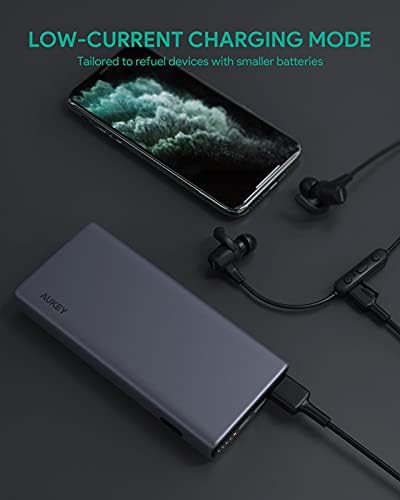
Image: The power bank connected to a smartphone and wireless earbuds, demonstrating its low-current charging mode for smaller devices.

Image: An illustration showing the power bank's broad compatibility with various devices, including smartphones, tablets, and gaming consoles.
6. Mantemento
- Keep the power bank away from liquids, extreme heat, and strong magnetic fields.
- Non deixe caer o cargador portátil nin o someta a impactos fortes.
- Limpa a batería externa cun pano seco e suave. Non empregues produtos de limpeza corrosivos.
- Garda o banco de enerxía nun lugar fresco e seco cando non estea en uso.
- Recharge the power bank at least once every 3 months to maintain battery health.
7 Solución de problemas
7.1 O banco de enerxía non carga
- Asegúrate de que o cable de carga estea conectado correctamente tanto ao banco de enerxía como ao cargador de parede.
- Proba cun cable USB-C ou cargador de parede diferente.
- Verify the wall charger's output meets the power bank's input requirements (DC 5V-3A / 9V-2A).
7.2 O dispositivo non se carga desde o banco de enerxía
- Asegúrate de que o banco de enerxía teña carga suficiente.
- Proba cun cable de carga diferente para o teu dispositivo.
- For wireless charging, ensure your device is Qi-compatible and properly aligned on the charging pad. Remove any thick cases that might interfere.
- If charging a low-power device, ensure low-current charging mode is activated.
7.3 Power Bank Overheating
- It is normal for the power bank to become slightly warm during charging or discharging.
- If it becomes excessively hot, disconnect all devices and the charging cable immediately. Allow it to cool down before resuming use.
- Ensure proper ventilation and avoid covering the power bank during use.
8. Especificacións
| Característica | Detalle |
|---|---|
| Nome do modelo | Sprint |
| Número de modelo | PB-Y32 |
| Capacidade da batería | 10000 mAh |
| Entrada USB tipo C | DC 5V-3A / 9V-2A |
| Saída USB tipo C | DC 5V-3A / 9V-2A / 12V-1.5A |
| Saída USB tipo A | 18 W |
| Potencia máxima de saída | 18 W |
| Saída de carga sen fíos | 5 W, 7.5 W, 10 W |
| Dimensións | 144 x 67 x 17 mm |
| Peso | 210 gramos |
| Composición da pila da batería | Polímero de litio |
| Características especiais | Short Circuit Protection, Wireless Charging |
| Cor | Negro |
| Tempo de carga da batería | 7 horas |
9. Garantía e soporte
According to the product specifications, this product comes with Sen garantía. For any product-related inquiries or support, please refer to the retailer or manufacturer's official websitio para información de contacto.