
1. Introdución
Thank you for choosing the CHONCHOW US801 Gaming Keyboard and Mouse Combo. This manual provides detailed instructions for setting up, operating, and maintaining your new peripheral set. Please read this manual carefully before use to ensure optimal performance and longevity of your product.

Image: The CHONCHOW US801 Gaming Keyboard and Mouse Combo, showcasing its full-size layout and ergonomic design.
2. Contido do paquete
The CHONCHOW US801 Gaming Keyboard and Mouse Combo package includes:
- 1 x CHONCHOW US801 Wired Gaming Keyboard
- 1 x CHONCHOW US801 Wired Gaming Mouse
- 1 x Manual de usuario (este documento)
3. Instrucións de configuración
The CHONCHOW US801 Gaming Keyboard and Mouse Combo is a plug-and-play device. No additional drivers or software are typically required for basic functionality.
- Conecta o teclado: Locate an available USB 2.0 port on your computer, laptop, or gaming console. Insert the USB connector of the keyboard into the port.
- Conecta o rato: Locate another available USB 2.0 port. Insert the USB connector of the mouse into the port.
- Recoñecemento do sistema: Your operating system (Windows, Mac OS, Xbox, PS4) should automatically detect and install the necessary drivers. This process may take a few moments. A notification typically appears once the device is ready for use.
- Initial Functionality Test: After installation, test the keyboard by typing and the mouse by moving the cursor and clicking buttons to ensure they are working correctly.
Note on Initial Connection:
In rare cases, after connecting the USB cable, the keyboard backlight may not illuminate fully or correctly. This can occur due to static electricity or repeated disconnections/reconnections causing signal issues with the operating system. If this happens, please wait patiently for approximately 20 seconds for the keyboard's light control chip to restart. If the issue persists, ensure your computer is connected to the internet, then reconnect the keyboard and wait for the "driver installation is complete" notification. If problems continue, refer to the Troubleshooting section or contact customer support.
4. Keyboard Features and Operation
4.1. Control de contraluz
The keyboard features adjustable RGB backlighting with multiple modes and brightness levels.
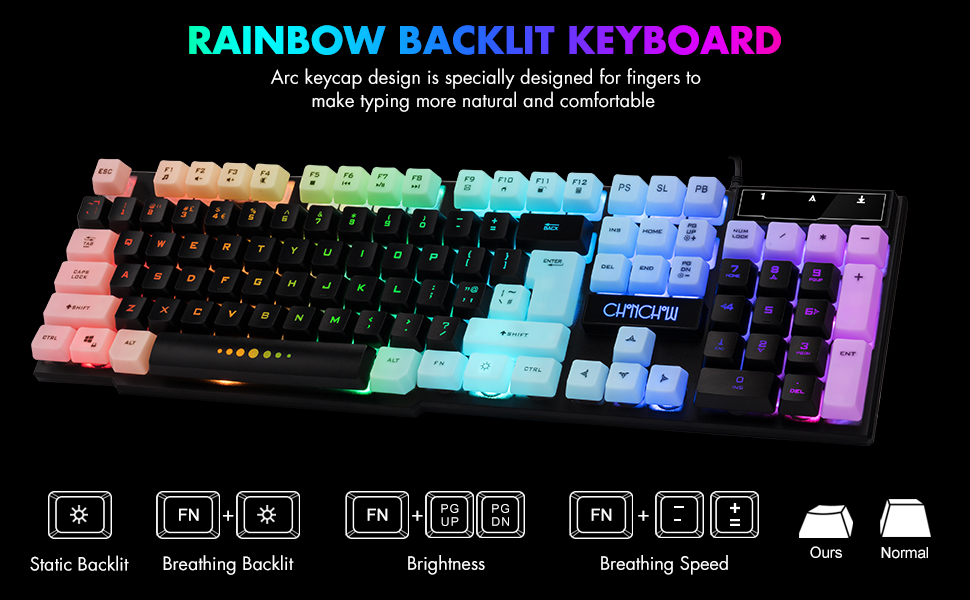
Image: Visual guide for controlling keyboard backlighting, showing key combinations for various effects.
- Activar/desactivar a retroiluminación: Preme o Bombilla key (usually located near the right Ctrl key).
- Switch Backlight Mode (Breathing/Static): Preme FN + Bombilla chave.
- Axustar o brillo: Preme FN + PG UP to increase brightness, or FN + PG DN para diminuír o brillo.
- Axustar a velocidade respiratoria: Preme FN + + to increase breathing speed, or FN + - to decrease breathing speed.
4.2. Teclas multimedia
The keyboard includes 12 multimedia function shortcut keys for quick access to common functions.

Image: Layout of the keyboard highlighting the 12 multimedia function keys and their corresponding FN key combinations.
| Combinación de teclas | Función |
|---|---|
| FN + F1 | Reproductor de música |
| FN + F2 | Baixar o volume |
| FN + F3 | Subir volume |
| FN + F4 | Silenciar |
| FN + F5 | Xogar/Parar |
| FN + F6 | Pista anterior |
| FN + F7 | Reproducir/Pausa |
| FN + F8 | Próxima pista |
| FN + F9 | Correo electrónico |
| FN + F10 | Web Casa |
| FN + F11 | Pantalla de bloqueo |
| FN + F12 | Calculadora |
4.3. Teclas antighosting
The keyboard features 19 anti-ghosting keys, ensuring that multiple key presses are registered simultaneously, which is crucial for gaming.

Image: The keyboard layout with 19 anti-ghosting keys visually indicated.
4.4. WIN Key Lock
The Windows key can be disabled to prevent accidental presses during gaming sessions.

Image: Close-up of the Windows key with an overlay indicating its lock function.
- Disable/Enable WIN Key: Preme FN + GAÑAR chave.
5. Mouse Features and Operation
The gaming mouse features 7-color breathing LED lighting and adjustable DPI settings.

Image: The CHONCHOW gaming mouse displaying its 7-color LED breathing light effect.
5.1. Axuste de DPI
The mouse offers four levels of DPI sensitivity to suit different tasks and preferences.
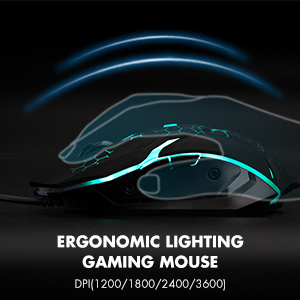
Image: The ergonomic design of the gaming mouse, highlighting its lighting and DPI settings.
- Niveis de DPI: 1200 / 1800 / 2400 / 3600 DPI.
- Adjust DPI: Preme o Botón DPI (usually located behind the scroll wheel) to cycle through the available DPI settings.
5.2. Mouse Buttons
The mouse is equipped with 6 buttons for enhanced control:
- Botón de clic esquerdo
- Botón de clic dereito
- Roda de desprazamento (clicable)
- Botón DPI
- Botón de avance
- Botón de retroceso
6. Compatibilidade
The CHONCHOW US801 Gaming Keyboard and Mouse Combo offers wide compatibility with various operating systems and devices.
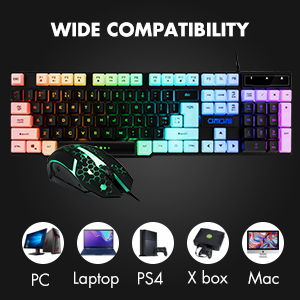
Image: Icons representing various compatible devices including PC, Laptop, PS4, Xbox, and Mac.
- Sistemas operativos: Windows 2000 / 2003 / XP / Vista / Win7 / Win8 / Win10
- Dispositivos: PC, Computer, Laptop, PS4, Xbox, Mac
7. Mantemento
Proper maintenance ensures the longevity and optimal performance of your keyboard and mouse.
- Limpeza: Use a soft, dry cloth to wipe down the surfaces of the keyboard and mouse. For deeper cleaning, especially for dust under keycaps, the keycaps are removable. Gently pull them off for cleaning and press them back into place. Avoid using harsh chemicals or abrasive materials.
- Verquidos: The keyboard features drainage holes to help mitigate damage from minor spills. In case of a liquid spill, immediately disconnect the keyboard from your device, turn it upside down to drain, and allow it to dry completely before reconnecting.
- Almacenamento: Garde o teclado e o rato nun lugar fresco e seco, lonxe da luz solar directa e de temperaturas extremas.
8 Solución de problemas
If you encounter issues with your CHONCHOW US801 Gaming Keyboard and Mouse Combo, please refer to the following common solutions:
- O teclado/rato non responde:
- Asegúrate de que os dous cables USB estean conectados correctamente aos portos USB do teu dispositivo.
- Try connecting the keyboard and mouse to different USB ports.
- Reinicia o teu ordenador ou a túa consola de xogos.
- Test the devices on another computer to rule out system-specific issues.
- Backlight Issues (Not Bright / Partially Lit):
- Wait approximately 20 seconds after connecting; the keyboard's light control chip may be restarting due to static electricity or repeated connections.
- Ensure your computer is connected to the internet, then reconnect the keyboard. Wait for the "driver installation is complete" notification.
- Axusta o brillo usando FN + PG UP / PG DN.
- As chaves non se rexistran / ghosting:
- Asegúrate de que o teclado estea limpo e libre de residuos debaixo das tapas das teclas.
- Verify that the WIN key lock is not accidentally engaged if you are experiencing issues with the Windows key.
- O cursor do rato salta ou é errático:
- Limpa o sensor óptico da parte inferior do rato.
- Asegúrate de usar o rato sobre unha superficie axeitada (por exemplo, unha alfombrilla de rato).
- Adjust DPI settings to a lower value if the cursor is too sensitive.
If the problem persists after attempting these steps, please contact CHONCHOW customer support for further assistance.
9. Especificacións
| Característica | Detalle |
|---|---|
| Marca | CHONCHOW |
| Número de modelo | US801 |
| Tecnoloxía de conectividade | USB con cable |
| Disposición do teclado | 104-Keys Full Size |
| Retroiluminación del teclado | RGB (Rainbow Backlit) |
| Características especiais do teclado | 19 Anti-Ghosting Keys, 12 Multimedia Keys, WIN Key Lock, Ergonomic, Removable Keycaps |
| Niveis de DPI do rato | 1200/1800/2400/3600 DPI |
| Botóns do rato | 6 Buttons (Left, Right, Forward, Backward, DPI, Scroll Wheel) |
| Mouse Backlighting | 7-Color Breathing LED |
| Dimensións do produto (teclado) | 17 x 5.1 x 1.3 polgadas |
| Peso do elemento | 1.94 libras |
| Material | Plástico |
10. Garantía e soporte
CHONCHOW stands behind the quality of its products. Your CHONCHOW US801 Gaming Keyboard and Mouse Combo is covered by the following:
- Reembolso ou substitución en 30 días: Para calquera problema dentro dos 30 días posteriores á compra.
- 12-Month After-Sales Service: For quality-related problems within 12 months of purchase.
For friendly and easy-to-reach support, please contact our customer service team. Refer to your purchase documentation or the CHONCHOW official websitio para os detalles de contacto.