
JBSYSTEMS PPC-081 (Model 011/8612)
JB Systems PPC-081 Adjustable Height Column Sound System
Manual de usuario
1. Introdución
Welcome to the user manual for the JB Systems PPC-081 Adjustable Height Column Sound System. This versatile PA system is designed for various audio applications, featuring an 8-inch woofer for deep bass, a built-in media player, and Bluetooth connectivity. Its modular design allows for three different height configurations, making it adaptable to your specific needs. Please read this manual thoroughly before operating the device to ensure proper use and to prevent damage.
2. Información de seguridade
Always observe the following basic safety precautions when using this product:
- Lea atentamente todas as instrucións antes do uso.
- Conserve este manual para futuras consultas.
- Non expoña a unidade á choiva nin á humidade para evitar incendios ou descargas eléctricas.
- Asegúrese de que a fonte de alimentación coincida co voltage requisitos especificados na unidade.
- Non abras a c.asing. Non hai pezas que o usuario poida reparar no interior. Encomende calquera mantemento a persoal cualificado.
- Coloque a unidade sobre unha superficie estable e nivelada para evitar que se volque.
- Avoid blocking ventilation openings. Ensure adequate airflow around the unit.
- Desconecte o cable de alimentación durante tormentas eléctricas ou cando non se use durante períodos prolongados.
- Non coloque obxectos cheos de líquidos, como vasos, sobre o aparello.
- Manteña a unidade lonxe de fontes de calor como radiadores, rexistros de calor, estufas ou outros aparellos (incluídos amplificadores) que producen calor.
3. Contido do paquete
The JB Systems PPC-081 package includes the following components:
- 1 x Main Subwoofer Unit (with integrated amplifier and media player)
- 2 x Modular Column Speaker Segments
- 1 x Top Column Speaker Segment
- 1 x Power Cable (IEC)
- Microphone Cables (if included in specific bundle)
- 1 x Stereo Mini Jack Cable
- Manual de usuario
4. Produto rematadoview
The PPC-081 system is comprised of a main subwoofer unit and modular column speaker segments, designed for flexible setup and powerful sound delivery.
4.1 Main Unit (Subwoofer)

The main unit houses the 8-inch woofer, amplifier, and control panel, forming the base of the system.
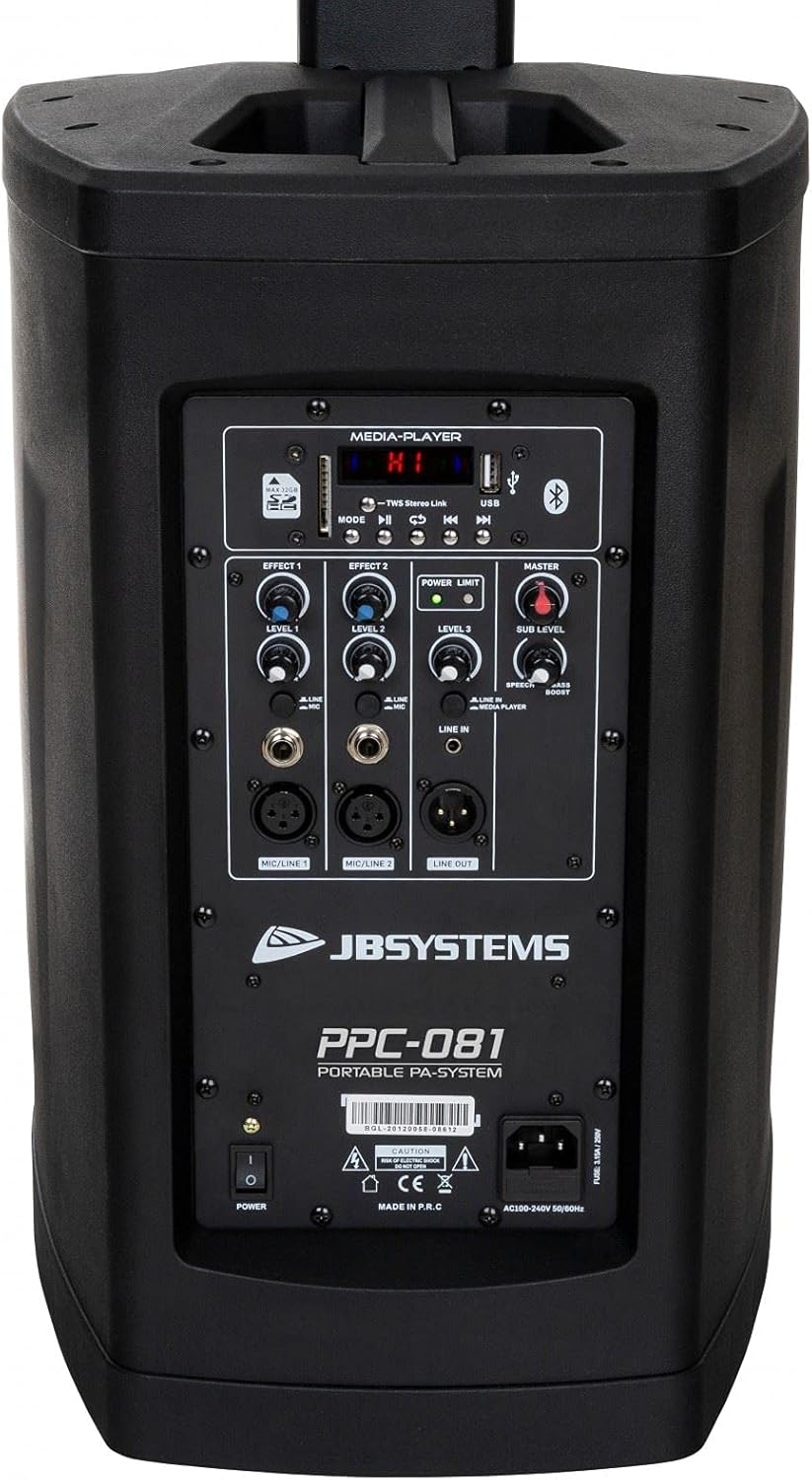
Traseira view of the main unit, showing the control panel and power input.
4.2 Column Speaker Segments
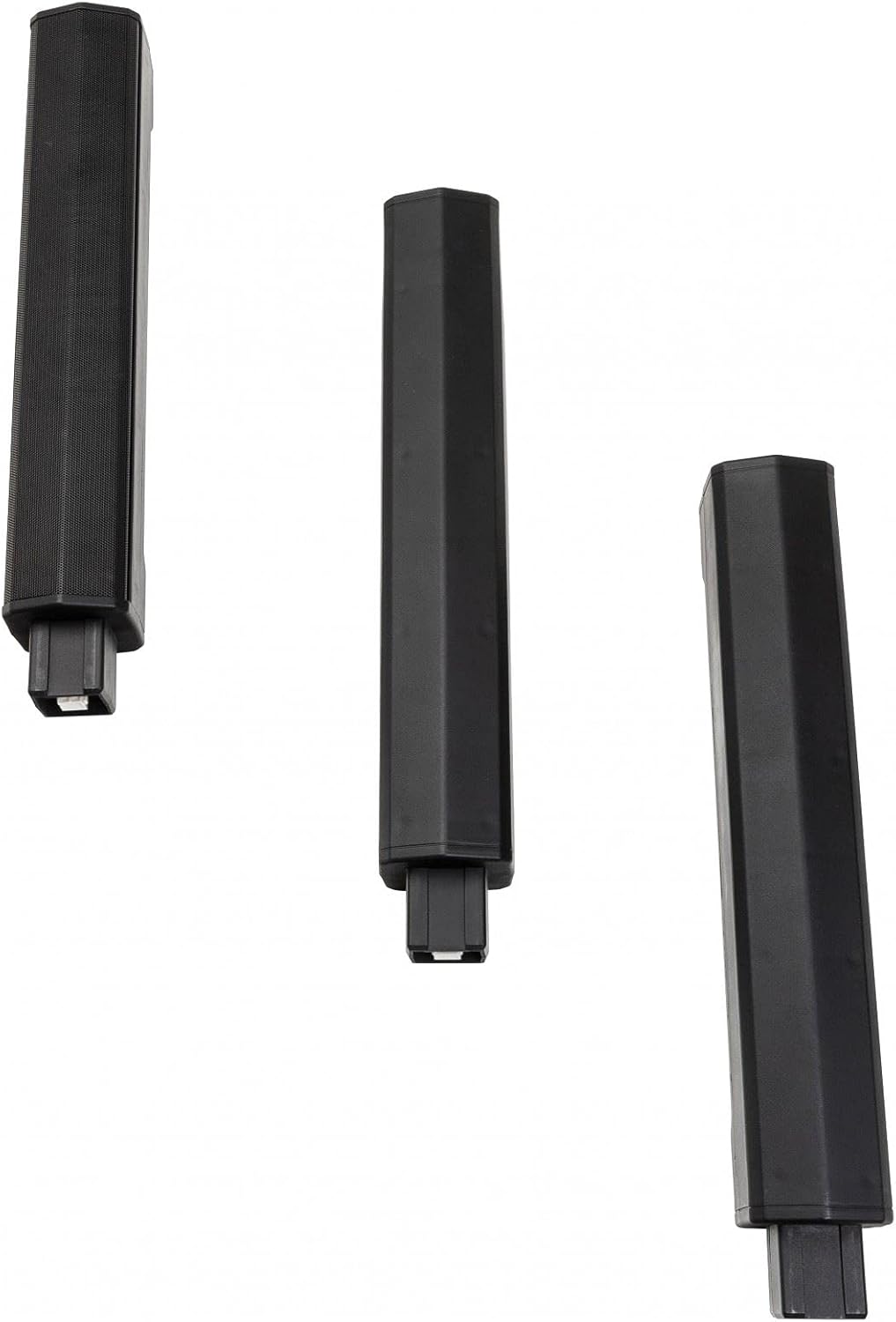
The system includes multiple modular column speaker segments that can be stacked to achieve different heights.
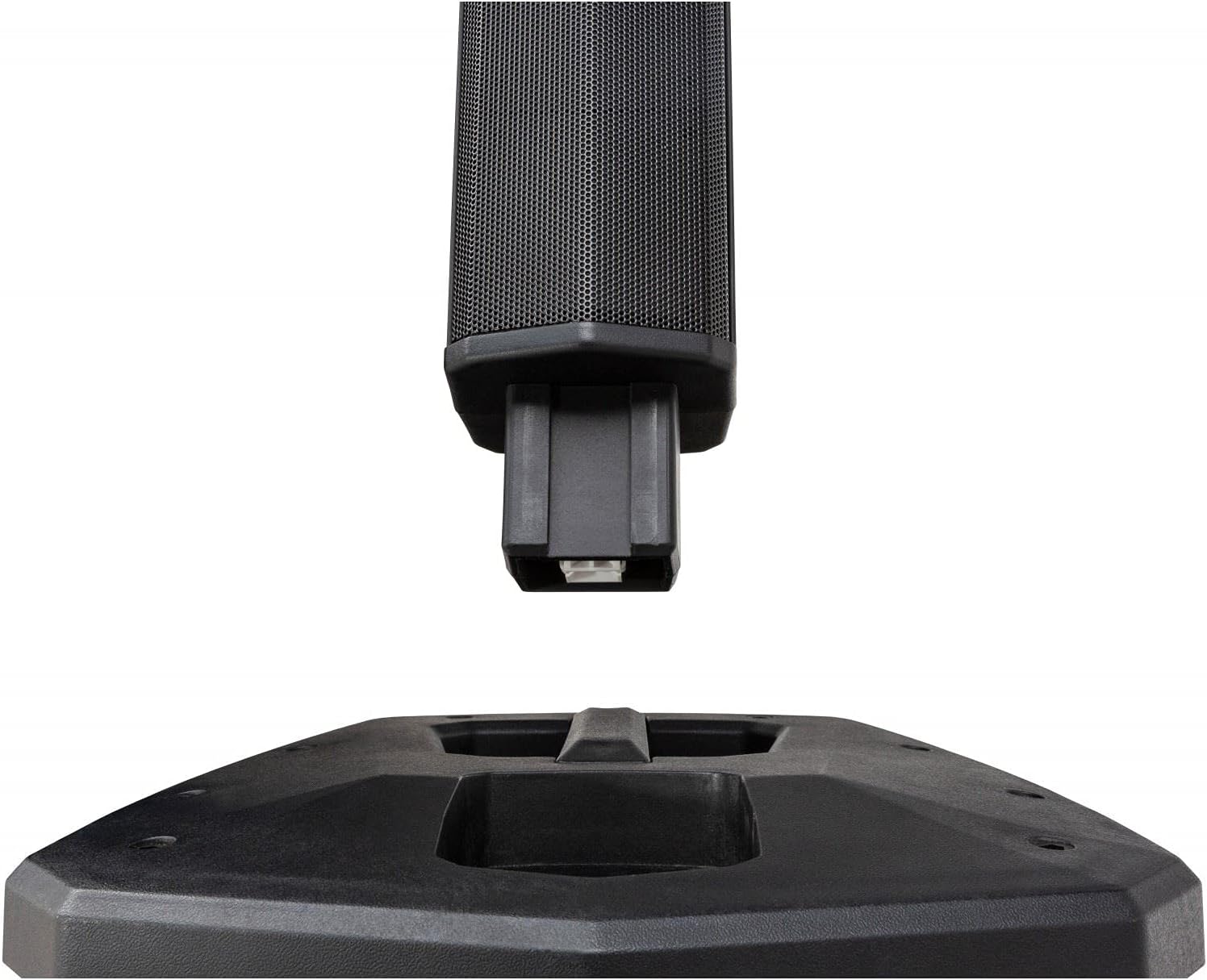
Detail of the connection point for the column speaker segments, ensuring secure assembly.
4.3 Panel de control

Close-up of the control panel, featuring inputs, level controls, and media player interface.
The control panel provides access to all system functions:
- Reproductor multimedia: Supports USB and SD-HC cards (up to 32GB) for MP3, WAV, WMA, APE, and FLAC playback. Includes Bluetooth connectivity for wireless audio streaming.
- Volume principal: Overall volume control for the system.
- Subnivel: Independent bass level control for the 8-inch woofer.
- Microphone Inputs (MIC/LINE 1 & 2): Two combo XLR/Jack inputs with individual level controls and built-in sound effects. Can also be used as mono line inputs.
- Line Input (LINE IN): Stereo mini jack input for connecting external audio players.
- Line Out (LINE OUT): Balanced XLR output for connecting additional speakers or audio devices.
- Controles de efectos: Adjustments for built-in audio effects.
- Power Limit Indicator: LED indicator for system power status.
5. Configuración
5.1 Asemblea
The PPC-081 system offers modular assembly for adjustable height:
Step 1: Position the Main Unit
Place the main subwoofer unit on a stable, flat surface where you intend to use the system.
Step 2: Assemble Column Speakers
Choose your desired height configuration by stacking the modular column speaker segments:
- Low Height (920mm): Attach only the top column speaker segment directly to the main unit.
- Medium Height (1390mm): Attach one modular column segment, then the top column speaker segment.
- Maximum Height (1860mm): Attach both modular column segments, then the top column speaker segment.
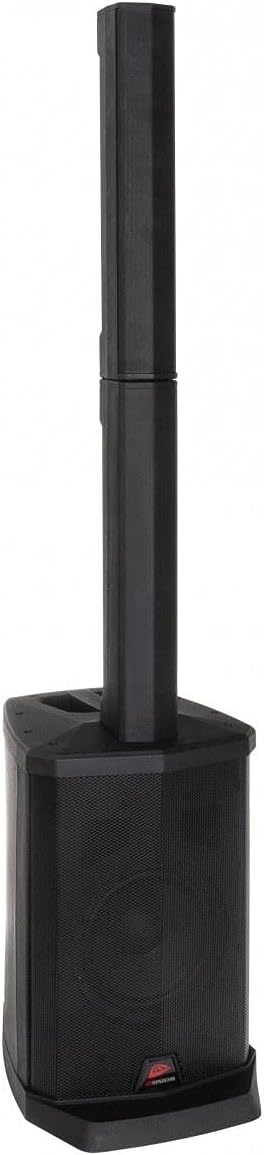
The system assembled with one column segment for a compact setup.

The system assembled with two column segments for medium height.
The system fully assembled with all column segments for maximum height.
Paso 3: Conecte a enerxía
Connect the supplied power cable to the IEC power inlet on the rear of the main unit, then plug it into a suitable AC outlet (100-240V, 50/60Hz).
5.2 Conexións
Conexións do micrófono
Connect microphones to the MIC/LINE 1 or MIC/LINE 2 combo inputs using XLR or 1/4" Jack cables. Adjust individual level controls as needed.
Conexións de entrada de liña
For external audio sources like smartphones or laptops, use the stereo mini jack input (LINE IN). For other line-level devices, use the RCA inputs.
External Speaker Connection (Line Out)
To connect additional powered speakers or audio equipment, use the balanced XLR Line Out.
6. Instrucións de funcionamento
6.1 Acendido/Apagado
Press the POWER switch on the rear panel to turn the unit ON or OFF. The Power Limit indicator will illuminate when the unit is on.
6.2 Funcionamento do reprodutor multimedia
USB/SD-HC Playback
Insert a USB drive or SD-HC card (up to 32GB) containing MP3, WAV, WMA, APE, or FLAC files into the respective slot. The media player will automatically detect and begin playback. Use the media player controls (Play/Pause, Next, Previous, Mode) to navigate.
Emparejamento Bluetooth
- Press the MODE button on the media player until 'Bluetooth' mode is selected.
- On your Bluetooth-enabled device (smartphone, tablet), search for available devices.
- Select 'PPC-081' from the list to pair. Once paired, you can stream audio wirelessly.
Bluetooth TWS (True Wireless Stereo): If you have two PPC-081 units, you can link them wirelessly for stereo sound. Refer to the specific TWS pairing instructions in the full manual (if available) or on the manufacturer's websitio.
6.3 Axustar os niveis
- Nivel mestre: Use the MASTER knob to control the overall output volume of the system.
- Subnivel: Adjust the SUB LEVEL knob to control the bass intensity from the 8-inch woofer.
- MIC/LINE Levels: Use the individual LEVEL knobs for MIC/LINE 1 and MIC/LINE 2 to adjust the volume of connected microphones or line-level devices.
6.4 Using Microphone Inputs
After connecting your microphone, adjust its individual level knob. Experiment with the built-in effect controls (EFFECT 1, EFFECT 2, EFFECT 3) to add reverb or other enhancements to the microphone signal.
7. Mantemento
- Limpeza: Limpe a unidade cun pano suave e seco. Non empregue produtos de limpeza abrasivos nin solventes.
- Almacenamento: When not in use, store the system in a cool, dry place, away from direct sunlight and extreme temperatures. If disassembling, ensure all components are stored safely.
- Ventilación: Asegúrate de que as aberturas de ventilación estean libres de po e residuos para evitar o sobrequecemento.
8 Solución de problemas
If you encounter issues with your PPC-081 system, refer to the table below for common problems and solutions:
| Problema | Causa posible | Solución |
|---|---|---|
| Sen poder | Cable de alimentación non conectado; interruptor de alimentación apagado; toma de corrente non funciona. | Comprobe a conexión do cable de alimentación; asegúrese de que o interruptor de alimentación estea aceso; probe a toma de corrente con outro dispositivo. |
| Sen saída de son | Master volume too low; Input level too low; Incorrect input selected; Speaker segments not properly connected. | Increase Master and input levels; Ensure correct input mode is selected; Re-check connections of column speakers to main unit. |
| Bluetooth non se sincroniza | Unit not in Bluetooth mode; Device too far; Bluetooth already connected to another device. | Ensure unit is in Bluetooth mode; Move device closer; Disconnect from other devices and try again. |
| Son distorsionado | Input signal too high (clipping); Master volume too high; Damaged cable. | Reduce input level; Lower Master volume; Try a different cable. |
| O micrófono non funciona | Microphone not connected; Microphone level too low; Faulty microphone. | Ensure microphone is securely connected; Increase MIC/LINE level; Test with a different microphone. |
If the problem persists after trying these solutions, please contact JB Systems customer support or your local dealer for assistance.
9. Especificacións
Detailed technical specifications for the JB Systems PPC-081:
| Característica | Especificación |
|---|---|
| Número de modelo | 011/8612 |
| Diámetro do woofer | 8 polgadas |
| RMS Power per Channel | 100 Watts (8 Ohm) |
| Rango de frecuencias | 45 Hz - 18000 Hz |
| Formatos de audio admitidos | MP3, WAV, WMA, APE, FLAC |
| Conexións de entrada | XLR, RCA, 1/4" Jack, USB, Bluetooth, IEC (Power) |
| Conexións de saída | XLR (Line Out) |
| Consumo de enerxía | 100 W |
| Fonte de alimentación | AC 100 - 240V, 50/60Hz |
| Dimensions (Max Height) | 310 x 400 x 1860 mm (ancho x fondo x alto) |
| Dimensions (Medium Height) | 310 x 400 x 1390 mm (ancho x fondo x alto) |
| Dimensions (Low Height) | 310 x 400 x 920 mm (ancho x fondo x alto) |
| Peso | 13.8 kg |
| Tecnoloxía sen fíos | Bluetooth |
| Método de control | Táctil |
| Cor | Negro |
10. Garantía e soporte
This JB Systems PPC-081 product comes with a limited warranty. For detailed warranty terms and conditions, please refer to the documentation provided with your purchase or visit the official JB Systems websitio.
For technical support, service inquiries, or to find authorized service centers, please visit the official JB Systems website or contact your local dealer. Please have your product model number (PPC-081 / 011/8612) and purchase information ready when seeking support.
Ask a question about this manual
Ask about setup, troubleshooting, compatibility, parts, safety, or missing instructions. Manuals+ will review the question and use this page’s manual context to help answer it.