
1. Introdución
Thank you for choosing the Hoco ES39 Wireless Bluetooth Earphones. This manual provides essential information for setting up, operating, and maintaining your earphones. Please read it carefully before use to ensure optimal performance and longevity of your device.
The Hoco ES39 earphones offer a seamless audio experience with Bluetooth 5.0 connectivity, a convenient charging case, and a water-resistant design suitable for various activities.
2. Contido do paquete
- Hoco ES39 Wireless Bluetooth Earphones (Left & Right)
- Estuche de carga
- Ear Cushions (pre-installed or in various sizes)
- Cable de carga USB
- Manual de usuario
3. Produto rematadoview
Familiarize yourself with the components of your Hoco ES39 earphones.
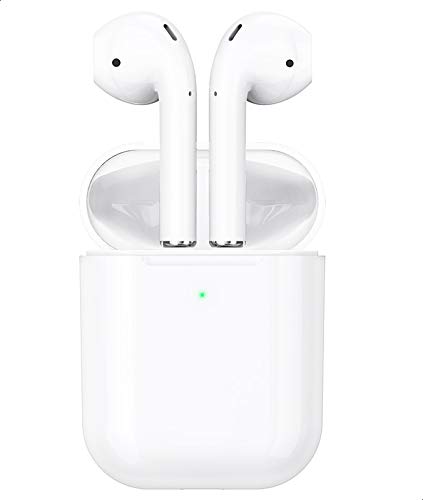
This image shows the Hoco ES39 wireless earphones, one placed outside its charging case and the other inside, alongside a smartphone. This illustrates the compact design and how the earphones are used with a mobile device.
- Auriculares: Left (L) and Right (R) earphones with touch control areas.
- Estuche de carga: Stores and charges the earphones. Features an LED indicator for battery status.
- Porto de carga: Situado na caixa de carga para a entrada de enerxía.
- Indicador LED: On both earphones and the charging case, indicating charging status, pairing mode, and battery level.
4. Configuración
4.1 Carga dos auriculares e da funda
Antes do primeiro uso, carga completamente os auriculares e a caixa de carga.
- Carga o estuche de carga: Connect the provided USB charging cable to the charging port on the case and a power source. The LED indicator on the case will show charging status and turn solid when fully charged.
- Cargar os auriculares: Place the earphones into their respective slots in the charging case. Ensure they are correctly seated. The earphones will begin charging automatically. The LED indicators on the earphones will show charging status and turn off when fully charged.
4.2 Emparellamento cun dispositivo Bluetooth
The Hoco ES39 earphones are designed for automatic pairing.
- Activar Bluetooth: Ensure Bluetooth is enabled on your smartphone or other device.
- Power On Earphones: Open the charging case and remove both earphones. They will automatically power on and enter pairing mode. The LED indicator on one earphone will flash, indicating it's ready to pair.
- Conectar: On your device, search for Bluetooth devices and select "Hoco ES39" from the list. Once connected, a voice prompt will confirm successful pairing.
- Uso dun só auricular: Either earbud can be used independently. Simply remove one earbud from the case, and it will automatically connect to the last paired device.
5. Instrucións de funcionamento
The Hoco ES39 earphones feature intuitive touch controls.

This image features the Hoco ES39 earphones within their open charging case, positioned beside a smartphone displaying a music player interface. This highlights the product's primary function for audio playback.
5.1 Encendido/apagado
- Encendido: Remove earphones from the charging case. They will power on automatically. Alternatively, long-press the touch control area for 3 seconds.
- Apagado: Place earphones back into the charging case. They will power off automatically. Alternatively, long-press the touch control area for 5 seconds.
5.2 Reprodución de música
- Reproducir/Pausa: Un só toque en calquera dos auriculares.
- Próxima pista: Toca dúas veces o auricular dereito.
- Pista anterior: Toca dúas veces o auricular esquerdo.
- Control de volume: Adjust volume directly from your connected device.
5.3 Xestión de chamadas
- Responder/Finalizar chamada: Toque unha vez en calquera dos auriculares durante unha chamada entrante ou activa.
- Rexeitar a chamada: Long-press on either earphone for 2 seconds during an incoming call.
5.4 Asistente de voz
- Activar o asistente de voz: Triple tap on either earphone to activate your device's voice assistant (e.g., Siri, Google Assistant).
6. Mantemento
Proper care ensures the longevity of your Hoco ES39 earphones.
- Limpeza: Usa un pano suave, seco e sen pelusa para limpar os auriculares e a funda de carga. Non empregues produtos químicos agresivos nin materiais abrasivos.
- Almacenamento: Garda sempre os auriculares no seu estoxo de carga cando non os uses para protexelos e mantelos cargados.
- Resistencia á auga: The earphones have an IPX-1 water resistance rating, meaning they are protected against vertically falling drops of water. They are resistant to light splashes and sweat but are not designed for immersion in water or use during heavy rain. Avoid exposing them to excessive moisture.
- Temperatura: Evite expoñer os auriculares a temperaturas extremas (calor ou frío) ou á luz solar directa durante períodos prolongados.
7 Solución de problemas
If you encounter issues with your Hoco ES39 earphones, try the following solutions:
- Auriculares sen emparellamento:
- Asegúrate de que tanto os auriculares como a caixa de carga estean suficientemente cargados.
- Desactiva e despois activa o Bluetooth no teu dispositivo.
- Forget "Hoco ES39" from your device's Bluetooth list and attempt to re-pair.
- Place both earphones back into the charging case, close the lid, wait a few seconds, then open and remove them to reset.
- Non se escoita son dun ou de ambos auriculares:
- Comproba o nivel de volume no dispositivo conectado.
- Asegúrate de que os auriculares estean conectados correctamente ao teu dispositivo.
- Tenta reproducir diferentes fontes de son.
- Problemas de carga:
- Verifica que o cable de carga estea conectado de forma segura tanto á caixa como á fonte de alimentación.
- Proba cun cable USB ou adaptador de corrente diferente.
- Asegúrate de que os contactos de carga dos auriculares e do interior da funda estean limpos e libres de residuos.
- Os auriculares desconéctanse con frecuencia:
- Asegúrate de estar dentro do alcance efectivo de Bluetooth (normalmente 10 metros/33 pés) sen obstáculos significativos.
- Minimizar as interferencias doutros dispositivos sen fíos.
8. Especificacións
| Característica | Especificación |
|---|---|
| Marca | Hoco |
| Modelo | ES39 |
| Versión Bluetooth | 5.0 |
| Capacidade da batería (caso de carga) | 320 mAh |
| Tempo de carga | Aproximadamente 1 hora |
| Tempo de conversa | Aproximadamente 3 horas |
| Clasificación de resistencia á auga | IPX-1 |
| Micrófono | Incluído |
| Peso | 46 gramos (total) |
| Factor de forma | In-Ear |
| Tecnoloxía de conectividade | Sen fíos |
| Tipo de control | Touch Control, Volume Control (via connected device) |
| Materiais | Plástico |
| Dispositivos compatibles | Multi-device (Smartphones, Tablets, etc.) |
9. Garantía e soporte
Hoco products are designed and manufactured to the highest quality standards. For information regarding warranty coverage, please refer to the warranty card included in your package or contact your retailer.
For technical support or customer service inquiries, please visit the official Hoco website or contact your local distributor. Please have your product model (ES39) and purchase details ready when seeking support.