
Introdución
This manual provides comprehensive instructions for the setup, operation, and maintenance of your POLONO PL60 Thermal Label Printer. Please read this guide thoroughly before using the printer to ensure optimal performance and longevity.
Contido do paquete
Verifique que todos os elementos que se indican a continuación estean incluídos no seu paquete:
- 1 Grey POLONO PL60 Thermal Label Printer
- 1 cable de alimentación
- Cable USB 1
- 1 U Disk (containing printer driver, installation guide, setup guide, and user manual)
- 1 Guía de inicio rápido
- 10pcs 4"x6" Labels (sample)

Image: All components included in the POLONO PL60 printer package, including the printer, cables, U disk, quick start guide, and sampas etiquetas.
Instrucións de configuración
- Connect Power and USB Cable: Connect the power cord to the printer and a power outlet. Connect the USB cable from the printer to your computer (Windows or Mac).

Image: Step 1 of setup, showing the power and USB cables being connected to the printer.
- Instalar o controlador: Insert the included U Disk into your computer. Install the printer driver. Alternatively, download the latest driver from the official POLONO website. The printer is compatible with Windows and Mac operating systems. Note: This printer does not support Bluetooth or Chromebook.

Image: The POLONO PL60 printer connected to a laptop, indicating compatibility with Mac and Windows systems.
- Etiquetas de carga: Open the printer cover. Place the thermal labels into the label compartment, ensuring the print side faces up. Adjust the label guides to fit the label width snugly. Close the cover.

Image: Step 3 of setup, demonstrating how to load labels into the printer's compartment.
- Automatic Label Alignment: After loading labels and closing the cover, press the feed button on the printer. The printer will automatically detect the label size and align the labels for printing.

Image: The POLONO PL60 printer with labels loaded, showing the automatic label detection feature.
Instrucións de funcionamento
Impresión de etiquetas
The POLONO PL60 printer uses advanced thermal direct technology, eliminating the need for ink or toner. It supports label widths from 1.57 inches (40 mm) to 4.65 inches (118 mm).
- Prepare o seu documento: Ensure your label design or shipping label is correctly formatted for a 4x6 inch label (or other supported sizes).
- Seleccionar impresora: In your computer's print dialog, select "POLONO PL60" as your printer.
- Configuración de impresión: Adjust print settings as needed. For optimal print quality, you may need to adjust the print density/darkness and speed in the printer preferences. Slower speeds generally result in better print quality.
- Iniciar impresión: Click "Print" to send the label to the printer. The printer can achieve speeds of 150mm/s, printing approximately 72 labels per minute.

Image: The POLONO PL60 printer printing a label, highlighting its high efficiency and print quality.
Adjusting Print Darkness and Speed (Windows Example)
To customize print quality, follow these steps:
- Go to your computer's Configuración > Impresoras e escáneres.
- Seleccione o POLONO Label Printer e fai clic Xestionar.
- Ir a Preferencias da impresora.
- No Configuración avanzada fiestra, fai clic en Velocidade e selecciona Customize Print Speed. Adjust the slider to a slower speed for better print quality.
- Similarly, adjust Escuridade settings to achieve desired label contrast.
Video: Instructions on how to adjust the print darkness settings for the POLONO PL60 printer.
Tamaños de etiqueta compatibles
The printer supports various label sizes, including:
- 4" x 6"
- 3" x 2"
- 3" x 1"
- 2" x 1"
- 2-5/16" x 4"
- 2.25" x 1.25"
- 2-inch round labels
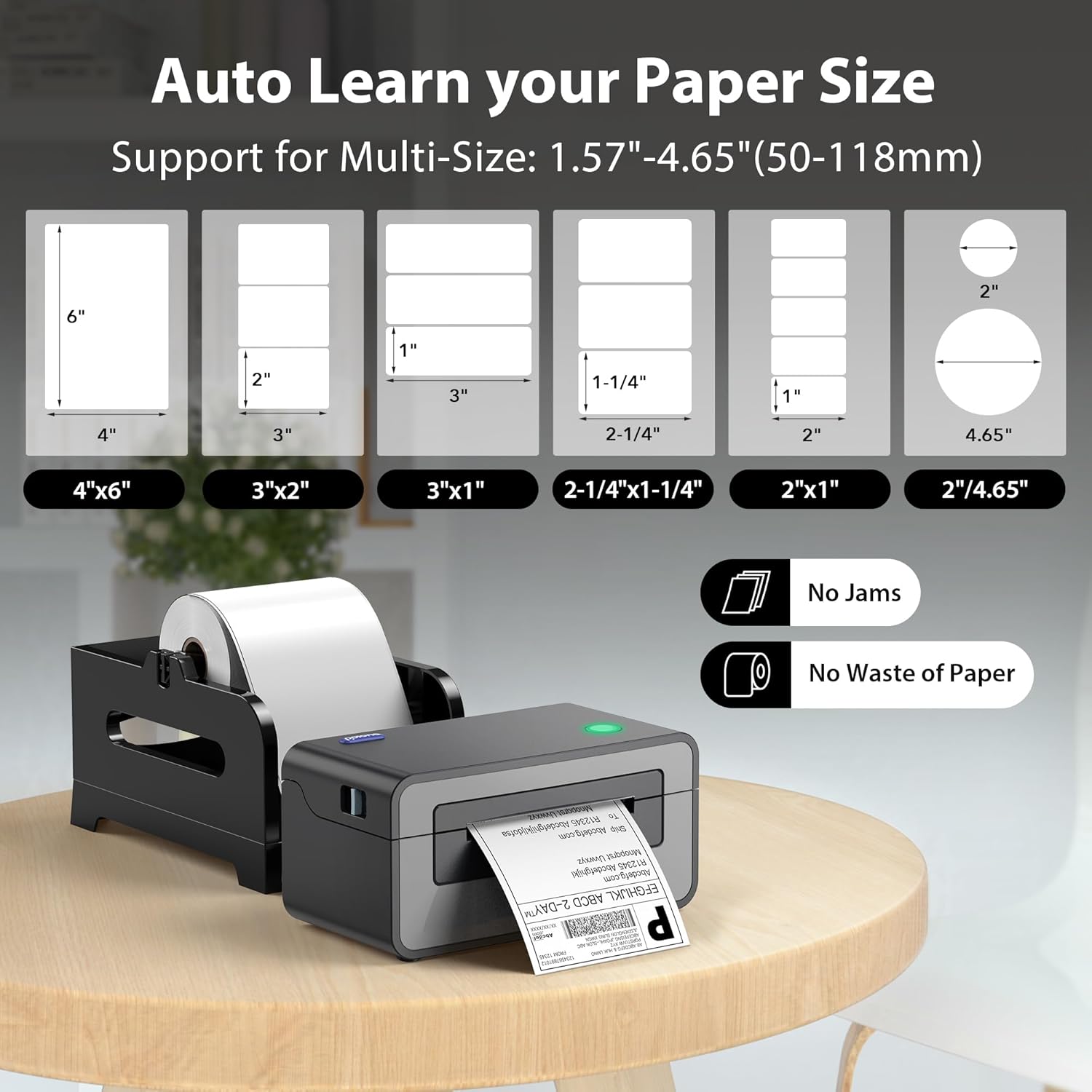
Image: Visual representation of different label sizes that the POLONO PL60 printer can automatically detect and print.
Mantemento
The POLONO PL60 is a thermal direct printer, meaning it does not require ink cartridges or toner. This simplifies maintenance significantly.
- Limpeza do cabezal de impresión: Periodically clean the print head with an alcohol wipe to ensure clear print quality. Refer to the detailed user manual on the U Disk for specific cleaning instructions.
- Limpeza xeral: Manteña a impresora libre de po e sucidade. Use un pano suave e seco para limpar o exterior.
Resolución de problemas
Problemas comúns e solucións
- Printer Not Responding / Not Printing:
- Ensure the power cord and USB cable are securely connected.
- Verify the printer is turned on (indicated by the LED light).
- Check if the correct printer driver is installed and updated.
- For Mac users experiencing issues, try uninstalling the driver, deleting the printer from your computer settings, then reinstalling the driver from the provided U Disk and re-adding the printer.
- Faded or Poor Print Quality:
- Adjust the print darkness setting in your printer preferences (refer to "Adjusting Print Darkness and Speed" section).
- Asegúrate de usar etiquetas térmicas de alta calidade.
- Limpe o cabezal de impresión como se describe na sección Mantemento.
- Labels Not Feeding Correctly / "Out of Labels" Error:
- Ensure labels are loaded correctly with the print side up.
- Adjust the label guides to fit the label width.
- Press the feed button to allow the printer to automatically detect and align the labels.
Especificacións
| Característica | Detalle |
|---|---|
| Marca | POLONO |
| Nome do modelo | PL60 |
| Tecnoloxía de conectividade | USB |
| Tecnoloxía de impresión | Térmica |
| Cor | Gris |
| Saída da impresora | Monocromo |
| Velocidade máxima de impresión (monocromo) | 150mm/s (72 labels/minute) |
| Peso do elemento | 1.9 quilogramos |
| Dimensións do produto (P x A x A) | 11.5" x 6" x 6" |
| Resolución | 203 x 203 DPI |
| Tamaño máximo do soporte | 4 x 6 polgadas |
| Tamaños de papel admitidos | 4"x6", 3"x2", 3"x1", 2"x1", 2.25"x1.25", 2-5/16" x 4", 2" Circle Inches |
| Dispositivos compatibles | Laptops, Mac, PC, Windows |
Garantía e Soporte
The POLONO PL60 Thermal Label Printer comes with a Garantía limitada do fabricante dun ano.
For further assistance, detailed user manuals, and driver downloads, please refer to the included U Disk or visit the official POLONO websitio.
Tamén podes acceder ao Guía de usuario (PDF) para información adicional.