
1. Introdución
This manual provides detailed instructions for the installation, operation, and maintenance of your ATOTO F7 XE 10.1-inch Double Din Car Stereo. Please read this manual thoroughly before using the product to ensure proper functionality and safety. The ATOTO F7 XE is an advanced in-dash navigation system designed to enhance your driving experience with its QLED display, wireless smartphone integration, and comprehensive audio features.

Image: ATOTO F7 XE Car Stereo showcasing its main features including Wireless CarPlay and Android Auto.
2. Información de seguridade
For your safety and the safety of others, observe the following precautions:
- Non manexes o dispositivo dun xeito que te distraia da condución. Prioriza sempre a seguridade viaria.
- Adjust volume to a level that allows you to hear outside traffic and emergency vehicles.
- Avoid prolonged exposure to direct sunlight or extreme temperatures, as this may damage the device.
- Ensure all wiring is correctly connected to prevent electrical hazards or damage to the vehicle's electrical system.
- Se tes dúbidas sobre algún paso, consulta cun profesional para a instalación.
3. Contido do paquete
Verifica que todos os elementos estean presentes no paquete:
- Car Stereo (ATOTO F7 XE Head Unit)
- Micrófono externo
- Double Brackets
- Cable de alimentación

Imaxe: Detallada view of the ATOTO F7 XE package contents, including the head unit, external microphone, double brackets, and power cable, alongside a wiring diagram and dimensions.
4. Instalación
The ATOTO F7 XE is a universal double DIN head unit. Installation may require additional vehicle-specific accessories (e.g., dash frame kit, wiring harness, radio antenna adapter, CANBUS data interface) not included in the package. It is recommended to consult a professional installer if you are unfamiliar with car audio system installation.
4.1 Diagrama de cableado
Refer to the included wiring diagram for proper connections. Ensure all connections are secure before powering on the device.
4.2 Montaxe
Use the provided double brackets for secure installation into your vehicle's double DIN opening. On some vehicles, the 10.1-inch display may partially obstruct air vents or buttons. Verify compatibility with your vehicle's dashboard layout.
5. Key Features & Functions
5.1 Visualización
The F7 XE features a Full HD 10.1-inch 1280x720 QLED display with a 178° full-viewing angle and 600cd/m2 brightness, offering clear visibility even in bright daylight. It utilizes a 5-touch capacitive touchscreen for smooth operation.

Image: The ATOTO F7 XE's 10.1-inch 1280x720 QLED display, highlighting its wide viewing angle, video output capabilities, and HD Rear-View Camera input with Live Rear-View (LRV) functionality.
5.2 CarPlay sen fíos e Android Auto
Enjoy seamless integration with your smartphone. The F7 XE supports both wireless and wired CarPlay (for iPhone 5 or later with iOS 7.1+) and Android Auto (for phones running Android 6.0 or higher). This allows access to navigation, music, messages, and calls directly from the car stereo display. The unit also supports quick charging (max. 1.5 A) for your phone when connected via wired CarPlay/Android Auto.

Image: Visual representation of wireless and wired connections for CarPlay and Android Auto, along with MirrorLink via AutoLink, demonstrating phone charging while connected.
5.3 MirrorLink (AutoLink)
For applications not supported by CarPlay or Android Auto, MirrorLink (via the AutoLink app) allows you to display your phone's screen on the F7 XE. Note that certain video streaming services may not support MirrorLink.
5.4 Funcións de audio
The F7 XE includes a built-in pre-amplifier with a maximum output of 4*49W and RMS 4*29W. It features a 10-band EQ with 7 presets, allowing for sound customization. Separate Subwoofer Out (0.8v) is also available.
5.5 Conectividade
The unit supports Bluetooth 5.0 for hands-free calls and music streaming. It includes two USB interfaces (one for phone connection, one for external storage up to 2TB SSD) and one Micro SD slot (up to 512GB) for media playback. Both SD and SSD must be in FAT32 or NTFS format.
5.6 entradas de cámara
The F7 XE supports 720P HD rearview camera input. The Live Rear-View (LRV) feature, when used with the ATOTO AC-HD02LR rear-view camera (sold separately), provides a real-time rear view even when moving forward.
5.7 Control do volante
The F7 XE supports OEM steering wheel control functions. It is also compatible with the ATOTO AC-44F5 wireless IR remote (sold separately) for convenient control.
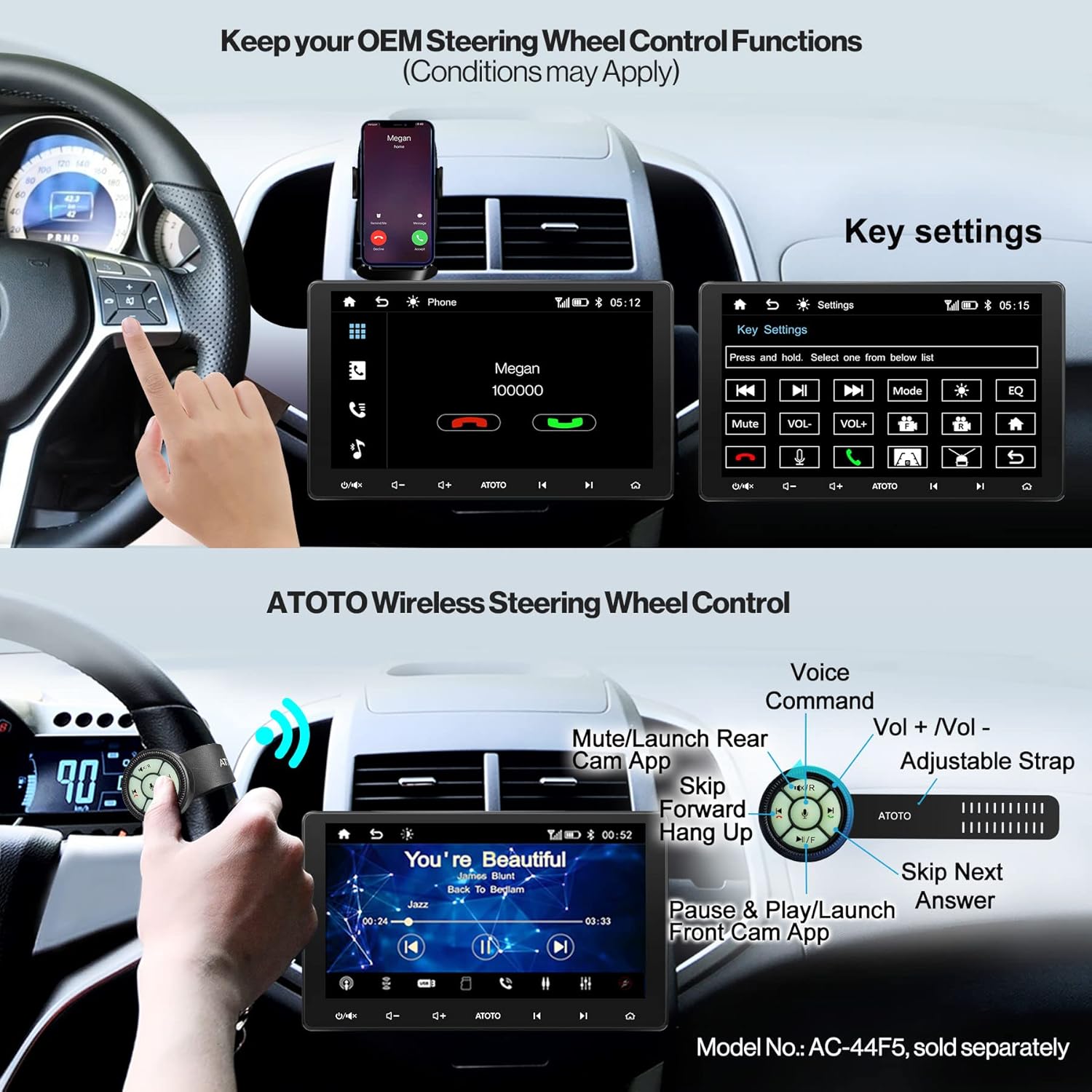
Image: Illustration of how to retain OEM steering wheel control functions and the optional ATOTO wireless steering wheel control (AC-44F5) with its various buttons and their corresponding actions.
5.8 SiriusXM Compatibility
The F7G211XE is compatible with SiriusXM. A Connect Vehicle Tuner and subscription are required (sold separately).
6. Instrucións de funcionamento
6.1 Funcionamento básico
The touchscreen interface allows for intuitive control. Use the physical buttons on the unit for quick access to essential functions like volume, power, and mode selection.
6.2 CarPlay / Android Auto Usage
To use wireless CarPlay/Android Auto, ensure Bluetooth and Wi-Fi are enabled on your phone and the F7 XE. For wired connection, use the original USB cable that came with your phone and connect it to the 'Phone Link' USB port. Once connected, your phone's compatible apps will appear on the F7 XE display.
6.3 MirrorLink Usage
Install the 'AutoLink' app on your F7 XE. Connect your smartphone via USB to enable screen mirroring. Follow the on-screen prompts to establish the connection.
6.4 Configuración de audio
Access the audio settings menu to adjust the 10-band equalizer, select from 7 preset sound profiles, and configure subwoofer output levels.
6.5 Emparejamento Bluetooth
Navigate to the Bluetooth settings on the F7 XE. Enable Bluetooth on your smartphone and search for available devices. Select 'ATOTO F7 XE' from the list and confirm the pairing code. Once paired, you can make hands-free calls and stream audio.
6.6 Pantalla da cámara
Cando unha parte traseira compatibleview camera is connected, the display will automatically switch to the rear view when the vehicle is in reverse. The Live Rear-View (LRV) function can be activated through the camera app on the head unit.
7. Mantemento
Regular maintenance ensures optimal performance and longevity of your ATOTO F7 XE.
- Manteña a pantalla limpa cun pano suave e sen pelusa. Evite produtos de limpeza abrasivos.
- Asegúrese de que todos os cables estean conectados de forma segura e sen danos.
- Perform system updates regularly to benefit from new features and performance improvements.
7.1 System Updates (OTA)
The F7 XE supports Over-The-Air (OTA) updates. Connect the unit to a Wi-Fi hotspot or use USB tethering to check for and install the latest firmware versions. Regular updates improve system stability and add new functionalities.
8 Solución de problemas
If you encounter issues with your ATOTO F7 XE, try the following basic troubleshooting steps:
- Sen enerxía: Check all power connections and the vehicle's fuse box.
- Sen son: Verify speaker connections, volume levels, and audio settings (EQ, balance).
- CarPlay/Android Auto non conecta: Ensure your phone's software is up to date. Try using a different, original USB cable. Restart both the phone and the head unit.
- Pantalla táctil sen resposta: Perform a system reset using the RST button (if available) or power cycle the unit.
- Mala recepción de radio: Check the antenna connection and ensure it is properly grounded.
For more complex issues, refer to the ATOTO support websitio ou póñase en contacto co servizo de atención ao cliente.
9. Especificacións
| Característica | Especificación |
|---|---|
| Modelo | F7G211XE |
| Tamaño de visualización | 10.1 polgadas |
| Resolución de visualización | 1280 x 720 (QLED) |
| Sistema Operativo | Linux 4.9.217 |
| CarPlay/Android Auto | Sen fíos e con fíos |
| Versión Bluetooth | 5.0 |
| AmpSaída lifier | Max. 4*49W, RMS 4*29W |
| Ecualizador | 10-Band EQ with 7 Presets |
| USB/SD Storage | Up to 2TB (USB), Up to 512GB (Micro SD) |
| traseiro-view Entrada da cámara | 720P HD (AC-HD02LR required for LRV) |
| Dimensións do produto | 11.4 x 4.3 x 9.6 polgadas |
| Peso do elemento | 4.16 libras |
10. Garantía e soporte
ATOTO provides professional customer support to assist with any questions regarding installation, operation, or other aspects of your ATOTO F7 XE product. For support, please visit the official ATOTO websitio web ou póñase en contacto directamente co seu equipo de atención ao cliente.