
Introdución
This manual provides essential instructions for setting up, operating, maintaining, and troubleshooting your Nyko 86158 Core Wireless Controller for Xbox One. Please read this manual thoroughly before use to ensure optimal performance and longevity of your device.
Contido do paquete
Verifique que todos os elementos que se indican a continuación estean incluídos no seu paquete:
- Nyko 86158 Core Wireless Controller
- USB Wireless Receiver Dongle
- Cable de carga USB
- Manual de usuario (este documento)
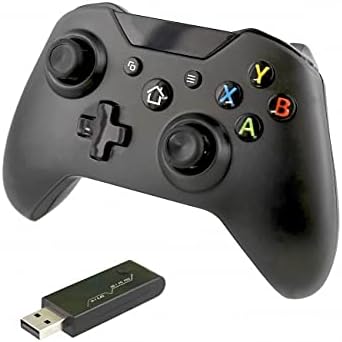
Image: Nyko 86158 Core Wireless Controller shown alongside its USB wireless receiver dongle. This illustrates the main components included in the package.

Imaxe: Primeiro plano view of the USB wireless receiver dongle. This dongle is essential for establishing a wireless connection between the controller and the Xbox One console or PC.

Image: The USB charging cable provided with the controller. This cable is used to recharge the controller's internal battery.
Disposición do controlador
Familiarize yourself with the buttons and features of your Nyko Core Wireless Controller.
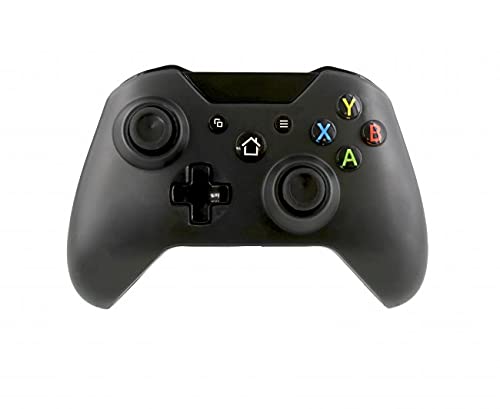
Imaxe: Fronte view of the Nyko 86158 Core Wireless Controller, showing the two analog sticks, D-pad, A/B/X/Y buttons, View button, Menu button, Xbox button, and Share button.
- Joystick analóxico esquerdo: Para o movemento e o control da cámara.
- Joystick analóxico dereito: Para o control da cámara e o apuntamento.
- D-Pad: Directional input for menu navigation and specific game actions.
- Botóns A/B/X/Y: Botóns de acción principais.
- View Botón: Accesses additional in-game information or menus.
- Botón de menú: Opens game menus or system options.
- Botón Xbox: Powers on the controller, accesses the Xbox Guide, or returns to the home screen.
- Botón Compartir: Captures screenshots or video clips (functionality may vary by console/game).

Imaxe: Arriba view of the Nyko 86158 Core Wireless Controller, highlighting the Left and Right Bumpers (LB, RB), Left and Right Triggers (LT, RT), and the micro-USB charging port located at the front.
- Left Bumper (LB) / Right Bumper (RB): Botóns de ombreiro para varias accións no xogo.
- Left Trigger (LT) / Right Trigger (RT): Analog triggers for precise input, often used for acceleration or aiming.
- Porto micro-USB: Used for charging the controller.

Imaxe: Costas view of the Nyko 86158 Core Wireless Controller, showing the battery compartment cover. This is where the batteries are inserted or the rechargeable battery pack is housed.
Instrucións de configuración
1. Alimentación do controlador
The Nyko 86158 Core Wireless Controller requires batteries to operate wirelessly. It is compatible with standard AA batteries or a rechargeable battery pack (sold separately).
- Localiza o compartimento da batería na parte traseira do controlador.
- Prema a lapela e deslice a tapa da batería para retirala.
- Insert two (2) AA batteries, ensuring correct polarity (+/-). If using a rechargeable pack, insert it as directed by the pack's instructions.
- Coloque a tapa da batería.
2. Conexión a Xbox One
To connect your wireless controller to an Xbox One console:
- Insert the USB Wireless Receiver Dongle into an available USB port on your Xbox One console.
- Turn on your Xbox One console.
- Manteña premido o Botón Xbox on the controller until it powers on. The Xbox button will flash.
- The controller will automatically attempt to pair with the USB receiver. Once connected, the Xbox button on the controller will glow solid.
- If the controller does not connect automatically, press the small pairing button on the USB receiver dongle, then press and hold the Botón Xbox on the controller until it pairs.
3. Connecting to PC (Optional)
The controller can also be used with a PC. Ensure your PC has an available USB port for the wireless receiver.
- Insert the USB Wireless Receiver Dongle into an available USB port on your PC.
- The PC should automatically install the necessary drivers. This may take a few moments.
- Manteña premido o Botón Xbox on the controller until it powers on.
- The controller will connect to the receiver. The Xbox button will glow solid once connected.
Instrucións de funcionamento
Activando/Desactivando
- Para activar: Manteña premido o Botón Xbox until the controller vibrates and the light turns on.
- Para desactivar: Manteña premido o Botón Xbox for 5-10 seconds until the controller powers down. The controller will also automatically turn off after a period of inactivity to conserve battery life.
Cargando o controlador
If using a rechargeable battery pack (not included) or if the controller has a built-in rechargeable battery:
- Connect the small end of the USB Charging Cable to the micro-USB port on the front of the controller.
- Connect the larger end of the USB Charging Cable to an available USB port on your Xbox One console or a USB wall adapter (5V, 1A recommended).
- The indicator light on the controller (usually the Xbox button) will show charging status (e.g., flashing while charging, solid when fully charged).
- Desconecte o cable unha vez que se complete a carga.
Mantemento
- Limpeza: Usa un pano suave e seco para limpar o controlador. Non empregues produtos químicos agresivos nin materiais abrasivos.
- Almacenamento: Garde o controlador nun lugar fresco e seco, lonxe da luz solar directa e de temperaturas extremas.
- Coidado da batería: If not using the controller for an extended period, remove the AA batteries to prevent leakage.
- Evita gotas: Protexa o controlador de caídas e impactos, que poden danar os compoñentes internos.
Resolución de problemas
O controlador non se acende
- Asegúrese de que as pilas estean inseridas correctamente coa polaridade correcta.
- Replace old batteries with new ones, or fully charge the rechargeable battery pack.
Controller Not Connecting to Xbox One/PC
- Ensure the USB Wireless Receiver Dongle is securely plugged into an active USB port.
- Proba cun porto USB diferente.
- Asegúrate de que o controlador estea acendido.
- Re-attempt the pairing process: press the pairing button on the dongle, then press and hold the Xbox button on the controller.
- Reinicia a túa consola Xbox One ou o teu PC.
Retardo de entrada ou desconexións
- Ensure the controller is within range of the USB receiver (typically up to 30 feet/9 meters).
- Minimiza as interferencias doutros dispositivos sen fíos (por exemplo, enrutadores Wi-Fi, teléfonos sen fíos).
- Asegúrate de que o controlador teña a batería suficiente.
Especificacións
| Marca | Nyko |
| Número de modelo | 86158 |
| Dispositivos compatibles | Xbox One, PC |
| Tipo de controlador | Controlador de xogo sen fíos |
| Tecnoloxía de conectividade | Wireless (2.4GHz via USB dongle) |
| Fonte de enerxía | Batteries (AA or rechargeable pack) |
| Dimensións (L x W x H) | 8.3 x 18.4 x 15.2 cm (aproximadamente 3.27 x 7.24 x 5.98 polgadas) |
| UPC | 743840861584 |
| ASIN | B09BD8813T |
Garantía e Soporte
For warranty information or technical support, please refer to the documentation included with your purchase or visit the official Nyko websitio. Garda o comprobante de compra para reclamacións de garantía.