
1. Introdución
This instruction manual provides essential information for the safe and efficient operation of your Beatfoxx Silent Guide V2 SDT-BP30 Bodypack Transmitter. Please read this manual thoroughly before use and retain it for future reference.
The Beatfoxx Silent Guide V2 SDT-BP30 is a wireless UHF stereo bodypack transmitter designed for tour guide systems, silent disco applications, and similar scenarios requiring clear audio transmission to multiple receivers. It operates on 3 channels within the 863-865 MHz frequency range.

Image 1.1: Beatfoxx Silent Guide V2 SDT-BP30 Transmitter in a typical usage scenario.
2. Información de seguridade
- Le todas as instrucións antes de utilizar o dispositivo.
- Non expoña o dispositivo á choiva nin á humidade.
- Non desmonte a unidade. Encargue calquera mantemento a persoal cualificado.
- Use only the specified power source (2 AA batteries, standard or rechargeable).
- Manteña o dispositivo lonxe de temperaturas extremas e da luz solar directa.
- Garantir unha ventilación adecuada para evitar o sobrequecemento.
- This device is not compatible with "Silent V1" systems.
3. Contido do paquete
Verifique que todos os elementos que se indican a continuación estean incluídos no seu paquete:
- Beatfoxx Silent Guide V2 SDT-BP30 Bodypack Transmitter
- External Antenna (pre-attached or to be attached)
- Cable de carga (USB)
- Metal Belt Clip (pre-attached)
4. Produto rematadoview
The SDT-BP30 transmitter features a compact design with essential controls and inputs for versatile use.

Imaxe 4.1: Fronte view of the transmitter showing the display and control buttons.
- Visualización: Shows selected channel and battery status.
- "M" Button (Menu): Used for channel selection and adjusting audio/microphone volume.
- "Down" Button: Decreases channel number or volume.
- "Up" Button: Increases channel number or volume.
- Indicador de batería baixa: LED light indicating low battery.
- Power ON Indicator: Luz LED que indica que o dispositivo está acendido.
- Antena externa: For enhanced signal range.

Imaxe 4.2: Arriba view of the transmitter with audio and microphone input ports.
- Entrada de AUDIO: 3.5mm stereo jack for connecting external audio sources (e.g., music player, mixer).
- Entrada MIC: 3.5mm mono jack for connecting an external microphone (e.g., Beatfoxx SDH-100, sold separately).
- Porto USB: For charging rechargeable batteries (if used).
- Interruptor de alimentación: Para acender ou apagar o dispositivo.

Imaxe 4.3: Costas view of the transmitter showing the metal belt clip.
The integrated metal belt clip allows for convenient and secure attachment to clothing.
5. Configuración
5.1. Instalación de baterías
The SDT-BP30 requires two AA batteries (standard or rechargeable).
- Abra a tapa do compartimento das baterías na parte traseira da unidade.
- Introduza dúas pilas AA, asegurándose de manter a polaridade correcta (+/-).
- Pecha a tapa do compartimento da batería de forma segura.
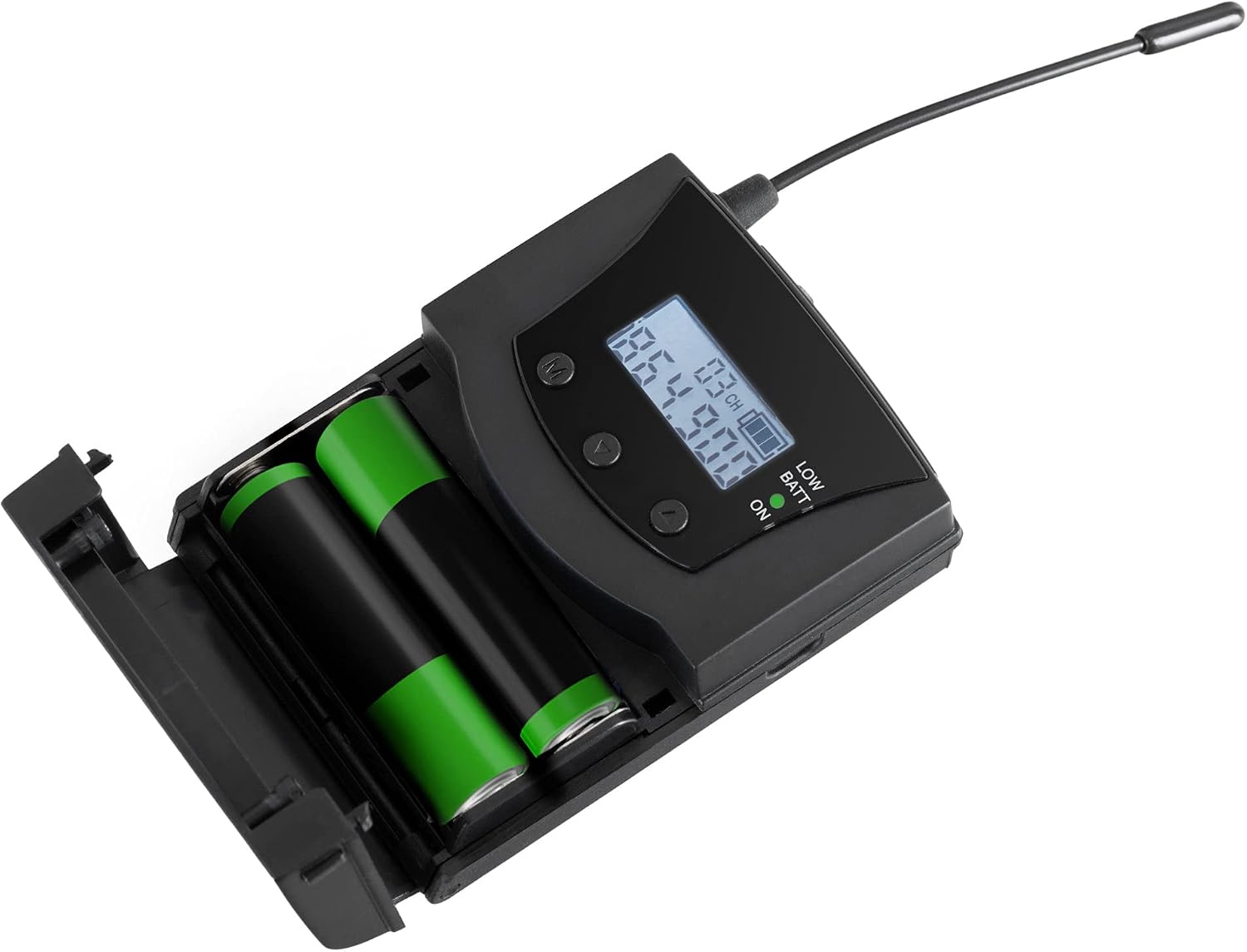
Image 5.1: Inserting AA batteries into the transmitter.
5.2. Conexión de fontes de son
You can connect either a microphone or an auxiliary audio source.
- Micrófono: Plug a 3.5mm mono jack microphone into the "MIC" input.
- Auxiliary Audio: Connect an audio player, mixer, or other source using a 3.5mm stereo jack cable to the "AUDIO" input.
5.3. Conexión da antena
Ensure the external antenna is securely attached to the designated port for optimal signal transmission.
6. Instrucións de funcionamento
6.1. Acendido/apagado
Slide the power switch to the "ON" position to turn on the transmitter. The power indicator LED will illuminate. Slide it to "OFF" to power down.
6.2. Selección de canles
The transmitter offers 3 selectable UHF channels: 863.3 MHz, 863.9 MHz, and 864.9 MHz.
- Press the "M" (Menu) button to enter channel selection mode. The channel number on the display will flash.
- Use the "Up" and "Down" buttons to cycle through the available channels.
- Press the "M" button again to confirm your selection.
Note: Ensure the transmitter and all connected receivers are set to the same channel for proper operation.
6.3. Axuste do volume
You can adjust the microphone and audio input volumes independently.
- Press the "M" button repeatedly until the volume indicator (e.g., "VOL MIC" or "VOL AUX") appears on the display.
- Use the "Up" and "Down" buttons to increase or decrease the respective volume level.
- The setting will be saved automatically after a few seconds of inactivity or by pressing "M" again to exit the menu.
6.4. Charging Rechargeable Batteries
If using rechargeable AA batteries, connect the included charging cable to the USB port on the transmitter and to a suitable USB power adapter (not included). Charging time is approximately 12 hours.
Note: Only rechargeable batteries can be charged directly in the unit. Do not attempt to charge standard alkaline batteries.
7. Mantemento
7.1. Limpeza
Limpe a unidade cun pano suave e seco. Non empregue produtos de limpeza líquidos nin materiais abrasivos.
7.2. Coidado da batería
Remove batteries if the device will not be used for an extended period to prevent leakage. Dispose of used batteries responsibly according to local regulations.
8 Solución de problemas
| Problema | Causa posible | Solución |
|---|---|---|
| No sound from receivers. |
|
|
| Poor signal quality or limited range. |
|
|
| O indicador de batería baixa está acendido. | As baterías estanse esgotando. | Replace or recharge batteries immediately. |
9. Especificacións
| Característica | Detalle |
|---|---|
| Modelo | SDT-BP30 |
| Marca | Beatfoxx |
| Sistema de transmisión | UHF Stereo |
| Canles | 3 |
| Frecuencias de transmisión | 863.3 MHz, 863.9 MHz, 864.9 MHz |
| Rango | Ata 75 metros (aproximadamente 246 pés) |
| Entrada de audio | 3.5mm Stereo Jack (AUX) |
| Entrada de micrófono | 3.5mm Mono Jack (MIC) |
| Fonte de alimentación | 2 x AA Batteries (standard or rechargeable) |
| Duración da batería | Aprox. 24 horas |
| Charging Time (rechargeable) | Aprox. 12 horas |
| Dimensións (sen antena) | 8.5 x 6.5 x 2.5 cm (3.35 x 2.56 x 0.98 polgadas) |
| Lonxitude da antena | 8 cm (3.15 polgadas) |
| Peso (sen pilas) | 62 g (2.19 onzas) |
| Cor | Negro |
| Compatibilidade | Not compatible with "Silent V1" systems. |

Image 9.1: Physical dimensions of the Beatfoxx SDT-BP30 transmitter.
10. Garantía e soporte
For warranty information and technical support, please refer to the official Beatfoxx website or contact your retailer. Beatfoxx is a brand of Musikhaus Kirstein.
You can find more information about Beatfoxx products and support at their official brand store: Beatfoxx Brand Store.
