
Introdución
The FreedConn T-COMVB Bluetooth Helmet Headset is designed to provide wireless communication for motorcyclists. This system allows for hands-free phone calls, music listening, FM radio, GPS voice prompts, and intercom communication between riders. It features Bluetooth 5.0 technology, noise cancellation, and a waterproof design for various riding conditions.
O que hai na caixa
Verifica que todos os compoñentes estean presentes no teu paquete:
- FreedConn T-COMVB Bluetooth Headset Unit (x2 for 2-pack)
- Altavoces estéreo
- Boom Microphone (for open-face/modular helmets)
- Soft-Wire Microphone (for full-face helmets)
- Helmet Mount Bracket (clip-on and adhesive options)
- Cable de carga USB
- Manual de usuario
- Velcro Pads for Speakers and Microphone
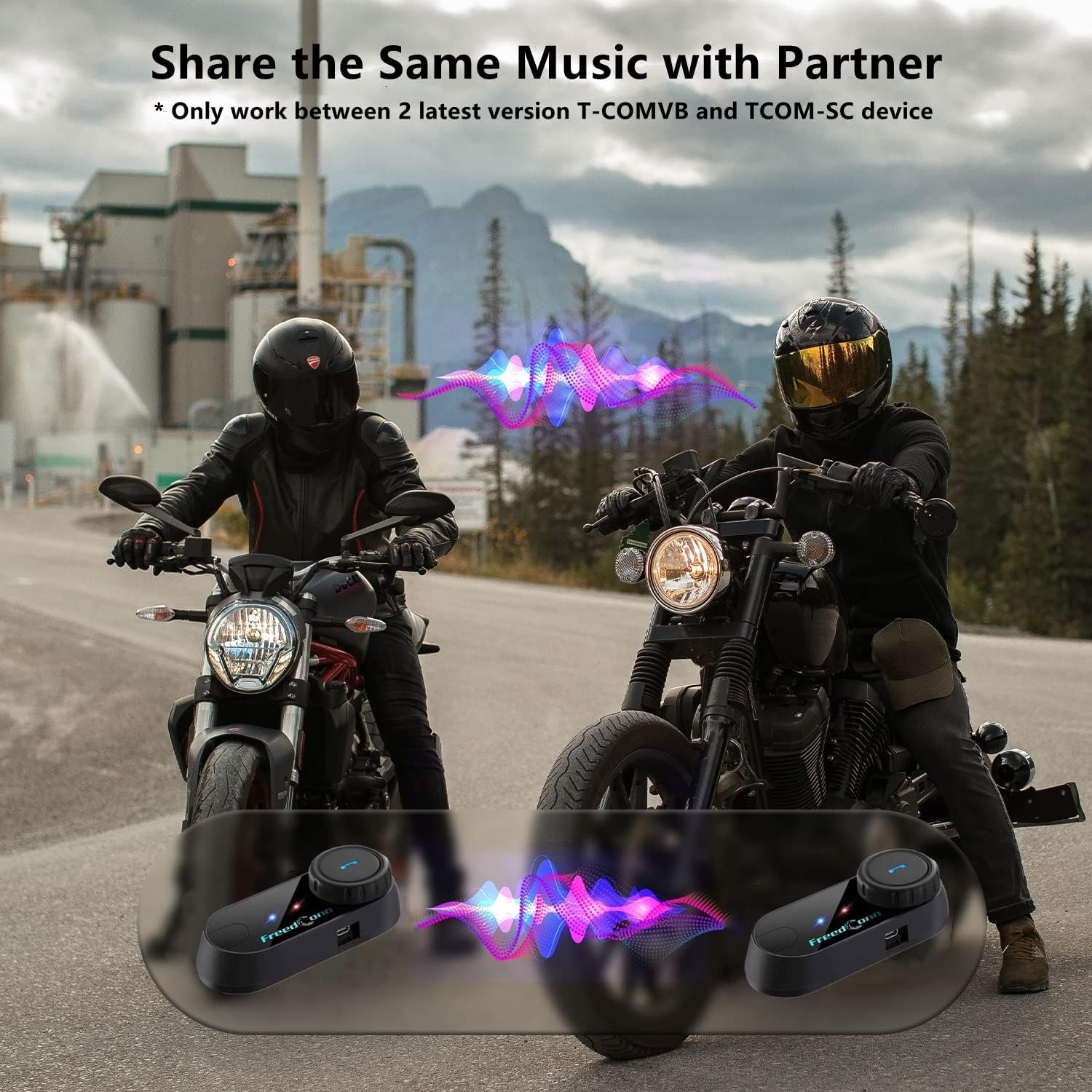
Image: Package contents for the FreedConn T-COMVB Bluetooth Helmet Headset 2-pack, showing all included accessories.
Configuración
1. Cargando o dispositivo
Before first use, fully charge the T-COMVB unit. Connect the USB charging cable to the headset's charging port and a USB power source. The indicator light will show charging status.
- Tempo de carga: Aproximadamente 3-4 horas.
- Duración da batería: Up to 7-8 hours of intercom, 10 hours of phone calls/music, 300 hours standby.

Image: Visual representation of the 400mAh battery capacity and estimated usage times for intercom, phone calls, and standby.
2. Microphone Selection
Choose the appropriate microphone for your helmet type:
- Micrófono de brazo: Recommended for open-face, half, and modular flip-up helmets.
- Soft-Wire Microphone: Recommended for full-face and off-road helmets.
Connect the chosen microphone and speakers to the corresponding ports on the headset unit.
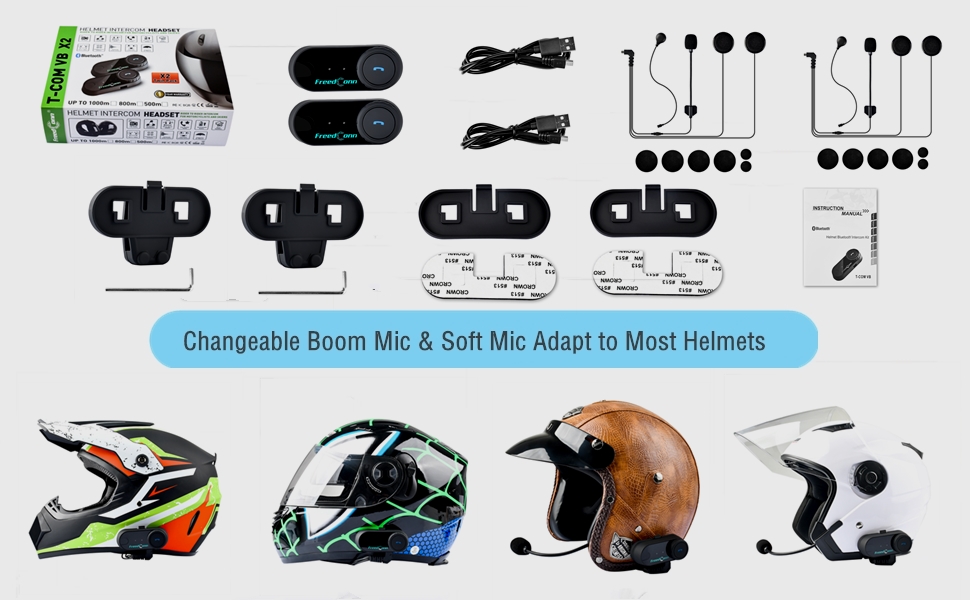
Image: Illustration demonstrating the compatibility of boom and soft-wire microphones with various helmet styles.
3. Instalación do casco
Mount the T-COMVB unit to the side of your helmet using either the clip-on bracket or the adhesive bracket. Ensure the unit is securely attached and the speakers are positioned correctly inside the helmet for optimal audio.

Image: A FreedConn T-COMVB unit securely installed on the exterior of a motorcycle helmet.
Instrucións de funcionamento
1. Acendido/apagado
- Encendido: Press and hold the Power button until the indicator light flashes.
- Apagado: Manteña premido o botón de acendido/apagado ata que o indicador luminoso se apague.
2. Bluetooth Pairing (with Phone/GPS)
To connect your T-COMVB to a Bluetooth-enabled device (phone, GPS):
- Ensure the T-COMVB is off.
- Manteña premido o botón de acendido e apagado durante aproximadamente 5-7 segundos ata que a luz indicadora parpadee en vermello e azul alternativamente, o que indica o modo de emparellamento.
- On your phone or GPS, enable Bluetooth and search for available devices.
- Select "FreedConn T-COMVB" from the list. If prompted, enter "0000" as the PIN.
- Once paired, the indicator light will flash blue slowly.

Image: The T-COMVB headset demonstrating its Bluetooth 5.0 and universal connectivity with different devices and helmet types.
3. Intercom Communication (Rider to Rider)
The T-COMVB supports intercom communication with other T-COMVB or TCOM-SC units.
- Ensure both units are powered on and not connected to other Bluetooth devices.
- On one unit, press and hold the Intercom button until the indicator light flashes red and blue alternately.
- On the second unit, press the Intercom button once.
- The units will automatically search and pair. Once connected, the indicator lights will flash blue slowly.
- To initiate intercom, press the Intercom button once. To end, press it again.
4. Music Playback and Sharing
Once paired with your phone, you can play music. Music sharing is supported between two latest version T-COMVB and TCOM-SC devices.
- Reproducir/Pausa: Prema o botón multifunción unha vez.
- Próxima pista: Rotate the Multi-function button clockwise.
- Pista anterior: Rotate the Multi-function button counter-clockwise.
- Compartir música: While music is playing, press and hold the Intercom button on both units to initiate music sharing.

Image: Two riders sharing music through their FreedConn T-COMVB headsets, highlighting the music sharing feature.
5. Radio FM
To activate the built-in FM radio:
- Turn On FM: Press the FM button once.
- Escanear canles: Rotate the Multi-function button to scan for stations.
- Turn Off FM: Press the FM button again.
6. Chamadas telefónicas
When paired with your phone, the T-COMVB allows for hands-free calls.
- Responder chamada: Prema o botón multifunción unha vez.
- Finalizar a chamada: Prema o botón multifunción unha vez durante unha chamada.
- Rexeitar a chamada: Manteña premido o botón multifunción durante 2 segundos.
- Volver a marcar o último número: Prema dúas veces o botón multifunción.
- Voice Assistant (Siri/Google Voice): Press the Voice Assistant button to activate your phone's voice assistant.

Image: Icons representing voice assistant activation (Siri, Google Voice) for hands-free calling functionality.
Mantemento
- Limpeza: Use un suave, damp cloth to clean the unit. Do not use harsh chemicals or solvents.
- Resistencia á auga: The unit is waterproof, but avoid submerging it in water. Ensure all ports are securely closed when exposed to rain.
- Coidado da batería: If the device is not used for an extended period, charge it at least once a month to preserve battery life.

Image: The FreedConn T-COMVB headset on a helmet, illustrating its waterproof feature in rainy conditions.
Resolución de problemas
- Sen enerxía: Ensure the unit is fully charged. Connect to a power source and check the charging indicator.
- Non se pode emparellar Bluetooth: Ensure the unit is in pairing mode (red and blue flashing light). Make sure other Bluetooth devices are disconnected. Try restarting both the headset and your phone/GPS.
- Sen son dos altofalantes: Check that the speakers are securely plugged into the headset unit. Ensure volume is not set to minimum.
- O intercomunicador non conecta: Ensure both units are T-COMVB or TCOM-SC models and are in intercom pairing mode. Keep units within range (up to 800 meters).
- Mala calidade de audio/ruído: Ensure the microphone is positioned correctly, close to your mouth. The T-COMVB features advanced noise cancellation technology.

Image: A visual representation of the advanced noise cancellation technology, demonstrating its effect on sound quality.
Especificacións
| Modelo | T-COMVB |
| Versión Bluetooth | 5.0 + EDR |
| Rango de intercomunicador | Up to 800 meters (2-3 riders) |
| Capacidade da batería | 400 mAh |
| Tempo de carga | 3-4 horas |
| Hora do intercomunicador | 7-8 horas |
| Phone Call/Music Time | 10 horas |
| Tempo de espera | 300 horas |
| Resistencia á auga | Impermeable |
| Método de control | Voice, Manual Buttons |
| Características especiais | Microphone Included, Noise Cancellation, FM Radio |
| Material | Polímero |
| Peso do elemento | Approximately 1.15 pounds (for 2 units) |
Garantía e Soporte
For warranty information, technical support, or service inquiries, please refer to the contact details provided with your purchase or visit the official FreedConn websitio. Garda o comprobante de compra para reclamacións de garantía.