
UNITOPSCI A2878
UNITOPSCI A2878 Double Din Car Stereo User Manual
Modelo: A2878
1. Introdución
This manual provides instructions for the installation, operation, and maintenance of your UNITOPSCI A2878 Double Din Car Stereo. This unit features a 7-inch touchscreen, Apple CarPlay, Android Auto, Bluetooth connectivity, FM radio, support for a backup camera, mirror link functionality, and dual USB ports.
Lea este manual detidamente antes de usar o produto para garantir o seu correcto funcionamento e evitar danos.
2. Contido do paquete
Verifique que todos os elementos que se indican a continuación estean incluídos no seu paquete:
- Main Head Unit
- Cámara de respaldo
- Micrófono externo
- Dual USB Adapter
- Cable de alimentación
- Manual de usuario
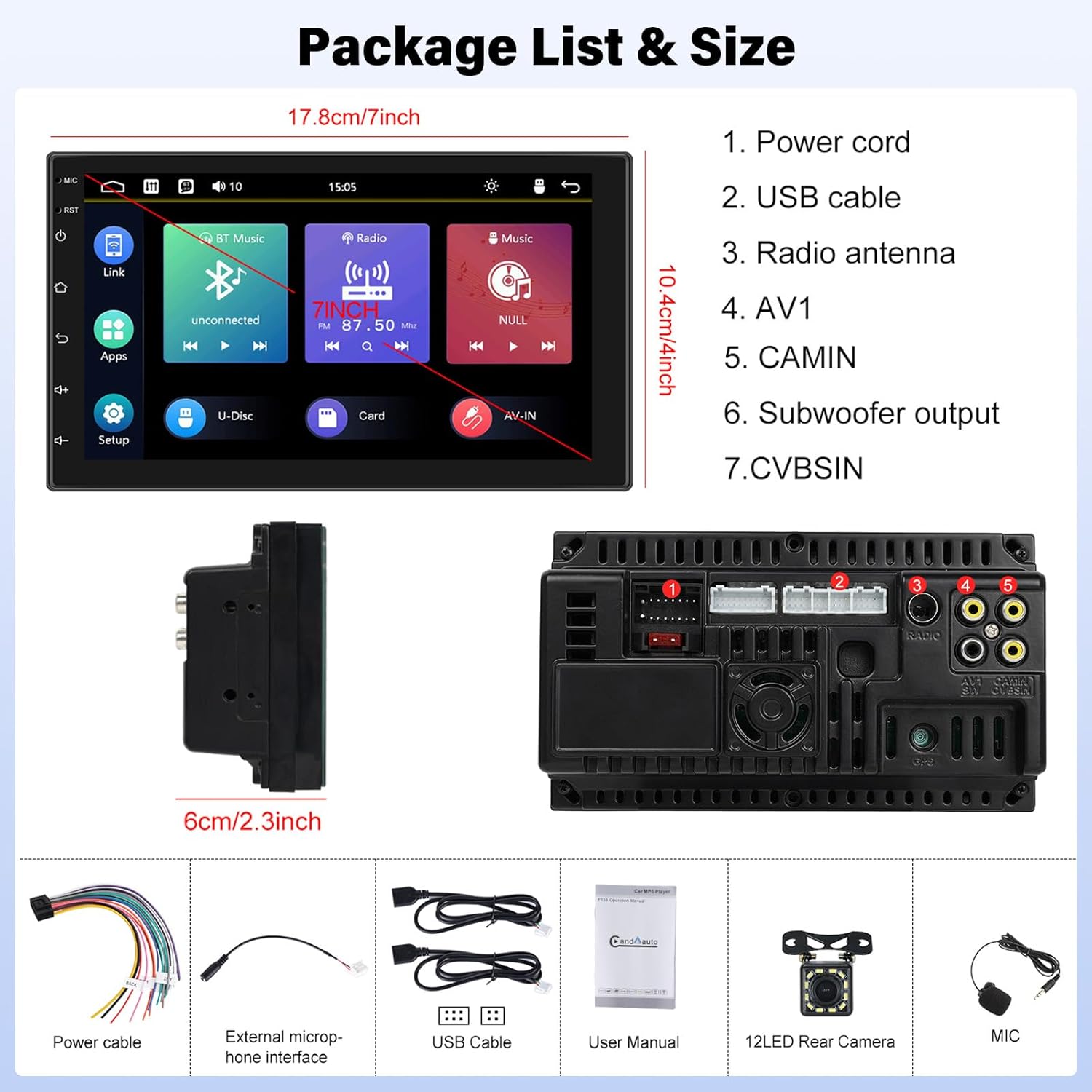
Image: Contents of the UNITOPSCI A2878 package, showing the main unit, wiring, and accessories.
3. Produto rematadoview
The UNITOPSCI A2878 is a double din car stereo featuring a 7-inch high-definition touchscreen. The front panel includes essential controls and the display for various functions. The rear panel provides all necessary connection ports for power, speakers, USB devices, and external accessories like the backup camera.

Imaxe: Fronte view of the UNITOPSCI A2878 car stereo with its 7-inch touchscreen interface.

Image: Rear panel connections of the UNITOPSCI A2878 head unit, indicating ports for power, USB, radio antenna, AV, camera, subwoofer, and CVBS.
4. Configuración e instalación
Proper installation is crucial for the performance and safety of your car stereo. It is recommended that installation be performed by a qualified professional.
4.1 Conexións de cableado
Consulta o diagrama de cableado que se inclúe coa unidade para coñecer as conexións específicas. As conexións principais inclúen:
- Cable de alimentación: Connect to the vehicle's power supply (constant 12V, accessory 12V, and ground).
- Cables USB: Connect the provided USB cables for CarPlay/Android Auto and media playback.
- Antena de radio: Connect your vehicle's FM/AM antenna.
- CAMIN (Camera Input): Connect the backup camera video signal.
- Saída do subwoofer: For connecting an external subwoofer.
- Micrófono externo: Conecta o micrófono externo para mellorar a calidade das chamadas.
4.2 Backup Camera Installation
Install the backup camera at the rear of your vehicle. Connect its video output to the CAMIN port on the head unit and its power to the vehicle's reverse light circuit so it activates automatically when reversing.
5. Instrucións de funcionamento
5.1 CarPlay e Android Auto
Connect your smartphone to the stereo via a USB cable to activate Apple CarPlay or Android Auto. This allows access to your phone's navigation, music, calls, and other compatible apps directly on the stereo's screen, controlled by voice or touch.

Image: Wired connection setup for CarPlay and Android Auto.

Image: CarPlay and Android Auto interfaces displayed on the stereo screen.
5.2 Ligazón de espello
The mirror link function allows you to project your smartphone's screen (both iOS and Android) onto the stereo display via a USB cable. This enables viewing videos, navigation maps, and images from your phone on the larger screen.

Image: Mirror Link functionality with a smartphone connected to the stereo.
5.3 Bluetooth Hands-free & FM Radio
Bluetooth: Pair your smartphone with the stereo via Bluetooth for hands-free calling and wireless audio streaming. The built-in microphone facilitates clear communication. You can access your phone book and dial directly from the stereo.
Radio FM: The unit includes an FM tuner with 18 preset stations. Tune into your favorite radio programs, music, and traffic updates.

Image: FM Radio interface and Bluetooth hands-free call screen.
5.4 Backup Camera Input
When the vehicle is shifted into reverse, the stereo automatically displays the clear image from the connected backup camera, assisting with safe parking maneuvers.
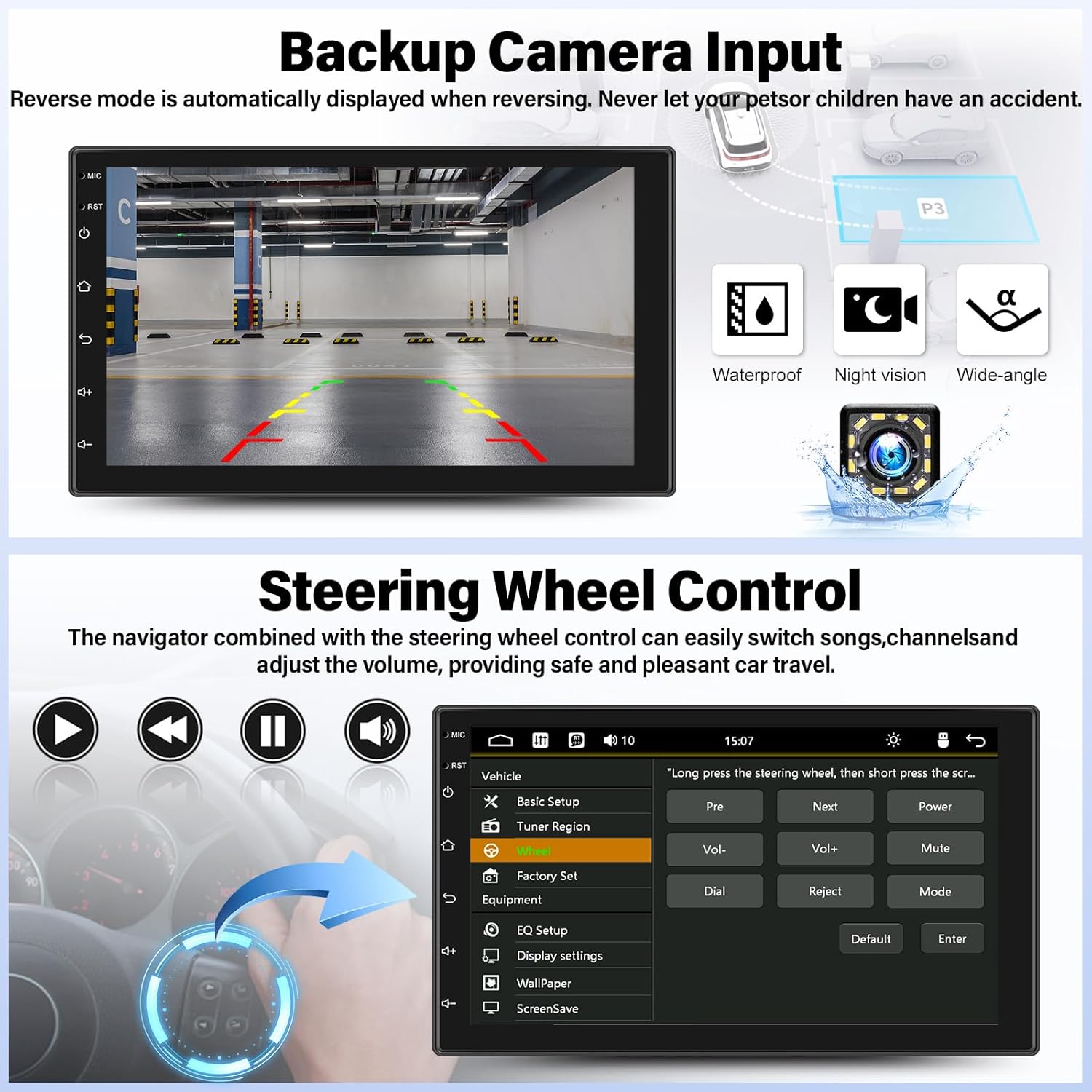
Image: Backup camera display on the stereo screen.
5.5 Control do volante (SWC)
The unit supports steering wheel control, allowing you to manage functions such as volume adjustment, track skipping, and mode switching directly from your vehicle's steering wheel buttons (if compatible and wired correctly). This enhances convenience and safety while driving.
5.6 USB Playback and Charging
The two USB adapter ports allow for media playback from a USB drive (audio/video files) and charging of compatible devices.

Image: USB media playback and charging capabilities.
5.7 Audio Equalizer (EQ)
Adjust the audio output using the built-in equalizer. You can select from various preset audio styles (e.g., Classic, Pop, Rock, Jazz) or customize settings to match your preferences and vehicle acoustics. The unit also supports subwoofer output for enhanced bass.

Image: Audio Equalizer interface for sound customization.
6. Mantemento
Para garantir a lonxevidade e o rendemento óptimo do equipo de son do teu coche, segue estas pautas de mantemento:
- Limpeza: Usa un pano suave e seco para limpar a pantalla táctil e o exterior da unidade. Evita produtos de limpeza abrasivos ou solventes.
- Temperatura: Evite expoñer a unidade a temperaturas extremas, á luz solar directa durante períodos prolongados ou a alta humidade.
- Conexións: Comprobe periodicamente todas as conexións do cableado para asegurarse de que estean seguras.
7 Solución de problemas
If you encounter issues with your UNITOPSCI A2878 car stereo, refer to the following common problems and solutions:
- Sen enerxía: Check the power cable connections (constant 12V, accessory 12V, ground). Ensure the vehicle's fuse for the stereo is not blown.
- Sen son: Verify speaker connections. Check volume levels and audio settings (EQ). Ensure the mute function is not activated.
- CarPlay/Android Auto non conecta: Ensure your phone is connected via a compatible USB cable. Try a different USB port or cable. Check phone settings for CarPlay/Android Auto permissions.
- Problemas de sincronización Bluetooth: Ensure Bluetooth is enabled on both the stereo and your phone. Delete previous pairings and try pairing again.
- Non se mostra a cámara de marcha atrás: Check the camera's power and video signal connections. Ensure the camera is properly installed and wired to the reverse light trigger.
- Pantalla táctil sen resposta: Try resetting the unit using the reset button (if available, typically a small pinhole).
Se os problemas persisten, póñase en contacto co servizo de atención ao cliente para obter asistencia.
8. Especificacións
| Característica | Especificación |
|---|---|
| Número de modelo | A2878 |
| Tamaño de visualización | 7 polgadas |
| Resolución de visualización | 1024x600 |
| Dimensións do produto | 7.01 x 1.77 x 4.02 polgadas |
| Peso do elemento | 2.4 libras (1.09 quilogramos) |
| Tecnoloxía de conectividade | Bluetooth, USB, RCA |
| Tipo de controlador | Android, iOS (via CarPlay/Android Auto) |
| Modo de saída de audio | Estéreo |
| Configuración da canle de son envolvente | 2.0 |
| Compatibilidade coa codificación de vídeo | H.264, H.263 |
9. Garantía e soporte
UNITOPSCI provides comprehensive customer support for its products:
- Substitución: Available within 24 months of purchase.
- Soporte técnico: Lifetime after-sales consultation and technical support.
- Devolucións: Política de devolución de 60 días.
For any inquiries or support, please contact UNITOPSCI customer service at: UNITOPSCI@126.com
Documentos relacionadosA2878


Ask a question about this manual
Ask about setup, troubleshooting, compatibility, parts, safety, or missing instructions. Manuals+ will review the question and use this page’s manual context to help answer it.