
Xiaomi MZB09YFEU
Manual do usuario do teléfono intelixente Xiaomi Redmi 9C
Model: MZB09YFEU
1. Introdución
This manual provides essential information for the safe and efficient use of your Xiaomi Redmi 9C smartphone. Please read this manual carefully before using the device and keep it for future reference.
The Xiaomi Redmi 9C features a 6.53-inch HD+ DotDrop display, a MediaTek Helio G35 processor, a 13MP AI triple rear camera, and a large 5000 mAh battery with 10W fast charging support. It comes with 4GB RAM and 128GB internal storage.
2. Configuración
2.1 Contido do paquete
Verifique que o seu paquete conteña os seguintes elementos:
- Smartphone Xiaomi Redmi 9C
- Adaptador de alimentación (10 W)
- Cable USB
- Ferramenta de expulsión da SIM
- Manual de usuario (este documento)
2.2 Inserción da tarxeta SIM e da tarxeta microSD
Locate the SIM card tray on the side of the device. Use the provided SIM eject tool to open the tray. Insert your Nano-SIM card(s) and an optional microSD card into the designated slots. Ensure the cards are correctly oriented as shown in the diagram.

Figura 2.2.1: Lateral view of the Xiaomi Redmi 9C, showing the location of the SIM card tray. The tray is designed to hold two Nano-SIM cards and one microSD card simultaneously.
2.3 Acendido inicial e asistente de configuración
Press and hold the Power button until the Xiaomi logo appears. Follow the on-screen instructions to complete the initial setup, including language selection, Wi-Fi connection, Google account login, and security settings.
3. Funcionamento do teu dispositivo
3.1 Disposición do dispositivo

Figura 3.1.1: Fronte view of the Xiaomi Redmi 9C, highlighting the 6.53-inch DotDrop display and the front camera notch.
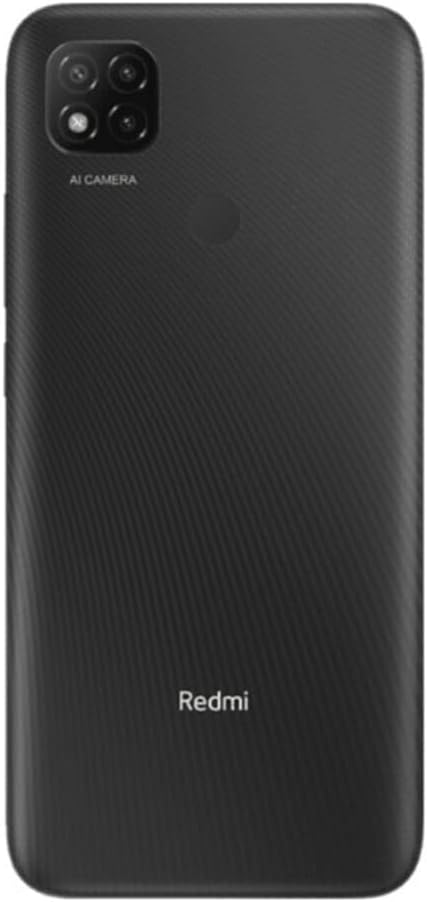
Figura 3.1.2: Traseira view of the Xiaomi Redmi 9C, showing the triple camera module with AI capabilities and the rear-mounted fingerprint sensor.
The Redmi 9C features a large display on the front, with a small notch for the front camera. On the rear, it has a square camera module housing three lenses and a flash, along with a circular fingerprint sensor. The power and volume buttons are located on the right side of the device.
3.2 Funcións básicas
- Encendido/apagado: Manteña premido o botón de acendido.
- Bloqueo/Desbloqueo da pantalla: Preme brevemente o botón de acendido.
- Axuste de volume: Usa os botóns para subir/baixar o volume.
- Facendo capturas de pantalla: Press Volume Down and Power button simultaneously.
3.3 Uso da cámara
The Xiaomi Redmi 9C is equipped with a 13MP AI triple rear camera system. To open the camera application, tap the camera icon on your home screen or app drawer.

Figura 3.3.1: Primeiro plano view of the Redmi 9C's rear camera module, showing the three lenses and the "AI CAMERA" branding, indicating its artificial intelligence features for photography.
The AI features assist in scene recognition and optimization for better photo quality. Explore different modes like Portrait, Macro, and Pro mode for various photographic effects.

Figure 3.3.2: An image depicting a person interacting with the Redmi 9C in a dimly lit environment, showcasing the phone's display and user interface during use.

Figure 3.3.3: A sample selfie photo, demonstrating the clarity and color reproduction capabilities of the Redmi 9C's front-facing camera.

Figure 3.3.4: A user holding the Redmi 9C to take a selfie, illustrating the ergonomic design and ease of use for self-portraits.
3.4 Xestión da batería
The Redmi 9C is equipped with a 5000 mAh high-capacity battery, providing extended usage time. To maximize battery life:
- Reduce o brillo da pantalla.
- Desactiva o Wi-Fi, o Bluetooth e o GPS cando non estean en uso.
- Pechar aplicacións en segundo plano.
- Use power-saving modes.

Figure 3.4.1: A graphical representation indicating the 5000 mAh battery capacity of the Redmi 9C, emphasizing its long-lasting power.
The device supports 10W fast charging. Always use the original charger and cable for optimal charging performance and safety.
3.5 Gaming and Multimedia
The MediaTek Helio G35 processor provides a smooth experience for everyday tasks and casual gaming. The large 6.53-inch display enhances the viewing experience for videos and games.

Figure 3.5.1: The Redmi 9C displaying a high-action racing game, illustrating its capability for multimedia consumption and gaming on its large screen.
For an optimal gaming experience, ensure your device is sufficiently charged and close unnecessary background applications.
3.6 Conectividade
The Redmi 9C supports various connectivity options:
- Wi-Fi: Conéctate a redes sen fíos para acceder a internet.
- Bluetooth: Emparéllase con auriculares sen fíos, altofalantes e outros dispositivos.
- GPS: Utilizar servizos de localización para aplicacións de navegación e cartografía.
- Conector de audio de 3.5 mm: Conecta uns auriculares con cable.
4. Mantemento
4.1 Limpeza do dispositivo
Usa un pano suave e sen pelusa para limpar a pantalla e a carcasa do teléfono. Evita o uso de produtos químicos agresivos ou materiais abrasivos que poidan danar o dispositivo.
4.2 Actualizacións de software
Comprobe e instale regularmente actualizacións de software para garantir un rendemento, unha seguridade e un acceso óptimos a novas funcións. Vaia a Configuración > Acerca do teléfono > Versión MIUI para comprobar as actualizacións.
4.3 Xestión do almacenamento
Con 128 GB de almacenamento interno, tes ample space for apps and media. To manage storage, go to Configuración > Almacenamento. Consider regularly clearing cache and uninstalling unused applications to free up space.
5 Solución de problemas
| Problema | Posible Solución |
|---|---|
| O dispositivo non se acende | Asegúrate de que a batería estea cargada. Conecta o cargador e agarda uns minutos antes de tentar acender de novo. Se non responde, realiza un reinicio forzado mantendo premido o botón de acendido durante 10-15 segundos. |
| As aplicacións fallan ou conxélanse | Limpar a caché da aplicación (Configuración > Aplicacións > [Nome da aplicación] > Almacenamento > Borrar caché). Restart the device. If the issue persists, consider reinstalling the app or performing a factory reset (backup data first). |
| Mala duración da batería | Review uso da batería en Axustes> Batería to identify power-hungry apps. Reduce screen brightness, disable unnecessary connectivity features (Wi-Fi, Bluetooth, GPS), and close background apps. |
| Non se pode conectar á wifi | Ensure Wi-Fi is enabled. Restart your router and the phone. Forget the network and reconnect. Check if other devices can connect to the same Wi-Fi network. |
6. Especificacións
| Característica | Detalle |
|---|---|
| Nome do modelo | Redmi 9C |
| Número de modelo | MZB09YFEU |
| Mostrar | 6.53-inch HD+ DotDrop Display |
| Procesador | MediaTek Helio G35 (velocidade da CPU de 1.8 GHz) |
| RAM | 4 GB |
| Almacenamento interno | 128 GB |
| Cámara traseira | 13MP AI Triple Camera |
| Capacidade da batería | 5000 mAh (Nominal Power: 3600) |
| Cargando | Carga rápida de 10 W |
| Dimensións | 0.9 x 7.71 x 16.49 cm |
| Peso | 196 g |
| Conectividade | Wi-Fi, Bluetooth, GPS, Cellular (GSM), 3.5mm Audio Jack |
| Características especiais | Camera, Flash |
7. Garantía e soporte
Para obter información sobre a garantía e asistencia técnica, consulte a páxina oficial de Xiaomi. websitio web ou póñase en contacto co servizo de atención ao cliente. Garde o comprobante de compra para reclamacións de garantía.
Podes atopar máis información e recursos de soporte na páxina oficial de Xiaomi websitio: Soporte de Xiaomi
Ask a question about this manual
Ask about setup, troubleshooting, compatibility, parts, safety, or missing instructions. Manuals+ will review the question and use this page’s manual context to help answer it.