
1. Introdución
Thank you for choosing the Sanag A5S Open Ear Headphones. These headphones utilize advanced air conduction technology to deliver sound while keeping your ears open to ambient surroundings, ensuring safety during outdoor activities. Designed for comfort and durability, the A5S features Bluetooth 5.0 connectivity, IP67 water resistance, and a lightweight design, making them ideal for sports, work, and daily use.
2. Contido do paquete
Comprobe se o paquete contén os seguintes elementos:
- Sanag A5S Sports Headset x1
- Cable de carga micro USB x1
- Manual de usuario x1
3. Produto rematadoview
Familiarize yourself with the various parts and controls of your Sanag A5S headphones.
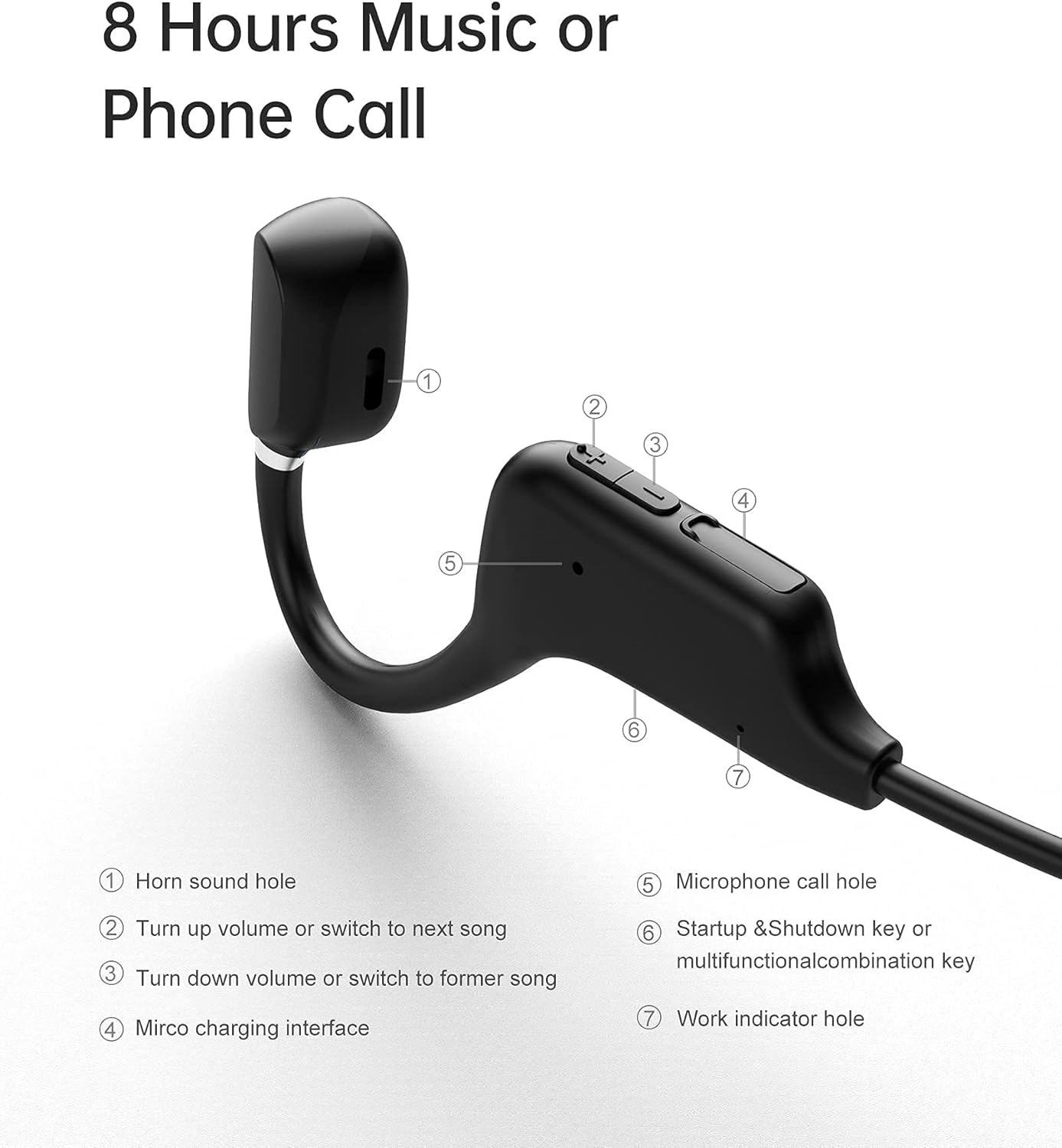
Figura 3.1: Sanag A5S Headset Components
- Horn sound hole
- Volume Up / Next Song button
- Volume Down / Previous Song button
- Interfaz de carga micro USB
- Microphone call hole
- Power On/Off / Multifunction button
- Work indicator hole

Figura 3.2: Key Features of Sanag A5S Headphones
4. Configuración
4.1 Carga dos auriculares
Before first use, fully charge your Sanag A5S headphones.
- Connect the Micro USB charging cable to the charging interface (4) on the headphones.
- Conecte o outro extremo do cable a unha fonte de alimentación USB (por exemplo, un ordenador, un adaptador de parede).
- The indicator light (7) will show charging status. A full charge takes approximately 2 hours.
A fully charged battery provides up to 8 hours of continuous use or 300 hours of standby time.

Figura 4.1: Charging the Sanag A5S Headphones
4.2 Emparellamento cun dispositivo Bluetooth
Follow these steps to connect your headphones to your smartphone, tablet, or other Bluetooth-enabled device:
- Encendido: Press and hold the Multifunction button (6) for 3 seconds until the indicator light (7) flashes, indicating the headphones are in pairing mode.
- Activar Bluetooth: No teu dispositivo, vai á configuración de Bluetooth e asegúrate de que o Bluetooth estea activado.
- Conectar: In the list of available devices, select "A5S". Once connected, the indicator light will stop flashing or change color (refer to specific light patterns in troubleshooting if needed).
Os auriculares tentarán reconectarse automaticamente co último dispositivo emparellado ao acenderse.

Figura 4.2: Conectividade Bluetooth 5.0
5. Instrucións de funcionamento
5.1 Encendido/apagado
- Encendido: Manteña premido o botón multifunción (6) durante 3 segundos.
- Apagado: Manteña premido o botón multifunción (6) durante 3 segundos.
5.2 Reprodución de música
- Reproducir/Pausa: Short press the Multifunction button (6).
- Próxima canción: Short press the Volume Up button (2).
- Canción anterior: Short press the Volume Down button (3).
5.3 Control de volume
- Aumentar o volume: Long press the Volume Up button (2).
- Diminuír o volume: Long press the Volume Down button (3).
5.4 Xestión de chamadas
- Responder chamada: Short press the Multifunction button (6) when a call comes in.
- Finalizar a chamada: Short press the Multifunction button (6) during a call.
- Rexeitar a chamada: Long press the Multifunction button (6) when a call comes in.
- Asistente de voz: Double-press the Multifunction button (6) to activate your device's voice assistant (if supported).
6. Mantemento
6.1 Limpeza
Regularly clean your headphones to ensure optimal performance and hygiene.
- Wipe the headphones with a soft, dry, or slightly damp pano.
- Non use produtos químicos agresivos, disolventes de limpeza ou deterxentes fortes.
- Asegúrese de que o porto de carga estea seco antes de cargar.
6.2 Almacenamento
When not in use, store the headphones in a cool, dry place away from direct sunlight and extreme temperatures.
6.3 Resistencia á auga
The Sanag A5S headphones are IP67 rated, meaning they are resistant to dust and can withstand immersion in water up to 1 meter for 30 minutes. While they are sweat and light rain resistant, avoid prolonged exposure to water or using them during swimming.

Figura 6.1: Open Ear Design for Awareness

Figura 6.2: Flexible and Durable Design
7 Solución de problemas
Se tes algún problema cos teus auriculares, consulta os seguintes problemas e solucións comúns:
- Os auriculares non se acenden:
Ensure the headphones are fully charged. Connect them to a power source using the Micro USB cable. - Non se pode emparellar co dispositivo:
Make sure Bluetooth is enabled on your device. Ensure the headphones are in pairing mode (indicator light flashing). Move the headphones closer to your device (within 10 meters). Turn off and on both the headphones and your device's Bluetooth. - Sen son ou volume baixo:
Check the volume levels on both the headphones and your connected device. Ensure the headphones are properly paired. Try playing different audio sources. - Conexión intermitente:
Asegúrate de que non haxa obstrucións entre os auriculares e o dispositivo. Afástate doutros dispositivos sen fíos que poidan causar interferencias. - O micrófono non funciona:
Ensure the headphones are properly connected and selected as the audio input device on your phone/computer. Check for any mute settings on your device.
Se o problema persiste, póñase en contacto co servizo de atención ao cliente.
8. Especificacións
| Característica | Especificación |
|---|---|
| Nome do modelo | A5S Sports Headset |
| Tecnoloxía de conectividade | Sen fíos (Bluetooth) |
| Tecnoloxía de comunicación sen fíos | Bluetooth 5.0 |
| Alcance Bluetooth | Ata 10 m (30 pés) |
| Nivel de resistencia á auga | IP67 (Waterproof and Sweat-proof) |
| Duración da batería | Ata 8 horas (uso continuo) |
| Tempo de espera | Ata 300 horas |
| Tempo de carga | Aprox. 2 horas |
| Capacidade da batería | 120 mAh |
| Peso do elemento | 18 g (0.63 onzas) |
| Material | Silicona |
| Tipo de controlador de audio | Air Conduction Driver |
| Tipo de control | Volume Control, Multifunction Button |
| Dispositivos compatibles | Teléfonos intelixentes, portátiles, tabletas, altofalantes intelixentes |
9. Garantía e soporte
9.1 Información da garantía
Sanag products are designed and manufactured to the highest quality standards. This product is covered by a limited warranty from the date of purchase. Please refer to the warranty card included in your package or visit the official Sanag websitio web para obter información detallada sobre os termos e condicións da garantía.
9.2 Atención ao cliente
If you have any questions, require technical assistance, or need to report an issue with your Sanag A5S headphones, please contact our customer support team. Contact information can typically be found on the Sanag official websitio web ou a través do seu vendedor.