
1. Introdución
Thank you for choosing the Andoer W200RGB LED Video Light. This manual provides detailed instructions for the proper setup, operation, and maintenance of your device. Please read this manual thoroughly before use to ensure optimal performance and longevity of the product. Keep this manual for future reference.
2. Produto rematadoview
2.1 Contido do paquete
Ao abrir o paquete, comprobe que todos os elementos enumerados a continuación estean presentes e en bo estado:
- Andoer W200RGB LED Video Light
- Cable de carga USB tipo C
- Mini trípode
- Correa de pulso
- User Manual (English and Chinese)

Image: Contents of the Andoer W200RGB LED Video Light package, showing the light, USB cable, mini tripod, and wrist strap.
2.2 Características principais
- Deseño compacto e portátil: Rod-shaped design, 20cm in length, lightweight for easy transport.
- Alto Brillo: Equipped with 184 high-quality LED beads (69 white, 69 yellow, 46 RGB) with 7W output and CRI 95+.
- RGB Colored Light Mode: 360° adjustable HUE and 0%-100% adjustable brightness for diverse colorful lighting effects.
- CCT Cold & Warm Light Mode: Wide adjustable color temperature range from 2500K to 9000K.
- 20 Special Lighting Effects: Includes ambulance, fireworks, TV, candle, party, strobe, RGB strobe, red flash, green flash, blue flash, slow HSI, fast HSI, and more.
- Batería recargable incorporada: Integrated 3.7V 3000mAh lithium battery for extended working time, rechargeable via Type-C port.
- Parte traseira magnética: Built-in magnets at both ends allow for easy attachment to magnetic surfaces.
2.3 Controles e pantalla
The Andoer W200RGB features intuitive controls and an LCD screen for easy operation.

Image: The control panel of the Andoer W200RGB LED Video Light, showing the power button, mode button, adjustment buttons, and LCD screen.
- Botón de encendido: Press and hold to turn the light on or off. Short press to switch between modes.
- Botón de modo (M): Short press to cycle through CCT, HSI (RGB), and Scene modes.
- Botóns Arriba/Abaixo (▲/▼): Adjust parameters such as brightness, color temperature, HUE, or saturation depending on the selected mode.
- Pantalla LCD: Displays current settings including mode, brightness, color temperature, HUE, and battery level.
- Porto de carga tipo C: Located at one end for charging the internal battery.
3. Configuración
3.1 Carga da batería
The Andoer W200RGB LED Video Light comes with a built-in rechargeable lithium battery. Before first use, it is recommended to fully charge the device.
- Connect the supplied USB Type-C cable to the charging port on the light.
- Conecta o outro extremo do cable USB a un adaptador de corrente USB estándar (non incluído) ou a un porto USB do ordenador.
- The LCD screen will indicate the charging status. A full charge typically takes a few hours.

Image: The Andoer W200RGB LED Video Light highlighting its internal 3.7V 3000mAh battery and Type-C charging capability.
3.2 Attaching the Mini Tripod
The included mini tripod can be attached to the 1/4-inch screw hole at the bottom of the light for stable placement.
- Locate the 1/4-inch screw hole on the bottom of the LED light.
- Screw the mini tripod securely into the screw hole.
- Adjust the tripod legs for desired height and stability.
4. Instrucións de funcionamento
4.1 Encendido/apagado
- To turn on the light, press and hold the Power button (labeled with a circle and vertical line) for a few seconds.
- To turn off the light, press and hold the Power button again for a few seconds.
4.2 Modos de conmutación
After powering on, short press the Mode button (M) to cycle through the available lighting modes:
- CCT Mode (Color Correlated Temperature): For adjusting white light from warm to cool.
- Modo HSI (Tono, Saturación, Intensidade): For adjusting RGB colored light.
- Modo escena: Para seleccionar efectos de iluminación especiais.
4.3 CCT Mode Operation
In CCT mode, you can adjust the color temperature and brightness.
- Use the Up/Down buttons (▲/▼) to adjust the brightness from 0% to 100%.
- Short press the Power button to switch to color temperature adjustment. Use the Up/Down buttons (▲/▼) to adjust the color temperature from 2500K (warm) to 9000K (cool).

Image: Visual representation of brightness adjustments (0%, 50%, 100%) and color temperature settings (6000K, 5000K, 2800K) in CCT mode.
4.4 HSI Mode (RGB) Operation
In HSI mode, you can adjust the HUE (color), saturation, and brightness.
- Use the Up/Down buttons (▲/▼) to adjust the HUE (360° color spectrum).
- Short press the Power button to switch to saturation adjustment. Use the Up/Down buttons (▲/▼) to adjust saturation.
- Short press the Power button again to switch to brightness adjustment. Use the Up/Down buttons (▲/▼) to adjust brightness from 0% to 100%.
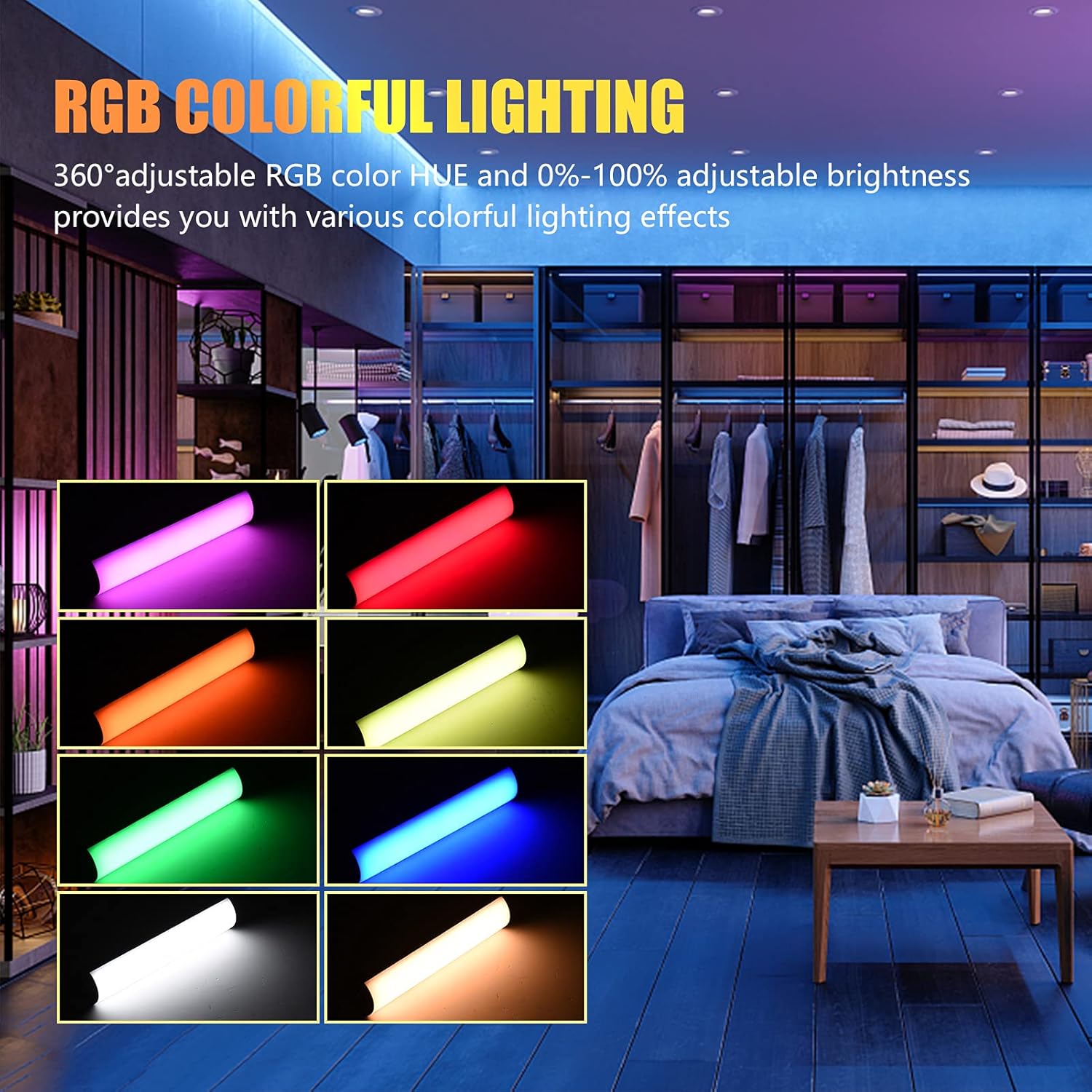
Image: The Andoer W200RGB LED Video Light demonstrating its RGB colorful lighting capabilities, showing different hues and brightness levels.

Image: Several Andoer W200RGB LED Video Lights illuminated in various solid RGB colors, showcasing the rod-shaped design.
4.5 Scene Mode Operation (Special Effects)
In Scene mode, you can select from 20 pre-programmed special lighting effects.
- Use the Up/Down buttons (▲/▼) to cycle through the 20 special effects.
- Some effects may have adjustable parameters (e.g., speed or intensity), which can be adjusted by short pressing the Power button and then using the Up/Down buttons.

Image: A visual guide to the 20 dynamic scene light effects, such as police car, ambulance, fireworks, TV, candle, party, strobe, and various color flashes.
4.6 Using the Magnetic Back
The Andoer W200RGB LED Video Light features built-in magnets at both ends, allowing it to be easily attached to metallic surfaces for flexible lighting setups.
- Simply place either end of the light onto a suitable magnetic surface.
- Ensure the surface is stable and can support the weight of the light.

Image: The Andoer W200RGB LED Video Light highlighting its magnetic ends, demonstrating how it can be attached to metal surfaces.
4.7 Aplicacións prácticas

Image: A comparison of scenes before and after using the Andoer W200RGB LED Video Light, illustrating its effectiveness in enhancing illumination for various activities.
5. Mantemento
5.1 Limpeza
- Asegúrese de que o dispositivo estea apagado e desconectado de calquera fonte de alimentación antes de limpalo.
- Use a soft, dry cloth to wipe the surface of the light.
- Para a sucidade persistente, d lixeiramenteampEnxágüe o pano con auga. Evite o uso de produtos químicos agresivos, solventes ou produtos de limpeza abrasivos.
- Do not allow water or liquids to enter the device.
5.2 Almacenamento
- Garda a lámpada nun lugar fresco e seco, lonxe da luz solar directa e de temperaturas extremas.
- Se a gardas durante un período prolongado, cárgaa aproximadamente ao 50 % cada tres meses para mantela en bo estado.
5.3 Coidado coa batería
- Evite descargar completamente a batería con frecuencia.
- Non expoña a batería a altas temperaturas nin a perfore.
- If the battery shows signs of swelling or leakage, discontinue use immediately and dispose of it properly according to local regulations.
6 Solución de problemas
If you encounter any issues with your Andoer W200RGB LED Video Light, please refer to the following common problems and solutions:
- A luz non se acende:
- Ensure the battery is charged. Connect the light to a power source using the USB Type-C cable.
- Mantén premido o botón de acendido/apagado durante uns segundos para asegurarte de que non se trata dunha pulsación curta.
- Light flickers or output is unstable:
- Check the battery level; low battery can cause unstable performance. Recharge if necessary.
- Ensure the light is not exposed to extreme temperatures.
- Cannot change modes or adjust parameters:
- Ensure you are pressing the correct buttons (Mode button for mode changes, Power button to cycle through adjustable parameters within a mode, Up/Down buttons for value adjustment).
- Reinicie o dispositivo apagándoo e acendendo de novo.
- A batería non se carga:
- Verify the USB Type-C cable is securely connected to both the light and the power source.
- Proba cun cable USB ou adaptador de corrente diferente para descartar accesorios defectuosos.
- Asegúrate de que a fonte de alimentación sexa funcional.
Se o problema persiste despois de probar estas solucións, póñase en contacto co servizo de atención ao cliente para obter máis axuda.
7. Especificacións
| Característica | Especificación |
|---|---|
| Marca | Andoer |
| Modelo | W200RGB |
| Abalorios LED | 69pcs White + 69pcs Yellow + 46pcs RGB |
| Temperatura da cor | 2500K-9000K |
| CRI (Índice de renderización de cor) | 95+ |
| Potencia máxima de saída | 7W |
| Fluxo luminoso | 800 lux / 0.3 m |
| Ángulo do feixe | 120° |
| Tipo de batería | Batería de litio integrada de 3.7 V 3000 mAh |
| Porto de carga | USB tipo C |
| Tamaño do elemento | 20 x 4 x 3.5 cm (7.9 x 1.6 x 1.4 polgadas) |
| Peso do elemento | 11.3 onzas (aprox. 320 g) |
| Tripod (folded length) | 7.5cm (use height 4.5cm) |
| Número de modelo (ASIN) | QEX6686347803069PL (B09F8RLMSY) |
8. Información de seguridade
Aviso:
If you find the product damaged, deformed, or exhibiting abnormal performance, please stop using it immediately and contact us.
Always handle the device with care. Do not disassemble or modify the product. Keep out of reach of children.
9. Garantía e soporte
Andoer products are designed for reliability and performance. This product is covered by a standard manufacturer's warranty against defects in materials and workmanship. For specific warranty terms and conditions, please refer to the documentation provided at the time of purchase or contact your retailer.
For technical support, troubleshooting assistance, or warranty claims, please contact Andoer customer service through the retailer's platform or the official Andoer websitio. Teña á man o modelo do produto e a información de compra cando contacte co servizo de asistencia.
Visita o Andoer Store on Amazon para máis información e produtos.