
Introdución
Thank you for choosing the SOMIC MS300 Over-Ear Wireless Bluetooth Headphones. This manual provides essential information for setting up, operating, and maintaining your headphones to ensure optimal performance and longevity. Please read this manual thoroughly before using the product.
Contido do paquete
- SOMIC MS300 Over-Ear Wireless Bluetooth Headphones
- Cable de carga USB
- Cable de audio de 3.5 mm
- Manual de usuario (este documento)
Produto rematadoview
Familiarize yourself with the various components and controls of your SOMIC MS300 headphones.
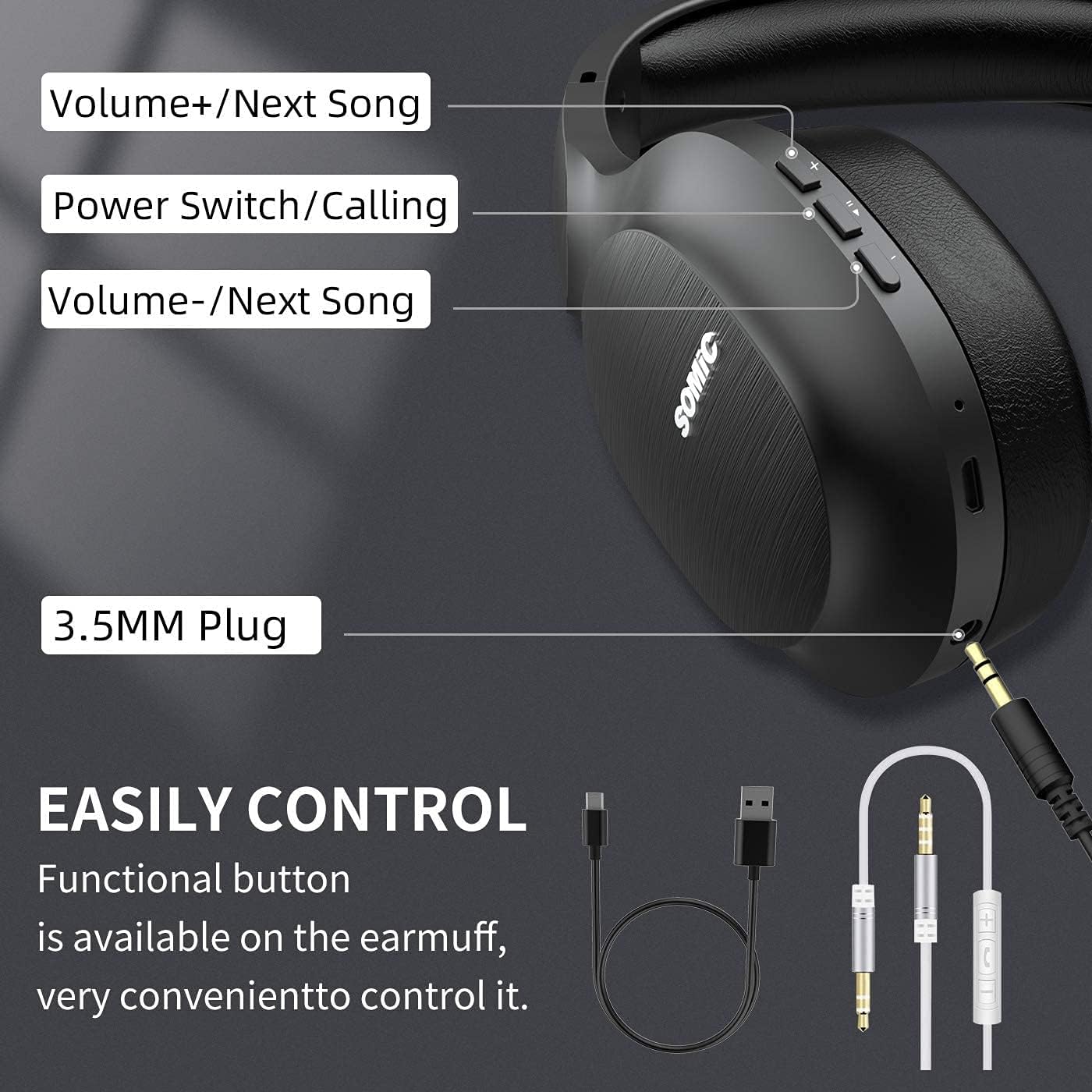
Imaxe: Acabadoview of the SOMIC MS300 headphone controls, including volume buttons, power switch, and 3.5mm audio jack.
Controis e portos
- Volume + / Next Song: Press briefly to increase volume, press and hold to skip to the next song.
- Power Switch / Calling: Press and hold to power on/off. Briefly press to play/pause music. During a call, press to answer/end a call.
- Volume - / Previous Song: Press briefly to decrease volume, press and hold to go to the previous song.
- Conector de audio de 3.5 mm: Para conexión por cable usando o cable de audio de 3.5 mm incluído.
- Porto de carga USB: For charging the headphones using the included USB cable.
- Micrófono: Integrado para chamadas mans libres.
Configuración
Cargando os auriculares

Imaxe: The SOMIC MS300 headphones illustrating the fast charging capability: 5 minutes of charge provides 2 hours of playback.
- Conecta o extremo pequeno do cable de carga USB ao porto de carga USB dos auriculares.
- Conecta o extremo máis grande do cable de carga USB a un adaptador de corrente USB (non incluído) ou ao porto USB dun ordenador.
- O indicador LED mostrará o estado de carga (por exemplo, vermello para a carga, azul para a carga completa).
- A full charge takes approximately 2-3 hours. For quick use, a 5-minute charge provides up to 2 hours of playtime.

Imaxe: The SOMIC MS300 headphones highlighting their strong endurance with up to 72 hours of playtime on a single charge.
Encendido/apagado
- Para acender: Press and hold the Power Switch button for approximately 3 seconds until the LED indicator flashes blue.
- Para apagar: Press and hold the Power Switch button for approximately 3 seconds until the LED indicator turns off.
Emparejamento Bluetooth
- Asegúrese de que os auriculares estean apagados.
- Press and hold the Power Switch button for about 5-7 seconds until the LED indicator flashes red and blue alternately, indicating pairing mode.
- No teu dispositivo (teléfono intelixente, tableta, ordenador), activa o Bluetooth e busca os dispositivos dispoñibles.
- Select "SOMIC MS300" from the list of devices.
- Unha vez conectado, o indicador LED parpadeará azul lentamente.
Conexión con cable (cable de audio de 3.5 mm)

Imaxe: The SOMIC MS300 headphones demonstrating their versatility with both wireless Bluetooth connectivity and a wired option via a 3.5mm audio cable.
The SOMIC MS300 headphones can also be used with a wired connection, even if the battery is depleted.
- Connect one end of the 3.5mm audio cable to the 3.5mm audio jack on the headphones.
- Conecta o outro extremo do cable de audio de 3.5 mm ao porto de saída de audio do teu dispositivo.
- The headphones will automatically switch to wired mode. Bluetooth functionality will be disabled.
Instrucións de funcionamento
Reprodución de música
- Reproducir/Pausa: Briefly press the Power Switch button.
- Subir volume: Briefly press the Volume + button.
- Baixar volume: Briefly press the Volume - button.
- Próxima pista: Manteña premido o botón Volume +.
- Pista anterior: Manteña premido o botón de Volume -.
Chamadas telefónicas
- Responder/Finalizar chamada: Briefly press the Power Switch button.
- Rexeitar a chamada: Press and hold the Power Switch button for 2 seconds.
- Volver a marcar o último número: Double-press the Power Switch button.
Conexión de dobre dispositivo
The SOMIC MS300 headphones support connecting to two Bluetooth devices simultaneously.
- Connect the headphones to the first device as described in the "Bluetooth Pairing" section.
- Desactiva o Bluetooth no primeiro dispositivo. Os auriculares volverán entrar no modo de emparellamento.
- Conecta os auriculares ao segundo dispositivo.
- Volve activar o Bluetooth no primeiro dispositivo. Os auriculares deberían reconectarse automaticamente aos dous dispositivos.
- O audio reproducirase desde o dispositivo que estea reproducindo contido multimedia ou recibindo unha chamada activamente.
Noise Cancellation (CVC 8.0)

Imaxe: A person wearing SOMIC MS300 headphones in a public setting, demonstrating the effectiveness of CVC Noise Cancelling Technology in reducing ambient noise.
The SOMIC MS300 headphones feature CVC 8.0 noise cancelling technology, which helps reduce ambient noise during calls for clearer communication. This feature is automatically active when using the built-in microphone.
Mantemento
Limpeza
- Limpe os auriculares cun pano suave, seco e sen fiapos.
- Non empregue produtos de limpeza abrasivos, solventes nin produtos de limpeza en aerosol.
- Evite a entrada de humidade en calquera abertura.
Almacenamento
- Garde os auriculares nun lugar fresco e seco, lonxe de temperaturas extremas e da luz solar directa.
- When not in use for extended periods, charge the headphones at least once every three months to preserve battery life.
Coidado da batería
- Do not attempt to replace the battery yourself. Contact customer support for battery-related issues.
- Avoid fully discharging the battery frequently, as this can reduce its overall lifespan.
Resolución de problemas
| Problema | Posible Solución |
|---|---|
| Os auriculares non se acenden. | Asegúrate de que os auriculares estean cargados. Conéctaos a unha fonte de alimentación mediante o cable USB. |
| Non se pode emparellar cun dispositivo. | Ensure headphones are in pairing mode (LED flashing red and blue). Turn off and on Bluetooth on your device. Move headphones closer to the device. |
| Sen son ou volume baixo. | Check volume levels on both headphones and the connected device. Ensure headphones are properly paired or the 3.5mm cable is fully inserted. |
| A calidade do son é baixa. | Move closer to the connected device to avoid interference. Ensure there are no obstacles between the headphones and the device. |
| O micrófono non funciona. | Ensure the headphones are connected via Bluetooth. Check microphone settings on your device. |
Especificacións

Imaxe: Un estoupou view of the 40mm dynamic driver and the Qualcomm QCC Bluetooth 5.0 chip, highlighting the audio technology within the SOMIC MS300 headphones.
| Característica | Detalle |
|---|---|
| Modelo | MS300 |
| Marca | SOMIC |
| Conectividade | Wireless (Bluetooth 5.0), Wired (3.5mm Audio Jack) |
| Chip Bluetooth | Qualcomm QCC Bluetooth 5.0 |
| Tamaño do controlador | Controladores dinámicos de 40 mm |
| Control de ruído | Cancelación de ruído CVC 8.0 |
| Capacidade da batería | 1000 mAh |
| Hora de xogo | Ata 72 horas |
| Carga rápida | 5 minutos de carga para 2 horas de reprodución |
| Material de almofadas | Memory Foam Protein |
| Peso | 208 g |
| Cor | Negro |
| Resistencia á auga | Non resistente á auga |
Garantía e Soporte
Información da garantía
SOMIC products are designed and manufactured to the highest quality standards. This product is covered by a limited warranty from the date of purchase. Please refer to the warranty card included in your package for specific terms and conditions. Keep your proof of purchase for warranty claims.
Atención ao cliente
If you encounter any issues or have questions regarding your SOMIC MS300 headphones, please contact our customer support team. Contact details can typically be found on the warranty card or the official SOMIC website. Please have your model number (MS300) and purchase information ready when contacting support.