
1. Introdución
This manual provides essential information for setting up, operating, maintaining, and troubleshooting your HP EliteDesk 800 G8 Desktop Mini computer. Please read this manual thoroughly before using the product to ensure proper functionality and longevity.

Figura 1: Fronte view of the HP EliteDesk 800 G8 Desktop Mini.
2. Guía de configuración
Follow these steps to set up your HP EliteDesk 800 G8 Desktop Mini.
2.1 Desembalaxe da caixa
Retire con coidado todos os compoñentes da embalaxe. A caixa debe conter:
- HP EliteDesk 800 G8 Desktop Mini
- Adaptador de CA
- Teclado
- Rato
- Documentación (incluído este manual)
2.2 Conexión de periféricos
Connect your monitor, keyboard, mouse, and other devices to the appropriate ports.

Figure 2: Front panel ports. Includes USB-C, USB-A, headphone jack, and power button.
- Portos frontales:
- USB-C (SuperSpeed USB 10Gbps signaling rate): Connect compatible USB-C devices.
- USB-A (SuperSpeed USB 10Gbps signaling rate): Connect USB devices like keyboards, mice, or external drives.
- Toma combinada de auriculares/micrófono: Conecta auriculares ou auriculares.
- Botón de encendido: To turn the computer on or off.
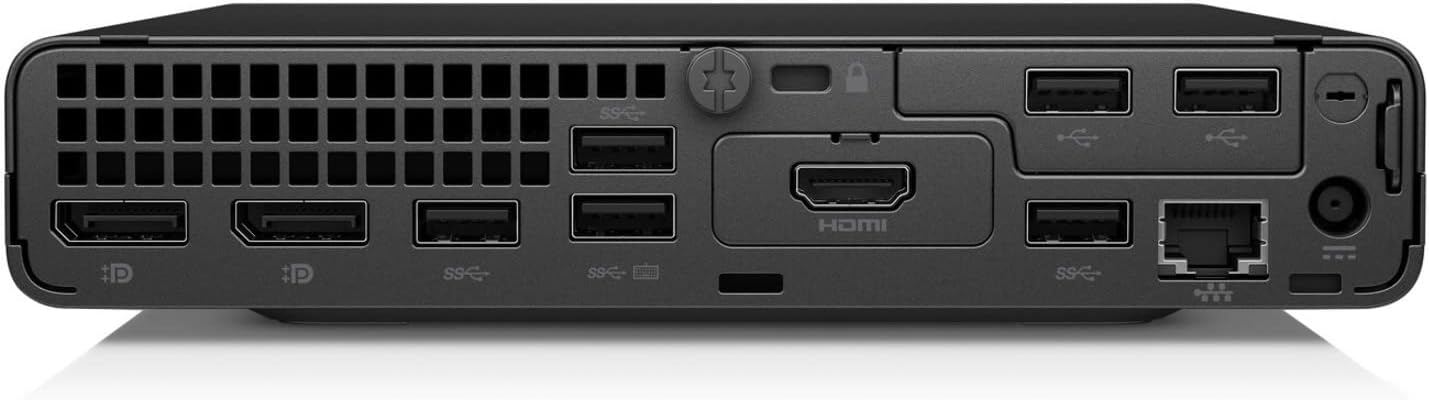
Figure 3: Rear panel ports. Includes DisplayPort, HDMI, USB-A, and Ethernet.
- Portos traseiros:
- DisplayPort: Conectar un monitor.
- HDMI: Connect a monitor or TV.
- USB-A (SuperSpeed USB 10Gbps signaling rate): Connect additional USB devices.
- Ethernet (RJ-45): Conéctate a unha rede con cable.
- Conector de alimentación: Conecte o adaptador de CA.
2.3 Acendido
- Connect the AC adapter to the power connector on the rear of the computer, then plug the adapter into a power outlet.
- Press the power button located on the front panel. The power indicator light will illuminate.
- The computer will boot up, and the operating system (Windows 10 Pro) will load.
3. Instrucións de funcionamento
This section covers basic operation of your HP EliteDesk 800 G8 Desktop Mini.
3.1 Primeiro uso
Upon first power-on, you may be prompted to complete the Windows 10 Pro setup process. Follow the on-screen instructions to configure your language, region, network settings, and user account.
3.2 Xestión de enerxía
- Apagar: Fai clic no botón Inicio, despois en Acendido e selecciona "Apagar".
- Reiniciar: Fai clic no botón Inicio, despois en Acendido e selecciona "Reiniciar".
- Durmir: Fai clic no botón Inicio, despois no botón Acendido e selecciona "Suspensión".
- Force Shut Down: If the system is unresponsive, press and hold the power button for approximately 10 seconds until the computer turns off. Use this only as a last resort.
3.3 Conectarse a unha rede
- Conexión por cable: Connect an Ethernet cable from your router or modem to the Ethernet port on the rear of the computer.
- Conexión sen fíos:
- Click the network icon in the system tray (usually bottom-right of the screen).
- Selecciona a rede Wi-Fi desexada da lista.
- Fai clic en "Conectar" e introduce a clave de seguridade da rede (contrasinal) se se che solicita.
4. Mantemento
Regular maintenance helps ensure the optimal performance and longevity of your HP EliteDesk 800 G8 Desktop Mini.
4.1 Limpeza do dispositivo
- Exterior: Use un pano suave e sen pelusa lixeiramente dampLavar con auga ou unha solución de limpeza suave. Evitar produtos químicos agresivos ou materiais abrasivos.
- Reixas: Periodically use compressed air to clear dust from the ventilation openings to prevent overheating. Ensure the computer is powered off before cleaning vents.
- Portos: Manteña os portos libres de po e residuos.
4.2 Actualizacións de software
Regularly check for and install operating system updates (Windows Update) and driver updates from the HP support website to ensure security and performance.
4.3 Copia de seguranza de datos
It is recommended to regularly back up your important data to an external drive or cloud storage to prevent data loss.
5 Solución de problemas
This section addresses common issues you might encounter with your HP EliteDesk 800 G8 Desktop Mini.
| Problema | Causa posible | Solución |
|---|---|---|
| O ordenador non se acende. | Sen corrente, adaptador de corrente defectuoso, conexión solta. |
|
| Sen visualización no monitor. | Loose video cable, incorrect input source, monitor off. |
|
| O teclado ou o rato non responden. | Loose connection, faulty device, driver issue. |
|
| Sen conexión a internet. | Network cable disconnected, Wi-Fi off, router issue. |
|
6. Especificacións
Detailed technical specifications for the HP EliteDesk 800 G8 Desktop Mini.
| Característica | Detalle |
|---|---|
| Modelo | HP EliteDesk 800 G8 Desktop Mini (499W7UT#ABA) |
| Procesador | Intel Core i7-11700T Octa-core (8 Core) 1.40 GHz |
| RAM | 16 GB DDR4 SDRAM |
| Almacenamento | 512 GB M.2 PCI Express NVMe SSD |
| Gráficos | Intel UHD Graphics 750 (Shared) |
| Sistema Operativo | Windows 10 Pro |
| Conectividade sen fíos | 802.11ax, Bluetooth |
| Portos (frontais) | USB-C (SuperSpeed USB 10Gbps), USB-A (SuperSpeed USB 10Gbps), Headphone/Microphone Combo |
| Portos (traseiros) | DisplayPort, HDMI, USB-A (SuperSpeed USB 10Gbps), Ethernet (RJ-45) |
| Dimensións (LxWxH) | 6.9 x 7 x 1.4 polgadas |
| Peso | 3.13 libras |
7. Garantía e soporte
Your HP EliteDesk 800 G8 Desktop Mini comes with a standard manufacturer's warranty. For specific warranty terms and conditions, please refer to the warranty documentation included with your product or visit the official HP support websitio.
For technical support, driver downloads, and additional resources, please visit:
Soporte oficial de HP Websitio
When contacting support, please have your product model number (EliteDesk 800 G8) and serial number ready.