
DOBE TY-1793
Manual de usuario del controlador inalámbrico
Modelo: TY-1793
Introdución
Grazas pola compraasing the DOBE Wireless Controller. This manual provides detailed instructions on how to set up, operate, and maintain your controller. Please read this manual carefully before use and keep it for future reference.
This controller is designed for use with Nintendo Switch, Android mobile devices, Android TV boxes, and personal computers. It offers both wireless Bluetooth and wired USB connectivity.
Contido do paquete
- 1 x Wireless Controller (TY-1793)
- 1 x cable de carga USB-C
- 1 Manual de usuario (inglés)

Image: The product packaging, clearly indicating the wireless controller, USB-C cable, and compatibility with N-S / Android / PC.
Produto rematadoview
Familiarize yourself with the various components of your wireless controller.

Imaxe: Fronte view of the TY-1793 wireless controller, showing the dual analog sticks with orange accents, D-pad, ABXY buttons, Turbo button, and other function buttons.

Imaxe: Lateral view of the TY-1793 wireless controller, highlighting the ergonomic grip and trigger buttons.
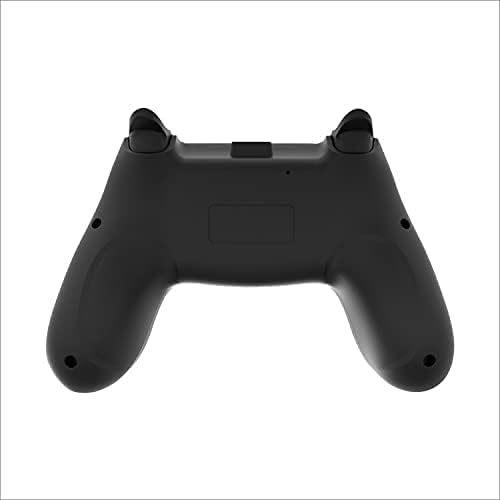
Imaxe: Traseira view of the TY-1793 wireless controller, showing the battery compartment or charging port area.
Configuración
Cargando o controlador
Before first use, fully charge the controller. Connect the supplied USB-C cable to the controller's charging port and the other end to a USB power source (e.g., computer USB port, USB wall adapter). The indicator lights will show charging status and turn off when fully charged.
- Traballo Voltage: DC 3.7 V
- Vol. de entrada de cargatage: DC 5 V
- Charging Input Current: 300mA
- Capacidade da batería: 400 mAh
Conectando a Dispositivos
Conexión Bluetooth (sen fíos)
- Asegúrese de que o controlador estea cargado.
- Activa o controlador premendo o botón Inicio.
- On your device (Nintendo Switch, Android mobile/TV box), go to Bluetooth settings or controller pairing menu.
- Select "TY-1793" or similar from the list of available devices to pair.
- Once paired, the indicator lights on the controller will stabilize.
Bluetooth transmission distance: <10m
Wired USB Connection (PC/Android)
- Connect the USB-C cable to the controller.
- Connect the other end of the USB-C cable to a USB port on your PC or Android device.
- The controller should be automatically recognized by your device. Drivers may be installed automatically.
Instrucións de funcionamento
Controis básicos
- Manetas analóxicas: Úsase para o movemento e o control da cámara.
- D-Pad: Directional input for menus and certain games.
- Botóns ABXY: Botóns de acción estándar.
- Botóns de ombreiro (E/D, Z L/Z R): Additional action buttons, often for triggers or special abilities.
- Botón de inicio: Volve á pantalla de inicio do sistema.
- Botóns +/-: System-specific functions (e.g., Start/Select, Plus/Minus).
Funcións especiais
Función Turbo
The controller features a Turbo function for rapid firing of buttons. To activate Turbo for a button:
- Manteña premido o botón de acción desexado (por exemplo, A, B, X, Y, L1, R1).
- Mentres mantén premido o botón de acción, prema o botón TURBO botón.
- Release both buttons. The Turbo function is now active for that button.
To deactivate Turbo for a button, repeat the steps above.
Comentarios sobre vibracións
The controller supports motor vibration feedback for an immersive gaming experience. This function is automatically enabled when supported by the game and connected device.
6-Axis Gyroscope (Motion Control)
The controller is equipped with a 6-axis gyroscope, enabling motion control in compatible games, particularly on Nintendo Switch.
Mantemento
- Keep the controller dry. Avoid exposure to moisture or liquids.
- Non expoña o controlador a temperaturas extremas.
- Limpa o controlador cun pano suave e seco. Non empregues produtos químicos agresivos nin materiais abrasivos.
- Garde o controlador nun ambiente limpo e libre de po cando non o use.
- Evite deixar caer o controlador nin someterlo a impactos fortes.
Resolución de problemas
- O controlador non se acende:
- Ensure the controller is fully charged. Connect it to a power source using the USB-C cable and allow it to charge for at least 30 minutes before attempting to turn it on again.
- Controller does not connect via Bluetooth:
- Asegúrese de que o controlador estea en modo de sincronización.
- Comproba que o Bluetooth estea activado no teu dispositivo.
- Move the controller closer to the device (within 10m).
- Remove any previous pairings of the controller from your device's Bluetooth list and try pairing again.
- Reinicia tanto o controlador como o dispositivo.
- Buttons or analog sticks are unresponsive:
- Asegúrate de que o controlador estea conectado correctamente (con cable ou sen fíos).
- Tenta reiniciar o controlador e o xogo/dispositivo.
- Se usas unha conexión con cable, proba cun porto ou cable USB diferente.
- Limpa arredor dos botóns e as varas para eliminar calquera residuo.
Especificacións
| Característica | Detalle |
|---|---|
| Modelo No. | TY-1793 |
| Conectividade | Bluetooth (Wireless), USB (Wired) |
| Compatibilidade | Nintendo Switch, Android Mobile, Android TV Box, PC |
| Tipo de batería | Polímero de litio incorporado |
| Capacidade da batería | 400 mAh |
| Traballo Voltage | DC 3.7 V |
| Entrada de carga | DC 5 V / 300 mA |
| Alcance Bluetooth | <10 metros |
| Dimensións (paquete) | 17.50 x 11.50 x 6.80 cm (6.89 x 4.53 x 2.68 polgadas) |
| Peso (paquete) | 0.372 kg |
| UPC | 6972520252617 |
Garantía e Soporte
For warranty information and technical support, please refer to the contact details provided on the product packaging or the official DOBE websitio. Garde o recibo da compra como xustificante da mesma.
Para obter máis axuda, póñase en contacto co servizo de atención ao cliente.