
Introdución
Thank you for choosing the Audizio SB85 Soundbar with Subwoofer. This manual provides essential information for the safe and correct operation of your new audio system. Please read it thoroughly before use and retain it for future reference. The SB85 is designed to enhance your television's audio, providing a rich, immersive sound experience for movies, games, and music, complete with a dedicated subwoofer for powerful bass.
Instrucións de seguridade
- Lea atentamente todas as instrucións antes de utilizar o dispositivo.
- Keep the unit away from water, moisture, and heat sources.
- Non bloquee ningunha abertura de ventilación.
- Use só accesorios/accesorios especificados polo fabricante.
- Desenchufe o aparello durante as tormentas eléctricas ou cando non se use durante longos períodos.
- Encargue toda a reparación a persoal de servizo cualificado.
- Do not expose the battery (if applicable) to excessive heat such as sunshine, fire, or the like.
Contido do paquete
Asegúrate de que todos os elementos estean presentes na caixa:
- Audizio SB85 Soundbar
- Subwoofer con cable
- Control remoto
- Optical Cable (Toslink)
- Cable AUX
- Adaptador de alimentación
- Manual de usuario
Produto rematadoview
The Audizio SB85 system consists of a soundbar and a separate wired subwoofer, designed to deliver a powerful and clear audio experience.
Características da barra de son
- Integrated 150W speaker system with 4 speakers (2x 2cm range, 2x 2cm tweeter).
- Front LED display for status indication.
- Control buttons on the side panel.
- Multiple input options: HDMI (ARC), USB, Line In (AUX), Coaxial, Optical.
- Bluetooth 5.0 para transmisión de audio sen fíos.

Image: Close-up of the Audizio SB85 Soundbar's control panel and its remote control, highlighting Bluetooth 5.0 and ease of use.

Imaxe: Interna view of the Audizio SB85 Soundbar's full-range speaker, emphasizing its 150W speaker system for an immersive audio experience.
Características do subwoofer
- 5.25-inch wired subwoofer for enhanced bass response.

Image: Close-up of the Audizio SB85 wired subwoofer, designed to amplify bass frequencies.
Configuración
1 Colocación
Place the soundbar centrally below your television. The subwoofer can be placed on the floor near the soundbar, ideally in a corner for optimal bass reflection, but ensure it is not obstructed.

Image: Audizio SB85 Soundbar and Subwoofer setup in a living room, demonstrating room-filling sound and clean design.

Image: Audizio SB85 Soundbar placed below a television, illustrating its universal compatibility with any TV.
2. Conectando ao poder
Connect the power adapter to the DC IN port on the soundbar and then plug it into a wall outlet (230 Vac/50 Hz).
3. Conectando o subwoofer
Connect the wired subwoofer to the dedicated subwoofer output port on the soundbar.
4. Conexión a fontes de son
The SB85 offers several connection options:
- HDMI (ARC): For the best audio quality and control, connect an HDMI cable from the HDMI (ARC) port on the soundbar to the HDMI ARC port on your TV. This allows the TV to send audio to the soundbar and often enables TV remote control of the soundbar's volume.
- Óptico (Toslink): Connect the included optical cable from the OPTICAL port on the soundbar to the Optical Digital Audio Out port on your TV or other audio source.
- Line In (AUX): Use the included AUX cable to connect the LINE IN port on the soundbar to the headphone jack or audio output of your device (e.g., smartphone, MP3 player).
- Coaxial: Connect a coaxial cable (not included) from the COAXIAL port on the soundbar to the Coaxial Digital Audio Out port on your TV or other audio source.
- USB: Insert a USB flash drive into the USB port for MP3 playback.
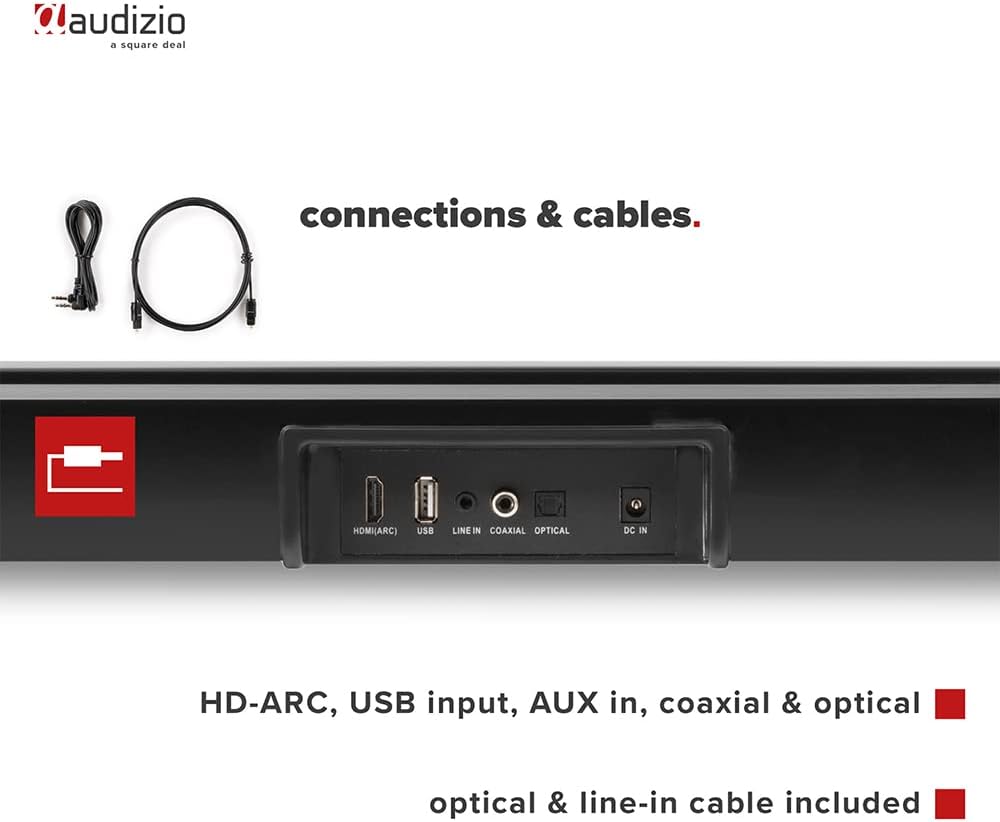
Imaxe: Traseira view of the Audizio SB85 Soundbar showing various connection ports: HDMI (ARC), USB, Line In, Coaxial, and Optical. Includes optical and line-in cables.
Instrucións de funcionamento
1. Acendido/apagado
Prema o botón de acendido/apagado da barra de son ou do mando a distancia para acender ou apagar a unidade.
2. Selección da fonte de entrada
Press the 'MODE' button on the soundbar or the remote control repeatedly to cycle through the available input sources: HDMI (ARC), Optical, Coaxial, AUX, USB, and Bluetooth. The selected input will be shown on the front LED display.
3. Control de volume
Use the 'VOL+' and 'VOL-' buttons on the soundbar or the remote control to adjust the volume. The 'MUTE' button on the remote control will temporarily silence the audio.
4. Emparellamento Bluetooth
- Switch the soundbar to Bluetooth mode using the 'MODE' button. The LED display will show 'BT'.
- No teu teléfono intelixente ou tableta, activa o Bluetooth e busca os dispositivos dispoñibles.
- Select 'Audizio SB85' from the list of devices.
- Once paired, the soundbar will indicate a successful connection, and you can stream audio wirelessly.
5. Reprodución USB
Inserir unha unidade flash USB que conteña son MP3 files into the USB port. The soundbar will automatically switch to USB mode and begin playing the music. Use the remote control to navigate tracks (play/pause, next/previous).
6. Funcións de control remoto
The remote control provides full functionality for the soundbar, including power, mode selection, volume, mute, and playback controls for USB and Bluetooth modes.
Mantemento
Limpeza
Wipe the soundbar and subwoofer surfaces with a soft, dry cloth. Do not use abrasive cleaners, waxes, or solvents as they may damage the finish. Ensure the device is unplugged before cleaning.
Almacenamento
Se garda a unidade durante un período prolongado, desconéctea da toma de corrente e gárdea nun lugar fresco e seco, lonxe da luz solar directa e de temperaturas extremas.
Resolución de problemas
| Problema | Causa posible | Solución |
|---|---|---|
| Sen poder | Cable de alimentación non conectado; Toma de corrente avariada | Comprobe a conexión do cable de alimentación; probe cunha toma de corrente diferente. |
| Sen son | Incorrect input selected; Volume too low; Mute activated; Cable connection loose | Select correct input source; Increase volume; Deactivate mute; Check all audio cable connections. |
| Bluetooth non se conecta | Soundbar not in Bluetooth mode; Device too far; Device already connected to another unit | Switch soundbar to BT mode; Move device closer; Disconnect from other devices and try again. |
| O control remoto non funciona | Pilas esgotadas; Obstrución entre o mando a distancia e a barra de son | Substitúa as baterías; retire calquera obstrución. |
Especificacións
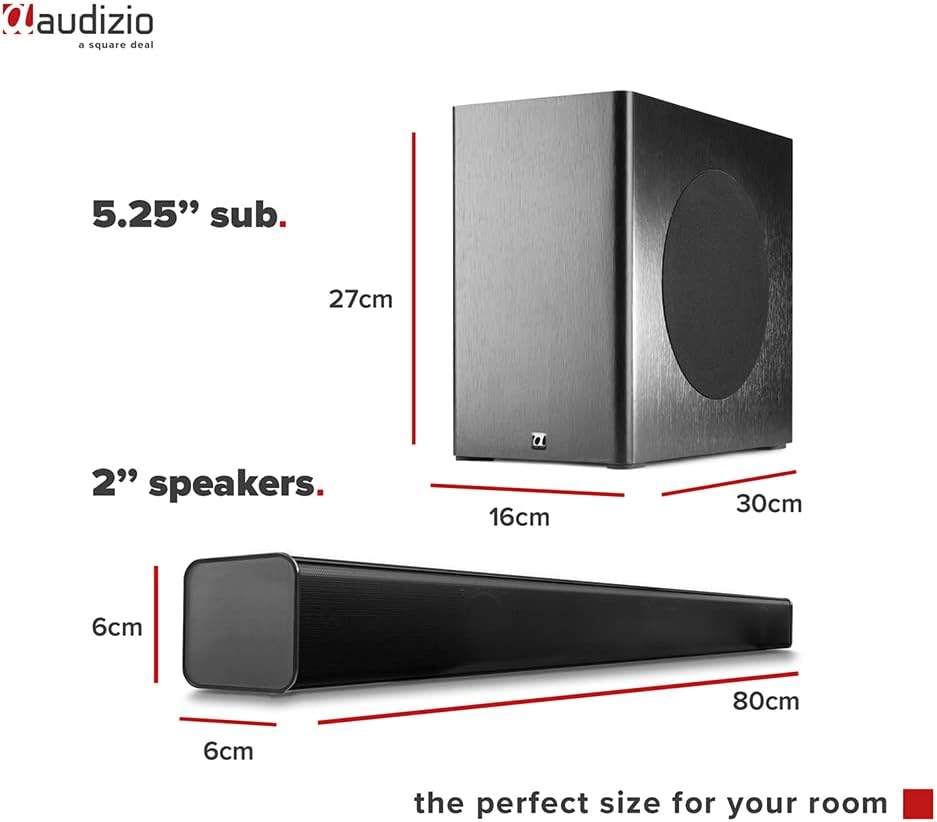
Image: Diagram showing the dimensions of the Audizio SB85 Soundbar and its subwoofer.
- Potencia de saída: 150 W (máx.)
- Configuración do altofalante: 4 speakers (2x 2cm range, 2x 2cm tweeter)
- Tamaño do subwoofer: 5.25 polgadas
- Rango de frecuencia: 50 Hz - 16,000 Hz
- SPL máximo: 125 dB
- Conectividade: Bluetooth 5.0, HDMI (ARC), USB, Line In (AUX), Coaxial, Optical
- Modo de saída de audio: Estéreo
- Dispositivos compatibles: MP3 Player, Smartphone, TV
- Fonte de enerxía: 230 Vac/50 Hz (via electric cable)
- Soundbar Dimensions (L x W x H): 80 x 6 x 6 cm
- Dimensións do subwoofer (L x A x H): 16 x 30 x 27 cm
- Peso total: 3.9 kg
- Número de modelo: 100.292
Garantía e Soporte
Para obter información sobre a garantía ou asistencia técnica, consulte a documentación proporcionada no momento da compra ou póñase en contacto co seu vendedor. Garde o comprobante de compra para calquera reclamación de garantía.