
Introdución
Thank you for choosing the Soulbytes S12 Gaming Headset. This manual provides essential information for setting up, operating, and maintaining your headset to ensure an optimal gaming experience. The S12 headset is designed for multi-platform compatibility, featuring immersive audio, a noise-canceling microphone, and dynamic RGB lighting.
Contido do paquete
- Soulbytes S12 Gaming Headset
- Cable de audio de 3.5 mm (integrado)
- USB Cable for RGB Lighting (integrated)
- 3.5mm Splitter Cable (for PC audio/mic separation)
Produto rematadoview
The Soulbytes S12 Gaming Headset combines high-fidelity audio with user-friendly features for an enhanced gaming session.
Immersive 3D Sound
Equipped with professional-grade 50mm high-definition drivers, the headset delivers high-fidelity stereo surround sound with strong bass and rich details. This allows for precise localization of in-game sounds, such as footsteps and gunfire, providing a competitive edge.

Imaxe: Interna view of the headset's 50mm audio drivers, illustrating how they produce immersive stereo surround sound for gaming, capturing details like car sounds, footsteps, and role sounds.
Micrófono con cancelación de ruído
The flexible, omnidirectional microphone features noise reduction technology, ensuring clear voice communication. It can be positioned for optimal voice pickup. An inline switch allows for easy muting, with an LED indicator on the microphone to show its active status.

Image: The headset's adjustable microphone, demonstrating its 120-degree rotation and the effectiveness of its noise-canceling feature by comparing sound waves before and after reduction.
Iluminación RGB dinámica
The headset features dynamic RGB LED lighting on both earcups, offering 16.8 million colors and various patterns. You can cycle through four lighting modes (fluid, circulation, gradient, static) using the inline LED controller. The USB connector powers these lights.

Image: The headset displaying its customizable RGB lighting effects, including breathing, color cycling, gradual brightening, and fixed color modes.
Ergonomic Design for Comfort
Designed for extended wear, the S12 headset features soft, breathable earcups, a retractable and padded headband, and an adaptive Y-shaped stem. The earcups and headband cushion are made from skin-friendly mesh fabric and breathable memory foam to reduce sweat, heat, and pressure, ensuring comfort for both adults and children.

Imaxe: Detallada view of the headset's ergonomic design elements, including breathable earcups, an adjustable headband, and a soft head cushion for comfort.
Configuración e conectividade
The Soulbytes S12 headset offers wide compatibility with various gaming platforms. The 3.5mm jack provides audio and microphone functionality, while the USB connector powers the RGB lighting.

Imaxe: Máis deview of the headset's universal compatibility with gaming consoles (Xbox, PS4, Switch), computers (PC, Mac), and mobile phones.
Guía de conexión
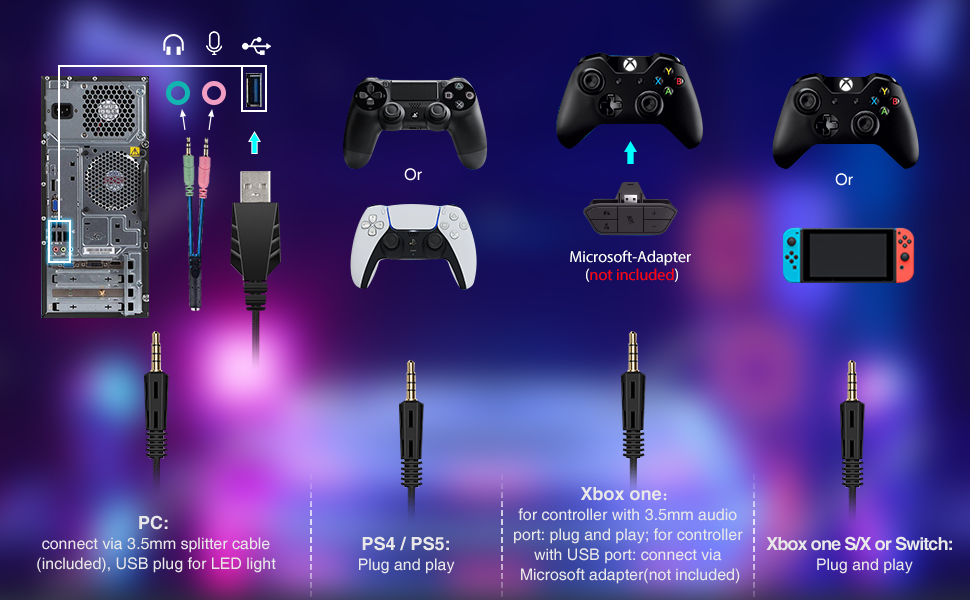
Image: A comprehensive diagram detailing the connection methods for the headset across different platforms: PC, PS4/PS5, Xbox One, and Nintendo Switch.
- Para PC: Connect the 3.5mm 4-pin plug to the included 3.5mm splitter cable. Plug the pink connector of the splitter into your PC's microphone input and the green connector into the headphone output. Plug the USB cable into an available USB port for RGB lighting.
- For PS4 / PS5: Plug the 3.5mm 4-pin plug directly into the controller's 3.5mm jack. The USB cable can be plugged into a console USB port for RGB lighting.
- For Xbox One (Older models): An official Microsoft adapter (not included) is required to connect the 3.5mm 4-pin plug to older Xbox One controllers. For Xbox One S/X controllers, plug the 3.5mm 4-pin plug directly into the controller. The USB cable can be plugged into a console USB port for RGB lighting.
- Para Nintendo Switch: Plug the 3.5mm 4-pin plug directly into the Switch's 3.5mm audio jack. The USB cable is not used for the Switch as it does not provide power for RGB lighting in this configuration.
- For Laptops/Smartphones: Plug the 3.5mm 4-pin plug directly into the device's 3.5mm jack. The USB cable is for RGB lighting and may not be usable with all mobile devices.
Instrucións de funcionamento
The headset features an inline controller for convenient access to audio and lighting functions.

Image: A user wearing the Soulbytes S12 headset while gaming, highlighting its practical use and comfortable design.
Inline Controller Functions:
- Control de volume: Use the scroll wheel on the inline controller to adjust the headset's audio volume.
- Micrófono activado/desactivado: Flip the switch on the inline controller to mute or unmute the microphone. The LED on the microphone will indicate its status (on/off).
- Control de luz RGB: Press the dedicated button on the inline controller to cycle through the four RGB lighting modes (fluid, circulation, gradient, static).
Mantemento
Proper care will extend the lifespan of your Soulbytes S12 Gaming Headset.
- Limpeza: Usa un pano suave e seco para limpar os auriculares e a diadema. Evita o uso de produtos químicos agresivos ou materiais abrasivos.
- Almacenamento: Garde os auriculares nun lugar fresco e seco, lonxe da luz solar directa e de temperaturas extremas.
- Coidado do cable: Evite curvas bruscas ou tirar demasiado dos cables para evitar danos.
- Micrófono: Handle the flexible microphone gently.
Resolución de problemas
Se tes problemas cos teus auriculares, consulta as seguintes solucións habituais:
| Problema | Solución |
|---|---|
| Non hai son dos auriculares |
|
| O micrófono non funciona |
|
| As luces RGB non funcionan |
|
| A calidade do son é mala |
|
Especificacións
| Característica | Detalle |
|---|---|
| Nome do modelo | S12 |
| Marca | Soulbytes |
| Tecnoloxía de conectividade | Con cable (conector de 3.5 mm, USB para RGB) |
| Factor de forma dos auriculares | Over-Ear (Circum-Auricular) |
| Tamaño do controlador de audio | 50 mm |
| Tipo de controlador de audio | Dinámico |
| Rango de frecuencias | 20 Hz - 20,000 Hz |
| Tipo de micrófono | Omnidirectional, Noise-Canceling |
| Tipo de control | Inline Controller (Volume, Mic Mute, RGB Mode) |
| Control de ruído | None (Passive noise isolation from earcups) |
| Material | Coiro, plástico |
| Cor | Negro |
| Dispositivos compatibles | PS4, PS5, Xbox One, Switch, PC, Laptops, Smartphones |
| Descrición do intervalo de idade | Neno |
Garantía e soporte
For warranty information and technical support, please refer to the documentation provided with your purchase or visit the official Soulbytes websitio. Garda o comprobante de compra para calquera reclamación de garantía.