
1. Introdución
The ASUS Notebook E210 is a compact and lightweight 11.6-inch laptop designed for productivity and portability. It features an Intel Celeron N4020 Processor, 4GB RAM, and 64GB eMMC storage, running Windows 10 in S mode. This manual provides essential information for setting up, operating, and maintaining your device.

Figure 1: ASUS Notebook E210, showcasing its compact design with the screen displaying a colorful desktop background.
2. Configuración
2.1 Desembalaxe e inspección inicial
Retire con coidado todos os compoñentes da embalaxe. Comprobe que estean incluídos os seguintes elementos:
- ASUS Notebook E210 (Model: E210MA-DB02)
- Adaptador de alimentación e cable
- Guía de usuario
- Tarxeta de garantía
Inspect the laptop for any physical damage. If any components are missing or damaged, contact your retailer or ASUS support.
2.2 Acendido e configuración inicial
- Conecta o adaptador de corrente ao porto de carga do portátil e despois a unha toma de corrente.
- Abre a tapa do portátil. É posible que o portátil se acenda automaticamente ou que teñas que premer o botón de acendido/acendida.
- Follow the on-screen instructions to complete the Windows 10 Home in S Mode setup, including language selection, network connection, and user account creation.
- Ensure the laptop is fully charged before its first use.
3. Instrucións de funcionamento
3.1 Uso básico
- Encendido/apagado: Preme o botón de acendido para acender. Para apagar, fai clic no botón Inicio e, a seguir, en Acendido > Apagar.
- Modo de suspensión: Pecha a tapa ou fai clic no botón Inicio e, a seguir, en Acendido/Apagado > Repouso.
- Teclado: The full-size keyboard offers comfortable typing with 1.4mm key travel.
- Touchpad: The touchpad supports multi-gesture input for navigation and control.
3.2 Windows 10 in S Mode
Windows 10 in S mode is a version of Windows 10 that is streamlined for security and performance, exclusively using apps from the Microsoft Store. If you require apps outside the Microsoft Store, you can switch out of S mode. This is a one-way switch and cannot be undone.
- Abre o Menú Inicio e selecciona Configuración.
- Ir a Actualización e seguridade > Activación.
- In the "Switch to Windows 10 Home" or "Switch to Windows 10 Pro" section, select Go to the Store.
- On the "Switch out of S mode" (or similar) page that appears in the Microsoft Store, click the Obter botón.
- After confirming, you will be switched out of S mode.
4. Funcións máisview
- Rendemento eficiente: Powered by the Intel Celeron N4020 Processor for daily computing tasks.
- Compacto e lixeiro: Designed for portability, measuring 0.7 inches thin and weighing 2.31 lbs.
- Pantalla HD de 11.6 polgadas: A clear 1366 x 768 resolution display suitable for productivity and media consumption.
- Integrated NumberPad: The touchpad features an illuminated NumberPad for efficient data entry.
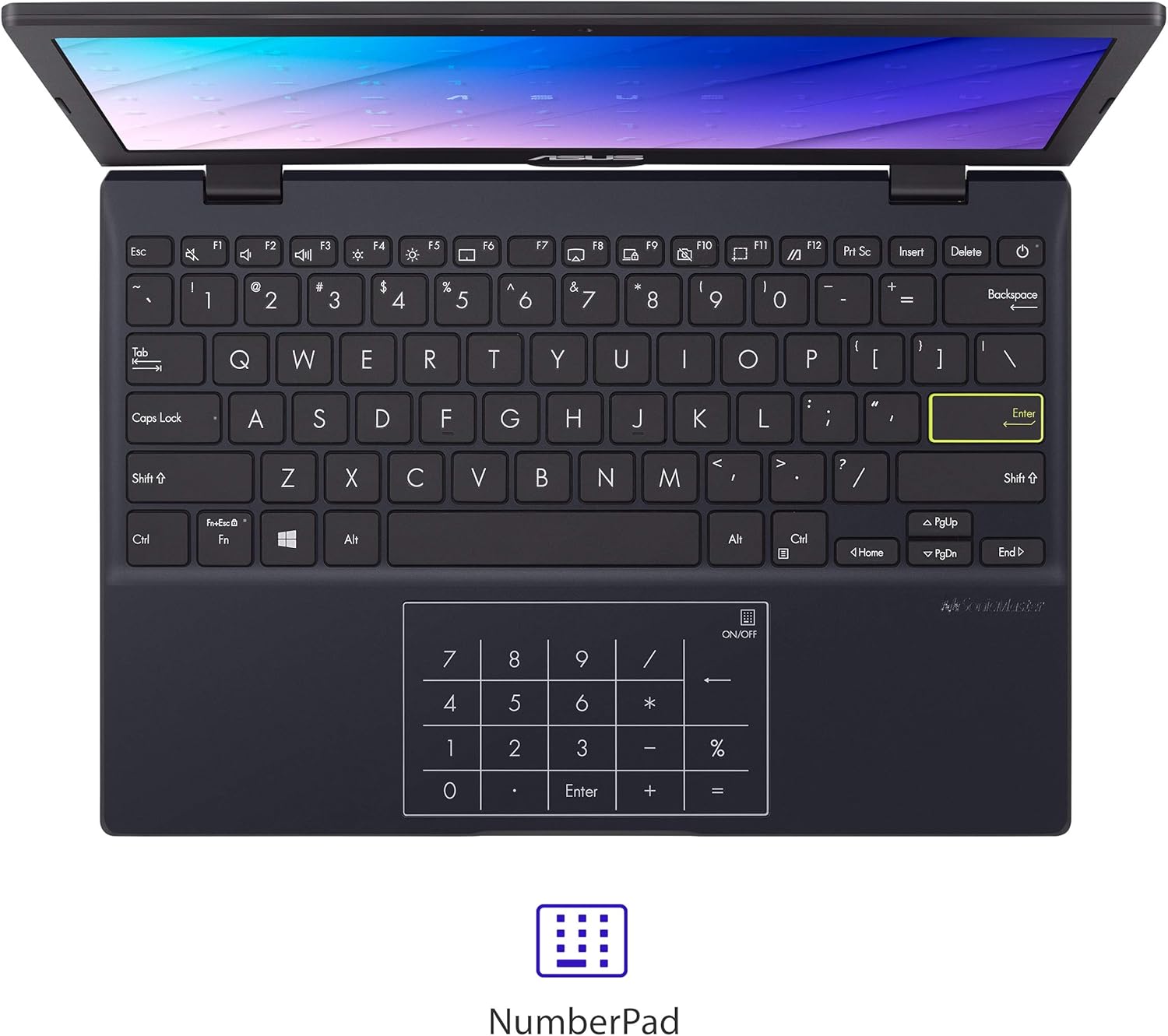
Figure 2: The touchpad with integrated NumberPad for quick numerical input.
- 180° Lay-Flat Hinge: Allows the laptop to open completely flat for easy sharing and collaboration.

Figure 3: The laptop's 180-degree lay-flat hinge allows for versatile viewing e compartir.
- Batería de longa duración: Provides up to 12 hours of battery life for extended use on the go.
5. Portos e Conectividade
The ASUS Notebook E210 offers a variety of ports for connecting peripherals and external displays:
- 1x USB 2.0 tipo A
- 1x USB 3.2 Gen 1 Tipo A
- 1x USB 3.2 Gen 1 Type-C
- 1x HDMI 1.4
- 1x conector de audio combinado de 3.5 mm
- Wi-Fi 802.11ac
- Bluetooth
6. Mantemento
- Limpeza: Use a soft, lint-free cloth to clean the screen and chassis. Avoid harsh chemicals.
- Coidado da batería: To prolong battery life, avoid fully discharging the battery frequently. Store the laptop in a cool, dry place.
- Actualizacións de software: Regularly update Windows and drivers to ensure optimal performance and security.
- Xestión de almacenamento: Limpar periodicamente o innecesario files and applications to maintain adequate storage space.
7 Solución de problemas
- O portátil non se acende: Asegúrate de que o adaptador de corrente estea conectado correctamente e de que a batería teña carga suficiente. Proba cunha toma de corrente diferente.
- Rendemento lento: Close unnecessary applications, check for background updates, and ensure sufficient free storage space.
- Problemas de conectividade Wi-Fi: Restart the laptop and your Wi-Fi router. Check network settings and ensure Wi-Fi is enabled.
- Problemas coa pantalla: If the screen is blank or flickering, try restarting the laptop. Connect to an external monitor to check if the issue is with the laptop's display or graphics.
8. Especificacións
| Característica | Detalle |
|---|---|
| Marca | ASUS |
| Nome do modelo | L210 |
| Número de modelo do artigo | E210MA-DB02 |
| Tamaño da pantalla | 11.6 polgadas |
| Resolución de pantalla | 1366 x 768 píxeles |
| Procesador | Intel Celeron N4020 (1.1 GHz, ata 2.8 GHz) |
| RAM | 4 GB LPDDR4 |
| Disco duro | 64 GB eMMC Flash Storage |
| Coprocesador gráfico | Gráficos Intel UHD 600 |
| Sistema Operativo | Windows 10 Home en modo S |
| Tipo sen fíos | 802.11ac, Bluetooth |
| Portos USB 2.0 | 1 |
| Portos USB 3.0 | 2 |
| Peso do elemento | 2.31 libras |
| Dimensións do produto | 10.98 x 7.52 x 0.67 polgadas |
| Cor | Estrela negra |
| Baterías | 1 batería de iones de litio (incluída) |
9. Garantía e soporte
9.1 Información da garantía
This ASUS Notebook E210 is covered by a manufacturer's warranty. Please refer to the included Warranty Card for specific terms, conditions, and duration of coverage. Keep your proof of purchase for warranty claims.
9.2 Atención ao cliente
Para asistencia técnica, resolución de problemas ou consultas de servizo, visite o soporte oficial de ASUS website or contact their customer service. Details can be found on the ASUS websitio web ou na documentación do produto.


